


There comes a point when adding another Wi-Fi extender stops feeling like networking and starts looking like you’re collecting white plastic wall ornaments. 😭
If your internet works beautifully beside the router but struggles upstairs, inside the bedroom, across a long hallway or behind several concrete walls, a mesh Wi-Fi system can be a much cleaner solution.
Instead of relying on one router trying heroically to cover your entire home, mesh Wi-Fi uses multiple coordinated nodes placed around the house. They communicate with one another and generally provide one unified Wi-Fi network, allowing compatible devices to move between nodes as you walk around the home.
This makes mesh particularly useful for:
- larger apartments
- duplex homes
- multi-floor houses
- homes with thick walls
- work-from-home setups
- smart-home-heavy households
- families using many devices simultaneously
But mesh systems vary enormously.
You can buy an inexpensive dual-band Wi-Fi 6 kit, a tri-band Wi-Fi 6E setup with a 6GHz band, or an expensive Wi-Fi 7 system with multi-gigabit Ethernet ports.
The biggest number on the box is not automatically the best choice.
For this guide, we compared current mesh Wi-Fi systems based on wireless generation, backhaul options, Ethernet ports, coverage, node expandability, roaming, device capacity, ease of setup and value for Indian homes.
Our Best Overall recommendation is the TP-Link Deco X50 because its AX3000 Wi-Fi 6 performance, three Gigabit Ethernet ports per unit, broad Deco ecosystem and relatively sensible pricing make it enough for most modern households without pushing you into premium Wi-Fi 6E or Wi-Fi 7 territory.
For larger homes relying heavily on wireless backhaul, however, the tri-band TP-Link Deco XE75 can be a smarter upgrade.
Quick Answer: Best Mesh Wi-Fi Systems
| Mesh System | Best For | Wi-Fi Class | Bands | Main Advantage |
|---|---|---|---|---|
| TP-Link Deco X50 | Best Overall | AX3000 Wi-Fi 6 | Dual-band | Excellent balance of speed, ports and value |
| TP-Link Deco XE75 | Best Premium Value | AXE5400 Wi-Fi 6E | Tri-band | 6GHz band and stronger wireless backhaul options |
| TP-Link Deco BE25 | Best Wi-Fi 7 Pick | BE5000/BE3600 region-dependent | Dual-band | Wi-Fi 7 + 2.5GbE + MLO |
| MERCUSYS Halo H80X | Best Value Alternative | AX3000 Wi-Fi 6 | Dual-band | Strong specs for less money |
| ASUS ZenWiFi XD5 | Best Compact Mesh | AX3000 Wi-Fi 6 | Dual-band | Small design + AiMesh flexibility |
| NETGEAR Orbi RBK763S | Best for Large Homes | AX5400 Wi-Fi 6 | Tri-band | Dedicated-style tri-band architecture |
| TP-Link Deco X10 | Best Budget Wi-Fi 6 | AX1500 Wi-Fi 6 | Dual-band | Entry-level mesh without dropping to Wi-Fi 5 |
Best Overall: TP-Link Deco X50
Best Premium: TP-Link Deco XE75
Best Wi-Fi 7: TP-Link Deco BE25
Best Value Alternative: MERCUSYS Halo H80X
Best for Large Homes: NETGEAR Orbi RBK763S
Best Budget: TP-Link Deco X10
1. TP-Link Deco X50 — Best Overall Mesh Wi-Fi System
For most households, the TP-Link Deco X50 is where I would start.
It is an AX3000 dual-band Wi-Fi 6 mesh system, with theoretical wireless rates of approximately 2402 Mbps on 5GHz and 574 Mbps on 2.4GHz.
TP-Link’s current Deco lineup continues to position AX3000-class systems as its mainstream Wi-Fi 6 tier, and the X50 remains actively supported with firmware updates through 2026.
Why We Recommend It
The X50 gets the fundamentals right without making you pay for features that many homes cannot yet use.
You get:
- Wi-Fi 6
- seamless Deco mesh networking
- Gigabit wired connectivity
- Ethernet backhaul support
- router and access-point modes
- WPA3 support
- app-based management
- expandable Deco ecosystem
A current Indian 3-pack listing was available around the ₹20,000 range when checked, although networking prices change frequently.
Best For
2BHK and 3BHK apartments, moderately large homes, work-from-home users and families upgrading from a traditional single router.
Who Should Skip It
If your nodes will communicate wirelessly across multiple floors and you have a very fast internet connection, a tri-band system such as the XE75 or Orbi may preserve speeds better.
Reasons to Buy
- Wi-Fi 6 AX3000
- Good balance of performance and price
- Mature Deco ecosystem
- Ethernet backhaul
- Easy expansion
- Multiple wired ports
- Excellent option for typical Indian fibre plans
What We Don’t Like
- Dual-band design means client traffic and wireless backhaul may share spectrum
- Gigabit ports limit wired throughput versus newer 2.5GbE systems
- Wi-Fi 7 buyers should look elsewhere
Verdict
For the majority of households asking, “I just want strong Wi-Fi everywhere without turning networking into my weekend hobby,” Deco X50 is our Best Overall pick.

- AX3000 Dual Band WiFi —— Super-fast WiFi 6 with speeds up to 3.0 Gbps
- 4 Streams, Less Lag —— 2×2/HE160 2402 Mbps + 2×2 574 Mbps△
- Gigabit Wired Speed —— 3× Gigabit ports provide sufficient connectivity§
2. TP-Link Deco XE75 — Best Premium Value Mesh System
The Deco XE75 is where mesh gets considerably more interesting.
It is an AXE5400 tri-band Wi-Fi 6E system, adding a 6GHz band alongside 5GHz and 2.4GHz.
TP-Link rates the XE75 family at up to 2402 Mbps on 6GHz, 2402 Mbps on 5GHz and 574 Mbps on 2.4GHz, with the current product catalogue quoting coverage up to about 5,500 sq. ft. for a 2-pack and 7,200 sq. ft. for a 3-pack, under ideal manufacturer test conditions.
Why We Recommend It
The extra band matters most for mesh communication between nodes.
In a dual-band mesh, the same Wi-Fi bands often need to carry both:
- traffic between your device and the node, and
- traffic between mesh nodes.
Tri-band systems have more wireless capacity available for handling that job.
That is particularly valuable when Ethernet backhaul is unavailable.
XE75 vs XE75 Pro
The standard XE75 provides Gigabit Ethernet.
The XE75 Pro adds a 2.5Gbps Ethernet port, which is much more useful if you have:
- gigabit-plus internet
- multi-gig NAS
- high-speed wired backbone
- future broadband upgrades
TP-Link’s current catalogue lists the XE75 Pro with one 2.5Gbps port plus two Gigabit ports per unit.
Best For
Large apartments, duplex homes, wireless-backhaul setups, heavy streamers and homes with many devices.
Pros
- Tri-band Wi-Fi 6E
- 6GHz band
- Strong wireless-backhaul potential
- Excellent capacity
- Ethernet backhaul
- Broad Deco compatibility
- Good long-term upgrade path
Cons
- More expensive than Wi-Fi 6 dual-band systems
- 6GHz has shorter effective range through walls
- Standard XE75 lacks the Pro model’s 2.5Gbps Ethernet port
Verdict
If you cannot run Ethernet cables between nodes and want more consistent high-speed mesh performance, the XE75 is the premium model I would consider before jumping into much more expensive systems.

- Whole Home WiFi 6 System —— Cover up to 2,900 ft2 with next-gen seamless WiFi and make dead zones and buffering a thing …
- AI-Driven Mesh —— Unites your home under one name and password while delivering the best connections as you move room to…
- TP-Link HomeShield —— Keeps your home network safe with cutting-edge features for network and IoT protection
3. TP-Link Deco BE25 — Best Wi-Fi 7 Mesh System for Most Buyers
Wi-Fi 7 is no longer purely “future tech”.
The TP-Link Deco BE25 brings features such as Multi-Link Operation (MLO), 4K-QAM and multi-gigabit Ethernet into a relatively mainstream mesh design.
TP-Link lists the BE25 as a dual-band Wi-Fi 7 system with up to 4324 Mbps on 5GHz and 688 Mbps on 2.4GHz in certain regional versions, plus two 2.5Gbps WAN/LAN ports per unit.
The Deco BE25 is also actively supported through TP-Link India’s firmware portal, with updates published as recently as September 29, 2026.
Why We Recommend It
The most important upgrade here may actually be the Ethernet ports.
Even if most of your devices are still Wi-Fi 6, having 2.5GbE on each mesh unit makes the system much better prepared for:
- multi-gig internet
- wired backhaul
- fast NAS transfers
- gaming PCs
- creator workstations
What Is MLO?
Wi-Fi 7’s Multi-Link Operation allows compatible devices and mesh systems to use multiple wireless links more intelligently.
TP-Link states that MLO can improve throughput, latency and connection reliability.
Best For
People buying networking hardware for the next several years, multi-gig broadband users and homes already upgrading to Wi-Fi 7 phones/laptops.
Who Should Skip It
If your internet connection is 100–300 Mbps and most devices are older Wi-Fi 5 hardware, spending heavily on Wi-Fi 7 is unlikely to transform your daily experience.
Pros
- Wi-Fi 7
- MLO
- Two 2.5GbE ports
- Backward compatible
- Wired + wireless combined backhaul support
- Strong long-term potential
Cons
- Higher purchase price
- Dual-band rather than tri-band
- Wi-Fi 7 benefits require compatible clients
- Regional specifications can differ
Verdict
Buy the BE25 for multi-gigabit networking and long-term ownership, not because “7” is one number higher than “6”.
Networking marketing loves numbers almost as much as smartphone camera marketing does. 😭

- 5 Gbps Dual-Band WiFi —— 4324 Mbps (5 GHz) + 688 Mbps (2.4 GHz).
- 2.5 Gbps Wired Connections —— 2× 2.5 Gbps ports ensure max flexibility and boosted throughput.§
- Wireless and Wired Combined Backhaul —— Connects a wireless and wired backhaul with each unit simultaneously to improve …
4. MERCUSYS Halo H80X — Best Value AX3000 Alternative
If Deco pricing feels a little spicy, the MERCUSYS Halo H80X deserves attention.
The H80X provides AX3000 dual-band Wi-Fi 6, with up to:
2402 Mbps on 5GHz + 574 Mbps on 2.4GHz.
MERCUSYS also includes three Gigabit WAN/LAN auto-sensing ports on each unit.
Why We Recommend It
Its underlying specification is surprisingly competitive.
A 2-pack is rated by MERCUSYS for up to approximately 5,000 sq. ft., while a 3-pack is rated up to 7,000 sq. ft., though actual home coverage depends heavily on walls and node placement.
It also supports:
- seamless roaming
- WPA3
- router mode
- access-point mode
- app management
- more than 150 connected devices according to manufacturer claims
Best For
Price-conscious buyers who want AX3000-class mesh but do not need TP-Link’s broader premium Deco lineup.
Pros
- AX3000 Wi-Fi 6
- Three Gigabit ports per node
- Strong theoretical coverage
- Single unified network
- WPA3
- Router and AP modes
- Competitive pricing
Cons
- Dual-band
- Smaller ecosystem than Deco
- Halo H and S series cannot be mixed together
MERCUSYS specifically warns that Halo H-series and S-series units do not work together in one mesh system.
Verdict
If current pricing is substantially below Deco X50, the H80X becomes an excellent spec-per-rupee mesh option.
5. ASUS ZenWiFi XD5 — Best Compact Mesh System
Not everyone wants three router-sized towers sitting around the house.
The ASUS ZenWiFi XD5 uses a smaller design while still providing AX3000 Wi-Fi 6 performance.
ASUS lists:
- 2402 Mbps on 5GHz
- 574 Mbps on 2.4GHz
- 1.7GHz quad-core processor
- 512MB RAM
- Gigabit WAN/LAN
- Gigabit LAN
- router mode
- access-point mode
- AiMesh mode
Why We Recommend It
The biggest advantage is AiMesh.
If you already own a compatible ASUS router, you may be able to incorporate it into a broader ASUS mesh network rather than replacing everything.
That flexibility is attractive for enthusiasts who like having more networking controls than most simplified mesh apps expose.
Best For
ASUS users, compact homes, advanced users and people who want more router-style configuration flexibility.
Pros
- AX3000 Wi-Fi 6
- Small physical footprint
- AiMesh
- Quad-core processor
- Router/AP modes
- Gigabit wired networking
Cons
- Only two Ethernet ports per unit
- Dual-band
- Less beginner-oriented than some app-first competitors
Verdict
If Deco feels a little too “set it and forget it” and you like ASUS networking, the XD5 provides a nice middle ground between simple mesh and enthusiast router features.

- The Superhighway WiFi 6 – Running on 160MHz of the Wi-Fi 6 standard for faster and more efficient networking in congeste…
- Space-saving and aesthetically pleasing – the iconic design also allows for wall mounting. Hang it on the wall or place …
- Hassle-free Control – 3 step setup and easy management with the ASUS Router App
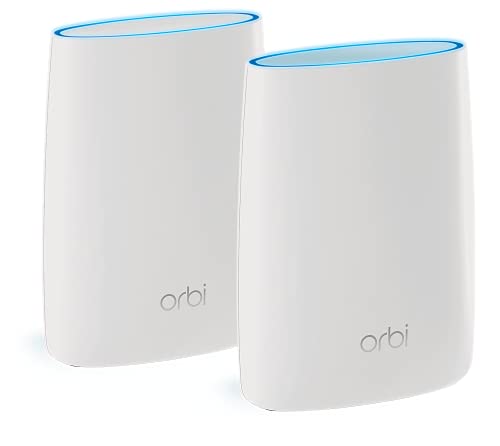
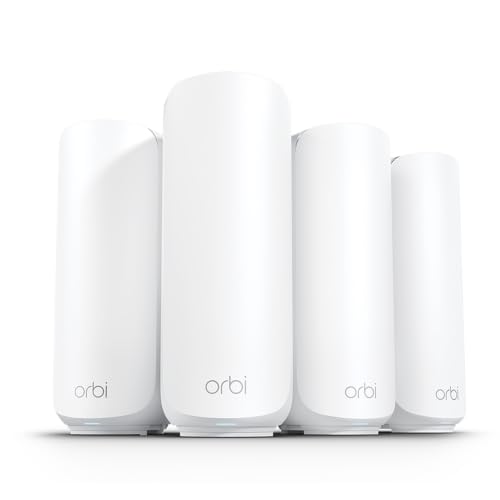
6. NETGEAR Orbi RBK763S — Best for Large Homes
The NETGEAR Orbi RBK763S takes the more premium tri-band route.
The system uses AX5400 tri-band Wi-Fi 6, divided across 2.4GHz and two 5GHz radios. NETGEAR specifies theoretical rates of roughly 600 + 2400 + 2400 Mbps.
The router includes:
- three Gigabit LAN ports
- one Gigabit WAN port
while each satellite provides:
- two Gigabit LAN ports
Why We Recommend It
Tri-band architecture is particularly useful in large houses where the mesh nodes must communicate wirelessly across distance.
NETGEAR itself notes that dual-band mesh systems share available radio capacity between clients and mesh communication, potentially reducing speed as wireless nodes are added.
Orbi systems historically focus heavily on maintaining strong connections between the main router and satellites.
Best For
Large houses, multi-floor homes and households where wired Ethernet backhaul is impossible.
Pros
- Tri-band AX5400
- Strong wireless mesh design
- Multiple Ethernet ports
- Good fit for larger houses
- MU-MIMO
- Beamforming
Cons
- Expensive
- Gigabit WAN limits multi-gig internet
- NETGEAR security/parental-control extras may involve subscriptions
- Overkill for ordinary apartments
Verdict
For a large independent house where wireless node-to-node performance matters more than price, Orbi remains a serious option.





7. TP-Link Deco X10 — Best Budget Wi-Fi 6 Mesh
You do not need AX3000, Wi-Fi 6E or Wi-Fi 7 merely to fix poor coverage.
The Deco X10 is TP-Link’s more affordable AX1500 Wi-Fi 6 mesh option.
TP-Link’s 2026 product catalogue lists the X10 in 1-, 2- and 3-pack configurations, positioned below the AX1800 Deco X20 and AX3000 Deco family.
Why We Recommend It
Suppose your internet plan is 100–300 Mbps.
Your household mainly uses:
- OTT streaming
- Zoom/Meet
- browsing
- phones
- laptops
- smart TVs
- smart-home devices
Do you really need a ₹40,000+ mesh?
Probably not.
The X10 gives you the real benefit you’re looking for:
whole-home coordinated Wi-Fi coverage.
Best For
Budget Wi-Fi 6 buyers, 2BHK apartments and moderate broadband plans.
Pros
- Wi-Fi 6
- Deco ecosystem
- Affordable mesh entry point
- Expandable
- Suitable for mainstream internet plans
Cons
- AX1500 rather than AX3000
- Dual-band
- Lower performance ceiling
- Less suited to gigabit-heavy households
Verdict
If coverage matters more than benchmark scores, X10 can be the most financially sensible mesh system in the list.

- Faster Connections —— Wi-Fi 6 speeds up to 1,500 Mbps—1,201 Mbps on 5 GHz and 300 Mbps on 2.4 GHz.
- Connect More Devices —— OFDMA and MU-MIMO technology quadruple capacity to enable simultaneous transmission to more devi…
- Boosted Seamless Coverage —— Achieve seamless whole home coverage with a clearer and stronger whole home Wi-Fi signal ge…
Mesh Wi-Fi Systems Comparison
| Model | Wi-Fi | Bands | Wireless Class | Ethernet | Best Use |
|---|---|---|---|---|---|
| TP-Link Deco BE25 | Wi-Fi 7 | Dual | BE5000/BE3600* | 2× 2.5GbE | Future-ready / multi-gig |
| TP-Link Deco XE75 | Wi-Fi 6E | Tri | AXE5400 | 3× Gigabit | Premium wireless mesh |
| NETGEAR Orbi RBK763S | Wi-Fi 6 | Tri | AX5400 | Gigabit | Large homes |
| TP-Link Deco X50 | Wi-Fi 6 | Dual | AX3000 | 3× Gigabit | Best overall |
| MERCUSYS Halo H80X | Wi-Fi 6 | Dual | AX3000 | 3× Gigabit | Value |
| ASUS ZenWiFi XD5 | Wi-Fi 6 | Dual | AX3000 | 2× Gigabit | Compact/AiMesh |
| TP-Link Deco X10 | Wi-Fi 6 | Dual | AX1500 | Gigabit class | Budget |
*Wi-Fi specifications can differ by regulatory region and hardware version. Check the exact Indian SKU before purchase.
How Does Mesh Wi-Fi Work?
A traditional network usually looks like:
Internet → Router → Devices
Everything depends on one router.
Mesh looks more like:
Internet → Main Mesh Node → Secondary Node → Additional Node
The nodes cooperate as one network.
Instead of manually connecting to networks named:
Home_WiFi
then:
Home_WiFi_Extender
then:
PLEASE_WORK_UPSTAIRS_FINAL
😂
a properly configured mesh system typically presents one Wi-Fi name and allows supported devices to roam between access points.
Mesh Wi-Fi vs Wi-Fi Extender
This is the obvious follow-up to our range-extender guide.
Choose an Extender If:
You have one isolated dead zone.
For example:
Router works everywhere except one bedroom.
A ₹2,000–₹5,000 extender may solve the problem.
Choose Mesh If:
You have:
- multiple dead zones
- multiple floors
- a long apartment
- many connected devices
- frequent movement between rooms
- inconsistent roaming
Mesh is more expensive, but it solves the network as a whole system rather than extending one weak spot.
Dual-Band vs Tri-Band Mesh: Why Does It Matter?
This is one of the most important specifications.
Dual-Band Mesh
Uses:
- 2.4GHz
- 5GHz
The nodes may use these same bands for both client traffic and communication between mesh units.
This can reduce available throughput over wireless hops.
Tri-Band Mesh
Adds another band often:
- second 5GHz band, or
- 6GHz with Wi-Fi 6E
That extra spectrum can improve wireless backhaul capacity.
NETGEAR explicitly notes that adding nodes to a dual-band wireless mesh can reduce speed because client and mesh traffic compete for wireless resources.
Does Everyone Need Tri-Band?
No.
If you can use Ethernet backhaul, dual-band systems become much more attractive.
Which brings us to arguably the most important mesh feature nobody puts in giant neon letters on the box.
What Is Ethernet Backhaul?
Backhaul is the connection between your mesh nodes.
Wireless backhaul means the nodes communicate over Wi-Fi.
Ethernet backhaul means:
Node 1 → Ethernet cable → Node 2
This can dramatically improve consistency because the nodes are no longer using precious wireless airtime to relay everything.
TP-Link supports Ethernet backhaul across compatible Deco systems and notes that Ethernet-connected Deco networks can scale beyond normal wireless-node recommendations.
If your home already has LAN wiring inside the walls, use it.
Seriously.
You may get more real-world benefit from ₹1,000 worth of good Ethernet cabling than spending ₹20,000 extra chasing a more exotic wireless specification.
Wi-Fi 6 vs Wi-Fi 6E vs Wi-Fi 7
Wi-Fi 6
For most homes, this is still excellent.
Advantages include:
- OFDMA
- better multi-device efficiency
- improved capacity
- widespread device compatibility
Models such as Deco X50 and Halo H80X remain strong buys.
Wi-Fi 6E
Wi-Fi 6E adds 6GHz spectrum.
That gives compatible devices access to a cleaner frequency band and gives mesh systems additional wireless capacity.
The Deco XE75 is a strong example.
Wi-Fi 7
Wi-Fi 7 introduces technologies including:
- Multi-Link Operation
- 4K-QAM
- wider channels on supported bands
- improved efficiency
The Deco BE25 combines Wi-Fi 7 with 2.5GbE wired ports.
Which Should You Buy?
For a normal home today:
Wi-Fi 6 = sensible
For a premium wireless mesh:
Wi-Fi 6E = excellent
For long-term multi-gig upgrades:
Wi-Fi 7 = future-facing
How Many Mesh Nodes Do You Need?
More is not automatically better.
TP-Link specifically warns that adding extra Deco units when there are no dead zones may not improve throughput or stability.
Small Apartment
Usually 1–2 nodes.
Typical 2BHK/3BHK
Usually 2 nodes, depending on walls and router placement.
Larger Apartment or Duplex
Often 2–3 nodes.
Multi-Floor Independent Home
Typically 3 or more, depending on floor area and construction.
Manufacturer square-foot coverage ratings should be treated as rough laboratory guidance, not promises.
Indian reinforced concrete walls have absolutely no respect for the beautiful open-plan house used in the Wi-Fi advertisement. 😭
Where Should Mesh Nodes Be Placed?
Do not put a node deep inside an existing dead zone and expect miracles.
A wireless node still needs a strong enough connection to the previous node.
A useful pattern is:
Main node → strong/intermediate location → secondary node → target area
Try to:
- keep nodes relatively open
- avoid closed cabinets
- minimise thick walls between them
- avoid placing them directly behind large TVs
- keep them away from heavy metal obstructions
- use Ethernet where available
For multi-floor homes, positioning nodes near staircases or more open vertical paths can sometimes help.
What to Look for When Buying a Mesh Wi-Fi System
1. Your Internet Speed
If your broadband plan is 200 Mbps, almost every system on this list can exceed that under good conditions.
Do not buy Wi-Fi 7 solely because the box says “5,000 Mbps”.
That number is not your internet speed.
2. Number of Floors
Single-floor apartment?
Dual-band could be enough.
Three-storey home with concrete slabs?
Tri-band or wired backhaul becomes much more attractive.
3. Ethernet Ports
Creators and power users should pay attention here.
You may want wired connections for:
- desktop PC
- NAS
- gaming console
- TV
- CCTV/NVR
- home-office workstation
Three ports per node is dramatically more convenient than one.
4. Gigabit vs 2.5 Gigabit
For most users:
Gigabit Ethernet is sufficient.
For broadband faster than 1Gbps or high-speed local networking:
2.5GbE matters.
This is one of the strongest reasons to consider the Deco BE25 or XE75 Pro.
5. Router vs Access-Point Mode
Many mesh kits can either replace your router or work behind an existing router as access points.
Access-point mode is particularly useful if your ISP gateway must remain in place.
6. Expansion Ecosystem
Before buying, check whether additional compatible nodes will be easy to obtain later.
TP-Link’s Deco family has a particularly broad cross-model ecosystem.
MERCUSYS is less flexible: Halo H-series and S-series do not interoperate.
Do You Need a Mesh System for a 1BHK?
Probably not.
Unless your walls are unusually difficult or your router is terribly positioned, replacing the main router with a better one may be enough.
Mesh is most valuable when one router genuinely cannot cover the layout efficiently.
Buying three mesh nodes for a 500 sq. ft. apartment is networking overkill.
Your neighbour might get fantastic Wi-Fi though. 😂
Common Mesh Wi-Fi Buying Mistakes
Buying Too Many Nodes
More nodes can create unnecessary wireless overlap and interference.
Start with what the home actually needs.
Putting Nodes Too Far Apart
A node cannot retransmit high-quality data if its own link is poor.
Ignoring Wired Backhaul
If Ethernet already exists, take advantage of it.
Buying Wi-Fi 7 Without Any Wi-Fi 7 Devices
Future-proofing is fine.
Paying twice as much for features you may replace before using is less fine.
Ignoring Ethernet-Port Speed
A premium wireless system with only Gigabit WAN may bottleneck internet plans above 1Gbps.
Assuming Mesh Increases ISP Speed
Mesh improves distribution and coverage.
It cannot turn your 100 Mbps broadband plan into 500 Mbps.
Keeping the Old Router Broadcasting Everywhere
If your mesh replaces the old router, leaving unnecessary overlapping Wi-Fi networks active can sometimes create more interference.
Configure the system properly rather than creating a wireless jungle.
How We Selected These Mesh Wi-Fi Systems
We evaluated mesh systems based on criteria that matter in real homes:
- Wi-Fi generation
- dual-band vs tri-band architecture
- wireless-backhaul capability
- Ethernet backhaul
- WAN/LAN port speeds
- mesh roaming
- node scalability
- device capacity
- coverage claims
- app experience
- security options
- access-point support
- current product support
- Indian market availability
- overall value
We prioritised current manufacturer documentation from TP-Link, ASUS, MERCUSYS and NETGEAR.
TP-Link’s April 2026 mesh guidance was also useful because it explicitly warns that adding more nodes does not automatically improve performance, which is exactly the type of caveat buyers should know before spending more money.
BestBuy93.IN does not claim hands-on testing of these systems unless explicitly stated.
Coverage figures and advertised wireless speeds are theoretical manufacturer values. Actual speeds depend on the home layout, walls, interference, client hardware, ISP connection and node placement.
In Case You Are Looking For –
- Best Wi-Fi Range Extenders for Improving Connectivity in Dead Zones
- Best USB Hubs for Expanding Connectivity on Desktop PCs
- Best KVM Switches for Controlling Two Computers with One Keyboard and Mouse
- Best External Monitors for Dual-Screen Productivity at Home
- Best Portable SSDs for Backing Up Smartphone Photos and Videos
- Best Laptops for Work from Home
- Best Monitor Light Bars for Reducing Glare on Your Desk
Frequently Asked Questions
Which mesh Wi-Fi system is best for home use?
For most households, the TP-Link Deco X50 offers the strongest overall balance of AX3000 Wi-Fi 6 performance, Gigabit Ethernet, easy expansion and pricing.
For larger homes using wireless backhaul, consider the Deco XE75.
Is mesh Wi-Fi better than a Wi-Fi extender?
For multiple dead zones, usually yes.
A range extender is cheaper for fixing one isolated problem.
Mesh is better suited to providing coordinated coverage across an entire home.
Does mesh Wi-Fi reduce speed?
It can.
With wireless backhaul, data may need to travel through one or more mesh nodes.
Dual-band systems can lose more usable wireless capacity because backhaul and client devices may share the same bands.
Ethernet backhaul or tri-band systems can reduce this problem.
Is tri-band mesh better than dual-band?
For wireless backhaul, tri-band often provides more capacity.
For a wired-backhaul home, a good dual-band mesh may already perform extremely well.
So “tri-band” is not automatically worth paying more for.
Do mesh systems work with fibre internet?
Yes.
Generally, your ISP’s ONT or modem connects to the main mesh router through Ethernet.
Some ISP configurations may require VLAN, PPPoE or other settings, so verify compatibility before replacing provider equipment.
Can I mix different mesh brands?
Usually not as one seamless proprietary mesh system.
For example, Deco units are designed to operate within TP-Link’s Deco ecosystem.
ASUS uses AiMesh.
NETGEAR uses Orbi.
Even within MERCUSYS, Halo H-series and S-series cannot be combined.
How many mesh nodes should a 3BHK use?
Two nodes are a sensible starting point in many apartments.
Homes with unusually thick walls, long layouts or multiple floors may benefit from a third.
Do not buy additional nodes unless coverage testing shows you need them.
Is Wi-Fi 7 worth buying in 2026?
It can be if:
- you are buying for long-term use
- you own Wi-Fi 7 devices
- you have multi-gig internet
- you need 2.5GbE wired networking
- the price premium is reasonable
Otherwise, a strong Wi-Fi 6 system such as Deco X50 remains perfectly sensible.
Which mesh Wi-Fi is best for multi-floor homes?
For homes where Ethernet cannot be run between floors, a tri-band mesh such as Deco XE75 or Orbi RBK763S can be more suitable because of the additional wireless capacity available for mesh communication.
If Ethernet is available between floors, use wired backhaul and your choice becomes much broader.
Final Verdict
For the best mesh Wi-Fi system for most homes, our top recommendation is the TP-Link Deco X50.
It gives you AX3000 Wi-Fi 6, a mature mesh ecosystem, multiple Gigabit Ethernet ports and enough wireless performance for typical fibre connections without pushing the price into enthusiast territory.
For larger homes where the mesh nodes must communicate wirelessly, upgrade to the TP-Link Deco XE75. Its tri-band Wi-Fi 6E architecture gives the system more wireless capacity, particularly when a wired backhaul is not available.
For long-term buyers with multi-gigabit ambitions, the Deco BE25 is the most interesting Wi-Fi 7 option here. Its MLO support and dual 2.5GbE ports make it genuinely more future-oriented rather than simply adding a new Wi-Fi number to the box.
Budget-conscious users should look at the MERCUSYS Halo H80X, while the Deco X10 is the simpler entry point into Wi-Fi 6 mesh.
And if you have a large multi-floor house with no practical way to run Ethernet, NETGEAR Orbi RBK763S is worth considering for its tri-band design.
The main lesson?
Choose mesh based on your home’s layout and backhaul not theoretical Mbps alone.
A properly positioned ₹15,000–₹20,000 mesh system can outperform a much more expensive system whose nodes are badly placed behind concrete walls.
Wi-Fi is still radio.
Fancy product names have not yet convinced physics to resign. 📶😄