
There is a very specific type of frustration that happens when your Wi-Fi works perfectly beside the router but suddenly behaves like it has forgotten your existence the moment you enter the bedroom.
One bar near the balcony.
Buffering in the study.
Smart TV disconnected in the other room.
And somehow the bathroom has better Wi-Fi than the place where you actually work. 😭
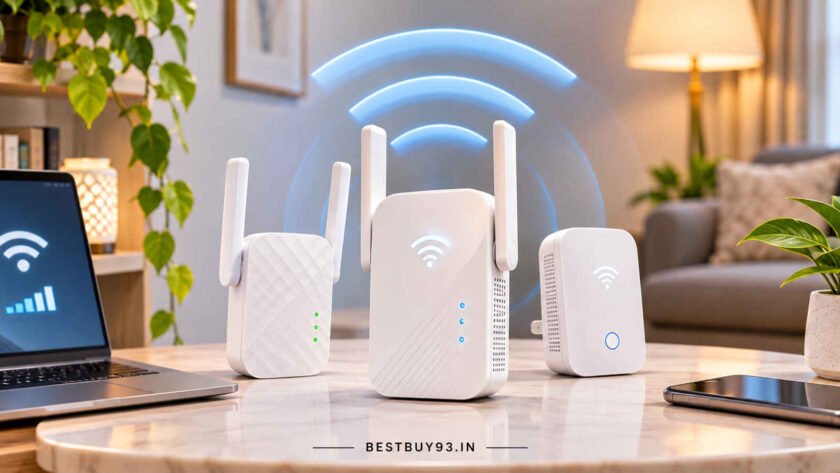
That is exactly where a Wi-Fi range extender can help.
A range extender connects to your existing wireless network and rebroadcasts that signal into areas where the router alone struggles to reach. It can be a relatively inexpensive way to improve coverage in a bedroom, study, balcony, kitchen or another isolated dead zone without replacing your entire router setup. TP-Link describes range extenders as devices that connect wirelessly to the existing router and extend its signal into previously weak areas.
But there is an important catch:
A Wi-Fi extender cannot magically create speed that your router or internet connection does not already have.
Placement, Wi-Fi standard, backhaul quality, band support and your home’s walls can matter just as much as the number printed on the box.
For this guide, we compared current models based on Wi-Fi standard, dual-band performance, Ethernet connectivity, mesh compatibility, placement assistance, access-point mode, setup experience and suitability for common home dead-zone problems.
Our overall recommendation is the TP-Link RE605X because its Wi-Fi 6 support, AX1800 dual-band performance, Gigabit Ethernet port and mesh integration offer a strong balance between speed and price for modern homes. TP-Link lists the RE605X at up to 1201 Mbps on 5 GHz plus 574 Mbps on 2.4 GHz with a Gigabit Ethernet port.
Quick Answer: Best Wi-Fi Range Extenders at a Glance
| Wi-Fi Extender | Best For | Wi-Fi Class | Key Advantage |
|---|---|---|---|
| TP-Link RE605X | Best Overall | AX1800 Wi-Fi 6 | Fast Wi-Fi 6 + Gigabit Ethernet |
| TP-Link RE705X | Best Premium | AX3000 Wi-Fi 6 | 160MHz support and higher 5GHz capacity |
| TP-Link RE505X | Best Value Wi-Fi 6 | AX1500 Wi-Fi 6 | Wi-Fi 6 + EasyMesh + Gigabit port |
| NETGEAR EAX12 | Best NETGEAR Option | AX1600 Wi-Fi 6 | 4-stream Wi-Fi 6 and Gigabit Ethernet |
| TP-Link RE315 | Best AC1200 Choice | AC1200 Wi-Fi 5 | EasyMesh + smart signal indicator |
| Mercusys ME30 | Best Budget Dual-Band | AC1200 Wi-Fi 5 | 867 + 300 Mbps and external antennas |
| TP-Link RE200 | Best Compact Budget Pick | AC750 Wi-Fi 5 | Compact design + dual-band connectivity |
Best Overall: TP-Link RE605X
Best Premium: TP-Link RE705X
Best Value Wi-Fi 6: TP-Link RE505X
Best Budget Dual-Band: Mercusys ME30
Best for a Simple Bedroom Dead Zone: TP-Link RE315
1. TP-Link RE605X — Best Overall Wi-Fi Range Extender
The TP-Link RE605X is the model we would recommend to most people upgrading a modern home network.
It is a dual-band AX1800 Wi-Fi 6 extender, offering approximately 1201 Mbps on the 5GHz band and 574 Mbps on 2.4GHz, plus a Gigabit Ethernet port.
That puts it in a useful middle ground.
It is considerably more future-friendly than older AC750 and AC1200 extenders without jumping into the price territory of premium AX3000 or Wi-Fi 7 hardware.
Why We Recommend It
Wi-Fi 6 becomes particularly useful when your home has several connected devices.
Think:
- smartphones
- laptops
- smart TVs
- Alexa or Google speakers
- CCTV cameras
- tablets
- gaming devices
- smart plugs
The RE605X also includes a Gigabit Ethernet port, which can be useful for giving a smart TV, desktop PC or console a wired connection from the extender.
Best For
Homes with a Wi-Fi 5 or Wi-Fi 6 router where you have one major dead zone or weak room and want stronger performance than entry-level extenders provide.
Who Should Skip It
If your internet plan is modest and your main goal is simply getting basic Wi-Fi into one bedroom, an AC1200 extender such as the RE315 can be cheaper and perfectly adequate.
Pros
- Wi-Fi 6
- AX1800 dual-band speed class
- Gigabit Ethernet port
- External antennas
- Suitable for streaming and multiple devices
- Mesh support within compatible TP-Link ecosystems
Cons
- More expensive than basic AC1200 models
- Still depends heavily on placement
- Does not replace a proper mesh system for very large homes
Our Verdict
The RE605X provides the best balance of modern Wi-Fi technology, useful wired connectivity and sensible performance for most users.

- Faster Wi-Fi 6 Speed —— RE605X comes equipped with the latest wireless technology, Wi-Fi 6, for faster speeds, greater c…
- Dual Band —— 1800 Mbps – 574 Mbps at 2.4GHz, 1201 Mbps at 5GHz
- OneMesh Compatible —— Creates a Mesh network by connecting to a OneMesh router for seamless whole-home coverage.
2. TP-Link RE705X — Best Premium Wi-Fi Extender
If your internet plan and router are already fast, moving up to the TP-Link RE705X makes more sense.
This model is rated AX3000, with up to 2402 Mbps on 5GHz and 574 Mbps on 2.4GHz. It also supports 160MHz channel width, a Gigabit Ethernet port and access-point mode.
Why We Recommend It
The RE705X is useful when the extender itself would otherwise become the bottleneck.
For example, suppose you have:
- a fast fibre internet connection
- Wi-Fi 6 phones and laptops
- 4K streaming
- cloud backups
- multiple high-bandwidth devices
An entry-level extender may technically eliminate the dead zone while still leaving the extended network disappointingly slow.
The RE705X gives you more capacity to work with.
Mesh Compatibility
TP-Link also positions the RE705X as a mesh-capable extender within compatible TP-Link setups, helping create smoother roaming rather than forcing users to manually jump between multiple network names.
Best For
High-speed broadband users, larger families and people with multiple demanding devices.
Who Should Skip It
Do not buy an AX3000 extender for a basic 50 Mbps internet plan purely because the number looks impressive.
Your internet will not suddenly become 3000 Mbps.
Marketing numbers remain marketing numbers. 😭
Pros
- AX3000 Wi-Fi 6
- 2402 Mbps 5GHz link rate
- 160MHz channel width
- Gigabit Ethernet
- Access-point mode
- Mesh integration
- Stronger long-term option
Cons
- Expensive compared with entry-level extenders
- Benefits depend on compatible router and devices
- Overkill for basic broadband plans
Our Verdict
If you want a premium extender without replacing your existing router system, the RE705X is the strongest option in this list.

- Dual Band Wi-Fi 6 – combined Wi-Fi speeds of up to 574 Mbit/s (over 2.4 GHz) and 2402 Mbit/s (over 5 GHz)
- Easy mesh compatibility – flexibly create a mesh Wi-Fi for the whole house
- AP Mode: Create a new Wi-Fi access point through the Gigabit Ethernet port to expand your wired network with Wi-Fi capab…
3. TP-Link RE505X — Best Value Wi-Fi 6 Extender
The TP-Link RE505X is an interesting compromise between older Wi-Fi 5 extenders and faster AX1800/AX3000 models.
It offers AX1500 Wi-Fi 6, with 1200 Mbps on 5GHz and 300 Mbps on 2.4GHz, plus a Gigabit Ethernet port and EasyMesh compatibility.
Why We Recommend It
For many households, AX1500 is already enough.
If your dead zone is a bedroom where you mainly:
- stream Netflix
- attend video calls
- use social media
- browse the web
- upload files
you may not need the extra theoretical bandwidth of AX3000.
The RE505X also supports access-point mode, which means you can connect an Ethernet cable and use the unit to create Wi-Fi from a wired network connection.
That can produce a much stronger result than wireless repeating when Ethernet is available.
Best For
Buyers wanting Wi-Fi 6 without paying premium extender prices.
Pros
- Wi-Fi 6
- 1200 Mbps 5GHz band
- Gigabit Ethernet
- EasyMesh-compatible
- Access-point mode
- External antennas
- Tether app setup
Cons
- 2.4GHz band is limited to 300 Mbps
- Not as fast as AX1800/AX3000 alternatives
- Bigger than tiny wall-plug extenders
Our Verdict
For many normal apartments, the RE505X hits the value sweet spot.
You get modern Wi-Fi 6 and Gigabit Ethernet without paying for performance you may never use.

- Extend WiFi Coverage —— RE505X comes equipped with the latest wireless technology, Wi-Fi 6, for faster speeds, greater c…
- WiFi 6 Speeds —— Enjoy smoother and more reliable streaming, gaming, downloading, and more with dual-band WiFi speeds up…
- OneMesh Compatible —— Creates a Mesh network by connecting to a OneMesh router for seamless whole-home coverage.
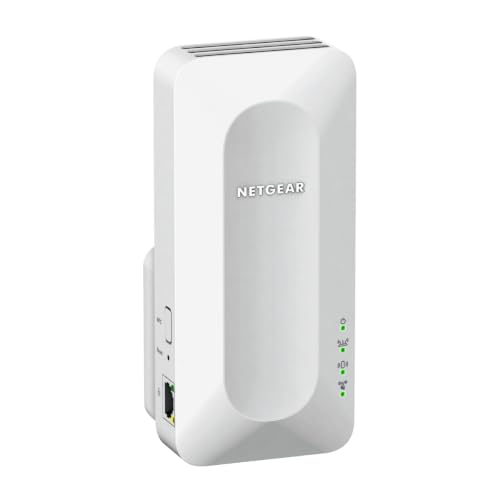
4. NETGEAR EAX12 — Best NETGEAR Wi-Fi 6 Mesh Extender
The NETGEAR EAX12 is an AX1600 Wi-Fi 6 mesh extender designed for users who prefer the NETGEAR ecosystem.
NETGEAR specifies four-stream AX1600 Wi-Fi 6, with approximately 0.4 + 1.2 Gbps across the bands and a Gigabit Ethernet port.
It is also backward compatible with older Wi-Fi generations.
Why We Recommend It
One of the strengths of Wi-Fi 6 is handling multiple connected devices more efficiently.
NETGEAR lists technologies including:
- OFDMA
- four-stream operation
- MU-MIMO
- Gigabit Ethernet
These become useful when multiple devices are trying to use the extended connection simultaneously.
Best For
NETGEAR router users and homes with several Wi-Fi 6 devices.
Who Should Skip It
In India, NETGEAR extenders can sometimes cost noticeably more than comparable TP-Link models.
Compare the current price before buying.
Pros
- AX1600 Wi-Fi 6
- Four-stream Wi-Fi
- Gigabit Ethernet
- MU-MIMO
- OFDMA
- Backward compatibility
- WPS setup
Cons
- Can be expensive
- Value depends heavily on current India pricing
- Premium may not be justified for a single low-demand bedroom
Our Verdict
The EAX12 is technically capable, but price determines whether it is a smart buy.
If it is available near the price of comparable Wi-Fi 6 extenders, it becomes much easier to recommend.
- Extends WiFi coverage by 1.2m2. feet, creating a mesh network; connect up to 15+ devices
- Plug it into any wall outlet and use your existing network SSID name so you never disconnect while moving around your ho…
- AX1600 Speed WiFi 6 powers up to 1.6Gbps of speed for uninterrupted streaming, HD gaming and web conferencing
5. TP-Link RE315 — Best AC1200 Wi-Fi Extender
Not every household needs Wi-Fi 6.
The TP-Link RE315 remains a practical option for ordinary broadband connections and Wi-Fi 5 routers.
It supports AC1200 dual-band Wi-Fi, delivering up to 867 Mbps on 5GHz and 300 Mbps on 2.4GHz. It also includes EasyMesh compatibility, adaptive path selection and a smart signal indicator.
Why We Recommend It
The signal indicator is more important than it sounds.
A huge percentage of extender problems come from poor placement.
If the extender is too close to your router, it does not extend coverage far enough.
If it is too far away, it receives a weak signal and simply rebroadcasts that weak connection.
The RE315’s indicator helps you find a more sensible location.
Ethernet Limitation
The biggest compromise is its 10/100 Mbps Fast Ethernet port, rather than Gigabit Ethernet.
So do not choose this model if you specifically want a high-speed wired connection from the extender.
Best For
Bedrooms, studies and apartments where internet speeds are moderate and Wi-Fi 6 is not essential.
Pros
- AC1200 dual-band
- EasyMesh-compatible
- Smart signal indicator
- Adaptive path selection
- Access-point mode
- External antennas
Cons
- Wi-Fi 5 rather than Wi-Fi 6
- Only Fast Ethernet
- Less future-proof
Our Verdict
For a simple home dead-zone problem, the RE315 may be all the extender you actually need.

- No Dead Zone —— Brings Wi-Fi dead zone to life with strong Wi-Fi expansion at combined speed of up to 1.2Gbps
- AC1200 Dual Band Wi-Fi —— Operates over both the 2.4GHz band(300Mbps) and 5GHz band(867Mbps) for more stable wireless ex…
- OneMesh —— Creates a Mesh network by connecting to a TP-Link OneMesh router for seamless whole-home coverage.
6. Mercusys ME30 — Best Budget AC1200 Dual-Band Extender
The Mercusys ME30 is one of the more attractive budget options if your main requirement is dual-band connectivity.
Mercusys specifies up to 867 Mbps on 5GHz and 300 Mbps on 2.4GHz, with two external antennas and a 10/100 Mbps Ethernet port.
Why We Recommend It
The ME30 gives budget users an important feature:
5GHz support.
Very cheap N300 extenders work only on 2.4GHz.
That can be fine for basic browsing or smart-home devices, but it is much less attractive for modern streaming and laptops.
The ME30 gives you proper dual-band operation without jumping directly into Wi-Fi 6 pricing.
Best For
Budget buyers using a Wi-Fi 5 router.
Who Should Skip It
If you are already upgrading to a Wi-Fi 6 router or have gigabit fibre, spend more on an AX-class extender.
Pros
- AC1200 dual-band
- External antennas
- Works with standard routers
- Ethernet port
- Good budget specification
Cons
- Fast Ethernet rather than Gigabit
- Wi-Fi 5
- Less sophisticated mesh ecosystem
Our Verdict
For budget users, the ME30 offers better long-term usefulness than ultra-cheap single-band repeaters.

- AC1300 Dual Band WiFi —— Speeds of up to 400 Mbps on the 2.4 GHz band and 867 Mbps on the 5 GHz band;Full Gigabit Ports …
- Far-Reaching Coverage —— 4× high-gain antennas with Beamforming boost stable connections throughout your home for strong…
- Higher Network Efficiency —— MU-MIMO technology allows AC12G to communicate with multiple devices at the same time, incr…
7. TP-Link RE200 — Best Compact Budget Wi-Fi Extender
The TP-Link RE200 is a compact AC750 extender that has survived for a reason:
it is simple.
TP-Link lists speeds of 433 Mbps on 5GHz and 300 Mbps on 2.4GHz, with three internal antennas and one 10/100 Mbps Ethernet port.
It is also now listed as EasyMesh-compatible in TP-Link’s current India range.
Why We Recommend It
Suppose your problem is not:
“I need maximum performance for a gaming PC.”
It is:
“Wi-Fi barely reaches my bedroom and I want Netflix to stop buffering.”
The RE200 makes much more sense in that situation.
Its compact wall-plug design also keeps it relatively unobtrusive.
Best For
Small apartments, bedrooms and modest broadband plans.
Pros
- Affordable
- Dual-band
- Compact
- EasyMesh-compatible
- Ethernet port
- Access-point mode
Cons
- AC750 performance
- Fast Ethernet only
- Not ideal for high-speed fibre
- Older Wi-Fi 5 technology
Our Verdict
A good entry-level option for one modest dead zone, provided you are not expecting flagship Wi-Fi performance.

- Boosts wireless signal to previously unreachable or hard-to-wire areas flawlessly
- Compatible with 802.11 b/g/n and 802.11ac Wi-Fi devices
- Dual band speeds up to 750Mbps
Wi-Fi Extender Comparison Table
| Model | Standard | 5GHz | 2.4GHz | Ethernet | Mesh |
|---|---|---|---|---|---|
| TP-Link RE705X | Wi-Fi 6 | 2402 Mbps | 574 Mbps | Gigabit | Yes |
| TP-Link RE605X | Wi-Fi 6 | 1201 Mbps | 574 Mbps | Gigabit | Yes |
| NETGEAR EAX12 | Wi-Fi 6 | ~1200 Mbps | ~400 Mbps | Gigabit | Mesh extender |
| TP-Link RE505X | Wi-Fi 6 | 1200 Mbps | 300 Mbps | Gigabit | EasyMesh |
| TP-Link RE315 | Wi-Fi 5 | 867 Mbps | 300 Mbps | Fast Ethernet | EasyMesh |
| Mercusys ME30 | Wi-Fi 5 | 867 Mbps | 300 Mbps | Fast Ethernet | Standard extender |
| TP-Link RE200 | Wi-Fi 5 | 433 Mbps | 300 Mbps | Fast Ethernet | EasyMesh |
Advertised wireless rates are theoretical link rates, not guaranteed internet speeds. Actual performance depends on router capability, distance, interference, building materials, connected devices and placement. Mercusys explicitly notes that real throughput and coverage vary with environmental conditions.
How Does a Wi-Fi Range Extender Actually Work?
A range extender sits between your router and the area with weak coverage.
It receives the router’s existing Wi-Fi signal and rebroadcasts it farther into the home.
Imagine your router’s signal like someone speaking from another room.
A range extender is basically another person standing halfway between you and repeating the message.
But here is the critical part:
If the extender itself can barely hear the router, it has nothing good to repeat.
That is why positioning matters so much.
Where Should You Place a Wi-Fi Extender?
Do not put the extender directly inside the dead zone.
This is probably the most common mistake.
Instead, place it somewhere between the router and the dead zone where the original router signal is still reasonably strong.
For example:
Router → strong signal → extender → weak room
Not:
Router → three concrete walls → no signal → extender sitting heroically in the darkness.
It cannot amplify a connection it cannot reliably receive.
Many modern extenders include signal-strength indicators specifically to help with positioning. The TP-Link RE315, for example, uses a smart signal indicator to show whether the extender is appropriately located.
Wi-Fi 5 vs Wi-Fi 6 Extender: Which Should You Buy?
Choose Wi-Fi 5 if:
- your existing router is Wi-Fi 5
- your broadband speed is modest
- you have relatively few devices
- budget matters
- you only need basic coverage
Models such as the RE315 and ME30 can be perfectly adequate.
Choose Wi-Fi 6 if:
- you have a Wi-Fi 6 router
- several devices are online simultaneously
- you stream 4K content
- you game
- you regularly upload large files
- you want better long-term value
Wi-Fi 6 technologies are designed to improve efficiency when many devices compete for network access.
The NETGEAR EAX12, for example, supports OFDMA and four-stream MU-MIMO for handling simultaneous devices more efficiently.
What to Look for When Buying a Wi-Fi Range Extender
1. Match the Extender to Your Router
Do not spend heavily on Wi-Fi 6 or Wi-Fi 7 equipment if your entire network is built around an old entry-level router and you have no intention of upgrading.
The network is only as useful as the system around it.
2. Choose Dual-Band Whenever Possible
A dual-band extender supports both:
2.4GHz and 5GHz.
2.4GHz
Better range and wall penetration but generally more interference and lower speeds.
5GHz
Higher speeds but shorter effective range.
For most modern households, a dual-band extender is the minimum I would recommend unless your only goal is connecting basic smart-home devices.
3. Check the Ethernet Port
This detail is very easy to miss.
Some inexpensive extenders include only 10/100 Mbps Fast Ethernet.
Others offer Gigabit Ethernet.
If you plan to connect a:
- desktop
- gaming console
- NAS
- smart TV
- workstation
through the extender’s Ethernet port, Gigabit connectivity is much more useful.
The RE505X, RE605X, RE705X and NETGEAR EAX12 all provide Gigabit Ethernet.
4. Look for Access-Point Mode
Access-point mode is underrated.
If your home already has Ethernet wiring, you can connect the extender to the router using a cable and let it create Wi-Fi in another room.
That is often far better than wirelessly repeating an already weakened signal.
The RE505X, RE315, RE200 and RE705X support access-point operation.
5. Consider Mesh Compatibility
Traditional range extenders can create separate networks.
Mesh-compatible extenders can potentially provide a cleaner experience with compatible routers, including:
- one network name
- smoother roaming
- automatic hand-off
- easier management
TP-Link currently promotes EasyMesh support across several extender models.
But check compatibility carefully.
Having “mesh” written somewhere on two boxes does not guarantee that products from different ecosystems will work together seamlessly.
6. Do Not Buy Based on Coverage Numbers Alone
“Covers 2,000 sq. ft.”
Sounds wonderfully precise.
Real homes are not open laboratory halls.
Concrete walls, mirrors, steel doors, floors, neighbouring routers and even furniture can change Wi-Fi behaviour.
Use advertised coverage only as a rough guide.
Wi-Fi Extender vs Mesh Wi-Fi: Which Is Better?
A range extender makes sense when you have:
- one or two isolated dead zones
- an otherwise good router
- a limited budget
- a smaller apartment
- no desire to replace your network
A mesh Wi-Fi system makes more sense when you have:
- multiple floors
- several dead zones
- a large home
- many connected devices
- frequent roaming between rooms
- repeated extender problems
Mesh systems use multiple coordinated nodes to provide broader coverage.
If your solution starts becoming:
router + extender + second extender + another extender upstairs
you have probably crossed the line where mesh deserves serious consideration.
Sometimes buying three cheap gadgets is just a complicated way of avoiding buying the correct gadget once. 😭
Common Mistakes to Avoid
Putting the Extender Inside the Dead Zone
It needs a decent router signal to repeat.
Move it closer to the router.
Expecting It to Increase Internet Speed
An extender increases coverage, not your ISP plan.
A 100 Mbps connection does not become 500 Mbps because your extender says AX1800.
Buying a Single-Band Extender for Heavy Streaming
For modern devices, dual-band is usually worth the extra cost.
Ignoring the Ethernet Port Speed
A Fast Ethernet port tops out far below Gigabit Ethernet.
This matters if you need wired performance.
Buying Wi-Fi 7 for an Ancient Router
Future-proofing has limits.
Do not spend huge money on an extender your current network cannot meaningfully use.
Using Too Many Extenders
Chaining multiple wireless repeaters can produce a messy, inefficient network.
Consider mesh instead.
Blaming the Extender When the Router Is the Problem
If Wi-Fi is weak everywhere not just in one room the real problem may be:
- old router
- poor router placement
- ISP equipment
- interference
- insufficient broadband speed
Fix the source before adding more hardware.
How We Selected These Wi-Fi Range Extenders
We compared current range extenders using criteria relevant to ordinary home networks:
- Wi-Fi generation
- dual-band performance
- Ethernet-port speed
- mesh compatibility
- access-point mode
- signal indicators
- antenna design
- setup method
- backward compatibility
- suitability for streaming
- device capacity
- current product status
- overall value
Specifications were primarily checked against manufacturer documentation from TP-Link, NETGEAR and Mercusys.
TP-Link’s current product catalogue includes Wi-Fi 5, Wi-Fi 6 and newer Wi-Fi 7 extender categories, illustrating how wide the performance range has become.
BestBuy93.IN does not claim hands-on testing of these products unless explicitly stated.
Product availability and prices can change, so check current listings before purchasing.
In Case You Are Looking For –
- Best USB Hubs for Expanding Connectivity on Desktop PCs
- Best External Monitors for Dual-Screen Productivity at Home
- Best KVM Switches for Controlling Two Computers with One Keyboard and Mouse
- Best Portable SSDs for Backing Up Smartphone Photos and Videos
- Best Laptops for Work from Home
- Best Monitor Light Bars for Reducing Glare on Your Desk
Frequently Asked Questions
Which Wi-Fi range extender is best for home use?
The TP-Link RE605X is our best overall choice for most modern homes because it combines Wi-Fi 6, AX1800 dual-band performance and a Gigabit Ethernet port.
For a lower budget, the RE315 is a strong Wi-Fi 5 alternative.
Will a Wi-Fi extender make my internet faster?
Not beyond the speed supplied by your router and internet connection.
A range extender primarily improves coverage.
In a dead zone, your usable speed may improve because the device gets a stronger connection, but an extender cannot increase your ISP plan’s maximum bandwidth.
Does a Wi-Fi extender work through walls?
Yes, but walls weaken wireless signals.
Concrete, brick, metal and thick structural walls can significantly reduce performance.
Place the extender before the major obstruction rather than deep inside an already dead area.
Should my Wi-Fi extender be halfway between the router and dead zone?
Roughly, yes but the key requirement is that the extender must still receive a good signal from the router.
Use the signal indicator or app if your extender provides one.
Is Wi-Fi 6 worth it for a range extender?
Yes if you have a modern router, multiple Wi-Fi 6 devices or a busy home network.
For basic browsing on a moderate broadband plan, a good Wi-Fi 5 extender may still be enough.
Is a mesh system better than an extender?
For large, multi-floor homes or multiple dead zones, usually yes.
An extender is cheaper and excellent for fixing one isolated weak spot.
Mesh is designed for broader coordinated coverage.
Can I connect a smart TV to a Wi-Fi extender with Ethernet?
Yes, if the extender includes an Ethernet port.
For high-speed wired devices, choose a model with Gigabit Ethernet, such as the RE505X, RE605X, RE705X or NETGEAR EAX12.
Does the extender need to be the same brand as my router?
Not necessarily.
Many extenders can work with routers from other manufacturers.
However, advanced mesh features such as seamless roaming may require compatible products and ecosystems.
Always check mesh compatibility before buying.
Final Verdict
For most households, the TP-Link RE605X is our Best Overall Wi-Fi Range Extender.
Its Wi-Fi 6 support, AX1800 performance and Gigabit Ethernet connection give it enough capability for streaming, work-from-home setups, smart TVs and multiple modern devices without becoming unnecessarily expensive.
If you already have high-speed fibre and want more headroom, choose the TP-Link RE705X. Its AX3000-class wireless performance and 160MHz channel width make it better suited to demanding networks.
For better value, the TP-Link RE505X gives you Wi-Fi 6, EasyMesh support and Gigabit Ethernet at a lower performance tier.
If you’re simply trying to eliminate one bedroom dead zone on a moderate broadband connection, the TP-Link RE315 or Mercusys ME30 can save you money without making the setup unnecessarily complicated.
And if your house has dead zones everywhere?
Stop buying extenders like they’re decorative wall plugs.
You probably need a proper mesh Wi-Fi system or a better-positioned access point.
The right networking upgrade is the one that fixes the architecture of the problem not just the room where Netflix happened to buffer yesterday. 📶