

You do not need a mirrorless camera to start making good YouTube videos.
For talking-head videos, Shorts, travel vlogs, product demonstrations, cooking videos, tutorials and even fairly serious cinematic content, today’s flagship smartphones can produce footage that looks ridiculously good once you add decent lighting, clean audio and sensible framing.
But buying the best smartphone for YouTube video recording is not as simple as checking which phone has the highest megapixel count.
A YouTube creator needs much more than that.
You need stable 4K recording, reliable autofocus, good skin tones, a strong front camera, external microphone support, enough storage, manageable heating, good battery life and video files that are actually practical to edit.
A 200MP camera sounds impressive on a product page. If the phone overheats after ten minutes, shifts colour dramatically between lenses or produces shaky walking footage, those megapixels are not going to edit your vlog for you. 😭
For this guide, we compared current smartphones available to Indian buyers in late 2026, focusing specifically on YouTube recording rather than general photography.
Our top overall recommendation is the Apple iPhone 18 Pro Max because its combination of 4K Dolby Vision, ProRes, ProRes RAW, Apple Log 2, advanced stabilisation, strong front-camera video and professional controls gives creators one of the most complete mobile-video workflows available right now.
Android creators, however, have several genuinely excellent alternatives including the Samsung Galaxy S26 Ultra, Xiaomi 17 Ultra, vivo X300 Pro and Google Pixel 11 Pro XL.
Quick Answer: Best Phones for YouTube Recording
| Smartphone | Best For | Maximum Highlight Video Mode | Front Video | Creator Advantage |
|---|---|---|---|---|
| iPhone 18 Pro Max | Best Overall | 4K Dolby Vision up to 120fps | 4K 60fps | ProRes RAW, Log 2, pro controls |
| Samsung Galaxy S26 Ultra | Best Android Overall | 8K 30fps / 4K 120fps | 4K capable | Versatile lenses and zoom |
| Xiaomi 17 Ultra | Best for Cinematic Android Video | 8K 30fps / 4K Dolby Vision 120fps | 4K Dolby Vision 60fps | 1-inch main sensor, Log, ACES |
| vivo X300 Pro | Best for Stabilised Portrait Video | 4K Dolby Vision 120fps | Strong creator modes | Gimbal-grade stabilisation |
| Google Pixel 11 Pro XL | Best for AI-Assisted Video | 8K via Video Boost / 4K 60fps | 4K 60fps | Video Boost and Creator Suite |
| iPhone 18 Pro | Best Compact Pro Phone | 4K Dolby Vision up to 120fps | 4K 60fps | Pro features in smaller body |
| Samsung Galaxy S26 FE | Best Value Samsung | 8K 30fps / 4K high-frame-rate modes | 12MP front | Flagship-style video for less |
Best Overall: iPhone 18 Pro Max
Best Android: Samsung Galaxy S26 Ultra
Best Cinematic Android: Xiaomi 17 Ultra
Best for Portrait & Stabilisation: vivo X300 Pro
Best AI Video Phone: Google Pixel 11 Pro XL
Best Compact Creator Phone: iPhone 18 Pro
Best Value Samsung: Galaxy S26 FE
1. Apple iPhone 18 Pro Max — Best Overall for YouTube Recording
The iPhone 18 Pro Max is the phone I would put at the top of the list for a creator whose main priority is video.
Apple’s current Pro flagship supports 4K Dolby Vision recording up to 120fps on the main camera, Cinematic mode up to 4K Dolby Vision at 60fps, ProRes up to 4K120 when recording externally, ProRes RAW, Apple Log 2, ACES and genlock support.
That list sounds very “film school brochure”, but several features are genuinely useful.
Why We Recommend It
Consistency is the big win.
YouTube creators constantly switch between:
- talking to camera
- B-roll
- ultra-wide shots
- close-ups
- telephoto shots
- walking footage
- front-camera clips
A creator phone needs those clips to look like they came from the same device.
The iPhone 18 Pro Max also adds manual control over aperture, shutter speed and white balance, which gives serious creators more predictable footage.
The main camera now uses a variable aperture with settings including f/1.48, f/1.8, f/2.8 and f/4.0, allowing creators more control over light and depth of field.
Front Camera for Vlogging
The 18MP Center Stage front camera records 4K Dolby Vision up to 60fps and supports ultra-stabilised video.
That matters for solo creators because you can actually see yourself while filming.
For Shorts, Reels, travel updates and handheld vlogs, the front camera is no longer merely the “emergency selfie camera”.
Audio
Apple also lists:
- four studio-quality microphones
- wind-noise reduction
- Audio Mix
- Spatial Audio recording
- audio zoom
Those features do not replace a wireless lav mic, but they are useful when spontaneous recording is more important than perfect studio audio.
Best For
Professional YouTube creators, vloggers, filmmakers, product reviewers and anyone who wants to colour-grade footage.
Who Should Skip It
Skip it if your videos are mostly static talking-head clips and you do not need ProRes, Log or premium telephoto capabilities.
You would be spending a lot of money on features sitting unemployed in your Camera app. 😅
Pros
- Excellent video consistency
- 4K Dolby Vision up to 120fps
- ProRes and ProRes RAW
- Apple Log 2
- Variable aperture main camera
- Strong stabilisation
- Excellent front-camera video
- Excellent accessory ecosystem
- External-storage recording support
Cons
- Very expensive
- ProRes files consume huge amounts of storage
- Large and heavy
- Many advanced features are unnecessary for beginners
Verdict
For creators who want a phone that can genuinely become part of a professional video workflow, the iPhone 18 Pro Max is our Best Overall pick.
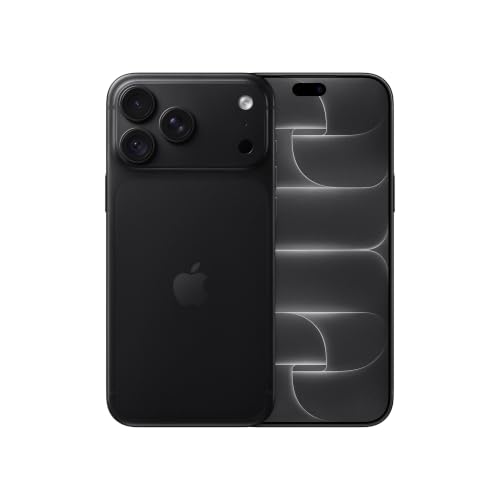
- Four gorgeous colours. One durable design — Built to last with an aluminium unibody design featuring colour-matched back…
- Immersive pro display — A 17.42 cm (6.9″) Super Retina XDR display. Brighter. Better anti-reflection. ProMotion up to 12…
- Durable Ceramic Shield. Front and back — Built to last with Ceramic Shield back — and Ceramic Shield 2 front, with 3x be…
2. Samsung Galaxy S26 Ultra — Best Android Phone for YouTube
If you want Android and do not want to compromise heavily on video versatility, the Galaxy S26 Ultra should be near the top of your shortlist.
Samsung specifies a 200MP main camera, 50MP ultra-wide, 50MP telephoto and 10MP additional telephoto, with optical zoom options at 3x and 5x and optical-quality zoom extending further.
For video, Samsung lists 8K recording at 30fps and 4K recording up to 120fps.
Why We Recommend It
The biggest advantage is focal-length flexibility.
Imagine filming a travel vlog.
One minute you want an ultra-wide establishing shot.
Then a normal walking clip.
Then a close-up of food.
Then a distant architectural detail.
The S26 Ultra gives you considerably more framing flexibility than many phones without attaching extra lenses.
Samsung also positions the S26 Ultra as its strongest current camera phone for content creators, with improved low-light video processing and Nightography.
Best For
Travel creators, event vloggers, tech reviewers, food creators and Android users who frequently change focal lengths.
Who Should Skip It
If your entire channel consists of a phone sitting on a tripod at 1x, the Ultra’s elaborate camera system may be unnecessary.
Pros
- 8K 30fps
- 4K high-frame-rate recording
- 200MP main camera
- Excellent zoom versatility
- OIS
- Strong low-light processing
- Large display for editing and reviewing footage
- USB-C creator ecosystem
Cons
- Premium price
- Large body
- 8K files become enormous quickly
- Beginners may not use the telephoto system enough to justify the price
Verdict
The Galaxy S26 Ultra is the strongest all-round Android recommendation here, especially for creators who want zoom flexibility without carrying interchangeable lenses.
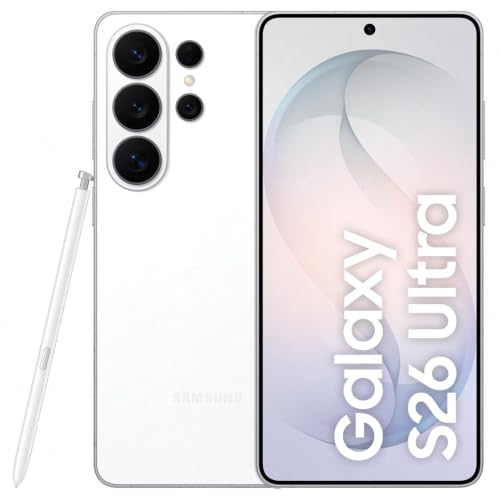
- Built-in Privacy Display – Say hi to world's first Privacy Display on mobile. With this new layer of privacy, one can cu…
- Agentic AI Experience – Enjoy the pinnacle of mobile AI innovation with the easiest and effortless AI phone built to sim…
- 200MP High Resolution Camera – Capture bright, detailed videos even at night with the brightest camera system and enhanc…
3. Xiaomi 17 Ultra — Best Android for Cinematic Video Controls
The Xiaomi 17 Ultra is the phone that should make serious Android videographers pay attention.
Its Leica camera system includes a 50MP 1-inch main sensor, 200MP telephoto and 50MP ultra-wide camera. Xiaomi supports 8K 30fps, 4K Dolby Vision at up to 120fps, Log recording up to 4K120 and ACES support.
That is a very serious video specification sheet.
Why We Recommend It
The 1-inch main sensor is particularly interesting for video.
Larger sensors can gather more light, which becomes valuable when recording indoor videos, evening street footage or cinematic B-roll.
Xiaomi also includes:
- Log recording
- Dolby Vision
- ACES support
- 4-microphone array
- ShootSteady mode
- night video
- Pro video controls
The front camera records 4K Dolby Vision up to 60fps and even includes a built-in video teleprompter feature.
That last feature feels almost suspiciously targeted at YouTubers. 😄
Best For
Cinematic B-roll, travel filmmaking, creators who manually colour-grade footage and people who want strong front and rear video.
Who Should Skip It
If you want the simplest possible point-and-shoot workflow, Pixel or iPhone may feel more straightforward.
Pros
- 1-inch main sensor
- 8K video
- 4K Dolby Vision up to 120fps
- Log recording up to 4K120
- ACES support
- 4K60 front-camera Dolby Vision
- Four-microphone array
- Video teleprompter feature
- 6000mAh battery
Cons
- Advanced settings may overwhelm casual creators
- Large camera module
- Pro video creates large files
- Premium pricing
Verdict
For Android creators who enjoy manual control, colour grading and cinematic B-roll, the Xiaomi 17 Ultra is one of the most technically interesting phones in this guide.

- World’s First Leica 1-Inch LOFIC Sensor Camera System: Capture extraordinary detail with exceptional light capture, ultr…
- Complimentary Xiaomi 17 Ultra Photography Kit Pro Worth ₹19,999: Bring professional camera-style control to your smartph…
- Snapdragon 8 Elite Gen 5 – Flagship Power, Exceptional Speed: Experience next-generation performance with advanced 3nm a…
4. vivo X300 Pro — Best for Stabilised Portrait and Telephoto Video
The vivo X300 Pro takes a slightly different approach.
Instead of screaming only about resolution numbers, vivo puts considerable emphasis on stabilisation and portrait-style video.
The X300 Pro features a 50MP gimbal-grade main camera, 200MP ZEISS APO telephoto camera and 50MP ultra-wide. vivo advertises 4K120 Dolby Vision video, 4K120 stabilisation and 10-bit Log recording.
Why We Recommend It
That makes the phone especially interesting for:
- walking vlogs
- fashion videos
- travel content
- wedding/event footage
- cinematic portraits
- handheld telephoto shots
The phone can also record 4K60 portrait video, which could appeal to creators who like subject separation and more cinematic-looking human footage.
Battery
The X300 Pro includes a large 6510mAh battery with 90W charging, which is useful during long shooting days.
Video recording destroys battery life with absolutely no remorse, so battery capacity matters more for creators than it does for someone mostly scrolling Instagram.
Best For
Fashion creators, travel vloggers, portrait-heavy channels and creators who often shoot handheld.
Pros
- 4K120 Dolby Vision
- Gimbal-grade main-camera stabilisation
- 10-bit Log
- Strong telephoto camera
- 4K portrait-video modes
- Large battery
- Fast charging
Cons
- Premium pricing
- Heavier camera-focused design
- Some creator features are more niche than everyday users need
Verdict
If smooth handheld footage and people-focused videos are priorities, the vivo X300 Pro is a particularly compelling alternative to Samsung and Apple.
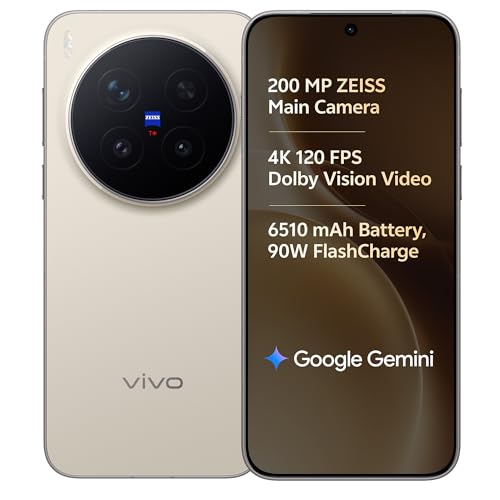
- [Main Camera]: 50MP ZEISS Gimbal Main Camera (LYT-828) | 1/1.28" sensor | f/1.57 | 1.5° gimbal OIS (CIPA 5.5) | VCS Bion…
- [Display]: 17.22cm (6.78”) AMOLED flat screen | 1260 × 2800 | LTPO 8T | 1.1 mm ultra-thin symmetrical bezels | High colo…
- [Memory & SIM]: 16GB RAM | 512GB internal memory | LPDDR5X Ultra | UFS 4.1
5. Google Pixel 11 Pro XL — Best for AI-Assisted Video Recording
The Pixel 11 Pro XL takes Google’s usual approach:
Shoot first. Let computational photography clean up the chaos later. 😂
Google officially supports 4K video up to 60fps, 8K video at 24/30fps through Video Boost, 4K60 front-camera recording, 10-bit HDR and Super Zoom Video up to 20x.
Why We Recommend It
Pixel’s biggest advantage is not raw manual control.
It is computational assistance.
Creator-focused features include:
- Creator Suite
- Pro Stable Video
- Video Boost
- Night Sight Video
- Audio Magic Eraser
- Speech Enhancement
- Wind Noise Reduction
- Audio Zoom
- Cinematic Pan
- Macro Focus Video
If your editing workflow is:
shoot → trim → caption → upload
rather than:
shoot Log → colour grade → noise reduction → audio cleanup → export
Pixel makes a lot of sense.
Front Camera
The front camera supports 4K at 30 or 60fps, which makes it particularly useful for vloggers who regularly record themselves.
Best For
Solo vloggers, casual creators, social-first YouTubers and people who want intelligent processing without learning advanced cinematography.
Who Should Skip It
Creators who want deep manual video controls and an extensive professional codec workflow may prefer iPhone or Xiaomi.
Pros
- 4K60 front and rear recording
- 8K Video Boost
- Strong stabilisation modes
- 10-bit HDR
- AI-powered audio tools
- Night Sight Video
- Straightforward workflow
Cons
- 8K depends on Video Boost processing
- Less pro-video oriented than iPhone
- Serious cinematographers may want more manual control
Verdict
The Pixel 11 Pro XL is the best choice for creators who want the phone to do more of the technical cleanup automatically.
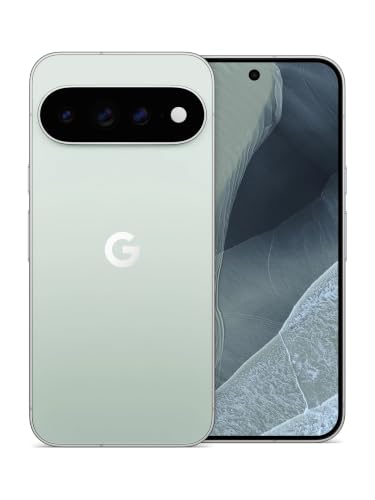
- PREMIUM PIXEL FLAGSHIP: Google Pixel 11 Pro XL combines premium design, powerful performance and Google's latest Pixel t…
- 256GB INTERNAL STORAGE: Store your photos, videos, apps, documents and other content with 256GB of built-in storage.
- ADVANCED PIXEL CAMERA: Capture detailed photos and videos with Google's advanced camera system and computational photogr…
6. Apple iPhone 18 Pro — Best Compact Smartphone for Professional YouTube Video
What if you want practically all the serious iPhone video tools but hate gigantic phones?
Get the iPhone 18 Pro.
The Pro and Pro Max share Apple’s current professional camera architecture and video capabilities, including 4K Dolby Vision up to 120fps, ProRes, ProRes RAW, Apple Log 2, ACES and advanced manual video controls.
Why We Recommend It
A lighter phone matters when you:
- vlog handheld
- use a smartphone gimbal
- mount the phone overhead
- attach it to a teleprompter
- use compact creator rigs
A huge phone plus cage plus SSD plus microphone plus light can turn your “mobile setup” into a dumbbell.
The smaller Pro is therefore arguably more practical for rigging.
Best For
Solo creators, mobile filmmakers and people who value portability.
Pros
- Pro video workflow
- Compact body
- ProRes RAW
- Apple Log 2
- Strong stabilisation
- High-quality front camera
- Excellent accessory support
Cons
- Still expensive
- Smaller battery than Pro Max
- Pro features create large files
Verdict
Choose the 18 Pro instead of Pro Max if portability matters more than maximum battery life and screen size.
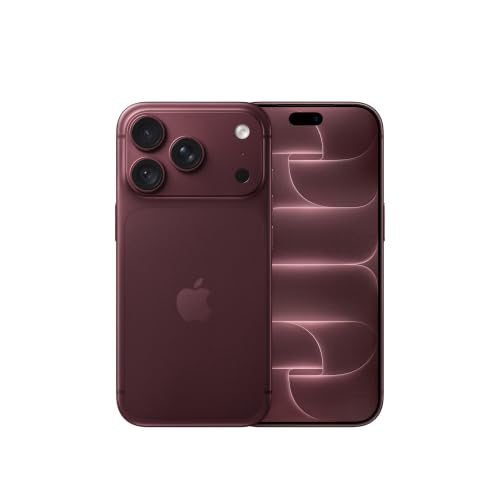
- Four gorgeous coloUrs. One durable design — Built to last with an aluminium unibody design featuring colour-matched back…
- Immersive pro display — A 15.93 cm (6.3″) Super Retina XDR display. Brighter. Better anti-reflection. ProMotion up to 12…
- Durable Ceramic Shield. Front and back — Built to last with Ceramic Shield back — and Ceramic Shield 2 front, with 3x be…
7. Samsung Galaxy S26 FE — Best Value Samsung for YouTube Recording
Not everyone starting a YouTube channel needs to spend ₹1 lakh-plus on a phone.
The Galaxy S26 FE is the more sensible Samsung option for creators who want strong video capabilities without buying the Ultra.
Samsung’s current model includes a 50MP OIS main camera, 12MP ultra-wide, 8MP 3x telephoto and 12MP front camera.
Samsung lists 8K recording at 30fps, with high-frame-rate UHD recording also supported.
Why We Recommend It
The FE gives creators something more useful than a random “108MP budget camera phone”:
a balanced camera system.
You get:
- OIS main camera
- ultra-wide
- dedicated telephoto
- respectable front camera
- large AMOLED display
- 256GB configuration
- 4900mAh battery
- 45W charging
Best For
Beginner YouTubers, students, lifestyle creators and people who want a phone that handles both normal life and content creation well.
Who Should Skip It
Creators doing advanced Log workflows or heavy cinematic productions should move up to an Ultra-class device.
Pros
- More affordable than flagship Ultra models
- 8K recording
- OIS
- Dedicated 3x telephoto
- 256GB storage option
- AMOLED display
- Strong everyday versatility
Cons
- Smaller camera sensors than premium flagships
- Less advanced video control
- 8GB RAM on standard configuration
- USB 2.0 transfer speeds may frustrate creators moving huge video files
Verdict
The Galaxy S26 FE is one of the most reasonable choices for someone saying:
“I want a good YouTube phone, but please don’t make me sell furniture to buy it.”
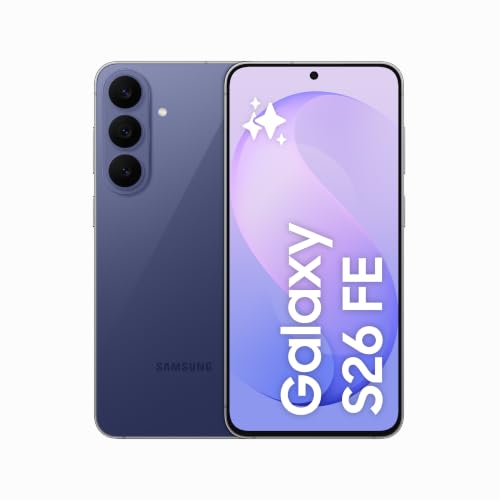
- Samsung Galaxy S26 FE 5G Smartphone with Galaxy AI (Blueberry, 8GB RAM, 256GB Storage)
Smartphone Comparison for YouTube Creators
| Phone | 4K High Frame Rate | 8K | Log/Pro Video | Front 4K60 | Main Strength |
|---|---|---|---|---|---|
| iPhone 18 Pro Max | 120fps | No emphasis needed | Excellent | Yes | Professional workflow |
| Galaxy S26 Ultra | 120fps | 30fps | Strong | Yes | Zoom versatility |
| Xiaomi 17 Ultra | 120fps | 30fps | Excellent | Yes | Cinematic video |
| vivo X300 Pro | 120fps | — | 10-bit Log | Yes | Stabilisation |
| Pixel 11 Pro XL | 60fps | Video Boost | Moderate | Yes | AI processing |
| iPhone 18 Pro | 120fps | — | Excellent | Yes | Compact pro setup |
| Galaxy S26 FE | High-frame-rate UHD | 30fps | Basic/Moderate | Capable | Value |
What Should You Look for When Buying a Phone for YouTube?
1. 4K60 Matters More Than 8K
For most YouTube creators, 4K at 60fps is the sweet spot.
It gives you plenty of resolution, smooth motion and flexibility for editing.
8K sounds spectacular in marketing material, but it creates:
- larger files
- more heat
- heavier editing workloads
- higher storage requirements
Most viewers will not notice that you recorded your coffee B-roll in 8K.
They will notice bad lighting and distorted audio.
2. Stabilisation Matters Hugely
For vloggers, stabilisation should be near the top of your checklist.
Look for:
- optical image stabilisation
- electronic stabilisation
- dedicated Action/Active modes
- gimbal-style stabilisation
This becomes especially important if you walk while recording.
3. Check the Front Camera Properly
Many smartphone reviews obsess over rear cameras.
But solo creators often use the front camera constantly.
Look for:
- 4K front recording
- autofocus
- 60fps support
- stabilisation
- good HDR
- sensible skin tones
The iPhone 18 Pro series and Pixel 11 Pro series are particularly strong here.
4. External Microphone Compatibility
Audio can ruin excellent footage.
A USB-C port makes it easier to connect:
- wireless microphones
- USB microphones
- lavalier receivers
- audio interfaces
Before buying any mic, verify its Android/iOS compatibility.
5. Storage Is Not Optional
4K footage eats storage.
Fast.
If YouTube is a serious use case, 256GB should be your practical starting point.
512GB becomes much more comfortable for creators recording:
- long videos
- 4K60
- Log footage
- ProRes
- multiple takes
A 128GB phone can work—but you may spend half your creative life deleting clips named IMG_8274_FINAL_FINAL2. 😭
How Much Storage Do You Need for YouTube?
128GB
Okay for occasional filming if you regularly move files to a computer or cloud storage.
256GB
Best starting point for most creators.
Enough for normal 4K recording without constant storage panic.
512GB
Recommended for frequent creators, travel vloggers and long-form recording.
1TB+
Best for professional workflows, especially ProRes or high-bitrate footage.
Rear Camera or Front Camera: Which Should You Use?
Use the rear camera whenever quality matters most.
Rear cameras generally have:
- larger sensors
- better stabilisation
- better low-light performance
- better dynamic range
- more lens options
But front cameras are incredibly convenient when filming alone.
For solo talking-head videos, the ability to see framing can outweigh a small quality difference.
A good workflow is:
Front camera for spontaneous vlogging.
Rear camera for planned studio shots and B-roll.
Do You Need 8K Video for YouTube?
Usually, no.
8K is useful when you want:
- heavy cropping
- reframing
- future-proof archival footage
- high-resolution professional production
For typical YouTube uploads, 4K is more practical.
8K increases file sizes and editing demands without automatically making your content better.
So please don’t buy a ₹1.5 lakh phone because “8K bro” appeared in bold letters on the box. 😭
Smartphone vs Vlogging Camera: Which Is Better?
A smartphone is better when you prioritise:
- portability
- quick recording
- automatic processing
- easy uploads
- Shorts/Reels
- discreet travel filming
A dedicated camera is better when you need:
- interchangeable lenses
- larger sensors
- stronger background blur
- longer professional shoots
- manual audio inputs
- advanced rigging
For many new creators, starting with a strong smartphone is actually smarter.
Learn lighting, framing, storytelling and audio first.
You can buy the giant camera later.
Common Buying Mistakes
Buying Only for Megapixels
200MP does not automatically mean better video than 48MP.
Sensor quality, stabilisation, processing and bitrate matter enormously.
Ignoring Front Video
If you’re a solo vlogger, front-camera quality matters.
Buying Only 128GB
Regular 4K recording can fill it surprisingly quickly.
Forgetting About Heat
Long high-resolution recording sessions generate heat.
If you routinely shoot long podcasts or interviews, consider thermal behaviour and give the device breaks when needed.
Recording Everything in 8K
You probably don’t need it.
4K60 will be a much more practical format for most creators.
Spending Everything on the Phone
A ₹1,80,000 smartphone with terrible lighting and echoey audio can still produce an unpleasant video.
Leave room in your budget for:
- wireless microphone
- tripod
- light
- phone mount
- power bank
- storage
How We Selected These Smartphones
For this guide, we evaluated current smartphones using factors that matter specifically for YouTube creation:
- video resolution and frame rates
- stabilisation
- front-camera recording
- autofocus
- lens versatility
- low-light capability
- Log/professional video formats
- external recording
- microphones and audio processing
- battery capacity
- storage options
- USB transfer capability
- creator-oriented software
- current availability in India
Specifications were verified primarily against manufacturer documentation from Apple, Samsung, Google, Xiaomi and vivo rather than relying purely on marketplace listings.
BestBuy93.IN does not claim hands-on testing unless explicitly stated.
In Case You Are Looking For –
- Best Cameras for Beginner YouTubers
- Best Vlogging Cameras with Flip Screens for Content Creators
- Best USB Microphones for Voiceovers, Podcasts and YouTube Recording
- Best Smartphone Teleprompters for Recording Talking-Head Videos
- Best Portable SSDs for Backing Up Smartphone Photos and Videos
Frequently Asked Questions
Which smartphone is best for YouTube video recording?
The iPhone 18 Pro Max is our overall recommendation because it combines 4K Dolby Vision, professional manual controls, ProRes, ProRes RAW, Apple Log 2, strong stabilisation and excellent front-camera recording.
For Android, choose the Galaxy S26 Ultra.
Which Android phone is best for YouTube?
The Samsung Galaxy S26 Ultra is the best all-round Android choice for most creators.
The Xiaomi 17 Ultra may suit cinematic creators better, while the vivo X300 Pro is particularly attractive for stabilised handheld and portrait video.
Is iPhone better than Android for YouTube video?
Not automatically.
iPhone has an especially mature professional video workflow, but premium Android phones now offer excellent 4K, 8K, Log, Dolby Vision and stabilisation options.
The better phone depends on your workflow.
Is 4K30 or 4K60 better for YouTube?
Use 4K30 for normal talking-head footage and cinematic content.
Use 4K60 for movement, travel, products, cooking or footage you may want to slow down slightly during editing.
Both are excellent for YouTube.
How much storage should a YouTuber buy?
For frequent 4K recording, 256GB is the minimum I would comfortably recommend.
512GB is better for long-form creators.
Professional ProRes users should consider larger storage or external SSD workflows.
Can I connect a wireless microphone to these phones?
Yes, most modern creator microphones can connect through USB-C or compatible wireless receivers.
Always check the microphone manufacturer’s compatibility list before purchasing.
Can I shoot an entire YouTube channel on a smartphone?
Absolutely.
A smartphone can handle talking-head videos, product reviews, cooking content, travel vlogs, tutorials, interviews and Shorts.
Your biggest quality upgrades after the phone are usually audio and lighting.
Final Verdict
For the best overall smartphone for YouTube video recording, choose the iPhone 18 Pro Max.
Its ProRes RAW support, Apple Log 2, variable-aperture main camera, professional controls, 4K120 Dolby Vision and excellent front camera make it the most complete creator package in this list.
If you prefer Android, the Samsung Galaxy S26 Ultra is the strongest all-round recommendation thanks to its 8K recording, 4K high-frame-rate video and versatile multi-camera system.
Choose the Xiaomi 17 Ultra if cinematic shooting, Log video and manual control are your priority.
Choose the vivo X300 Pro for stabilised handheld and portrait-heavy content.
Choose the Pixel 11 Pro XL if you want Google’s AI and computational video tools doing more of the technical work for you.
And if flagship prices make your bank account start sending distress signals, the Galaxy S26 FE gives aspiring YouTubers a much more realistic entry point.
Most importantly, remember this:
The best YouTube phone isn’t necessarily the one with the biggest camera number. It’s the one that lets you record consistently, comfortably and confidently enough to actually publish videos.
Because a ₹2 lakh camera sitting in a drawer has exactly zero subscribers. 📱🎥