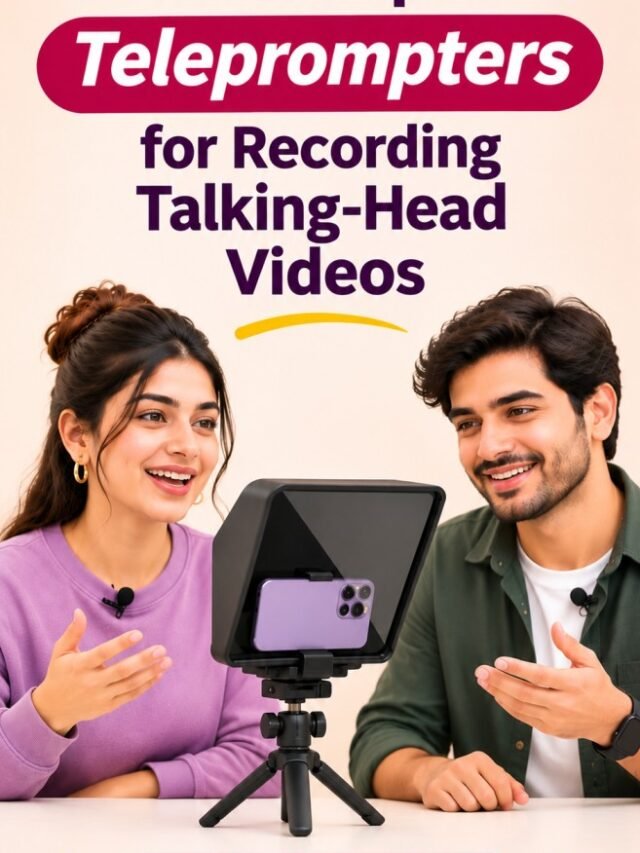

Recording a talking-head video sounds simple until you press the record button. You know what you want to say, you have prepared your script, and your smartphone is ready. But halfway through the recording, you forget a sentence, repeat the same point three times, or keep looking down at your notes. Sound familiar?
This is where a smartphone teleprompter can make a real difference.
Whether you are starting a YouTube channel, creating product review videos, recording educational content, filming tutorials, or sharing your thoughts through long-form videos, a teleprompter helps you follow your script while maintaining eye contact with the camera.
Unlike traditional studio equipment, many smartphone teleprompters are compact enough for home recording setups. Some use reflective glass to display your script directly in front of the camera lens, while others use your smartphone or tablet as a prompting screen.
But which type should you buy? Is a compact teleprompter enough for YouTube videos? Do you need a Bluetooth remote? And what features actually matter when recording talking-head videos?
In this guide, we explore the best smartphone teleprompter options, their features, advantages, limitations, and the important factors to consider before purchasing one.
Also Read | Best Portable SSDs for Phone Backups
Best Smartphone Teleprompters at a Glance
Here are the teleprompter models worth exploring for different recording requirements.
| Teleprompter | Best For | Main Advantage |
|---|---|---|
| NEEWER X12B | Home studio recording | Aluminium construction and tablet support |
| NEEWER X12 | Long-form videos | Larger 14-inch prompting glass |
| NEEWER X17 | Professional recording | Larger 17-inch prompting glass |
| Desview T3 | Multi-device recording | Phone, tablet and camera compatibility |
| FEELWORLD TP10 | Portable recording | Folding 10-inch design |
| AMBITFUL 7.5-inch Mini | Beginners | Compact desktop recording setup |
Important: These models are not identical. Some use a separate phone or tablet to display the script, while the camera records through reflective glass. Check the exact mounting configuration before purchasing, especially if you intend to use one smartphone for both recording and prompting.
What Is a Smartphone Teleprompter?
A smartphone teleprompter is a recording accessory that displays your written script close to the camera lens, allowing you to read while looking towards the camera.
Traditional teleprompters use a special optical component called beam-splitter glass. It reflects text from a display towards the presenter while allowing the camera to capture the subject through the glass.
This arrangement makes it possible to read your script without constantly shifting your eyes towards a separate screen.
Most smartphone-compatible teleprompters include some combination of:
- Reflective beam-splitter glass
- Smartphone or tablet holder
- Camera mounting support
- Adjustable lens adapters
- Teleprompter application compatibility
- Bluetooth remote control
- Protective hood or carrying case
Some compact models are designed for smartphone cameras, while larger systems can accommodate DSLRs, mirrorless cameras, tablets, and other recording equipment.
Best Smartphone Teleprompters for Talking-Head Videos
1. NEEWER Basics X12B – Best for Home Studio Recording
The NEEWER Basics X12B is worth considering if you want a more structured recording setup without moving into expensive professional broadcasting equipment.
Its 12-inch teleprompter design uses reflective glass and an aluminium-alloy construction. It is designed to accommodate compatible phones, tablets, and cameras.
For creators recording YouTube videos at a desk or in a dedicated home studio, this type of setup can be particularly useful.
What We Like:
- Aluminium-alloy construction.
- Designed for phone, tablet, and camera setups.
- Bluetooth remote support.
- Suitable for stationary recording environments.
What We Don’t Like:
- Requires additional space compared with a simple phone stand.
- Tablet compatibility needs to be checked before purchase.
- More equipment to assemble and position.
Best For: YouTube creators who regularly record scripted videos from a fixed location.

- No Assembly, Foldable Design One-piece portable teleprompter that is ready to use out of the box without complicated set…
- Wide Device Compatibility Features an extendable tray compatible with tablets and smartphones up to supported width limi…
- HD Beam Splitter Glass for Clear Script Display Equipped with premium beam splitter glass offering high light transmitta…
2. NEEWER X12 14-Inch Teleprompter – Best for Long-Form Videos
If your videos involve longer scripts, tutorials, product discussions, or educational presentations, a larger prompting area can make reading more comfortable.
The NEEWER X12 features a 14-inch teleprompter design and supports compatible smartphones and tablets. It also includes remote and app-based script control.
The larger glass can be useful when the camera is positioned farther away, although actual reading comfort depends on text size, display dimensions, and recording distance.
What We Like:
- Larger 14-inch prompting glass.
- Compatible with supported smartphones and tablets.
- Bluetooth remote control.
- Useful for longer scripted presentations.
- Carrying case included in the listed configuration.
What We Don’t Like:
- Requires more desk or tripod space.
- Not as compact as smaller folding models.
- Compatibility should be checked against your exact device dimensions.
Best For: Creators recording long-form YouTube videos, tutorials, reviews, and presentations.
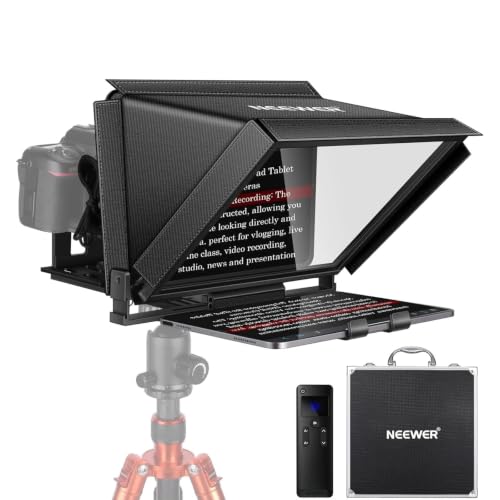
- 【Easy to Read with HD Display】Thanks to an innovative coating technique, the high quality beam splitter glass ensures 75…
- 【Upgraded Smart Control】 The NEEWER teleprompter supports intelligent control via the included RT-110 remote control and…
- 【Effortless Assembly】 With clear instructions for installation, the teleprompter can be set up within minutes. The colla…
3. NEEWER X17 – Best for Larger Studio Setups
For creators who want to move beyond basic desk recording, a larger teleprompter can offer more flexibility.
The NEEWER X17 is a 17-inch teleprompter designed for more substantial recording setups. Its larger display area is particularly useful when the presenter sits or stands farther away from the camera.
This type of teleprompter is better suited to dedicated studios than small desktop recording corners.
What We Like:
- Large 17-inch prompting area.
- Suitable for more spacious studio setups.
- Designed for professional-style camera workflows.
- More flexibility for longer viewing distances.
What We Don’t Like:
- Requires a larger recording area.
- More expensive than compact alternatives.
- May be unnecessary for creators recording close-up videos at a desk.
Best For: Experienced creators, educators, and presenters who record longer videos from greater distances.

- 【Foldable & Assembly Free】 The professional NEEWER X17 Teleprompter is an all in one collapsible teleprompter that requi…
- 【Large & Crystal Clear HD Beamsplitter】 The 17″/30.7cm clear beamsplitter glass with 71% light transmission and a readin…
- WiFi & HDMI Output Function: The Saneen WiFi digital camera allows instant sharing of photos and videos online via mobil…
4. Desview T3 – Best for Multi-Device Recording
The Desview T3 is an option worth considering if you want a teleprompter that can work with different recording devices.
It is designed around a beam-splitter glass arrangement and supports compatible smartphones, tablets, and cameras.
This flexibility can be useful if you currently record with a smartphone but may eventually upgrade to a dedicated camera.
What We Like:
- Multi-device compatibility.
- Supports compatible phones and tablets.
- Useful for camera-based recording workflows.
- Designed for indoor and outdoor production setups.
What We Don’t Like:
- Requires checking the correct adapter and device dimensions.
- Larger than basic smartphone stands.
- Setup can take longer than a simple mobile recording arrangement.
Best For: Content creators who want flexibility across smartphone and camera-based recording.

- 【Perfect for using an smartphone or iPad with a mirrorless camera】When live online, without having to look away from the…
- 【Recommend Monitors size 】Compatible with up to 10″ Tablets, Ipads, smartphone & other Monitors.
- 【8 inch Mirror,High-definition display】8 inch Mirror , also known as a “Beamsplitter Mirror”, is a semi-transparent mirr…
5. FEELWORLD TP10 – Best for Portable Recording
The FEELWORLD TP10 is a portable folding teleprompter option for creators who do not want a permanently installed recording setup.
Its 10-inch design makes it a practical option to investigate for home recording, interviews, and occasional on-location video production.
Portability is particularly useful if you regularly move your recording equipment between rooms or locations.
What We Like:
- Folding design.
- Compatible with supported phones and tablets.
- Portable recording format.
- Suitable for creators who need a flexible setup.
What We Don’t Like:
- Requires a compatible mounting arrangement.
- Smaller viewing area than 14-inch and 17-inch alternatives.
- Actual device compatibility should be confirmed before ordering.
Best For: Creators who need a teleprompter they can pack away after recording.
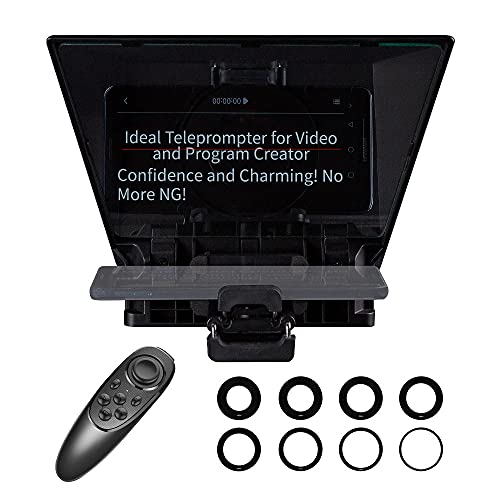
- The TP10 teleprompter supports DSLR Camera and Smartphone Shooting. It supports up to 16.4 ft reading distance. Supports…
- The TP10 comes with eight standard lens adapter rings: 49/52/55/58/62/67/72/77/82mm. You can choose the one of them for …
- Operated by bluetooth Remote Control + APP. The TP10 APP for smartphone/tablet which suitable for Android & IOS system. …
6. AMBITFUL 7.5-Inch Mini Teleprompter – Best for Beginners
If you are just getting started with scripted videos, a compact teleprompter may be enough.
The AMBITFUL 7.5-inch mini teleprompter is designed for smaller recording setups and offers a more portable alternative to large studio teleprompters.
It is worth considering for desk-based videos, close-up presentations, and beginners who want to experiment with reading scripts while recording.
What We Like:
- Compact form factor.
- Lightweight design.
- Desktop tripod and Bluetooth remote in the listed kit configuration.
- Suitable for smaller recording environments.
What We Don’t Like:
- Smaller reading area.
- Better suited to shorter camera distances.
- May not be ideal for presenters who stand farther away.
Best For: Beginners, vloggers, and creators recording short talking-head videos from a desk.

- 【7.5” HD Teleprompter with Crystal-Clear Reflection】Features high light transmittance coated glass to deliver sharp, cl…
- 【Wide Compatibility for Smartphone & DSLR Camera】Comes with multiple adapter rings (49-77mm) and a sturdy phone holder, …
- 【Bluetooth Remote Control & Smart APP Operation】This telepromter supports remote control for adjusting scrolling speed, …
Comparison of Smartphone Teleprompters
Before selecting a model, compare the overall design and intended use.
| Model | Glass Size | Main Use | Ideal Setup |
|---|---|---|---|
| NEEWER X12B | 12-inch | Home studio | Phone/tablet and camera |
| NEEWER X12 | 14-inch | Long-form recording | Phone/tablet and camera |
| NEEWER X17 | 17-inch | Studio presentations | Larger camera setup |
| Desview T3 | Compact | Multi-device recording | Phone/tablet/camera |
| FEELWORLD TP10 | 10-inch | Portable recording | Phone/tablet and camera |
| AMBITFUL Mini | 7.5-inch | Beginner recording | Compact desktop |
Sizes and compatibility refer to the respective product configurations. Verify the manufacturer’s current specifications before ordering.
Pros and Cons of Using a Smartphone Teleprompter
A teleprompter can improve your recording workflow, but it is not a magic solution for every on-camera problem.
| Reasons to Buy | What to Consider |
|---|---|
| Helps maintain eye contact | Requires practice to read naturally |
| Reduces forgotten lines | Script preparation takes time |
| Makes long videos easier to record | Some models require additional devices |
| Reduces repeated takes | Setup and positioning are important |
| Supports structured presentations | Poor scrolling speed can look unnatural |
| Useful for solo creators | Larger models need more space |
The biggest advantage is convenience. You can prepare your script, position it near the camera, and record without constantly checking notes.
However, reading every word mechanically can make your delivery sound unnatural. A teleprompter should support your presentation, not replace your personality.
What to Look for When Buying a Smartphone Teleprompter
Choosing a teleprompter involves more than comparing glass sizes and prices. The right model should match your recording device, shooting distance, content format, and available space.
A. Smartphone and Camera Compatibility
This should be your first consideration.
Some teleprompters use a smartphone as the camera while a separate tablet displays the script. Others use a smartphone as the prompting display while a separate camera records through the glass.
Before purchasing, establish which arrangement the product supports.
Also check:
- Maximum phone width.
- Tablet dimensions.
- Camera lens adapter compatibility.
- Phone case clearance.
- Portrait and landscape support.
B. Beam-Splitter Glass Quality
Beam-splitter glass is one of the most important components.
Look for clear optical glass that provides readable text without significantly affecting the recorded image.
The glass angle, reflection quality, and light transmission all influence the final recording experience.
C. Screen Size and Reading Distance
A larger glass panel can be useful when the camera is positioned farther away.
For close-up desk recording, a compact model may work perfectly well. For standing presentations or wider camera framing, consider a larger teleprompter.
Do not purchase a large model simply because it sounds more professional. Match the glass size to your actual shooting distance.
D. Bluetooth Remote Control
A remote control is particularly useful when recording alone.
It allows you to start, pause, and adjust script scrolling without reaching towards the prompting device.
Check whether the remote supports:
- Start and pause.
- Scroll speed adjustment.
- Page navigation.
- Bluetooth pairing with your device.
E. Teleprompter App Compatibility
The application is just as important as the hardware.
Look for an app that offers adjustable scrolling speed, font size, text alignment, background settings, and mirrored text when required.
Some apps also support voice-activated scrolling, allowing the script to move according to your speaking pace.
Check whether the required features are free or subscription-based before committing to a particular ecosystem.
F. Build Quality and Portability
If you record frequently, look for a sturdy frame, secure phone holders, reliable tripod mounting, and a protective carrying case.
Aluminium construction can be preferable for heavier studio equipment, while compact folding designs are convenient for occasional recording.
G. Portrait and Landscape Recording
Your content format should influence your purchase.
- Landscape 16:9: Long-form YouTube videos, tutorials, interviews, and educational content.
- Portrait 9:16: Instagram Reels, YouTube Shorts, and vertical social videos.
If you plan to publish in both formats, look for a teleprompter that supports the required orientation without obstructing the camera.
How to Use a Teleprompter for Natural-Looking Videos
Buying a teleprompter is only the first step. You also need to learn how to use it properly.
Here are some practical recording tips.
1. Write conversational scripts: Avoid unnecessarily complicated sentences. Write the way you naturally speak.
2. Adjust the scrolling speed: Start slowly and increase the speed until it matches your speaking pace.
3. Use readable text: Choose a comfortable font size and appropriate line spacing.
4. Position the camera at eye level: This helps maintain a natural posture and a consistent eye line.
5. Practise before recording: Read a few paragraphs aloud to become comfortable with the scrolling movement.
6. Add natural pauses: Do not rush through every sentence. Allow time for emphasis and expression.
7. Record a test video: Review your eye movement, speaking pace, framing, and audio before recording the full video.
One useful tip is to avoid writing scripts as enormous paragraphs. Break them into short sections with natural pauses. Your delivery will feel less like reading a document and more like having a conversation.
Common Teleprompter Mistakes to Avoid
Even a good teleprompter can produce disappointing results if the setup is incorrect.
Avoid these common mistakes:
- Reading too quickly: Match the scrolling speed to your natural speaking pace.
- Using tiny fonts: If you struggle to read the script, you will naturally strain your eyes.
- Writing overly formal scripts: Conversational language generally sounds better on camera.
- Ignoring lighting: A teleprompter does not replace proper lighting.
- Positioning the lens incorrectly: Your eyes should remain close to the camera lens.
- Ignoring audio quality: A clear microphone is just as important as a good video setup.
- Skipping practice: Spend a few minutes rehearsing before recording the final take.
Remember, viewers connect with people, not perfectly delivered paragraphs. Leave room for natural expressions and personality.
Frequently Asked Questions
1. Can I use my smartphone as both a camera and a teleprompter?
Yes, but it depends on the teleprompter design. Some models use a separate display for the script while your smartphone records through the glass. Others support different phone-based arrangements. Check the mounting configuration before buying.
2. Are smartphone teleprompters suitable for YouTube videos?
Absolutely. They are useful for product reviews, tutorials, educational videos, interviews, and long-form talking-head content.
3. Do teleprompters work with Android and iPhones?
Many models support both Android and iOS through compatible applications. However, app compatibility and remote functionality should be verified before purchase.
4. Do I need a Bluetooth remote?
It is not compulsory, but it makes solo recording easier. You can pause, resume, and adjust scrolling without touching the prompting screen.
5. What is beam-splitter glass?
It is specially designed glass that reflects the script towards the presenter while allowing the camera to record through it.
6. Is a teleprompter better than reading notes from another phone?
A proper optical teleprompter generally offers better eye contact because the text appears close to the camera lens. Reading notes from another phone placed beside the camera can make your eyes visibly shift.
7. Can I record vertical videos using a teleprompter?
Yes, provided the model supports portrait recording and the phone can be mounted without obstructing the camera lens.
Final Verdict: Which Smartphone Teleprompter Should You Choose?
The best smartphone teleprompter depends on how frequently you record, the length of your scripts, and the equipment you already own.
- Choose the NEEWER X12B for a structured home recording setup.
- Consider the NEEWER X12 for longer scripts and a larger reading area.
- Explore the NEEWER X17 for a more spacious studio environment.
- Consider the Desview T3 if you need multi-device flexibility.
- Choose a compact option such as the AMBITFUL Mini if portability and beginner-friendly recording are priorities.
You do not need an expensive studio to start creating good videos. A smartphone, a stable tripod, a decent microphone, appropriate lighting, and a suitable teleprompter can make a practical home recording setup.
Most importantly, remember that a teleprompter is a supporting tool. Your storytelling, presentation, expressions, and ability to connect with viewers are what make people stay and watch.
So, prepare your script, position your camera, take a deep breath, and start recording. Your next video might be your best one yet!