
Your smartphone can do much more than browse social media, make calls and capture photographs. With the right USB-C hub, you can connect multiple accessories, transfer files from external storage, use a physical keyboard and mouse, access memory cards and, on compatible phones, connect to an external monitor.
But choosing the right USB-C hub isn’t as simple as buying the one with the most ports. Some hubs offer HDMI output, USB 3.0 connections, SD card readers and Power Delivery (PD), while others focus on basic connectivity. More importantly, not every smartphone supports every feature advertised by a USB-C hub.
So, which USB-C hub should you actually buy?
In this guide, we explore some of the best USB-C hubs for connecting multiple devices to your smartphone in India, including options from TP-Link and Portronics. We’ll compare their features, USB transfer speeds, HDMI capabilities, charging support and practical limitations. We’ll also explain USB OTG, DisplayPort Alt Mode and Power Delivery so you can avoid purchasing a hub that doesn’t work with your phone.
Whether you’re a content creator transferring camera footage, a student connecting a keyboard, or someone who wants to make their smartphone more productive, this guide will help you choose a suitable multiport adapter.
Important: Product recommendations are based on manufacturer-published specifications and product information. We have not independently tested these products with every smartphone model.
Quick Answer: Which USB-C Hub Is Best for Smartphones?
If you want a quick recommendation, here are our shortlisted options:
| Category | Recommended USB-C Hub | Why We Recommend It |
|---|---|---|
| Best Overall | TP-Link UH6120C | Multiple USB ports, HDMI, Ethernet and PD |
| Best for Memory Cards | Portronics Mport 6C | Three USB 3.0 ports with SD and microSD readers |
| Best Compact Option | Portronics Mport Swift | HDMI, USB 3.0 and 100W PD pass-through |
| Best Basic Option | Portronics C-Konnect | Simple USB, HDMI and charging connectivity |
Our top pick: TP-Link UH6120C is a versatile option if you need multiple connectivity features in one accessory. However, the smartphone must support the individual functions you intend to use.
Before buying: Check USB OTG or USB host support for USB accessories. For HDMI output, verify DisplayPort Alt Mode or the phone manufacturer’s supported wired-display functionality.
Best USB-C Hubs for Connecting Multiple Devices to Your Smartphone
A USB-C hub expands the connectivity options available through a compatible USB-C port. Instead of connecting just one accessory, you can potentially use several devices simultaneously.
Depending on the hub and smartphone, these accessories may include USB flash drives, keyboards, mice, external SSDs, card readers, Ethernet adapters and external displays.
Here are our recommendations.
1. TP-Link UH6120C – Best Overall USB-C Hub
Best for: Users who want multiple connectivity options in one compact hub.
The TP-Link UH6120C is a six-port USB-C hub designed to expand a single USB-C connection into several useful interfaces. It combines USB-A and USB-C data connections with HDMI, Gigabit Ethernet and USB-C Power Delivery.
What makes this model interesting is its range of connectivity options. Instead of purchasing separate adapters for USB accessories, wired internet and external displays, you get these interfaces in one accessory.
TP-Link also lists Android and iOS among its supported operating systems and smartphones among its supported device categories. However, individual features still depend on the smartphone’s hardware capabilities.
Key Features
- Six-port USB-C hub.
- Two USB-A data ports.
- One USB-C data port.
- USB data transfer up to 5Gbps.
- HDMI output up to 4K at 60Hz.
- Gigabit Ethernet up to 1Gbps.
- USB-C Power Delivery interface rated up to 100W.
- Aluminium alloy construction.
- 180mm braided cable.
Why We Recommend It
The biggest advantage of the UH6120C is versatility.
Imagine connecting a compatible USB keyboard, mouse and flash drive while using an Ethernet connection for wired internet. If your smartphone supports wired video output, you can also connect an external monitor through HDMI.
This makes the hub useful for people who regularly switch between smartphones, tablets and laptops.
Its three USB data ports are particularly helpful when connecting multiple peripherals. You don’t have to disconnect one accessory every time you need another.
The Ethernet connection is another useful addition for compatible devices, especially when you prefer a wired network connection.
Best For
- Users connecting multiple USB accessories.
- Smartphone and tablet users who need additional connectivity.
- People who require Ethernet connectivity.
- Users with compatible external display setups.
- People who want one hub for several devices.
Who Should Skip It?
- Users who only need a single OTG connection.
- People who don’t need Ethernet or HDMI.
- Smartphone owners without compatible video-output support who are buying it primarily for HDMI.
- Buyers looking for the smallest possible adapter.
Pros and Cons
| Pros | Cons |
|---|---|
| Three USB data ports | More features than basic users may need |
| HDMI supports up to 4K at 60Hz | HDMI requires compatible phone video output |
| Gigabit Ethernet connection | Not every smartphone supports every interface |
| 100W PD input specification | Does not guarantee 100W phone charging |
| Aluminium alloy construction | Larger than a simple OTG adapter |
Our Verdict
The TP-Link UH6120C is our best overall recommendation for users who want a versatile USB-C hub with multiple connection options.
Its combination of USB data ports, HDMI, Ethernet and Power Delivery makes it useful beyond basic file transfers.
However, don’t buy it expecting every feature to work automatically with every USB-C smartphone. Check your phone’s specifications first.
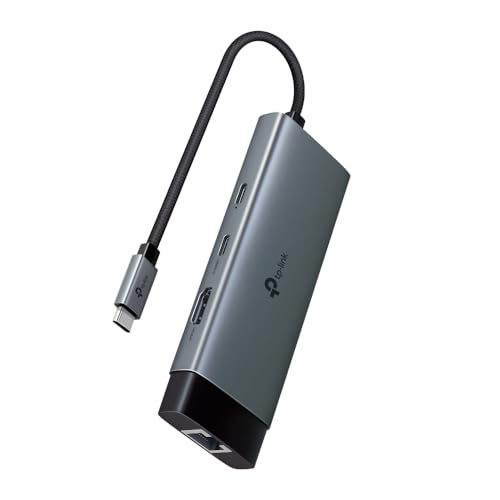
- 6 in 1 USB-C Hub —— UH6120C turns a single USB-C port into 6 ports with a 4K@60Hz HDMI, 1 Gbps ethernet, 100W Power Deli…
- Ultra High-Definition Media Display —— Connect to an external monitor via the 4K@60Hz HDMI port for a stunning ultra hig…
- Stable Gigabit Connection —— This compact gadget provides stable Gigabit Ethernet connectivity for your ultrabook, Chrom…
2. Portronics Mport 6C – Best for Memory Cards and Multiple USB Devices
Best for: Photographers, video creators and people who regularly transfer files.
If your smartphone is also your primary photography or content-creation device, a USB-C hub with dedicated memory-card readers can be extremely useful.
The Portronics Mport 6C is a six-in-one multiport adapter featuring three USB 3.0 ports, an HDMI connection, an SD card reader and a microSD card reader.
This combination makes it particularly interesting for users who work with cameras, action cameras and external storage devices.
Key Features
- Six-in-one USB-C hub.
- Three USB 3.0 ports.
- USB transfer speeds up to 5Gbps.
- HDMI output up to 4K at 30Hz.
- Dedicated SD card reader.
- Dedicated microSD card reader.
- One-year manufacturer warranty.
Why We Recommend It
The Mport 6C is particularly useful because it combines multiple USB ports with two different memory-card formats.
For example, you could connect a compatible keyboard, mouse and USB flash drive while using the card readers to access photographs stored on an SD or microSD card.
This can make transferring camera footage to your smartphone more convenient.
Imagine returning from a photography session with dozens of photographs stored on your camera’s SD card. Instead of transferring everything through a computer first, you can potentially access the files directly through your smartphone.
You can then organise, edit and share your content using compatible applications.
The three USB 3.0 ports also provide more flexibility than a basic single-port adapter.
One limitation worth considering is the absence of a dedicated USB-C PD charging input in its published six-port specification. If you plan to connect power-hungry accessories, check their power requirements carefully.
Best For
- Content creators and photographers.
- People transferring camera photographs and videos.
- Users who need SD and microSD card readers.
- People connecting multiple USB-A peripherals.
- Smartphone users who regularly manage external storage.
Who Should Skip It?
- Users who specifically need Ethernet.
- People who require charging pass-through.
- Buyers who primarily need HDMI and charging.
- Users who don’t need memory-card connectivity.
Pros and Cons
| Pros | Cons |
|---|---|
| Three USB 3.0 ports | No dedicated PD pass-through input listed |
| Separate SD and microSD card readers | HDMI limited to 4K at 30Hz |
| Up to 5Gbps USB interface specification | No Ethernet connection |
| Useful for photography workflows | External devices may require additional power |
| Smartphone and tablet compatibility listed | HDMI compatibility depends on the phone |
Our Verdict
The Portronics Mport 6C is a good option for people who frequently transfer photographs, videos and other files using memory cards.
Its dedicated SD and microSD readers make it more practical for content creators than a basic USB-C hub.
If your main requirement is multiple USB connections and memory-card access, this model deserves a place on your shortlist.
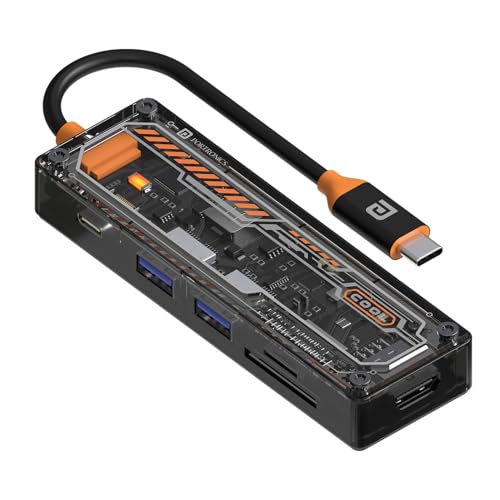
- 4K @ 30Hz Max HDMI Output: Enjoy crisp, high-definition video with 4K resolution at 30Hz via the HDMI port.
- 100W Type-C Charging: Power up your devices with up to 100W Type-C Power Delivery charging for laptops and smartphones.
- Transparent Case: A sleek and stylish transparent design that gives your workspace a modern touch.
3. Portronics Mport Swift – Best Compact USB-C Hub
Best for: Users who want HDMI, USB connectivity and charging in a smaller adapter.
Not everyone needs a large docking station with six or eight connections. Sometimes, a compact hub with three essential interfaces is all you need.
The Portronics Mport Swift is a three-in-one USB-C hub that combines HDMI output, USB 3.0 data connectivity and USB-C Power Delivery pass-through.
Its aluminium body and braided cable make it an interesting choice for people who prefer a compact accessory for everyday use.
Key Features
- Three-in-one USB-C hub.
- HDMI output up to 4K at 30Hz.
- One USB 3.0 data port.
- USB-C PD pass-through up to 100W.
- Aluminium construction.
- Braided cable.
- One-year manufacturer warranty.
Why We Recommend It
The Mport Swift focuses on three useful functions without adding unnecessary ports.
You can connect a compatible USB flash drive or keyboard through its USB 3.0 port, connect an external monitor through HDMI and attach a suitable PD charger through the charging input.
This is useful when you want to use your smartphone with an external display while keeping it connected to a power source.
However, HDMI functionality requires a smartphone that supports USB-C DisplayPort Alt Mode or compatible Thunderbolt video output.
The 100W PD rating is also a maximum pass-through specification, not a promise that your smartphone will receive 100W of charging power.
Best For
- People who prefer compact accessories.
- Users connecting one USB-A peripheral.
- Compatible smartphone and tablet users.
- People who need HDMI and charging pass-through.
- Users who travel frequently.
Who Should Skip It?
- People who need multiple USB-A connections.
- Users who need SD or microSD card readers.
- Buyers looking for Ethernet.
- Smartphone owners without compatible video-output support.
Pros and Cons
| Pros | Cons |
|---|---|
| Compact three-in-one design | Only one USB data port |
| Aluminium body | No dedicated memory-card reader |
| HDMI up to 4K at 30Hz | No Ethernet |
| 100W PD pass-through rating | Actual phone charging depends on power negotiation |
| Braided cable | Not suitable for extensive peripheral setups |
Our Verdict
The Portronics Mport Swift is a practical choice if you want a simple combination of USB data, HDMI and charging pass-through.
It is not designed to replace a full docking station, but its smaller feature set may be exactly what everyday users need.
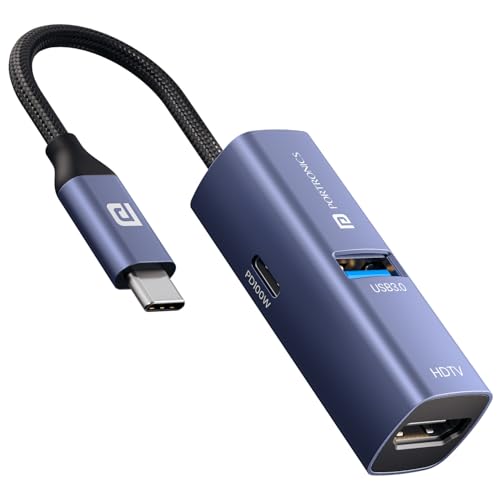
- 3-in-1 Multi-Port Expansion: Expand your device instantly with HDMI output, USB 3.0 port, and Type-C PD charging. Ideal …
- 4K HDMI Display Output: Enjoy crisp and clear visuals with support for up to 4K resolution at 30Hz. Perfect for presenta…
- 100W Power Delivery Pass-Through: Keep your laptop charged while using the hub with high-speed Type-C PD charging suppor…
4. Portronics C-Konnect – Best Basic USB-C Multiport Adapter
Best for: First-time USB-C hub buyers and users with basic connectivity requirements.
If you don’t need several USB ports or memory-card readers, a simpler multiport adapter can be a sensible purchase.
The Portronics C-Konnect offers USB 3.0 connectivity, HDMI output and a USB-C charging input supporting Power Delivery up to 100W.
Its relatively straightforward design makes it suitable for people who want to connect a basic USB peripheral, use a compatible external display and provide charging input through the hub.
Key Features
- USB-C input connector.
- One USB 3.0 data port.
- HDMI output up to 4K at 30Hz.
- USB-C PD charging support up to 100W.
- USB data transfer specification up to 5Gbps.
- ABS housing.
- 150mm cable.
- Approximate weight of 72.6g.
- Twelve-month manufacturer warranty.
Why We Recommend It
The C-Konnect is a simple option for users who don’t want to pay for additional connectivity features they may never use.
Its USB 3.0 port can be useful for compatible flash drives, keyboards, mice and other USB-A accessories.
The HDMI connection allows you to connect an external display when the smartphone supports wired video output.
The PD charging input is another practical addition for compatible devices.
It is worth remembering that this hub offers only one USB data port. If you want to connect a keyboard, mouse and flash drive simultaneously, you may need a different model.
Best For
- First-time USB-C hub buyers.
- Users who need basic USB connectivity.
- People who want HDMI and charging pass-through.
- Users with limited accessory requirements.
- Buyers who prefer simple adapters.
Who Should Skip It?
- People connecting several USB peripherals simultaneously.
- Photographers who need memory-card readers.
- Users who need Ethernet.
- Buyers looking for a full docking station.
Pros and Cons
| Pros | Cons |
|---|---|
| Simple connectivity options | Only one USB data port |
| 5Gbps USB 3.0 specification | No SD or microSD reader |
| HDMI output up to 4K at 30Hz | No Ethernet |
| PD charging input up to 100W | HDMI requires compatible phone support |
| Compact design | Limited expansion possibilities |
Our Verdict
The Portronics C-Konnect is a sensible option for basic USB, HDMI and charging connectivity.
It is worth considering if you don’t need a large collection of ports and prefer a straightforward adapter.
However, compare its features with the Mport Swift before buying. Both offer a relatively simple setup, but the Mport Swift has an aluminium body and explicitly states its DisplayPort Alt Mode requirements.
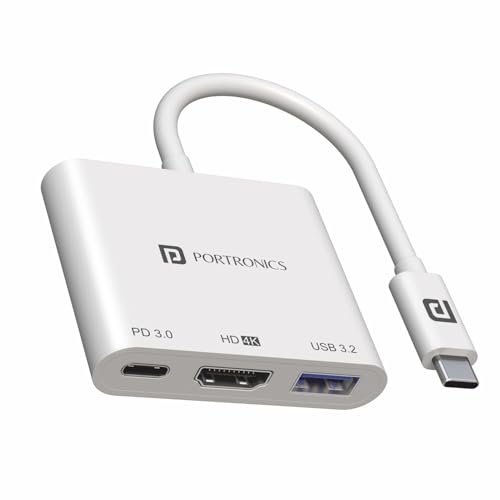
- [USAGE]- Project your Type-C Macbook, Google Chromebook Pixel, Dell XPS 13 within a few seconds. Display on a large scre…
- [USB 3.0 Port]-This port can deliver super-fast up to 5Gbps data transfer. Compatible with USB flash disk, mouse, keyboa…
- [CHARGE WHILE PROJECTING]- It provides continuous charging to your Type C device eradicating the low battery issues when…
2. USB-C Hub Comparison Table: Which One Offers the Best Features?
Choosing between multiple USB-C hubs can become confusing when manufacturers advertise similar features.
Here is a quick comparison of the four shortlisted products.
| Feature | TP-Link UH6120C | Mport 6C | Mport Swift | C-Konnect |
|---|---|---|---|---|
| Port configuration | 6-in-1 | 6-in-1 | 3-in-1 | 3-in-1 |
| USB-A data ports | 2 | 3 | 1 | 1 |
| USB-C data port | 1 | Not specified | Not specified | Not specified |
| USB speed | 5Gbps | 5Gbps | 5Gbps | 5Gbps |
| HDMI | 4K 60Hz | 4K 30Hz | 4K 30Hz | 4K 30Hz |
| SD reader | No | Yes | No | No |
| microSD reader | No | Yes | No | No |
| Ethernet | Gigabit | No | No | No |
| PD input | Up to 100W | Not specified | Up to 100W | Up to 100W |
| Body material | Aluminium alloy | Not specified | Aluminium | ABS |
Specifications are based on the manufacturers’ published product information. USB-C charging inputs, data ports and HDMI capabilities are different interfaces and should not be treated as interchangeable.
Which USB-C Hub Should You Choose?
- Choose TP-Link UH6120C if you need USB data connections, HDMI, Ethernet and PD in one accessory.
- Choose Portronics Mport 6C if transferring photographs and videos from SD or microSD cards is your priority.
- Choose Portronics Mport Swift if you want a compact USB-C hub with HDMI and charging pass-through.
- Choose Portronics C-Konnect if basic USB connectivity and HDMI are sufficient.
Why Should You Use a USB-C Hub with Your Smartphone?
A USB-C hub can make your smartphone more useful by expanding its connectivity options.
Here are some practical ways to use one.
Connect a Keyboard and Mouse
Typing long documents on a touchscreen isn’t always comfortable.
A compatible USB-C hub allows you to connect a physical keyboard and mouse to a smartphone that supports USB host mode.
This can be useful when:
- Writing documents.
- Replying to long emails.
- Preparing presentations.
- Working with spreadsheets.
- Navigating applications.
Some Android phones also offer desktop-style environments, depending on the manufacturer and model.
Connect USB Flash Drives and External SSDs
External storage is useful when your smartphone runs out of space or you need to move files between devices.
A compatible USB-C hub can help you access external flash drives and SSDs.
You can use this setup for:
- Transferring photographs.
- Moving video files.
- Backing up documents.
- Accessing stored media.
- Managing work files.
For external SSDs, check both the phone’s USB capabilities and the drive’s power requirements.
Transfer Photos from SD and microSD Cards
This is particularly useful for photographers and video creators.
A hub with SD and microSD card readers allows compatible smartphones to access files stored on camera memory cards.
You can potentially transfer photographs, organise footage and edit files using supported mobile applications.
The Portronics Mport 6C is particularly interesting here because it includes both card-reader formats.
Connect Your Smartphone to an External Monitor
Some smartphones support wired video output through USB-C.
With a compatible hub, HDMI cable and monitor, you can display your smartphone’s screen on a larger display.
This can help with:
- Presentations.
- Document viewing.
- Photo and video previews.
- Supported gaming applications.
- Compatible productivity workflows.
However, an HDMI port on the hub doesn’t automatically make every phone HDMI-compatible.
Your smartphone must support the appropriate video-output technology.
Connect External Microphones and Other Accessories
Content creators may want to connect external microphones, audio interfaces, controllers and other specialised peripherals.
A hub can provide the physical connection, but software compatibility matters too.
For example, an external microphone may connect successfully but require a compatible recording application to function correctly.
What to Look for When Buying a USB-C Hub for Your Smartphone
Before purchasing a USB-C hub, consider the following factors carefully.
1. USB OTG and Host Mode Support
USB OTG (On-The-Go) and USB host mode allow compatible smartphones to communicate with external USB peripherals.
In Android host mode, the smartphone acts as the host and communicates with connected devices such as keyboards, mice, cameras and card readers.
However, Android’s USB host functionality depends on the smartphone’s hardware. Having a recent Android version or USB-C connector does not automatically guarantee support.
Before purchasing:
- Check your exact phone model.
- Look for USB OTG or USB host support.
- Verify external storage compatibility.
- Check support for the accessories you intend to connect.
Buying tip: A USB-C connector fitting into your phone is not proof that the hub will work.
2. Number and Types of Ports
Think about how many accessories you want to connect simultaneously.
| Your Requirement | Recommended Ports |
|---|---|
| Keyboard and mouse | At least 2 USB data ports |
| Keyboard, mouse and flash drive | At least 3 USB data ports |
| External SSD | USB 3.0 or faster |
| Camera memory cards | SD and microSD readers |
| External display | HDMI with compatible phone video output |
| Wired internet | RJ45 Ethernet |
USB-A remains useful because many keyboards, mice and flash drives still use it.
USB-C data ports are useful for newer storage accessories and compatible peripherals.
3. USB 2.0 vs USB 3.0 vs USB 3.2
USB transfer speed matters when you regularly move large files.
| USB Standard | Theoretical Maximum Speed |
|---|---|
| USB 2.0 | 480Mbps |
| USB 3.0 / USB 3.2 Gen 1 | 5Gbps |
| USB 3.2 Gen 2 | 10Gbps |
These are theoretical interface speeds, not guaranteed real-world transfer rates.
Actual performance depends on the phone, hub, cable, connected device and storage media.
For ordinary keyboards and mice, USB 2.0 is generally sufficient.
For external SSDs and large video files, USB 3.0 or faster is a more practical choice.
Our recommendation: Don’t pay extra for a 10Gbps hub if your smartphone supports only a slower data interface.
4. HDMI Resolution and Refresh Rate
If you want to connect your smartphone to a television, monitor or projector, check the HDMI specifications.
| HDMI Specification | Typical Use |
|---|---|
| 1080p at 60Hz | Full HD display use |
| 4K at 30Hz | Standard 4K viewing and presentations |
| 4K at 60Hz | Smoother 4K display output |
A 4K60 hub is technically more capable than a 4K30 model, but the smartphone, cable and display must also support the required output.
Look for DisplayPort Alt Mode or another officially supported wired video-output implementation.
5. Power Delivery Support
Power Delivery allows a compatible hub to receive power from a USB-C charger and pass suitable power to the connected host device.
This is useful when you want to charge your smartphone while using external accessories.
However, there is an important difference between the hub’s advertised maximum PD rating and the actual charging power received by your phone.
For example:
- The hub may support up to 100W PD input.
- Your charger may support a different power profile.
- Your smartphone may accept a lower charging wattage.
- The hub and connected accessories may consume some available power.
Therefore, 100W PD support does not mean your smartphone will charge at 100W.
Check the phone’s charging specifications and the hub’s PD documentation before buying.
6. External Power Requirements
A USB keyboard generally requires less power than an external hard drive.
When several devices are connected simultaneously, your smartphone may not be able to supply sufficient power to every accessory.
Look for a hub with suitable PD input or support for external power where required.
This is particularly important for:
- External hard drives.
- Power-hungry SSD enclosures.
- Multiple USB accessories.
- Professional audio equipment.
A powered hub can be a better choice for demanding peripherals.
7. SD and microSD Card Readers
If you use cameras, action cameras or drones, card readers can save time.
Check:
- Whether the hub supports both SD and microSD cards.
- Supported card capacities.
- Supported file systems.
- Whether both slots work simultaneously.
- Actual card-reader transfer speeds.
Don’t assume two card slots can always operate simultaneously simply because both are physically present.
8. Ethernet Connectivity
An RJ45 Ethernet port allows compatible devices to connect to a wired network.
This may be useful for people who prefer wired internet connectivity or need a stable network connection in a work environment.
A Gigabit Ethernet port supports a theoretical network link speed of up to 1Gbps, subject to the router, cable, network and connected device.
The TP-Link UH6120C includes a Gigabit Ethernet interface.
However, the phone’s operating system must also support the Ethernet adapter.
9. Build Quality and Cable Length
A USB-C hub is often connected to several accessories simultaneously, so construction quality matters.
Look for:
- Durable housing.
- Strong cable connections.
- Adequate spacing between ports.
- A practical cable length.
- Good heat management.
- Manufacturer warranty.
Also consider your phone case. Some thick cases can prevent a USB-C plug from connecting fully.
USB-C Hub Compatibility: Android vs iPhone
Android smartphones and USB-C iPhones can connect to external accessories, but their hardware and software capabilities differ.
Understanding these differences will help you choose a compatible hub.
Using a USB-C Hub with Android Smartphones
Android supports USB host mode, which allows compatible smartphones to communicate with external USB devices.
Depending on the phone and accessory, you may be able to connect:
- USB flash drives.
- External keyboards.
- Wired mice.
- Memory-card readers.
- Game controllers.
- External SSDs.
- Compatible audio equipment.
Some specialised accessories may also require additional applications.
Google’s Android documentation explains that USB host support depends on the device’s hardware, not simply the Android operating-system version.
Before buying, check your phone manufacturer’s official specifications.
Using a USB-C Hub with an iPhone
Apple introduced USB-C on the iPhone 15 generation.
Compatible USB-C iPhones can connect to a range of external devices, including storage accessories, card readers, microphones and external displays.
Apple also documents using compatible external storage through the Files app.
Supported storage formats include:
- APFS.
- Encrypted APFS.
- Mac OS Extended (HFS+).
- exFAT.
- FAT32.
- FAT.
External hard drives may require additional power. Apple recommends using a powered USB hub when the drive cannot obtain sufficient power from the iPhone.
Another important point is that external-display support differs between iPhone models. Check Apple’s compatibility information for your exact model.
Android vs iPhone: Compatibility Comparison
| Feature | Android | USB-C iPhone |
|---|---|---|
| USB flash drive | Requires host support | Compatible accessories supported |
| Keyboard and mouse | Depends on phone and accessory | Depends on iOS and accessory |
| SD card reader | Depends on device and file-management support | Supported with compatible readers |
| External SSD | Depends on power and file system | Supported formats and power requirements apply |
| HDMI output | Requires compatible wired video output | Supported by specified models |
| PD charging | Depends on phone and charger | Depends on iPhone and charger |
| Ethernet | Requires compatible adapter and software | Compatible Ethernet adapters supported |
Important: Never assume that all USB-C smartphones offer identical functionality. Check the exact model before purchasing.
Common USB-C Hub Buying Mistakes to Avoid
Even an expensive USB-C hub can disappoint you if you overlook a few technical details.
Here are the mistakes worth avoiding.
Mistake 1: Assuming Every USB-C Port Supports HDMI
USB-C is a connector standard, not a guarantee of video output.
Your smartphone must support compatible wired video output, such as DisplayPort Alt Mode.
Mistake 2: Buying More Ports Than You Need
An 11-in-1 docking station might look impressive, but do you really need HDMI, VGA, Ethernet, an audio jack, card readers and multiple USB ports?
Choose a hub according to your actual usage.
Mistake 3: Ignoring Data Transfer Speeds
A USB 2.0 connection may work perfectly well for a keyboard, but it is less suitable for transferring large video files.
Check the speed of the individual data ports.
Mistake 4: Assuming 100W PD Means 100W Phone Charging
The hub’s maximum PD rating isn’t necessarily the power your smartphone receives.
The charger, hub and smartphone must negotiate compatible power profiles.
Mistake 5: Connecting Too Many Power-Hungry Accessories
External storage devices may need more power than your smartphone can supply.
If your SSD repeatedly disconnects, insufficient power may be one possible reason.
Mistake 6: Forgetting About Software Compatibility
Some peripherals need dedicated applications or operating-system support.
This is particularly important for professional microphones, capture cards and specialist audio equipment.
Mistake 7: Ignoring the Return Policy and Warranty
Check the seller’s replacement policy, manufacturer warranty and product authenticity before purchasing.
A USB-C hub is a relatively small accessory, but a compatibility-related return can still waste your time.
How We Selected These USB-C Hubs
At BestBuy93.IN, we believe product recommendations should help readers make informed purchasing decisions.
For this guide, we evaluated the shortlisted products using the following criteria:
1. Smartphone compatibility: We prioritised models whose manufacturers provide relevant smartphone, Android or iOS compatibility information.
2. Port selection: We compared USB-A, USB-C, HDMI, Ethernet and card-reader connectivity.
3. Data transfer capability: We reviewed published USB interface speeds to understand which models are more suitable for external storage and file transfers.
4. Display output: We compared HDMI resolution and refresh-rate specifications while highlighting the additional smartphone compatibility requirements.
5. Charging support: We examined PD pass-through specifications and distinguished maximum hub ratings from actual smartphone charging performance.
6. Practical use cases: We considered photography, video transfers, mobile productivity, external storage and multi-device connectivity.
7. Build and warranty: We considered published construction details and manufacturer warranty information.
8. Availability: We checked manufacturer product pages and Indian retail listings where available.
Research transparency: This is a specification-based editorial comparison. BestBuy93.IN has not independently laboratory-tested these products or verified every accessory combination. Prices and availability may change, so readers should check the latest retailer listing before purchasing.
In Case You Are Looking For –
- Best USB-C Hubs for Laptops, Tablets & Everyday Use
- USB-C vs USB-A Hub: Which to Buy?
- Best USB-C Hubs in India: 2026 Buying Guide
- Best Surge Protectors for Home Electronics
Frequently Asked Questions About USB-C Hubs
1. Can I connect multiple devices to my smartphone using a USB-C hub?
Yes. A compatible USB-C hub can allow you to connect several USB peripherals, such as keyboards, mice, flash drives and card readers, simultaneously. Your smartphone must support the necessary USB host functionality, and the hub must provide sufficient power for connected accessories.
2. Does every Android smartphone support USB-C hubs?
No. Having a USB-C connector does not guarantee USB OTG or host-mode functionality. Check your smartphone manufacturer’s specifications before purchasing a hub. Some phones may support basic USB storage but have limitations with specialised peripherals.
3. Can I connect a keyboard and mouse to my phone simultaneously?
Yes, provided your smartphone supports USB host mode and the hub has enough data ports. You can then use compatible wired keyboards and mice for typing and navigation. A powered hub may be useful when connecting several accessories.
4. Can I connect a USB-C hub to my iPhone?
Yes. Compatible USB-C iPhone models support various external accessories, including storage devices, card readers and displays. You can access supported external storage through Apple’s Files app. However, wired-display capabilities vary by iPhone model.
5. Will a USB-C hub allow my smartphone to connect to a television?
It can, but only if your smartphone supports compatible wired video output. You also need a hub with HDMI, a suitable cable and a compatible television. A USB-C hub cannot add video-output functionality to a smartphone that doesn’t support it.
6. Can I connect an external SSD to my smartphone using a USB-C hub?
Yes, compatible smartphones can work with external SSDs through suitable USB-C hubs. Check the drive’s power requirements, smartphone USB capabilities and supported file systems. Some external storage devices may require an externally powered hub.
7. Is a 100W USB-C hub safe for a smartphone?
A 100W PD rating does not mean the hub automatically sends 100W to your smartphone. The actual charging power depends on the compatible power profiles negotiated between the charger, hub and phone. Use a reputable product and a suitable charger.
8. Which is better: a USB-C hub or a USB OTG adapter?
A USB-C OTG adapter is suitable when you need to connect one peripheral, such as a flash drive or keyboard. A USB-C hub is more useful when you want multiple accessories connected simultaneously or need additional features such as HDMI, Ethernet, card readers and PD pass-through.
Final Verdict: Which USB-C Hub Should You Buy?
A USB-C hub can make your smartphone considerably more versatile, but the best option depends on the accessories you intend to connect.
You don’t need an expensive docking station just to connect a flash drive or keyboard. On the other hand, a basic OTG adapter won’t be sufficient if you regularly transfer camera footage, connect several USB accessories or use an external display.
Here is our final recommendation:
| Requirement | Recommended Product |
|---|---|
| Best Overall | TP-Link UH6120C |
| Best for Photography and Memory Cards | Portronics Mport 6C |
| Best Compact Option | Portronics Mport Swift |
| Best Basic Option | Portronics C-Konnect |
Our top recommendation is the TP-Link UH6120C because it offers a versatile combination of USB data connections, HDMI, Ethernet and Power Delivery.
For photographers and content creators, the Portronics Mport 6C is a particularly interesting choice because of its three USB 3.0 ports and dedicated SD and microSD card readers.
If you prefer something smaller, the Portronics Mport Swift offers a simpler HDMI, USB and charging combination.
And if you only need basic connectivity, the Portronics C-Konnect is worth considering.
Before making your purchase, check USB OTG support, video-output compatibility, charging requirements and the warranty.
The best USB-C hub isn’t necessarily the one with the most ports. It’s the one that works with your smartphone and supports the accessories you actually use.
Make your smartphone more productive, expand its connectivity and choose an adapter that fits your everyday requirements! 📱