
Your desk is more than just a place to keep your laptop. It affects how much room you have to work, how easily you can organize your accessories, and how your entire workspace looks. 🖥️
Whether you’re setting up a home office, a study corner, or a dedicated workstation, choosing the right desk shape can make a noticeable difference.
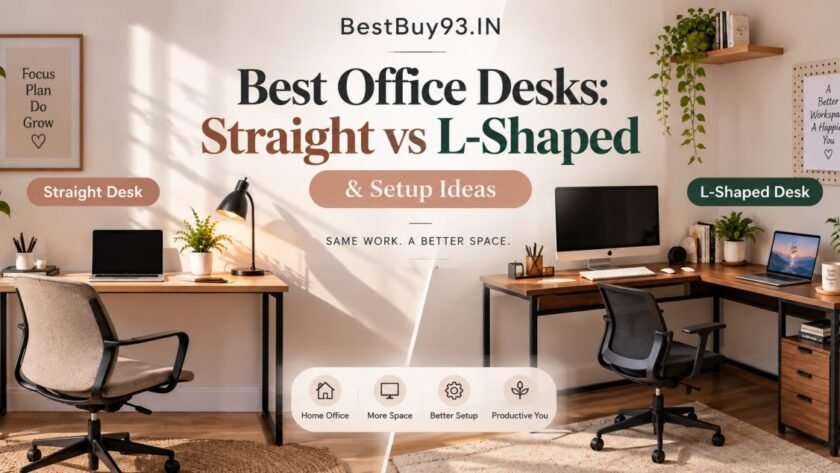
A straight desk offers a simple, versatile layout, while an L-shaped desk creates more surface area and can help divide your work into separate zones. But which one actually fits your room and daily routine?
In this guide, we’ll compare straight and L-shaped office desks, explore desk options to consider in India, and share practical setup ideas for different spaces and work styles.
Also Read | Boost Productivity with Desk Plants | 10 Must-Have Desk Gadgets from Amazon India to Boost Your Productivity
Quick Answer: Straight Desk vs L-Shaped Desk


| Your requirement | Desk style to consider |
|---|---|
| Compact bedroom or study corner | Straight desk |
| Simple laptop-based work | Straight desk |
| Multiple monitors and accessories | L-shaped desk |
| Separate computer and paperwork zones | L-shaped desk |
| Flexible furniture arrangement | Straight desk |
| A dedicated corner workstation | L-shaped desk |
The simple difference: A straight desk gives you one continuous work surface, while an L-shaped desk adds a perpendicular surface for extra workspace.
Neither is automatically better. The right choice depends on your room dimensions, furniture placement and how you work.
Best Office Desks to Consider in India
These desk options cover different layouts, styles and budgets. Product prices, finishes, dimensions and availability can change, so confirm the exact listing before purchasing.
1. IKEA LAGKAPTEN / ADILS — Best for a Simple Straight Desk Setup

Straight desk • Minimal design • Home office
The IKEA LAGKAPTEN / ADILS desk is a simple option for people who want a clean, straightforward workspace. Its uncomplicated design can work in a bedroom, study area or home office without making the room feel visually crowded.
It suits a setup where the main essentials are a laptop or monitor, keyboard, mouse and a few everyday accessories.
Why consider it?
A straight desk is easy to position along a wall and can leave more flexibility for other furniture. This makes it worth considering if you’re creating a workspace in a room that already has a bed, wardrobe or storage unit.
Pros and cons
Pros
- Simple, minimal desk design.
- Suitable for a straightforward laptop or computer setup.
- Easy to incorporate into different room styles.
- Can work well with separate shelves or storage.
Cons
- Does not provide the additional side surface of an L-shaped desk.
- Available space depends on the specific configuration.
- Check dimensions carefully if you plan to use a large monitor.
Best for: Students, bloggers and home-office users who want a simple desk layout.
Skip it if: You need a large, dedicated surface for multiple work zones.
2. IKEA LAGKAPTEN / ALEX — Best for a Desk with Drawer Storage
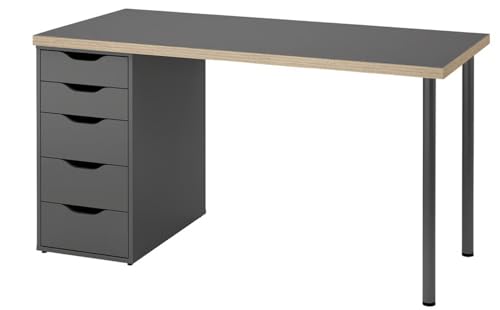
- Mix and match your choice of table top and legs – or choose this ready-made combination. Boost your productivity with a …
- Here you enjoy plenty of storage space for things you want within easy reach. The table top is made of board-on-frame, a…
- Material Table top Fibreboard, Acrylic paint, Plastic edging, Honeycomb structure paper filling (min. 70% recycled), Par…
Straight desk • Drawer storage • Organized workspace
If you like the clean look of a straight desk but also want somewhere to keep stationery, notebooks and small accessories, the IKEA LAGKAPTEN / ALEX combination is worth exploring.
The ALEX drawer unit gives the setup a more storage-focused design than a basic tabletop-and-leg arrangement.
Why consider it?
A desk with drawers can help keep everyday items out of sight, especially if your workspace is part of your bedroom or living room.
It can also help reduce the number of separate storage accessories you need to place around the desk.
Pros and cons
Pros
- Combines a straight work surface with drawer storage.
- Suitable for a tidy home-office aesthetic.
- Can accommodate a laptop-based setup.
- Provides storage for smaller work essentials.
Cons
- Drawer configuration takes up space underneath the desk.
- Check the exact combination and dimensions before ordering.
- Storage units can affect legroom and chair positioning.
Best for: People who want a straight desk with integrated storage.
Skip it if: You need maximum open space underneath the desk or want an ultra-light setup that is easy to move.
3. Wakefit Modern Study Table — Best for a Straight Desk with a Contemporary Look
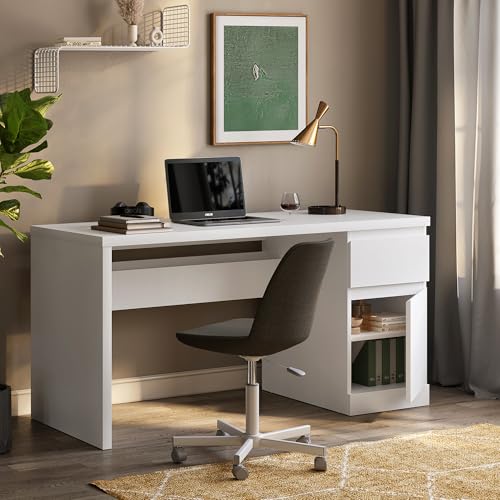
- Spacious Work Surface – Features a wide rectangular tabletop that provides ample space for laptops, monitors, books, sta…
- Smooth-Operating Drawer – Includes a spacious drawer with smooth-gliding mechanisms capable of supporting up to 30 kg of…
- Storage Cabinet – Includes a spacious cabinet, providing secure storage for books, files, electronics, and everyday esse…
Straight desk • Contemporary styling • Home office
The Wakefit Modern Study Table is an option to explore if you want a conventional rectangular desk with a contemporary appearance.
It can be considered for a home-office corner where you want a dedicated place for a laptop, monitor or study materials without moving to a large corner workstation.
Why consider it?
A straight desk can keep your setup visually simple. You can add a monitor stand, desk lamp, storage tray or wall shelf depending on your available space.
Pros and cons
Pros
- Conventional straight-desk format.
- Can suit a modern home-office setup.
- Works with separate desk accessories and storage.
- Useful for a compact, single-zone workstation.
Cons
- Exact tabletop dimensions and storage features depend on the selected model.
- May not provide enough surface for extensive equipment.
- Check the frame, materials and assembly requirements before buying.
Best for: People setting up a simple study or work-from-home desk.
Skip it if: You need a dedicated second surface for documents, equipment or another workstation.
4. Green Soul Brixton L-Shape Computer Table — Best for a Multi-Zone Workstation
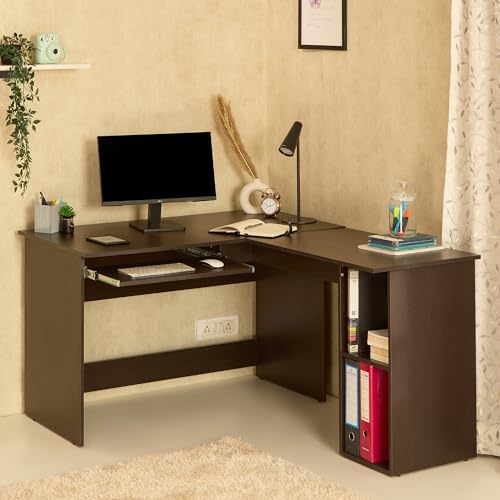
- 𝗟-𝗦𝗵𝗮𝗽𝗲𝗱 𝗗𝗲𝘀𝗶𝗴𝗻: This study table for home is designed to fit into corners and can be used as a study desk, computer tab…
- 𝗜𝗻𝘁𝗲𝗴𝗿𝗮𝘁𝗲𝗱 𝗦𝗵𝗲𝗹𝘃𝗶𝗻𝗴: Features built-in shelves for storing books, files, stationery, and other essentials. Suitable for …
- 𝗦𝗹𝗶𝗱𝗲-𝗢𝘂𝘁 𝗞𝗲𝘆𝗯𝗼𝗮𝗿𝗱 𝗧𝗿𝗮𝘆: Includes a dedicated keyboard tray that provides a separate space for a keyboard while keeping …
L-shaped desk • Multiple work zones • Storage shelves
The Green Soul Brixton L-Shape Computer Table is designed around a corner-style workstation layout. Its product listing highlights an expansive tabletop, storage shelves and a keyboard tray.
An L-shaped design can be useful if your work regularly involves a laptop or desktop, documents, accessories and other equipment that would otherwise compete for the same surface.
Why consider it?
The additional side section gives you an opportunity to separate activities. For example, you could keep your main monitor and keyboard in one zone and use the return for writing, accessories or reference materials.
Pros and cons
Pros
- L-shaped layout provides separate surface zones.
- Product listing highlights storage shelves.
- Includes a keyboard tray, according to the listing.
- Can suit a dedicated computer workstation.
Cons
- Requires careful room measurement.
- Corner configuration may be harder to reposition.
- Check the exact assembly orientation and dimensions.
- Additional surface area can become cluttered without organization.
Best for: People who need a larger computer workstation with distinct work zones.
Skip it if: Your room is small or you only need space for a laptop and notebook.
5. Raywud Ergocomp Modular Engineered Wood Study Table — Best for Compact Storage
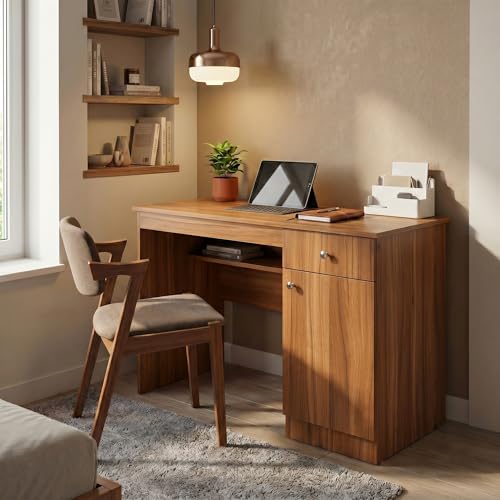
- PREMIUM ENGINEERED WOOD CONSTRUCTION: Crafted from high-density, wood-based engineered wood rather than sugarcane pulp (…
- 100% MODULAR & REUSABLE DESIGN: Unlike standard furniture that relies on permanent screws, the Raywud Ergocomp desk util…
- SMART STORAGE SOLUTIONS: Designed to maximize your workspace efficiency, this desk features a dedicated open storage she…
Modular desk • Storage shelf • Drawer & cabinet
The Raywud Ergocomp Modular Engineered Wood Study Table is an Amazon India option designed for users who want a workstation with built-in organization without going for a large executive-style desk. The current product result lists a storage shelf, drawer and cabinet, making it suitable for a home office or study setup where keeping everyday essentials organized matters.
Why consider it?
The combination of a work surface with a drawer, cabinet and storage shelf gives you multiple places for stationery, documents, accessories and other frequently used items. Its modular-style layout can also work when you want your desk to provide storage without occupying the footprint of a large L-shaped workstation.
Pros and cons
Pros
- Modular workstation design.
- Includes storage shelf.
- Includes drawer and cabinet.
- Suitable for home office or study use.
- More compact than many large executive desks.
- Currently listed through Amazon India
Cons
- Not an L-shaped desk.
- Check the exact dimensions before ordering.
- Confirm the finish and storage configuration of the selected variant.
- Assembly may be required.
Best for: People who want a storage-focused workstation for a home office or study room without choosing a large L-shaped desk.
Skip it if: You specifically need an L-shaped desk with a large dual-surface work area.
6. TEKAVO Daino L-Shaped Computer Table — Best for a Corner Computer Setup
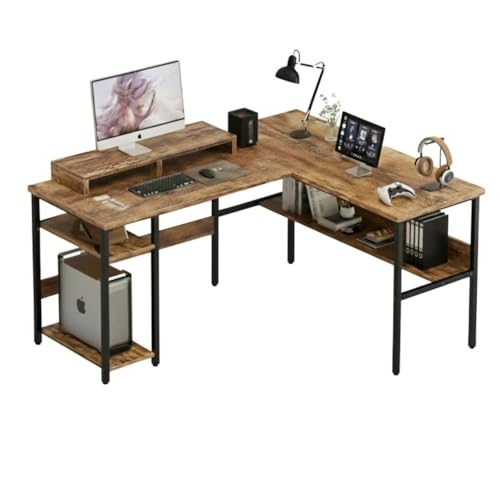
- PRODUCT DIMENSIONS: Length = 150 cm, Width = 60 cm, Height = 75 , MONITOR RISER SIZE: Length=80 cm , Width = 20 cm.
- Product Material: High grade prelam engineering wood with natural wood grain finish | Product Color:Forest
- Installation/Assembly : Our all the furniture products are DIY, i.e., do it yourself. With the product package, we are p…
L-shaped desk • Corner layout • Computer workstation
The TEKAVO Daino L-Shaped Computer Table is listed as a corner computer desk with CPU storage and a bottom shelf.
It is worth considering if you want to make use of a corner and need room for a computer setup along with additional accessories.
Why consider it?
A corner desk can help organize equipment around two adjoining work surfaces. The CPU storage and shelf mentioned in the listing may be useful depending on your computer and accessory arrangement.
Pros and cons
Pros
- Corner-style L-shaped layout.
- Product listing mentions CPU storage.
- Includes a bottom shelf, according to the listing.
- Suitable for a dedicated computer area.
Cons
- Check whether the layout fits your room and equipment.
- Verify dimensions and storage clearance.
- Make sure the CPU compartment allows adequate ventilation for your computer.
Best for: People building a corner-based desktop computer workstation.
Skip it if: You primarily use a laptop and don’t need the extra structure.
Straight Desk vs L-Shaped Desk: Full Comparison


| Feature | Straight desk | L-shaped desk |
|---|---|---|
| Work surface | One continuous surface | Two connected surfaces |
| Room placement | Along a wall or in an open layout | Usually makes use of a corner |
| Space planning | Generally simpler | Requires more careful measurement |
| Multiple work zones | Possible, depending on size | Easier to separate across two sides |
| Laptop-only work | Often sufficient | May offer more space than necessary |
| Multiple monitors | Depends on desk width and depth | Can provide extra room for equipment |
| Storage | Often added separately or built in | May accommodate side storage |
| Moving furniture | Generally easier to reposition | Can be more awkward due to its shape |
| Visual style | Simple and minimal | Larger, workstation-focused |
The key consideration: Don’t choose a desk based only on how much surface area it offers. Think about how much of that surface you will actually use and whether the desk fits comfortably into your room.
Straight Desk: Setup Ideas for Different Spaces
1. Minimal Laptop Workstation

A minimal setup can work well if you mainly use a laptop for writing, browsing, email or everyday office tasks.
Keep the essentials on the desk:
- Laptop.
- Wireless keyboard and mouse, if needed.
- Notebook and pen.
- Desk lamp.
- Small organizer for frequently used items.
Use a wall shelf or drawer unit for things you don’t need every day.
Design tip: Choose a restrained colour palette—such as warm white, natural wood and black accents—to keep the setup visually calm.
2. Straight Desk with an External Monitor

If you work with an external monitor, position the screen centrally and keep your keyboard and mouse directly in front of it.
Place your laptop on a stand or to the side if you use it as a second screen.
A straight desk can work well for this arrangement as long as its width and depth accommodate your equipment without crowding your working area.
Design tip: Use a monitor riser or adjustable monitor arm only if it is compatible with your desk and screen.
3. Straight Desk in a Bedroom

A straight desk can be a practical choice when your workstation shares space with a bed or wardrobe.
Place it against a suitable wall or near a window, provided the position doesn’t block curtains, doors or access to storage.
Use a small drawer unit or wall-mounted shelf to keep the desktop from becoming a storage dump.
Design tip: Match the desk finish with existing bedroom furniture for a more coordinated look.
L-Shaped Desk: Setup Ideas for Different Work Styles
1. Dual-Monitor Workstation
An L-shaped desk can provide extra surface area for people who use multiple screens or several pieces of equipment.
One possible arrangement:
- Main side: primary monitor, keyboard and mouse.
- Return side: secondary monitor, laptop or reference materials.
- Storage area: headphones, chargers and other accessories.
The best arrangement depends on which side you naturally use most and whether the desk fits your chair position.
2. Work and Writing Zones

If your day includes computer work and handwritten notes, an L-shaped desk can give each activity its own area.
For example, use the main side for your laptop or monitor and the return for a notebook, documents or planning materials.
This can be particularly helpful when you don’t want to keep moving papers around to make room for your keyboard.
3. Storage-Focused Corner Office

A storage-focused L-shaped workstation can be useful if you regularly work with documents, books, stationery or office accessories.
Consider using:
- Drawer storage for smaller supplies.
- Shelves for books and reference materials.
- Cable clips to keep wires organized.
- A dedicated tray for items you use frequently.
Avoid filling every available surface. The goal is to create useful zones, not simply to collect more desk accessories.
How to Choose the Right Office Desk Size
Desk dimensions matter just as much as desk shape.
A desk that is too narrow may leave insufficient room for your monitor and keyboard. A desk that is too large may interfere with the rest of your furniture.
What to measure before buying
Desk measurement checklist
Before you order
0/8 checkedMeasure the available wall length or corner dimensions.Check the desk’s full width, depth and height in the product listing.Allow space to pull your chair back and sit comfortably.Check wardrobe, drawer and room-door opening paths.Confirm the desk won’t block windows, curtains or walkways.Measure the available space for a monitor, keyboard and accessories.Check plug-point locations and plan cable routing.For an L-shaped desk, confirm the return’s orientation and full footprint.
Desk depth: why it matters
Desk depth determines how much room you have from the front edge to the wall.
A shallow desk may be fine for a laptop, but an external monitor, keyboard and other accessories can require more space. Check the dimensions of your equipment alongside the desk before making a purchase.
Chair clearance
Don’t measure only the desk itself. Leave enough space for your chair to move in and out without hitting a bed, cabinet or wall.
For an L-shaped desk, pay particular attention to the inside corner, where the desk return can affect chair positioning.
Office Desk Materials: What Should You Consider?
The desk’s material and construction affect its appearance, maintenance and how it fits into your workspace.
| Material or construction | What to consider |
|---|---|
| Engineered wood | Check finish, edge quality and care instructions. |
| Solid wood | Consider weight, maintenance and the specific wood used. |
| Metal frame | Check stability, construction and floor protection. |
| Wood-and-metal combination | Can offer a contemporary look; verify the frame and tabletop materials. |
| Glass top | Consider cleaning, reflections and the desk’s stated load capacity. |
Don’t assume that a desk is sturdy simply because it looks thick in a product photograph. Review the manufacturer’s specifications, assembly details and stated load capacity.
How to Make Your Office Desk Look Organized


A well-organized desk doesn’t need dozens of accessories. A few practical choices can make the setup feel more intentional.
Keep only daily essentials on the tabletop
Your laptop or monitor, keyboard, mouse and frequently used notebook should have a clear place.
Move spare cables, packaging and rarely used accessories into a drawer or storage box.
Plan cable management
Use cable clips, ties or a suitable cable tray to keep wires from spreading across the desk or hanging into your leg space.
Before buying a desk, check whether it includes cable-management features or whether you’ll need to add them separately.
Use lighting thoughtfully
A desk lamp can provide task lighting when the room’s main lighting isn’t enough.
Position it so that it doesn’t create distracting reflections on your screen.
Add a small amount of décor
A small plant, a framed print or a desk organizer can personalize your workspace without taking up too much working surface.
Design tip: Keep decorative items toward the edges or on shelves so the central work area remains usable.
Common Office Desk Buying Mistakes
Choosing the desk before measuring the room
A desk may look perfect online but still block a wardrobe or reduce walkway space. Measure first, then compare products.
Buying more desk than you need
A large L-shaped desk can be useful for a multi-zone setup, but it may be unnecessary if you mainly use a laptop and notebook.
Ignoring chair movement
A desk can fit against the wall but still leave too little space to sit comfortably. Check the chair’s movement area as well.
Forgetting about cable routing
Think about where your laptop, monitor, router, chargers and other devices will connect. Plan the cable route before assembling the workstation.
Choosing based only on appearance
A beautiful desk isn’t automatically suitable for your work. Consider the surface dimensions, materials, storage, compatibility and assembly requirements.
Not checking the exact product configuration
Desk names can cover multiple finishes, dimensions or combinations. Make sure the selected listing matches the version you intend to buy.
Frequently Asked Questions
Is a straight desk or L-shaped desk better for a home office?
It depends on the room and your workflow. A straight desk can suit a simple laptop or monitor setup, while an L-shaped desk can provide more surface area for separate tasks and equipment.
Is an L-shaped desk good for a small room?
It can work if the room has a suitable corner and enough clearance for the chair, doors and other furniture. Measure the full footprint before buying.
Can I use a straight desk for two monitors?
Yes, if the desk has enough width and depth for both monitors, your keyboard and other essentials. Check the equipment dimensions and desk specifications.
Are L-shaped desks harder to move?
They can be more awkward to reposition because of their shape and size. Check the assembly design and whether the desk can be disassembled if you expect to move it often.
What should I keep on my office desk?
Keep the items you use daily—such as your computer, keyboard, mouse, notebook and essential accessories—within easy reach. Store less frequently used items separately.
How do I make a small office desk look good?
Choose a desk that fits the room, keep the surface uncluttered, manage cables and use a restrained colour palette. Wall shelves can provide additional storage without taking up desk space.
Should I buy a desk with drawers?
Drawers can be useful for stationery, notebooks and small accessories. However, check that the drawer unit doesn’t interfere with your legroom or chair position.
Final Verdict: Which Office Desk Should You Choose?
The right office desk is the one that fits your room and supports the way you work every day.
- Choose a straight desk if you want a simple layout, mostly use a laptop or monitor, or need more flexibility in a compact room.
- Choose an L-shaped desk if you regularly use multiple devices, need separate work zones, or have a suitable corner for a larger workstation.
- Choose a desk with drawers or shelves if storage is a priority, but check how the extra structure affects legroom and access.
Before you order, measure the available space, compare the exact dimensions and confirm the desk’s materials, configuration and assembly requirements.
A well-planned workstation doesn’t have to be huge—it just needs to work for you. ✨