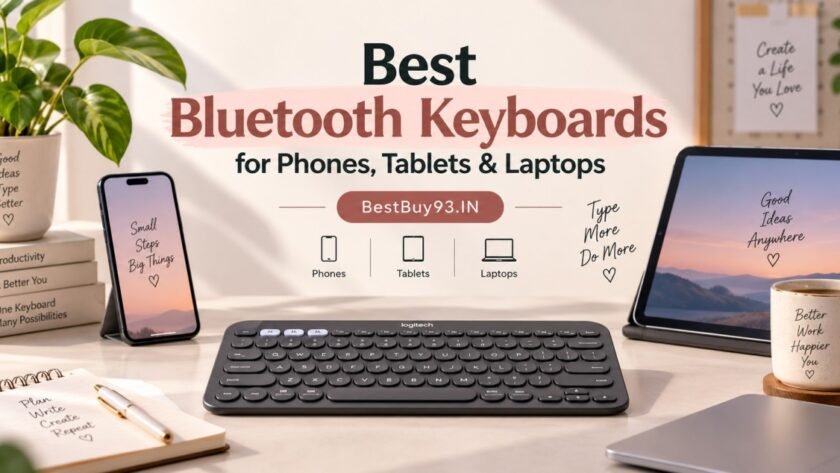

One keyboard. Multiple devices. Less typing on tiny screens. ⌨️
If you regularly switch between your phone, tablet and laptop, a Bluetooth keyboard can make writing emails, taking notes, replying to messages and working on documents much more comfortable.
But not every wireless keyboard is designed for the same purpose. Some are compact enough to carry with your tablet, while others offer a built-in phone stand or a more traditional desktop layout.
This guide explores Bluetooth keyboard options for different needs, what to check before buying, and how to choose one that fits your everyday setup.
Quick Answer: Which Bluetooth Keyboard Should You Consider?
| Your requirement | Keyboard to consider |
|---|---|
| Compact keyboard for travel and tablets | Logitech Pebble Keys 2 K380s |
| Keyboard with a built-in device cradle | Acer Swift Slim Multi-Device Wireless Keyboard |
| Compact typing setup for multiple devices | Logitech Pebble Keys 2 K380s |
| Budget keyboard and mouse combination | Portronics Key7 Combo check connectivity before buying |
The Logitech Pebble Keys 2 K380s supports Bluetooth pairing with up to three devices. The Acer Swift Slim Multi-Device Wireless Keyboard also supports switching between up to three paired devices and has a built-in slot for a phone or small tablet.
Important: A keyboard being wireless does not automatically mean it connects through Bluetooth. Some models use a USB receiver instead, so check the exact variant and connectivity details before ordering.
Alos Read | Top 5 Affordable Keyboards Under 5K
Why Buy a Bluetooth Keyboard for Your Phone, Tablet or Laptop?
A Bluetooth keyboard gives you physical keys without requiring a wired connection to your device.
It can be useful for:
- Writing long messages, emails and documents on a phone.
- Taking class notes on a tablet.
- Typing blog drafts while travelling.
- Switching between a laptop and a mobile device.
- Creating a compact workspace without a full desktop setup.
For a blogger, student or remote worker, the main benefit is convenience: you can keep your preferred typing setup while moving between compatible devices.
However, Bluetooth keyboards do not automatically improve your typing speed. Key layout, key spacing and comfort still matter.
Best Bluetooth Keyboards to Consider
1. Logitech Pebble Keys 2 K380s — Best for Travel and Tablets


These are selected models with different design priorities not a claim that every keyboard has been independently tested. Check the exact model, compatibility, current price and seller listing before purchasing.
Compact • Bluetooth • Multi-device
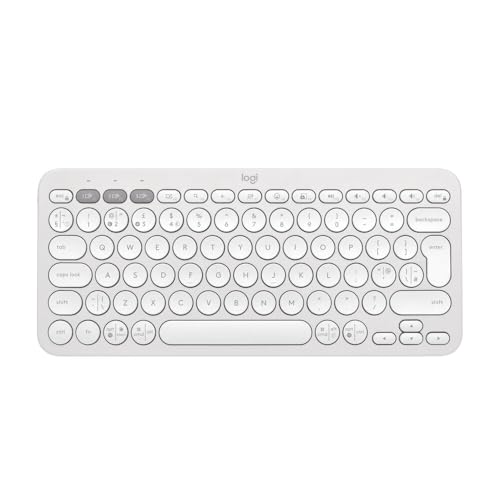
The Logitech Pebble Keys 2 K380s is designed for people who want a compact keyboard that can move between a laptop, tablet and phone. Its small footprint makes it suitable for a portable workstation, a study desk or a café setup.
It can pair with up to three devices and lets you switch between them using dedicated Easy-Switch keys. Its rounded keycaps give it a distinctive look, although the compact layout may take some getting used to if you normally type on a full-size keyboard.
Key features
- Bluetooth connection.
- Pairing with up to three devices.
- Compact, low-profile design.
- Dedicated device-switching keys.
- Powered by AAA batteries; advertised battery life varies by usage and source.
Why consider it?
It is a practical option if portability and multi-device switching matter more to you than having a number pad or a full-size layout.
Pros and cons
Pros
- Compact enough for a mobile setup.
- Can switch between three paired devices.
- Low-profile keys and quiet typing characteristics.
Cons
- Rounded keys and tighter spacing may not suit everyone.
- No built-in phone cradle.
- No backlighting, according to the reviewed model information.
Best for: Students, bloggers, tablet users and people who move between devices.
Skip it if: You need a full-size number pad or prefer widely spaced conventional keycaps.
Check current price: Logitech Pebble Keys 2 K380s prices and seller availability may change.
2. Acer Swift Slim Multi-Device Wireless — Best for a Built-In Phone or Tablet Cradle
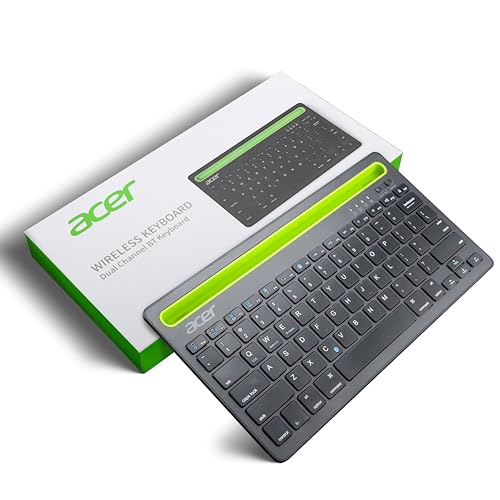
- 【KEYBOARD WITH CRADLE】Keyboard comes with Cradle to hold Tablet or Smartphones I The slim profile and modern minimalist …
- 【NOISELESS KEYS】The quiet, responsive keys offer a smooth typing experience, perfect for home, office, or on the go I Sc…
- 【DUAL CHANNEL SWITCHING】Instantly toggle between two devices without missing a beat. Seamlessly switch from typing on yo…
Multi-device • Built-in cradle • Wireless
The Acer Swift Slim is a wireless keyboard designed for multi-device use, with a built-in cradle for keeping a phone or tablet positioned while typing. It can be a practical option if you want to reply to messages, take notes or work on a mobile device without holding it in your hand.
The product listing describes it as a multi-device wireless keyboard with a cradle for tablets and phones. Before purchasing, confirm the exact listing’s Bluetooth support, device compatibility and availability, as specifications can vary by variant.
Key features
- Multi-device wireless keyboard.
- Built-in cradle for a phone or tablet.
- Designed for use with mobile devices and computers.
- Slim keyboard design.
- Check the exact listing for supported connection types and device limits.
Why consider it?
It lets you position a compatible phone or tablet beside the keys, making it convenient to view your screen while typing.
Pros and cons
Pros
- Built-in phone or tablet cradle.
- Designed for multi-device use.
- Useful for a compact desk setup.
Cons
- Confirm Bluetooth connectivity for the exact variant.
- Check whether your phone or tablet fits the cradle, especially with a case.
- Current stock and seller availability may vary.
Best for: People who want to type on a phone or tablet while keeping it upright on their desk.
Skip it if: You need a very compact travel keyboard or require confirmed multi-device Bluetooth switching and the listing does not specify it.
3. Portronics Key7 Combo — Budget Keyboard-and-Mouse Option
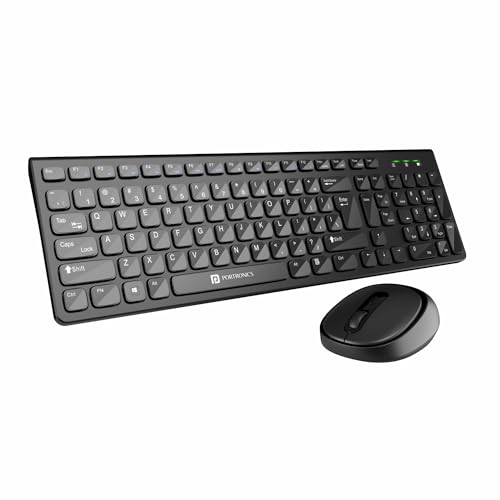
- [HIGH-PRECISION OPTICAL TRACKING] : 1200 DPI for accurate and smooth cursor movement. Hi-optical tracking technology ens…
- [SLEEK AND STYLISH DESIGN] :104 soft keys for a comfortable typing experience.Elegant and modern design that complements…
- [2.4 GHZ WIRELESS CONNECTIVITY] : Reliable and fast wireless connection with 2.4 GHz technology. Wireless receiver provi…
Budget-oriented • Keyboard and mouse set
The Portronics Key7 is a keyboard-and-mouse combination that may suit buyers looking for an affordable desktop typing setup.
Connectivity caution: The Key7 listings can refer to wireless receiver-based versions. Do not assume that a listing supports Bluetooth simply because it says “wireless.” Confirm whether the exact model supports Bluetooth and your intended phone, tablet or laptop before purchasing.
Why consider it?
A combo can be useful if you need both a keyboard and mouse for a laptop or desktop workstation, rather than a keyboard alone.
Pros and cons
Pros
- Keyboard and mouse included together.
- Budget-focused option.
- Can be practical for a desk setup if the connection type matches your device.
Cons
- Bluetooth support must be verified for the exact version.
- A USB receiver may not work directly with every phone or tablet.
- Not the first choice if compact travel portability is your priority.
Best for: Buyers looking for a low-cost keyboard-and-mouse set for a compatible computer.
Skip it if: You specifically need Bluetooth pairing across a phone, tablet and laptop without using a USB receiver.
Check listing: Portronics Key7 Wireless Keyboard & Mouse.
Bluetooth Keyboard Comparison Table
| Feature | Logitech Pebble Keys 2 K380s | Acer Swift Slim | Portronics Key7 Combo |
|---|---|---|---|
| Main use | Portable typing | Desk-based mobile typing | Keyboard-and-mouse setup |
| Bluetooth | Yes | Yes | Verify exact version |
| Multiple devices | Up to 3 | Up to 3 | Check listing |
| Built-in phone slot | No | Yes | Not established |
| Number pad | No | Check layout | Check exact version |
| Portability | Compact | More desk-oriented | Depends on combo |
| Best suited for | Travel and tablets | Phone/tablet at a desk | Budget computer setup |
The K380 is a multi-device based on Logitech and keyboard review information. For the Portronics option, verify the precise model and connection method on the product listing.
How to Choose the Right Bluetooth Keyboard
1. Check Device Compatibility
Before buying, check whether the keyboard supports the operating system on your phone, tablet or laptop.
Look for compatibility with:
- Android
- iOS and iPadOS
- Windows
- macOS
- ChromeOS, if relevant
Some keyboards support multiple systems but use different shortcut labels or key combinations. Check the manufacturer’s compatibility information for the exact model.
2. Decide Whether You Need Multi-Device Switching
If you only plan to use the keyboard with one laptop, multi-device pairing may not matter.
But if you frequently switch between a phone, tablet and laptop, look for a keyboard that can remember multiple devices and offers dedicated switching controls.
The Logitech K380 and Acer Swift Slim Multi-Device Wireless Keyboard both support up to three paired devices.
3. Choose the Right Keyboard Size
Compact keyboards are easier to carry and take up less desk space, but their key spacing and layout may feel different.
Full-size keyboards are more suitable if you regularly use a number pad, function keys or a conventional desktop layout.
Think about where you will use the keyboard most often: on a small table, at a workstation, or while travelling.
4. Check the Phone or Tablet Stand
Some keyboards include a device slot, while others require a separate stand.
A built-in slot can keep your screen visible while typing, but make sure it can accommodate your device’s dimensions and case.
If you use different-sized devices, a separate adjustable stand may offer more flexibility.
5. Understand the Connection Type
There are three common connection options:
| Connection | What it means |
|---|---|
| Bluetooth | Connects wirelessly without a dedicated USB receiver |
| 2.4GHz USB receiver | Uses a small receiver plugged into a compatible USB port |
| Wired USB | Connects through a cable |
If you want to use a keyboard with a phone or tablet, Bluetooth is often convenient because many mobile devices do not have a standard USB-A port. A receiver-based keyboard may require an adapter and may not work with every device.
6. Consider Battery and Charging
Bluetooth keyboards can use replaceable batteries or a rechargeable internal battery.
Check:
- Battery type.
- Whether a charging cable is included.
- Manufacturer-rated battery life.
- Whether backlighting affects battery life.
- Whether the keyboard has an automatic sleep feature.
Battery-life claims are estimates under particular usage conditions, not guarantees for every user.
7. Look at the Key Layout and Typing Feel
The keyboard’s physical design affects your everyday experience.
Consider:
- Key spacing and key shape.
- Whether you prefer low-profile or deeper keys.
- The placement of function keys.
- Whether you need a number pad.
- The location of device-switching controls.
If possible, try the keyboard in person before buying, especially if you plan to type for long periods.
Bluetooth Keyboard vs Laptop Keyboard
| Bluetooth keyboard | Laptop’s built-in keyboard |
|---|---|
| Can be used with compatible phones, tablets and laptops | Usually tied to the laptop |
| Can be positioned separately from the screen | Fixed to the laptop |
| Adds an accessory to carry and maintain | Already included |
| May offer multi-device switching | Typically does not switch between separate devices |
| Requires its own power source | Usually powered by the laptop |
A Bluetooth keyboard is useful when you want a more flexible typing setup. If you mainly use one laptop at a desk, the built-in keyboard may already meet your needs.
Is a Bluetooth Keyboard Good for Blogging?
Yes, it can be useful for drafting blog posts, writing social media captions, taking notes and editing documents on a compatible phone or tablet.
For a mobile blogging setup, consider a keyboard that:
- Connects to your intended device through Bluetooth.
- Has a layout you can type on comfortably.
- Is easy to carry with your tablet.
- Offers multi-device switching if you use several devices.
- Has reliable battery or charging arrangements.
A compact keyboard such as the Logitech Pebble Keys 2 K380s is worth considering for portable typing, while the Acer Swift Slim Multi-Device Wireless Keyboard may appeal to users who prefer a built-in device slot.
Remember that a keyboard does not replace the need for a suitable writing app, internet connection or compatible device.
Common Mistakes to Avoid Before Buying
- Confusing wireless with Bluetooth: Check the exact connectivity method.
- Ignoring device compatibility: Confirm support for your phone, tablet or operating system.
- Buying a compact keyboard without checking its layout: Key spacing and missing keys may affect your typing.
- Assuming every phone fits a built-in cradle: Check the supported dimensions and case clearance.
- Trusting battery claims as guaranteed: Real-world life depends on usage and settings.
- Not checking the seller’s exact model: Product names and bundled accessories can vary between listings.
Frequently Asked Questions
Can I connect one Bluetooth keyboard to my phone and laptop?
Yes, if the keyboard supports multi-device pairing and both devices are compatible. Some keyboards can remember multiple devices and let you switch between them using dedicated controls. The Logitech K380 support up to three paired devices.
Can I use a Bluetooth keyboard with an Android phone?
Yes, a compatible Bluetooth keyboard can connect to many Android phones. Check the keyboard’s compatibility information and your phone’s Bluetooth settings.
Can I use a Bluetooth keyboard with an iPad?
Yes, compatible Bluetooth keyboards can be paired with an iPad. Check the exact keyboard’s supported operating systems and key functions.
Does a Bluetooth keyboard work with every laptop?
Not necessarily. The laptop needs compatible Bluetooth connectivity and operating-system support. Check the keyboard’s compatibility requirements.
Is a Bluetooth keyboard better than a USB wireless keyboard?
They serve different needs. Bluetooth can be convenient for phones and tablets because it does not require a dedicated USB receiver. A receiver-based keyboard may be suitable for a computer with a compatible USB port.
Do Bluetooth keyboards need charging?
Some use rechargeable batteries, while others use replaceable batteries. Check the exact model’s power requirements before buying.
Can I use a Bluetooth keyboard for gaming?
You can use a Bluetooth keyboard for compatible casual games, but it may not be suitable for fast-paced or competitive gaming. Latency and game support vary by keyboard and device.
Final Verdict: Which Bluetooth Keyboard Fits Your Setup?
The right Bluetooth keyboard depends on how you plan to use it.
- For travel and tablet typing: Consider the Logitech Pebble Keys 2 K380s for its compact design and multi-device pairing.
- For typing with your phone or small tablet on a desk: Consider the Acer Swift Slim Multi-Device Wireless Keyboard for its built-in device slot.
- For a budget keyboard-and-mouse setup: Consider the Portronics Key7 only after confirming the exact connection type and device compatibility.
Before purchasing, check the current price, seller, layout, supported devices and connection method. Those details matter more than choosing a keyboard simply because it is labelled “wireless.”