
Buying a gaming laptop worth ₹1 lakh? 🎮 Your audio setup deserves some attention too. Whether you plan to play competitive FPS games, explore open-world adventures, enjoy cinematic games or communicate with friends on Discord, the right gaming headset can make your experience more immersive and convenient.
But you do not necessarily need to spend ₹15,000 on gaming headphones just because your laptop costs ₹1 lakh. A well-chosen headset in the ₹5,000–₹8,000 range can be a sensible investment, while premium wireless models offer extra convenience, connectivity options and features.
In this guide, we compare gaming headsets worth considering for a ₹1 lakh gaming laptop in India in 2026, including HyperX, Logitech, Razer and ASUS ROG. We will look at wired versus wireless connectivity, microphone quality, comfort, positional audio, compatibility and value for money.
Our recommendation: Start with the HyperX Cloud III Wired if you prioritise dependable wired connectivity and comfort, consider the Logitech G Pro X Wired if microphone customisation matters, and explore the Razer BlackShark V3 X HyperSpeed or ASUS ROG Pelta if you want low-latency wireless gaming.
This is a research-based buying guide, not a hands-on test. Prices, availability and specifications can change, so verify the exact model and current Indian listing before purchasing.
Also Read | Best Budget Gaming Laptops in India
Quick Answer: Which Gaming Headset Should You Buy?
| Headset | Best for | Connectivity | Budget positioning |
|---|---|---|---|
| HyperX Cloud III Wired | Best all-round wired choice | Wired USB/3.5 mm, depending on connection | Mid-range |
| HyperX Cloud Stinger 2 Core | Budget-conscious gamers | Wired | Entry-level |
| Logitech G Pro X Wired | Voice chat and microphone customisation | Wired | Mid-range to premium |
| HyperX Cloud III Wireless | Cable-free gaming and long sessions | 2.4 GHz wireless | Premium |
| Razer BlackShark V3 X HyperSpeed | Competitive wireless gaming | 2.4 GHz wireless and Bluetooth, depending on version | Premium |
| ASUS ROG Pelta | Flexible premium wireless setup | 2.4 GHz, Bluetooth and USB-C, depending on configuration | Premium |
These categories are based on product positioning and published features, not comparative laboratory testing. Confirm the exact connectivity and included accessories for the Indian SKU.
My top picks at a glance
- Best overall value: HyperX Cloud III Wired
- Best for a tighter budget: HyperX Cloud Stinger 2 Core
- Best for microphone customisation: Logitech G Pro X Wired
- Best for wireless gaming: HyperX Cloud III Wireless
- Best premium competitive option: Razer BlackShark V3 X HyperSpeed
- Best for multiple connection options: ASUS ROG Pelta
How Much Should You Spend on Gaming Headphones for a ₹1 Lakh Laptop?
A sensible starting budget is ₹5,000–₹8,000 for a good wired headset or a capable mid-range option. If you want premium wireless connectivity, additional controls or more flexibility between devices, you can consider spending ₹10,000–₹15,000.
| Headphone budget | Who should consider it? | What to prioritise |
|---|---|---|
| Under ₹3,000 | Casual gamers and first-time buyers | Comfort, basic microphone and reliable connection |
| ₹3,000–₹5,000 | Budget-conscious laptop gamers | Clear audio, microphone quality and build |
| ₹5,000–₹8,000 | Most gaming laptop owners | Comfort, directional audio and dependable connectivity |
| ₹8,000–₹12,000 | Frequent gamers and streamers | Better microphone controls, wireless options or extra features |
| ₹12,000–₹15,000 | Enthusiasts who value wireless freedom | Low-latency wireless, multi-device connectivity and premium comfort |
The sweet spot for many ₹1 lakh gaming laptop owners is ₹5,000–₹8,000. Spend more only when you will benefit from the extra features. A premium headset cannot compensate for poor game settings, an unsuitable audio mix or an uncomfortable fit.
Best Gaming Headphones for a ₹1 Lakh Laptop in India
1. HyperX Cloud III Wired — Best Overall Value
Best for: FPS games, story-driven titles, long gaming sessions and gamers who prefer a reliable wired connection.
The HyperX Cloud III Wired Gaming Headset is a strong starting point for someone building a gaming setup around a ₹1 lakh laptop. It focuses on the essentials: over-ear comfort, a boom microphone and wired connectivity without requiring you to manage a battery.
The headset is available with USB and 3.5 mm connection options, depending on the cable and package configuration. Its multiple connection methods can make it useful across compatible laptops, consoles and other devices. Recent reviews have also highlighted its comfort, microphone and broad platform compatibility.
Key features to consider
- Over-ear design for extended sessions
- Wired connectivity with supported USB and/or 3.5 mm connections
- Detachable microphone on the relevant configuration
- No headset battery to recharge
- Broad compatibility with supported gaming platforms
Why we recommend it
Wired connectivity removes the need to charge a headset and avoids the additional wireless latency that can come with Bluetooth audio. That makes it a straightforward choice for competitive gaming, online multiplayer and everyday laptop use.
For games such as Counter-Strike 2, Valorant and other competitive shooters, clear audio and consistent directional cues matter more than flashy RGB lighting.
Best for
- Gamers who play for several hours
- People who use voice chat regularly
- Buyers who want to keep their accessory budget sensible
- Anyone who prefers plug-and-play simplicity
Who should skip it?
Skip it if you specifically want cable-free movement or need to connect to multiple devices wirelessly. A wireless headset will be more convenient for that use case.
Pros
- No battery charging required
- Straightforward connection
- Detachable microphone on the relevant version
- Useful for both gaming and everyday audio
Cons
- A cable can restrict movement
- No wireless convenience
- Software features depend on the connection and supported hardware
Our verdict: For a ₹1 lakh gaming laptop, this is the most sensible first headset to shortlist. Check the current Indian price and package contents before deciding.

- HyperX Cloud III Wired Gaming Over Ear Headset, Pc, Ps5, Xbox Series X|S, Angled 53Mm Drivers, DTS, Memory Foam, Durable…
- Best for First person shooter(FPS) games. Smartchoice products are curated to give you reliable products to boost your g…
- Comfort is King – Comfort’s in the Cloud III’s DNA. HyperX signature memory foam in the headband and ear cushions wrappe…
2. HyperX Cloud Stinger 2 Core — Best Budget Option
Best for: First-time gaming headset buyers and people who would rather spend more on a mouse, cooling pad or external storage .
The HyperX Cloud Stinger 2 Core is a more budget-conscious choice. It is worth considering if you mainly need a comfortable headset, a microphone for multiplayer games and a direct connection to your laptop.
Why consider it?
Not every gamer needs premium wireless technology. If you play casually, use Discord occasionally and want a headset that does the basics, an entry-level model can leave more money available for other accessories.
What to check
- Whether the package uses a single 3.5 mm plug or requires a splitter
- Whether your laptop’s audio jack supports microphone input
- The fit and padding for long sessions
- Whether the microphone meets your voice-chat needs
Best for
- Students and budget-conscious gamers
- Casual gaming
- People who prefer wired audio
- Buyers who want to spend less than ₹5,000
Who should skip it?
If you stream regularly, need extensive microphone controls or want premium wireless connectivity, consider moving up to a more capable headset.
Pros
- Budget-friendly category
- Simple wired operation
- No battery management
Cons
- Fewer premium features than higher-tier headsets
- Wired-only convenience
- Less flexibility for multi-device wireless use
Our verdict: A sensible option if your priority is gaming audio rather than buying an expensive accessory just to match the laptop’s price.

- HyperX Cloud Stinger 2 Core Essential PC Gaming Wired Headset, Lightweight Over_Ear Wired Headphones Headset with Mic, S…
- Crisp, clear in-game sound: Cloud Stinger 2 Core’s 40mm directional drivers are tuned to provide enhanced bass for impac…
- Improved in-game chat experience: HyperX quality-of-life features like the swivel-to-mute microphone are built to enhanc…
3. Logitech G Pro X Wired — Best for Voice Chat and Streaming
Best for: Gamers who frequently use Discord, team communication or streaming software.
The Logitech G Pro X Gaming Headset is designed around competitive gaming and microphone customisation. Its published feature set includes 50 mm PRO-G drivers, a detachable microphone and Blue VO!CE microphone processing through compatible Logitech G software.
Why consider it?
A headset is not only about what you hear; it is also about how teammates hear you. Microphone processing and voice controls can be useful when your room has background noise or when you regularly communicate with a team.
The wired design also means there is no headset battery to recharge.
Best for
- Multiplayer team games
- Discord and voice chat
- Streamers who want microphone controls
- Players who value a wired connection
Who should skip it?
If you do not use voice chat much, the extra microphone features may not justify the higher price. If wireless freedom is your priority, compare the wireless options below.
Pros
- Microphone customisation on supported software
- Wired connection
- Competitive-gaming-oriented feature set
- No wireless battery to maintain
Cons
- Cable management is necessary
- Some features depend on compatible software and connection method
- A premium price may be unnecessary for casual use
Our verdict: A good candidate for a gamer whose setup includes regular team communication or streaming. Compare it with the HyperX Cloud III Wired before paying extra.
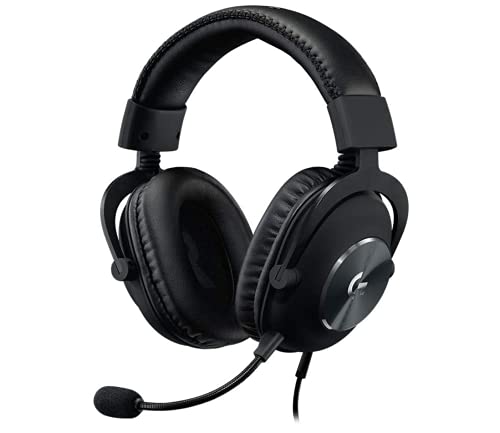
- Blue VO!CE microphone technology* – Detachable pro-grade microphone filters tune your voice in real time to sound richer…
- DTS Headphone:X 2.0 – Next-gen surround sound* provides greater positional and distance awareness, so you know exactly w…
- Comfortable memory foam padding – Soft memory foam earpads with your choice of premium passive noise-cancelling leathere…
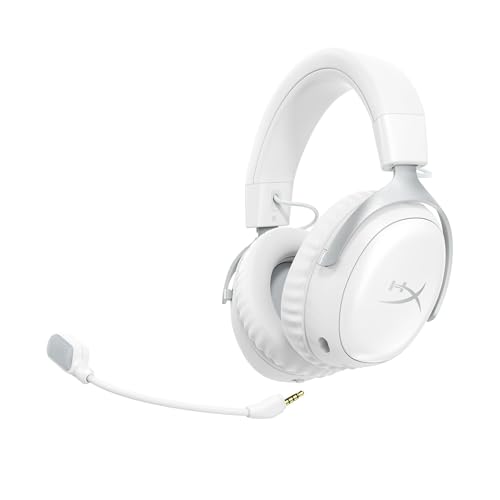
4. HyperX Cloud III Wireless — Best for Cable-Free Gaming
Best for: Gamers who want to move around without a cable and play for extended sessions.
The HyperX Cloud III Wireless is worth considering if you prefer a wireless headset for your gaming laptop. Its 2.4 GHz wireless connection is intended for gaming use, and its battery-powered design removes the cable from your desk.
Independent comparisons have found that the Cloud III Wireless offers longer battery life than some competing wireless gaming headsets, although real-world endurance varies with usage and settings.
Why consider it?
A wireless headset can make a desk setup tidier and let you stand up or move around without taking it off. A dedicated gaming wireless connection is generally a better starting point for low-latency gaming than Bluetooth alone.
Best for
- Long gaming sessions
- Wireless desk setups
- Gamers who dislike cable clutter
- Players who also use their laptop for general media
Who should skip it?
Choose a wired headset if you do not mind a cable and would rather spend less. Wireless models also need charging, and the included dongle must be connected to a compatible port.
Pros
- Wireless convenience
- No cable trailing across the desk
- Designed for gaming use
- Useful for extended sessions between charges
Cons
- More expensive than a basic wired headset
- Requires charging
- Wireless dongle compatibility should be checked
Our verdict: A good upgrade if cable-free gaming is important to you. Compare its live Indian price with the wired Cloud III before buying.
5. Razer BlackShark V3 X HyperSpeed — Best Premium Competitive Wireless Pick
Best for: Gamers who want a wireless headset aimed at competitive play.
The Razer BlackShark V3 X HyperSpeed is a premium wireless option highlighted in an Indian gaming-headset comparison published in 2026. That guide lists 2.4 GHz HyperSpeed wireless, Bluetooth connectivity and 50 mm drivers, with pricing around ₹12,449 at the time of its June 2026 check. The current price and exact availability may differ.
Why consider it?
For competitive games, a dedicated low-latency wireless connection is a useful feature. It lets you play without a cable while maintaining a connection designed for gaming.
The key question is whether you will benefit from the wireless convenience enough to justify spending more than you would on a wired headset.
Best for
- Competitive multiplayer games
- Gamers who want a wireless desk setup
- People who also want Bluetooth connectivity, where supported
- Buyers who are comfortable with premium accessory pricing
Who should skip it?
If you mostly play single-player games and do not mind a cable, the HyperX Cloud III Wired may offer better value. Check the exact version as platform-specific variants may differ.
Pros
- Dedicated wireless gaming connection
- Bluetooth on the relevant version
- Competitive gaming-oriented design
- Cable-free convenience
Cons
- Higher cost than wired alternatives
- Requires charging
- Exact platform compatibility and included accessories must be checked
Our verdict: Consider it when wireless gaming is a genuine priority, not simply because your laptop is expensive.
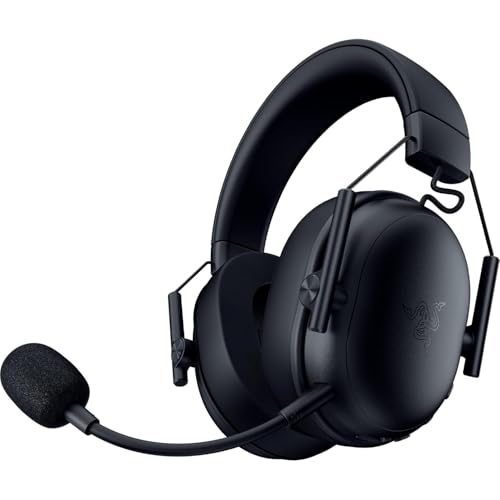
- Razer TriForce 50mm Gen 2 Driver – For rich, crystal-clear, competitive sound: The 2th generation drivers are fine-tuned…
- Removable Razer HyperClear cardioid microphone (9.9 mm) – Even better voice quality: thanks to its unidirectional polar …
- Razer HyperSpeed Wireless – Maximum response speed and reliability: With ultra-fast 2.4 GHz wireless connection, you can…
6. ASUS ROG Pelta — Best for Multiple Connection Options
Best for: Gamers who want a premium headset with flexibility across supported devices.
The ASUS ROG Pelta is another premium option worth comparing. Its published feature set includes ROG SpeedNova 2.4 GHz wireless, Bluetooth and USB-C connectivity, although the exact capabilities and included accessories should be confirmed on the Indian product listing. A 2026 comparison listed it around ₹14,021 at the time of its price check.
Why consider it?
Multiple connection options can be useful if you switch between a gaming laptop, phone and other compatible devices. A premium wireless model may also suit buyers who value a lightweight design and fewer cables.
Best for
- Gamers who use more than one device
- People who prefer premium wireless accessories
- Buyers who want multiple connection methods
- Users who will actually use the additional flexibility
Who should skip it?
If you only play on one laptop and are happy with wired audio, paying for multiple connection methods may not be worthwhile.
Pros
- Multiple connectivity options, depending on configuration
- Premium wireless positioning
- Flexible use across supported devices
Cons
- Higher purchase price
- Extra features may be unnecessary for single-device use
- Confirm connection modes and compatibility before ordering
Our verdict: A premium alternative for users who value connectivity flexibility. Compare it with the Razer and HyperX wireless options before committing.
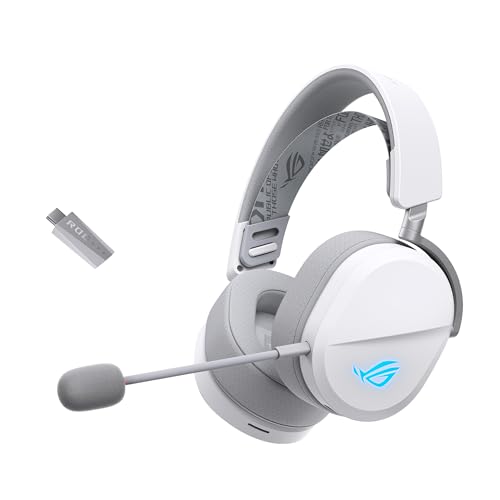
- Versatile Tri-Mode Connectivity: Features Bluetooth, 2.4GHz (via ROG SpeedNova wireless technology), and USB-C wired con…
- Multi-Platform Compatibility: Works seamlessly across multiple devices including PC and Mac, consoles such as PlayStatio…
- Immersive High-Fidelity Audio: 50mm titanium-plated diaphragm drivers ensure rich, detailed sound with wide 20 Hz–20 kHz…
Comparison Table: Which Headset Fits Your Setup?
| Headset | Connection | Main strength | Best budget approach |
|---|---|---|---|
| HyperX Cloud III Wired | Wired | Everyday gaming and comfort | Best value starting point |
| HyperX Cloud Stinger 2 Core | Wired | Basic gaming audio | Spend as little as practical |
| Logitech G Pro X Wired | Wired | Microphone controls | Worth considering for communication |
| HyperX Cloud III Wireless | 2.4 GHz wireless | Cable-free gaming | Pay extra for wireless convenience |
| Razer BlackShark V3 X HyperSpeed | 2.4 GHz wireless, Bluetooth on relevant version | Competitive wireless use | Premium upgrade |
| ASUS ROG Pelta | Multiple connection methods | Device flexibility | Premium multi-device option |
Price note: Headset prices change with sales, import availability and sellers. Use the table to shortlist the right category, then check current Indian pricing and warranty before ordering.
Wired vs Wireless Gaming Headphones: Which Is Better for a ₹1 Lakh Laptop?
Wired gaming headsets
Wired headsets are ideal if you want a simple, reliable setup without charging another device.
Advantages
- No headset battery to recharge
- No wireless dongle required when using a compatible audio jack
- Often better value at the same budget
- Suitable for competitive gaming
Limitations
- Cable can restrict movement
- Cable management is needed
- Some USB audio features may depend on software
Wireless gaming headsets
Wireless headsets are convenient for people who dislike cables or regularly move around their desk.
Advantages
- Cleaner desk setup
- More freedom of movement
- Dedicated 2.4 GHz gaming connections can offer low latency
- Some models also support Bluetooth for compatible devices
Limitations
- Need charging
- Usually cost more for comparable features
- USB dongle compatibility matters
- Bluetooth-only audio may introduce noticeable latency in games
What about Bluetooth headphones?
Bluetooth headphones can be useful for casual gaming, music and videos. But for fast-paced games where audio timing matters, do not assume Bluetooth alone will provide the same experience as a dedicated 2.4 GHz gaming connection.
Our advice: Choose wired if you want value and simplicity. Choose 2.4 GHz wireless if cable-free gaming is worth the extra cost.
What Should You Look for Before Buying Gaming Headphones?
A. Sound quality and positional audio
For competitive shooters, you want to hear subtle sounds and distinguish where they are coming from. Clear positional cues can be more useful than exaggerated bass.
For open-world games, racing games and cinematic titles, a fuller sound can make the experience more immersive.
Do not buy solely based on “7.1 surround sound” printed on the box. Virtual surround processing can help in some setups, but its effectiveness depends on the headset, game and personal preference.
B. Microphone quality
If you play online multiplayer games, a clear microphone matters. Look for a boom microphone, mute controls and software features if you regularly use voice chat.
For streaming, a gaming headset microphone may be sufficient to begin with, but it will not necessarily replace a dedicated microphone for higher-quality recording.
C. Comfort for long sessions
A headset can sound excellent and still be a poor purchase if it hurts after an hour.
Look for:
- Comfortable ear cushions
- A headband that distributes weight evenly
- Adequate ear-cup space
- Adjustable fit
- A design that suits your glasses, if you wear them
If possible, test the fit before buying. Clamp force and ear-cup size are highly personal.
D. Driver size
Many gaming headsets advertise 40 mm or 50 mm drivers. Driver size alone does not establish sound quality. Tuning, acoustic design, fit and processing matter too.
Compare the overall sound profile and credible reviews rather than selecting the headset with the largest driver.
E. Connectivity and laptop ports
Before ordering, check whether your gaming laptop has:
- A 3.5 mm combo audio jack
- USB-A ports
- USB-C ports that support the required connection
- Enough accessible ports for a wireless dongle and other accessories
A headset with a USB dongle may require an adapter if your laptop has limited ports. Confirm what is included in the box.
F. Software compatibility
Some features such as microphone processing, equaliser controls or virtual surround sound—may require Windows software.
Check whether the headset’s software supports your operating system and whether the features work over the connection you intend to use.
G. Warranty and replacement support
For purchases in India, check the seller’s warranty terms, return window and support availability. Be especially careful with imported models or listings that offer unclear warranty coverage.
Will These Gaming Headphones Work With a ₹1 Lakh Gaming Laptop?
Most mainstream gaming headsets are designed to work with PCs, but compatibility depends on the connection and included accessories.
- 3.5 mm wired headsets: Usually straightforward if your laptop has a compatible combo audio jack.
- USB wired headsets: Check whether the laptop has the required USB-A or USB-C port.
- 2.4 GHz wireless headsets: Usually require a compatible USB dongle.
- Bluetooth headsets: Require supported Bluetooth connectivity, but latency may be less suitable for competitive play.
- Software-enabled headsets: Some advanced controls may require Windows software.
A laptop’s ₹1 lakh price does not automatically guarantee every port or connection type. Check the exact laptop model and headset package before purchasing.
Common Mistakes to Avoid
1. Spending more just because the laptop costs ₹1 lakh
Your headset budget should reflect your gaming habits. A ₹6,000 wired headset may be a better purchase than a ₹15,000 wireless headset if you do not need wireless features.
2. Choosing Bluetooth-only headphones for competitive gaming
For fast-paced games, prioritise wired connectivity or a dedicated low-latency gaming wireless connection.
3. Buying for RGB lighting instead of comfort
Lighting is cosmetic. Fit, sound quality, microphone performance and connectivity matter more during long sessions.
4. Assuming bigger drivers mean better audio
Driver size is only one specification. Sound tuning and design are just as important.
5. Ignoring the microphone
If you regularly play multiplayer games, check microphone clarity and mute controls before buying.
6. Forgetting about ports and adapters
Confirm the laptop’s available ports and the headset’s included cables or dongles.
7. Ignoring warranty details
An unusually cheap listing may not offer the same warranty or return support as an authorised seller. Verify the exact seller and product version.
Frequently Asked Questions
Which gaming headphones are best for a ₹1 lakh laptop?
The HyperX Cloud III Wired is a strong starting point for most gamers. Consider the Logitech G Pro X Wired if microphone customisation matters, or a dedicated 2.4 GHz wireless model if you want cable-free gaming.
Should I spend ₹15,000 on gaming headphones?
Only if you will use the extra features. Premium wireless connectivity, multiple connection modes and additional controls can be valuable, but many users will be well served by a good headset in the ₹5,000–₹8,000 range.
Are wired gaming headphones better than wireless ones?
Wired headsets offer simplicity, no battery management and often better value. Wireless headsets offer freedom of movement. The better choice depends on your budget and how you play.
Is Bluetooth good enough for gaming?
Bluetooth is suitable for casual gaming, music and videos, but latency can be an issue in competitive games. A wired headset or dedicated 2.4 GHz gaming connection is generally the safer choice for low-latency audio.
Do I need surround sound for FPS games?
Not necessarily. Clear stereo audio and good positional cues can be sufficient. Virtual surround processing may help some users, but it is not a guarantee of better directional accuracy.
Which headset is best for Discord and streaming?
The Logitech G Pro X Wired is worth considering because of its microphone processing features. For more demanding streaming, you may eventually want a dedicated microphone.
Will a gaming headset work with my gaming laptop and phone?
It depends on the model. A wired 3.5 mm headset may work with compatible devices, while USB and wireless models need supported ports or connectivity. Check the exact headset’s specifications before buying.
What matters most for long gaming sessions?
Comfort, fit, ear-cup space, sound quality and reliable connectivity matter most. If possible, try the headset on before buying, especially if you wear glasses.
Are expensive gaming headphones automatically better?
No. Higher-priced models may add wireless technology, software features or premium materials, but those features are not necessary for every gamer.
What is the best value gaming headset for a laptop?
For a straightforward wired setup, start by comparing the HyperX Cloud III Wired with the HyperX Cloud Stinger 2 Core. The right choice depends on the current price, fit, microphone needs and the features you will actually use.
Final Verdict: Which Gaming Headphones Should You Buy?
If you are buying a ₹1 lakh gaming laptop, build a balanced setup rather than matching every accessory to the laptop’s price.
- Best overall value: HyperX Cloud III Wired
- Best budget option: HyperX Cloud Stinger 2 Core
- Best for voice chat: Logitech G Pro X Wired
- Best wireless upgrade: HyperX Cloud III Wireless
- Best premium competitive wireless option: Razer BlackShark V3 X HyperSpeed
- Best multi-connection premium option: ASUS ROG Pelta
Our final recommendation: Start with the HyperX Cloud III Wired if you want dependable gaming audio without overspending. Move to a premium wireless headset only if cable-free gaming and its additional features genuinely matter to you.
Remember: a comfortable headset with clear audio and a good microphone will serve you better than an expensive headset purchased purely to match your laptop’s price.
Ready to complete your gaming setup? Compare current prices, confirm compatibility and choose the headset that fits your gaming style on BestBuy93.IN.