

Finding the best budget gaming laptops in India is not just about choosing a laptop with a powerful processor or colourful RGB lighting. The graphics card, cooling system, display refresh rate, RAM, storage and upgrade options all influence how well a laptop performs during gaming.
Whether you enjoy Valorant, Counter-Strike 2, Minecraft, GTA V, BGMI through an emulator or demanding AAA games, the right gaming laptop can offer a satisfying experience without requiring a premium gaming-PC budget.
In this guide, we compare budget-friendly gaming laptops from brands such as HP, Lenovo, ASUS, Acer and MSI. We will also explain what you can realistically expect from entry-level graphics cards, which specifications deserve priority, and when it makes sense to spend a little more.
Quick answer: If gaming performance is your priority, start by comparing laptops with an NVIDIA GeForce RTX 3050 or RTX 4050, depending on your budget. The HP Victus, Lenovo LOQ, ASUS TUF Gaming, Acer Nitro and MSI Thin families are useful starting points. Always check the exact configuration because the same laptop family can include different graphics cards, screens and memory options.
Prices and availability vary by retailer, configuration and sale. The prices below are indicative shopping ranges, not guaranteed live offers.
Best Budget Gaming Laptops at a Glance
| Laptop series | Indicative price range | Best for |
|---|---|---|
| HP Victus 15 | ₹55,000–₹75,000 | Balanced gaming and everyday use |
| Lenovo LOQ 15 | ₹60,000–₹85,000 | Performance-focused gaming |
| ASUS TUF Gaming A15/F15 | ₹55,000–₹80,000 | Gaming with a rugged design |
| Acer Nitro V 15 | ₹50,000–₹75,000 | Entry-level to mid-range gaming |
| MSI Thin 15 | ₹55,000–₹80,000 | Buyers who prefer a relatively slim design |
These ranges are broad estimates across different configurations and sales. A laptop with an RTX 2050 should not be treated as equivalent to a configuration with an RTX 4050 simply because both belong to the same product family.
Best Budget Gaming Laptops in India
1. HP Victus 15 — Best for Everyday Gaming
Best for: Students, first-time gaming laptop buyers and people who also need a laptop for work or college.
The HP Victus 15 is worth considering if you want a gaming laptop that can also handle everyday productivity, online classes, browsing, streaming and general multitasking. Its understated styling may also appeal to buyers who do not want an aggressively designed gaming machine.
Different Victus configurations can feature Intel or AMD processors and NVIDIA dedicated graphics. For gaming, look for a configuration with at least 16GB of RAM or a practical upgrade path to reach that capacity.
What to check before buying
- Exact GPU: RTX 2050, RTX 3050 or RTX 4050, depending on the variant.
- Display refresh rate and brightness.
- RAM configuration and upgradeability.
- Storage capacity and available SSD expansion.
- Warranty coverage and service options in your area.
Pros
- Versatile for study, work and entertainment.
- Relatively understated design.
- Multiple configurations at different prices.
Cons
- Performance varies significantly by configuration.
- Battery life during gaming will be limited.
- Some entry-level configurations may need a RAM upgrade.
Verdict: A practical all-rounder when you find the right GPU and memory configuration at a competitive price.
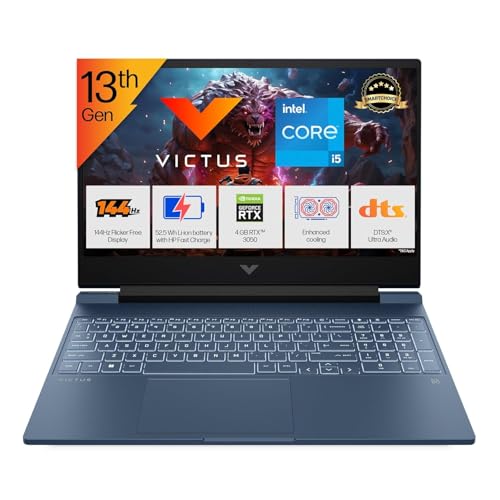
- Processor, Memory & Storage: Intel Core i5-13420H (up to 4.6 GHz with Intel Turbo Boost Technology, 12 MB L3 cache, 8 co…
- Operating System & Preinstalled Software: Windows 11 Home | MS Office Home 2024 |1 year Microsoft 365 Basic Free
- Display & Graphics: 39.6 cm (15.6″) diagonal, FHD (1920 x 1080), 144 Hz, IPS, micro-edge, anti-glare, 300 nits, 62.5% sR…
Lenovo LOQ 15 — Best for Performance-Focused Buyers
Best for: Gamers who prioritise graphics performance, a responsive display and upgrade potential.
The Lenovo LOQ series is designed for people who want gaming-oriented hardware without moving to Lenovo’s more expensive Legion range. Selected models offer powerful processors, dedicated NVIDIA graphics and high-refresh-rate displays.
The most important step is to compare the exact LOQ configuration. A model with an RTX 3050 is a different proposition from one equipped with an RTX 4050, and graphics power limits can also affect sustained performance.
What to check before buying
- Graphics card and its configured power limit.
- Processor model and cooling design.
- Screen colour coverage, refresh rate and brightness.
- RAM slots and maximum supported memory.
- SSD expansion options.
Pros
- Gaming-focused hardware options.
- Configurations suited to different performance levels.
- Can be useful for gaming, coding and creative workloads.
Cons
- Heavier than many ordinary productivity laptops.
- Fans can become audible under gaming loads.
- Prices can increase considerably for stronger GPU configurations.
Verdict: A strong contender if you find a LOQ configuration with the graphics card you need, sufficient RAM and a good display at the right price.

- Processor: AMD Ryzen 7 7435HS | Speed: 3.1GHz (Base) – 4.5GHz (Max) | 8 Cores | 16 Threads | 16MB Cache
- Display: 15.6″ FHD (1920×1080) IPS Technology | 144 Hz Refresh Rate | 100pct. sRGB |Brightness: 300Nits Anti-glare || Co…
- Memory: 2x12GB SO-DIMM DDR5-4800, Max Memory :-Up to 32GB DDR5-4800 | Storage: 512GB SSD M.2 2242 PCIe 4.0×4 NVMe
ASUS TUF Gaming A15/F15 — Best for a Gaming-Focused Design
Best for: Gamers who want a dedicated gaming laptop with a distinctive chassis and performance-oriented features.
ASUS TUF Gaming laptops are available in several configurations, including AMD- and Intel-based systems. Depending on the model, you may find dedicated NVIDIA graphics, high-refresh-rate screens and upgradeable memory.
Do not assume every TUF laptop has the same performance. An older model with an entry-level GPU may be less appealing than a newer alternative at a similar price.
What to check before buying
- The complete model number, not just “TUF Gaming.”
- Dedicated GPU and video memory.
- Display refresh rate and colour reproduction.
- RAM capacity and whether one or two slots are occupied.
- Cooling performance and port selection.
Pros
- Wide selection of configurations.
- Gaming-oriented design and feature set.
- Suitable for both gaming and everyday tasks.
Cons
- Some variants use older processors or graphics cards.
- Battery performance depends on the configuration and workload.
- Gaming performance can differ considerably between models.
Verdict: Worth comparing with the HP Victus and Lenovo LOQ when pricing and specifications are similar.
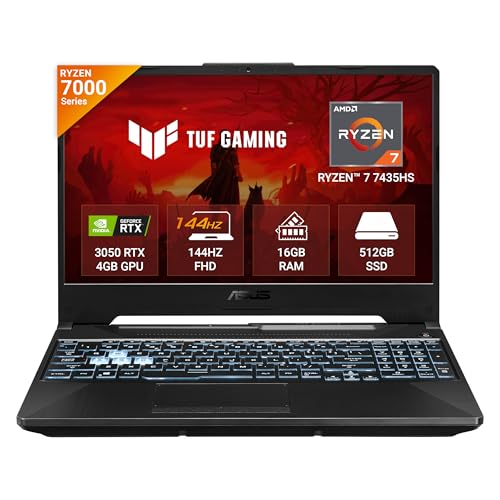
- Processor, Memory & Storage : AMD Ryzen 7 7435HS Mobile Processor 3.1GHz (20MB Cache, up to 4.5 GHz, 8 cores, 16 Threads…
- Operating System & Software : Windows 11 Home | 1-month trial for new Microsoft 365 customers. Credit card required | Xb…
- Display & Graphics : 15.6-inch (39.6 cm), FHD (1920 x 1080) 16:9, 144Hz Refresh Rate, 250nits Brightness, Anti-glare dis…
Acer Nitro V 15 — Best for Value Hunting
Best for: Buyers who want the strongest gaming specifications possible within a strict budget.
The Acer Nitro V 15 is another series to watch when comparing budget gaming laptops. Depending on the generation and configuration, it can offer dedicated graphics, modern processors and high-refresh-rate displays.
This series is particularly worth checking during major online sales, but the exact GPU matters more than the product name. An RTX 2050 configuration and an RTX 3050 configuration should be evaluated separately.
What to check before buying
- Whether the listing specifies RTX 2050, RTX 3050 or another GPU.
- GPU power limit and cooling configuration.
- Included RAM and the cost of upgrading it.
- Display brightness and colour coverage.
- Current selling price across authorised retailers.
Pros
- Multiple configurations to compare.
- Potential value during sales.
- Gaming-oriented hardware in a relatively accessible price category.
Cons
- Entry-level variants may have limited graphics headroom.
- Build, display and battery characteristics vary by model.
- Some configurations may require upgrades for demanding multitasking.
Verdict: A good candidate for price-conscious buyers willing to compare the full specification sheet rather than buying the first Nitro listing they find.

- Processor: AMD Ryzen 7 7735HS octa-core processor(3.2 GHz base clock, up to 4.75 GHz max boost clock, 16 MB L3 cache, 8 …
- Operating System: Windows 11 Home |Preinstalled Software: None
- Display : 15.6″ display with IPS (In-Plane Switching) technology, Full HD 1920 x 1080, Acer ComfyView LED-backlit TFT LC…
MSI Thin 15 — Best for Buyers Who Prefer a Slimmer Design
Best for: Gamers who want a relatively slim gaming laptop for occasional travel and everyday use.
The MSI Thin 15 series combines a gaming-oriented specification with a design that is generally less bulky than some traditional gaming laptops. It can be appealing if you need a laptop for both entertainment and regular computing.
However, a thinner chassis does not automatically make a laptop faster or better. Cooling capacity and GPU power limits can influence sustained gaming performance, so compare independent reviews of the exact model where available.
What to check before buying
- GPU model and configured power limit.
- Whether 8GB RAM needs upgrading to 16GB.
- Display refresh rate and colour quality.
- Thermal performance under prolonged gaming.
- Warranty, service and upgrade costs.
Pros
- Relatively slim design for a gaming-focused laptop.
- Can serve as a general-purpose computer.
- Several configurations may be available at different price points.
Cons
- Some models ship with limited RAM.
- Slimmer designs can involve compromises in cooling or GPU power.
- Specifications vary substantially across generations.
Verdict: Consider it if portability matters, but compare gaming performance carefully against similarly priced HP, Lenovo, ASUS and Acer alternatives.

- Processor: Intel Core i5-13420H Up To 4.6GHz
- Operating System: Pre-loaded Windows 11 Home with lifetime validity |Preinstalled Software: MSI Center | In the box: Lap…
- Display: 40cm FHD (1920×1080), 144Hz 45%NTSC IPS-Level
RTX 2050 vs RTX 3050 vs RTX 4050: Which GPU Should You Choose?
For gaming, the dedicated graphics processor is often the most important component to compare. Here is a practical overview of these GPU tiers.
| GPU | General positioning | Best suited to |
|---|---|---|
| NVIDIA GeForce RTX 2050 Laptop GPU | Entry-level dedicated gaming | Esports and less demanding games, with suitable settings |
| NVIDIA GeForce RTX 3050 Laptop GPU | Entry-level to mainstream gaming | Esports and many games at sensible settings |
| NVIDIA GeForce RTX 4050 Laptop GPU | Higher performance tier among these three | More demanding games, with better headroom and DLSS 3 support |
Actual results depend on the game, resolution, graphics settings, laptop cooling, GPU power limit and available VRAM. Do not rely on a single FPS number without checking how it was measured.
Is an RTX 3050 enough for gaming?
For many people, yes. An RTX 3050 laptop can be a sensible option for competitive games and a range of older or moderately demanding titles. Newer AAA games may require lower graphics settings, upscaling or other compromises.
Check whether the laptop uses a 4GB or 6GB version. VRAM capacity can affect the settings that are practical in some modern games.
Is an RTX 4050 worth paying more for?
It can be worth the extra money if you play demanding games, want more graphics headroom or plan to keep the laptop for several years. The RTX 4050 also supports DLSS 3 frame generation in compatible games.
However, compare the total price difference and the laptop’s power limits. A higher GPU name alone does not guarantee the best overall purchase.
What Specifications Should You Look for?
Processor: Choose a Modern Mid-Range CPU
A recent Intel Core i5/Core 5 or AMD Ryzen 5-class processor can be sufficient for many budget gaming setups. Higher-tier CPUs may help with demanding games, multitasking and content creation, but avoid paying extra for a processor upgrade if it means settling for a substantially weaker GPU.
Compare the full processor model number rather than relying only on “Core i5,” “Core 7” or “Ryzen 7” branding.
RAM: Aim for 16GB
For a new gaming laptop, 16GB RAM is the practical starting point for a balanced experience. Some laptops are sold with 8GB, which may work for lighter games but can be limiting when modern games run alongside browsers, chat apps or recording software.
If your chosen laptop has 8GB RAM, check whether it can be upgraded and how much that upgrade will cost.
Storage: Prefer a 512GB SSD or More
Modern games can occupy substantial storage space. A 512GB SSD is a reasonable starting point, although a larger SSD is more convenient if you install several large games.
Before purchasing, check whether the laptop supports an additional SSD or whether replacing the existing drive will be necessary.
Display: A High Refresh Rate Is Useful
A 144Hz display can make supported games look smoother than a standard 60Hz panel. However, the display’s refresh rate is only one consideration.
Also check:
- Brightness for comfortable indoor use.
- Colour coverage if you edit photos or videos.
- Response time and viewing angles.
- Resolution and whether your GPU can run games comfortably at that resolution.
Cooling: Do Not Ignore It
Gaming creates sustained heat. A laptop’s cooling system helps it maintain performance during longer sessions. Read reviews that discuss temperatures, fan noise and sustained performance rather than relying exclusively on a short benchmark.
Keyboard, Ports and Connectivity
A comfortable keyboard, reliable Wi-Fi, USB ports, HDMI and a suitable audio connection can make everyday use more convenient. If you intend to connect an external gaming monitor, confirm that the relevant video output supports your desired display setup.
How to Choose a Gaming Laptop for Your Budget
Around ₹50,000–₹60,000: Focus on finding the strongest sensible dedicated GPU configuration within your budget. Compare RTX 2050 and RTX 3050 models, and factor in any RAM upgrade costs. Sale prices can make a meaningful difference.
Around ₹60,000–₹75,000: You may find better RTX 3050 configurations and, during certain sales, selected RTX 4050 models. Compare graphics performance, screen quality and cooling before deciding whether a more expensive model is worth it.
Above ₹75,000: Compare the available RTX 4050 configurations and consider whether a higher GPU tier or better screen justifies the additional spending. At this point, do not overlook warranty, upgradeability and the laptop’s overall build quality.
These are budget bands for comparison, not promises that a particular GPU will be available at a particular price on the day you shop.
Also Read | Best Water Purifier for Borewell Water in India
Common Gaming Laptop Buying Mistakes
- Choosing by processor name alone: A stronger CPU cannot compensate for every graphics limitation.
- Ignoring the exact GPU: Product families often include several GPU options.
- Buying 8GB RAM without checking upgrades: A low starting price may hide additional costs.
- Assuming every RTX 4050 performs identically: GPU power limits and cooling can affect results.
- Ignoring the display: A high refresh rate does not automatically mean good brightness or colour reproduction.
- Expecting long battery life while gaming: Gaming laptops generally perform best when connected to power.
- Buying an old model without comparing alternatives: A discounted older laptop is not automatically the best value.
- Forgetting peripherals and accessories: A mouse, headset, cooling stand or external storage may add to the total cost.
Frequently Asked Questions
Which is the best budget gaming laptop in India?
The HP Victus 15, Lenovo LOQ 15, ASUS TUF Gaming, Acer Nitro V 15 and MSI Thin 15 are worth comparing. The best choice depends on the exact GPU, display, RAM, cooling and current selling price.
Is ₹50,000 enough for a gaming laptop?
It can be enough for entry-level gaming if you find a suitable discounted configuration. You may need to compromise on graphics settings, display quality or upgrade capacity. Check the current market carefully before deciding.
Is 8GB RAM enough for a gaming laptop?
It can be adequate for lighter games, but 16GB is a better starting point for a new gaming laptop. Confirm whether the RAM is upgradeable before purchasing an 8GB configuration.
Can budget gaming laptops run GTA V?
Many budget gaming laptops can run GTA V, but performance varies with the graphics card, processor, RAM, resolution and settings. Check benchmarks for the exact laptop configuration before buying.
Can I use a gaming laptop for video editing?
Yes. A laptop with a capable processor, dedicated GPU, 16GB or more of RAM and SSD storage can handle many video-editing workloads. More demanding projects may benefit from additional RAM and stronger graphics.
Do gaming laptops overheat?
They generate considerable heat under load, but that does not automatically mean they are overheating. Check reliable reviews for sustained performance, temperatures and fan noise. Use the laptop on a firm, well-ventilated surface.
Should I buy a gaming laptop or build a gaming PC?
A gaming laptop is more convenient if you need portability and a built-in display. A desktop PC often offers better upgrade flexibility and may deliver more performance for the same total budget, depending on component prices and whether peripherals are included.
Should I buy during an online sale?
Compare the final price across reputable retailers, including bank offers and exchange conditions. Confirm the model number, warranty and return policy, and do not assume a displayed discount makes an older configuration the best choice.
Final Verdict
The best budget gaming laptop is the one that balances graphics performance, cooling, memory, display quality and price—not necessarily the one with the most impressive marketing.
Start by comparing the HP Victus 15, Lenovo LOQ 15, ASUS TUF Gaming, Acer Nitro V 15 and MSI Thin 15. Prioritise a suitable dedicated GPU, 16GB RAM or an affordable upgrade path, and a 512GB SSD. If you can comfortably afford the difference, compare RTX 4050 options with RTX 3050 alternatives before making your final decision.
Most importantly, check the complete model number and current price before ordering. Two laptops with nearly identical names can offer very different gaming experiences.