
Want to watch videos, display photos, play mobile games or share presentations from your smartphone on a bigger television screen? A USB-C to HDMI adapter can make that possible without depending on wireless screen mirroring.
These compact accessories connect a compatible smartphone to an HDMI-equipped television, monitor or projector. They are particularly useful when you want a wired connection for presentations, offline media playback or a larger viewing experience.
However, there is one important detail you should understand before purchasing: not every smartphone with a USB-C port supports HDMI video output. The phone must support a compatible wired display technology, usually DisplayPort Alternate Mode (DP Alt Mode). Buying an adapter without checking this feature can lead to a frustrating no-signal experience.
In this guide, we explore the different types of USB-C to HDMI adapters, what features matter when choosing one, how to check smartphone compatibility, and which products are worth comparing in 2026.
What Is a USB-C to HDMI Adapter?
A USB-C to HDMI adapter is a small accessory that allows a compatible device with a USB-C video-output port to connect to an HDMI display.
It converts the video signal coming from the phone into a format that an HDMI television or monitor can receive.
Depending on the design, an adapter may have:
- A USB-C connector that plugs into your smartphone.
- An HDMI output port for connecting an HDMI cable.
- A USB-C Power Delivery port for charging.
- Additional USB-A or USB-C data ports.
- A compact cable or built-in connector.
Some models are simple converters, while others are multiport hubs offering several connections in one accessory.
Why would you connect your phone to a TV?
There are several practical reasons:
- Watch videos on a bigger screen: Display compatible video content on your television.
- View photos: Share holiday pictures, family photographs and videos with others.
- Play mobile games: Enjoy compatible games on a larger display, although latency and controller support depend on the phone and setup.
- Present documents: Display slides, spreadsheets and presentations during meetings.
- Use desktop mode: Certain smartphones, including supported Samsung Galaxy devices, offer a desktop-style interface through Samsung DeX.
A wired connection can also be useful when wireless casting is inconvenient or unavailable.
How Does a USB-C to HDMI Adapter Connect a Phone to a TV?
The connection works through a sequence of hardware components.
- Your smartphone generates a compatible video signal through its USB-C port.
- The adapter converts that signal into HDMI output.
- An HDMI cable carries the signal to your television.
- The television displays the picture and plays supported audio.
The important technology to understand is DisplayPort Alternate Mode.
DP Alt Mode allows compatible USB-C devices to send DisplayPort video through the USB-C connection. A suitable adapter then converts that signal into HDMI.
A USB-C connector alone does not guarantee this capability. Your phone may support charging and file transfers but still lack wired video output.
This is the first specification to verify before purchasing an adapter.
Best USB-C to HDMI Adapters to Consider
The following products represent different accessory styles and budgets. They should be evaluated according to their exact model specifications, availability and your phone’s compatibility.
1. TP-Link UA520C USB Type-C to HDMI Adapter
Best for: Buyers looking for a dedicated USB-C to HDMI accessory.
A dedicated adapter is a sensible choice when your main requirement is connecting a compatible smartphone to an HDMI television or monitor.
The TP-Link UA520C is one model worth comparing. Before ordering, verify its supported resolution, refresh rate, device requirements and whether the exact listing specifies the video-output standard required by your phone.
What we like:
- Dedicated display-connection design.
- Useful for a simple HDMI setup.
- Suitable to compare against other branded adapters.
What to check:
- Phone support for DP Alt Mode.
- HDMI resolution and refresh-rate limits.
- Whether an additional HDMI cable is required.

- HDMI up to 4K@60Hz — Connect to an external monitor via the HDMI for a stunning ultra high-definition experience
- Compatible with USB Type — C Devices: Allows you to connect to any devices with an available type-c port which support…
- Plug and Play — Instantly turn the USB-C port of your devices into an HDMI port, with no extra installation.
2. UGREEN 40273 USB-C to HDMI Adapter
Best for: Buyers comparing a branded adapter for everyday display connections.
UGREEN offers USB-C display accessories for connecting compatible devices to HDMI displays. The 40273 is another option to investigate if you prefer a dedicated adapter rather than purchasing a larger hub.
Check the product listing for supported display resolution, HDMI version, compatibility requirements and connector design.
What we like:
- Compact adapter category.
- Useful for a straightforward connection.
- An alternative to larger multiport hubs.
What to check:
- Exact resolution and refresh-rate support.
- Whether charging pass-through is available.
- Phone and operating-system compatibility.

- 【Life-Like Video & Audio】: The premium USB C HDMI 2.0 Adapter supports 4K@60Hz high-definition resolution, letting you g…
- 【Work Out of Box】: Just plug & play, no driver or software installation, easily delivers presentations, documents, photo…
- 【Refined & Enhanced Durability】: The Thunderbolt 3 HDMI 2.0 Video Adaptor combines heat-resistant aluminum case, flexibl…
3. Portronics C-Konnect Plus Type-C to HDMI Adapter
Best for: Buyers who want a multiport-style accessory.
A multiport adapter can be useful when you need more than HDMI output. Depending on its configuration, it may offer additional USB connectivity and charging support.
The Portronics C-Konnect Plus is worth comparing if you want to explore this type of accessory.
Before purchasing, check the exact port arrangement and the maximum HDMI resolution. Do not assume that every USB-C port on the accessory supports video; some are designed only for power or data.
What we like:
- Multiport accessory format.
- Useful when additional connections are required.
- Worth comparing with basic HDMI converters.
What to check:
- HDMI output specification.
- USB-C Power Delivery support and limitations.
- Whether the additional ports work with your phone.

- 3-in-1 USB-C Hub: The Portronics C-Konnect Plus, a Type-C hub with 1 HDMI (4K @ 30Hz) port, 1 USB-A (3.0) port, and 1 PD…
- 4K@30 Hz HDMI Port: Project your device (with Thunderbolt 3) display, whether it be movies, or presentations on a bigger…
- USB 3.0 Port: The USB 3.0 port offers high-speed connectivity, allowing you to transfer data (files, photos, videos) fro…
4. Amazon Basics 3-in-1 USB Type-C to HDMI Adapter
Best for: Buyers looking for a simple multi-function accessory.
The Amazon Basics 3-in-1 adapter is another option to consider when comparing compact USB-C accessories.
The listed version advertises HDMI output up to 4K at 30Hz and a 100W Power Delivery port. These figures describe the accessory’s advertised capabilities, not a guarantee that your smartphone will output 4K or accept 100W charging.
Your phone, charger, HDMI cable and television all influence the actual experience.
What we like:
- Combines HDMI and additional connectivity.
- Advertised 4K at 30Hz output.
- Power Delivery pass-through is useful for compatible setups.
What to check:
- Phone video-output compatibility.
- Whether 4K at 30Hz is sufficient for your television.
- Charging limitations and supported power input.

- 【Three-in-one USB C HUB multiport adapter】Extend the computer’s usb c port to a HDMI 4K output port, a USB 3.0 port and …
- 【4K HDMI video output port】This USB C to HDMI adapter enable you to mirror or extend the display of your laptop Phone to…
- 【USB 3.0 high speed transfer port】Providing up to 5Gbps data transmission speed, that’s fast enough to transfer images, …
5. Zebronics TA150H Type-C to HDMI Converter
Best for: Buyers comparing a compact converter option.
Zebronics is another brand worth checking when exploring USB-C display accessories.
The TA150H is listed as a Type-C to HDMI converter. Before selecting it, check the seller’s detailed specification sheet for resolution, refresh rate, supported devices and any additional requirements.
A low purchase price should not be the only deciding factor. Compatibility and return support matter just as much.
What we like:
- Compact converter category.
- Another option to compare in the budget segment.
- Useful for buyers exploring simple display accessories.
What to check:
- Exact video-output specifications.
- Phone compatibility.
- Seller warranty and return policy.
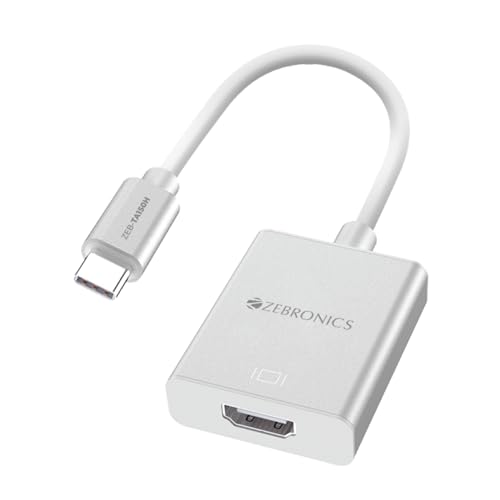
- Type-C to HDMI: To enable effortless transmission of audio and video signals between compatible devices, the ZEB-TA150H …
- Matte finish: The ZEB-TA150H’s matte finish elevates the adapter’s visual appeal but also enhances grip and durability.
- Elevated Visuals: Equipped with HDMI 4K @30Hz (max.) and 1080P @60Hz (max.) capabilities, the ZEB-TA150H delivers stunni…
USB-C to HDMI Adapter Comparison Table
| Product | Accessory type | What to compare |
|---|---|---|
| TP-Link UA520C | Dedicated HDMI adapter | Resolution, refresh rate and compatibility |
| UGREEN 40273 | Dedicated HDMI adapter | Display support and connector design |
| Portronics C-Konnect Plus | Multiport adapter | HDMI and additional port specifications |
| Amazon Basics 3-in-1 | Multi-function adapter | 4K 30Hz listing and PD pass-through |
| Zebronics TA150H | HDMI converter | Exact output and device support |
Important: This is a product shortlist, not a laboratory performance ranking. Confirm the exact model specifications and phone compatibility before buying.
How to Choose the Right USB-C to HDMI Adapter
Choosing an adapter becomes much easier when you understand the specifications that actually affect performance.
A. Check DisplayPort Alternate Mode
This is the most important requirement for a conventional USB-C-to-HDMI adapter.
Look for explicit support for:
- DisplayPort Alternate Mode.
- USB-C video output.
- HDMI output through USB-C.
- Manufacturer-supported external display functionality.
If your phone does not support wired video output, a conventional USB-C-to-HDMI adapter cannot add that capability.
B. Choose the Right Resolution
Adapters commonly advertise specifications such as:
- Full HD (1920 × 1080).
- 4K at 30Hz.
- 4K at 60Hz.
A 4K adapter may be useful if you own a 4K television, but the phone must also support the required output resolution.
For regular videos and presentations, Full HD may be sufficient. For smoother desktop use and compatible high-refresh-rate displays, consider the refresh-rate specification as well.
Remember that the entire connection chain determines the available output.
C. Understand Refresh Rate
Refresh rate refers to how frequently the display updates its image each second.
For example:
- 30Hz means 30 updates per second.
- 60Hz means 60 updates per second.
A 60Hz output can provide smoother motion than 30Hz when the phone and television support it.
Do not pay extra for 4K at 60Hz unless your devices and intended use can benefit from it.
D. Consider Power Delivery Pass-Through
Some adapters include a separate USB-C charging port.
This allows a compatible charger to supply power while the phone is connected to an external display.
It is particularly useful when:
- Watching long videos.
- Playing games.
- Using Samsung DeX.
- Giving extended presentations.
Check whether the adapter supports Power Delivery pass-through and whether the phone accepts charging through the connected setup.
The advertised maximum wattage is not necessarily the amount your phone will receive.
E. Look at Build Quality and Cable Length
A compact adapter is easier to carry, but connector design and cable length still matter.
Look for:
- A sturdy connector.
- Good strain relief.
- Durable cable insulation.
- A compact body that does not block neighbouring ports.
- Enough cable length to reach your TV comfortably.
If your phone has a protective case, check whether the USB-C connector can fit without removing it.
F. Check HDCP Compatibility
HDCP is a digital content protection standard used by certain streaming services and devices.
If a protected streaming app displays a black screen while ordinary phone content appears correctly, HDCP compatibility may be part of the problem.
Check the adapter and display specifications if protected video playback is important to you.
How to Check Whether Your Phone Supports USB-C to HDMI
Do not assume that every smartphone with a Type-C port supports HDMI output.
Before purchasing, search for your exact phone model along with these terms:
- USB-C DisplayPort Alt Mode.
- Wired external display.
- USB-C video output.
- HDMI output support.
- Samsung DeX compatibility.
- Motorola Smart Connect or Ready For compatibility.
Some examples of model-dependent support include:
| Smartphone family | What to check |
|---|---|
| Samsung Galaxy S series | Wired DeX or HDMI support on the exact model |
| Samsung Galaxy Z Fold | Model-specific external-display support |
| Samsung Galaxy Z Flip | Do not assume support across generations |
| Google Pixel | Google documents wired display support beginning with Pixel 8 |
| Motorola Edge and Razr | Check the exact model’s Smart Connect or wired-display features |
| iPhone 15 and newer USB-C models | Check the individual model’s external-display specifications |
These are examples, not a universal compatibility guarantee. Manufacturer documentation should be your final reference.
For instance, Samsung provides instructions for connecting supported Galaxy devices through a USB-C-to-HDMI adapter. Google also documents wired display connections for compatible Pixel phones.
If your phone is not compatible with wired video output, consider wireless casting or a supported streaming device instead.
How to Connect Your Phone to a TV Using a USB-C to HDMI Adapter
Once you have confirmed compatibility, the setup is straightforward.
Step 1: Check your television
Make sure your TV has an available HDMI input.
Step 2: Connect the adapter
Insert the adapter’s USB-C connector into your smartphone.
Step 3: Attach the HDMI cable
Connect one end of the HDMI cable to the adapter and the other end to your television.
Step 4: Select the correct TV input
Use your TV remote to select the HDMI port where you connected the cable.
Step 5: Allow the phone to recognise the display
Some phones automatically mirror the screen, while others may display an external-display or desktop-mode prompt.
Step 6: Start using the television
Depending on your device, you may be able to mirror your screen, use a desktop interface or display supported content.
Common USB-C to HDMI Problems and How to Fix Them
Problem 1: TV displays No Signal
Possible reasons:
- The smartphone does not support wired video output.
- The TV is set to the wrong HDMI input.
- The adapter or cable is faulty.
- The connection is not seated properly.
What to do: Verify phone compatibility, reconnect the cables and select the correct HDMI source.
Problem 2: Phone Charges but Nothing Appears on the TV
This is a particularly confusing problem.
Charging and video transmission are separate functions. Your phone may receive power through USB-C without supporting DisplayPort video output.
What to do: Check the exact phone model’s DP Alt Mode or external-display support before replacing the adapter.
Problem 3: Video Appears but Audio Does Not
Check the television’s audio output settings, phone volume and the connected display’s audio configuration.
Some apps may also behave differently when an external display is connected.
Problem 4: Streaming Apps Show a Black Screen
Certain streaming services use content-protection technologies.
Check HDCP compatibility and the streaming app’s external-display restrictions.
Problem 5: The Phone Disconnects Repeatedly
Inspect the USB-C connector, HDMI cable and adapter for loose connections. If you are using a multiport hub, check whether its power requirements are being met.
In Case You Are Looking For –
- Best Wireless Lavalier Microphones for YouTube Videos and Vlogging
- Best Mobile Gimbals for Recording Smooth YouTube Videos
- Best Portable SSDs for Backing Up Smartphone Photos and Videos
- Best Smartphones Under ₹20,000: Which Features Matter Most?
- Best Wireless Chargers: MagSafe vs Qi
Frequently Asked Questions
Can I connect any USB-C phone to a TV using HDMI?
No. Your phone must support compatible wired video output, usually DisplayPort Alternate Mode. A USB-C charging port alone is not enough.
Do I need Wi-Fi to connect my phone to a TV using HDMI?
No. A compatible wired USB-C-to-HDMI connection does not require Wi-Fi for the basic display connection.
Can a USB-C to HDMI adapter charge my phone?
Some multiport adapters include USB-C Power Delivery pass-through. A basic HDMI adapter may not have charging support.
Does a 4K HDMI adapter guarantee 4K output from my phone?
No. The phone, adapter, cable and television must all support the required resolution and refresh rate.
Can I use a USB-C to HDMI adapter with an iPhone?
Compatible USB-C iPhone models can connect to HDMI displays using an appropriate adapter. Check Apple’s specifications for your exact model.
Will the adapter work with a Samsung Galaxy phone?
Selected Galaxy devices support wired external displays and Samsung DeX. However, compatibility varies by model and series. Check Samsung’s official compatibility guidance.
Can I connect my phone to an old television?
Yes, if the television has a working HDMI input and the phone supports wired video output. If the TV only has older composite inputs, you may need additional conversion hardware.
Is a USB-C hub better than a basic HDMI adapter?
Not necessarily. A basic adapter is usually more convenient for display-only use. A hub is more useful when you also need charging, USB accessories or additional ports. USB-C to HDMI Adapter
Final Verdict: Which USB-C to HDMI Adapter Should You Choose?
The right USB-C to HDMI adapter depends on your smartphone, television and intended use.
If you only need to connect a compatible phone to a TV, a dedicated adapter such as the TP-Link UA520C or UGREEN 40273 is worth comparing.
If you want additional connectivity and charging pass-through, consider a multiport option such as the Portronics C-Konnect Plus or Amazon Basics 3-in-1 adapter.
For budget-focused buyers, the Zebronics TA150H is another model to investigate, provided its exact specifications match your requirements.
But before purchasing any of these accessories, remember the most important rule: check whether your smartphone supports wired video output first.
An adapter cannot turn an ordinary USB-C charging port into an HDMI video-output port. A little compatibility research can save you money, time and a lot of unnecessary troubleshooting.