

A good tablet can become one of the most useful study tools a student owns. It can replace piles of notebooks, make PDF reading easier, handle online classes, store textbooks, and when paired with a good stylus turn into a digital notebook.
But the best tablet for students isn’t necessarily the most powerful tablet.
For studying, things like display quality, battery life, weight, storage, stylus support, multitasking and software features often matter more than gaming performance.
So, which tablet should you actually buy?
We compared current options available in India based on student-focused features, specifications, pricing, stylus support, display, storage and overall value.
Quick answer: For most students, the Lenovo Idea Tab is one of the strongest value choices because you can get an 11-inch 2.5K display, 8GB RAM, 256GB storage and pen-bundle options at a relatively reasonable price. For premium Android users, the Samsung Galaxy Tab S10 FE is a more polished choice with an S Pen included. If you prefer iPadOS, the 11-inch iPad (A16) is the safest mainstream Apple option.
Also Read | Best Bluetooth Keyboards for Phones, Tablets & Laptops
Quick Picks: Best Student Tablets at a Glance
| Tablet | Best For | Display | RAM/Storage | Stylus | Approx. Price |
|---|---|---|---|---|---|
| Lenovo Idea Tab | 🏆 Best Overall | 11″, 2.5K, 90Hz | 8GB/256GB | Pen bundle available | ₹28,000–₹29,000 |
| Redmi Pad 2 | 💰 Best Budget | 11″, 2.5K, 90Hz | 4/6/8GB, up to 256GB | Smart Pen | ₹20,000+ |
| Samsung Galaxy Tab S10 FE | ✍️ Best Premium Android | 10.9″, 90Hz | 8GB/128GB+ | S Pen included | ₹47,999+ |
| OnePlus Pad Go 2 | 📖 Best Large-Screen Study Tablet | 12.1″, 120Hz | 8GB/128GB+ | Stylo support | ₹29,999+ |
| Apple iPad 11 (A16) | 🍎 Best iPad for Students | 11″, Liquid Retina | 128GB+ | Apple Pencil USB-C | ₹49,900+ |
| Lenovo Idea Tab Plus | 🖥️ Best Large Productivity Setup | 12.1″, 2.5K, 90Hz | 12GB/256GB | Pen + keyboard bundles | ₹44,999+ |
Prices are approximate India listing snapshots and can change with offers, bank discounts and bundles.
1. Lenovo Idea Tab — Best Overall Student Tablet 🏆
Why we picked it
If you’re buying a tablet primarily for studying, note-taking, PDFs and online classes, the Lenovo Idea Tab makes a lot of sense.
The 11-inch tablet offers a 2.5K 2560 × 1600 IPS display, MediaTek Dimensity 6300 processor, up to 8GB RAM and 256GB storage. Lenovo also positions it specifically as a tablet suitable for students, with pen support and AI-oriented study features.
Current Lenovo listings show the 8GB + 256GB Wi-Fi + Pen configuration around ₹28,999, while different bundles and 5G configurations are available at different prices.
Key specifications
- Display: 11-inch 2.5K IPS
- Resolution: 2560 × 1600
- Refresh rate: Up to 90Hz
- Processor: MediaTek Dimensity 6300
- RAM: 6GB / 8GB
- Storage: 128GB / 256GB
- Connectivity: Wi-Fi / 5G options
- Stylus: Pen-supported
- Weight: Around 480g
- OS: Android 15 or later
Why students should consider it
The combination of 11-inch screen + high resolution + 8GB RAM + 256GB storage + pen bundle makes this especially attractive for students who want to write notes digitally.
It’s also substantially more practical than buying a cheap tablet with only 4GB RAM and limited storage.
Best for
- College students
- School students
- PDF-heavy studying
- Digital handwritten notes
- Online classes
- Presentations
- General entertainment
Skip it if
You need an iPad-specific app ecosystem or professional creative software.
Verdict: ⭐ Best overall value for most students

- Immersive Display & Precision Input for Learning and Creativity: Featuring a vibrant 11-inch 2.5K display with a sharp 2…
- Reliable Performance for Smooth Everyday Learning: Powered by the MediaTek Dimensity 6300 octa-core processor, featuring…
- Ample Memory & Expandable Storage for Growing Needs: Equipped with 6GB LPDDR4x RAM and 128GB UFS 2.2 storage, this table…
2. Redmi Pad 2 — Best Budget Student Tablet 💰
If your budget is closer to ₹20,000, the Redmi Pad 2 deserves serious consideration.
The tablet features an 11-inch 2.5K display with up to 90Hz refresh rate, a 9000mAh battery and reading/eye-care features. Xiaomi also supports the Redmi Smart Pen for handwriting and sketching.
The base Wi-Fi version has been listed around ₹19,999, while pen bundles and higher-memory configurations cost more. Xiaomi’s own store listings show several combinations, including 8GB + 128GB + Redmi Smart Pen 1S around ₹25,498.
Key specifications
- Display: 11-inch 2.5K IPS
- Resolution: 2560 × 1600
- Refresh rate: Up to 90Hz
- Battery: 9000mAh
- Charging: 18W support
- Rear camera: 8MP
- Front camera: 5MP
- Stylus: Redmi Smart Pen compatible
- Storage: Multiple configurations
- Connectivity: Wi-Fi and cellular variants
Why students should consider it
The display is the biggest attraction.
For reading textbooks, PDFs, presentations and lecture material, a high-resolution 11-inch screen is much more comfortable than a small phone.
The large battery is another advantage for students who spend hours reading, attending lectures or watching educational videos.
One important catch
The Redmi Smart Pen is not always included with the basic tablet.
So don’t compare a ₹19,999 tablet with a ₹25,000+ pen bundle without considering what you actually need.
Best for
- Students on a budget
- PDF reading
- YouTube lectures
- Online classes
- Basic note-taking
- Entertainment
Verdict: ⭐ Best budget choice if you want a large, sharp display

- DISPLAY: 11-inch (27.94 CM), LCD display, 2.5K Sharp & Clear resolution , 90Hz refresh rate, 600 Nits brightness, 274 PP…
- RAM & STORAGE: 6 GB RAM, 128 GB ROM, Expandable storage upto 2TB, Up to 16GB RAM*, LPDDR4X RAM
- CONNECTIVITY: Wi-Fi 5 (802.11a/b/g/n/ac), Wi-Fi Direct Dual band support 2.4GHz & 5Ghz, Miracast, Bluetooth 5.3, Dual SI…
3. Samsung Galaxy Tab S10 FE — Best Premium Android Tablet ✍️
If handwritten notes are a major priority and you want a more premium Android experience, the Galaxy Tab S10 FE is one of the strongest choices.
Samsung’s India listing currently shows the Galaxy Tab S10 FE 8GB + 128GB Wi-Fi at ₹47,999, although availability and offers can vary. Importantly, the S Pen is included in the box.
Key advantages
- Premium Samsung software experience
- S Pen included
- Excellent option for handwritten notes
- 90Hz display
- Strong multitasking features
- Good ecosystem integration
- Better suited to long-term productivity than very cheap tablets
Why the included S Pen matters
A stylus can easily change the total cost of a student tablet.
With some tablets, you may initially see an attractive ₹20,000–₹30,000 price, only to discover that a compatible pen costs another ₹3,000–₹8,000.
Samsung’s S Pen being included makes the actual student package easier to evaluate.
Best for
- College students
- Medical students
- Engineering students
- Students who take handwritten notes
- PDF annotation
- Samsung phone users
- Students who want a premium Android tablet
Skip it if
Your entire budget is below ₹30,000.
Verdict: ⭐ Best premium Android option for serious note-taking
![Samsung Galaxy Tab S10 FE [Smartchoice], S Pen in-Box, 27.7 cm (1...](https://m.media-amazon.com/images/I/31qIlikAcVL.jpg "Best Tablets for Students in India 4")
- Perfect Balance of Power and Play with Intelligent Galaxy Features: Whether you’re working on a personal project or a bi…
- Designed for Life on the Go: The Galaxy Tab S10 FE Series is thin and light, offering enhanced portability. Available in…
- Powerful & Robust Performance: Effortlessly complete your tasks with the Galaxy Tab S10 FE Series. Enjoy multi-tasking w…
4. OnePlus Pad Go 2 — Best Large-Screen Study Tablet 📖
The OnePlus Pad Go 2 is interesting because it focuses heavily on the large-screen reading and study experience.
It has a 12.1-inch display, 120Hz refresh rate, 8GB RAM options and a large 10,050mAh battery. Current India listings put the 8GB + 128GB Wi-Fi model around ₹29,999.
OnePlus also advertises Stylo support with 4,096 pressure levels and low latency, along with AI tools such as lecture recording, transcription and summarisation.
Key specifications
- Display: 12.1-inch
- Resolution: QHD+
- Refresh rate: 120Hz
- RAM: 8GB
- Storage: 128GB / 256GB
- Battery: 10,050mAh
- Charging: 33W
- Stylus: OnePlus Stylo support
- OS: Android
Why students may like it
A 12.1-inch screen gives you noticeably more room for:
- Reading PDFs
- Split-screen studying
- Watching lectures
- Taking notes beside a textbook
- Presentations
- Browsing research material
The large battery also makes it attractive for students who spend long hours away from a charger.
Important buying note
Check Stylo availability and bundle pricing before ordering. The tablet’s headline price doesn’t necessarily represent the complete note-taking setup.
Verdict: ⭐ Excellent for students who prefer a larger display
![OnePlus, Pad Go 2 [Smartchoice], 12.1 inch (30.73 CM), LCD, 8GB R...](https://m.media-amazon.com/images/I/41r-T5aQVRL.jpg "Best Tablets for Students in India 5")
- DISPLAY: Ultimate viewing experience with 30.73 cm (12.1 inch) 2.8K Display; 2800×1980 display with Dolby Vision; 7:5 As…
- STORAGE: 8GB RAM, 256GB ROM
- CONNECTIVITY: Bluetooth, WiFi and 5G; Strap in for OnePlus first 5G; Enabled tablet with on the go, always connected int…
5. Apple iPad 11 (A16) — Best iPad for Students 🍎
If you already use an iPhone or Mac, the standard iPad remains an extremely attractive student device.
The current 11-inch iPad uses Apple’s A16 chip, starts at 128GB, and has an 11-inch Liquid Retina display. Apple currently lists the 128GB Wi-Fi version from ₹49,900 in India.
It supports the Apple Pencil (USB-C) as well as the first-generation Apple Pencil with an adapter.
Key specifications
- Display: 11-inch Liquid Retina
- Resolution: 2360 × 1640
- Processor: Apple A16
- Storage: 128GB / 256GB / 512GB
- Camera: 12MP
- Connectivity: Wi-Fi / Cellular
- Stylus: Apple Pencil USB-C
- USB: USB-C
Why students choose iPad
The biggest advantage isn’t simply the hardware.
It’s the iPadOS app ecosystem.
Students can use apps for:
- Digital notes
- PDF annotation
- Presentations
- Research
- Flashcards
- Drawing
- Video editing
- Document management
- Online learning
And if you already have an iPhone, Apple’s ecosystem can make file sharing and continuity much easier.
The downside
Accessories can significantly increase the total cost.
The iPad itself starts at ₹49,900, but adding an Apple Pencil and keyboard means the complete student setup can become considerably more expensive.
Verdict: ⭐ Best choice for students who specifically want iPadOS

- WHY IPAD — The 11″ iPad is now more capable than ever with the superfast A16 chip, a stunning Liquid Retina display, adv…
- PERFORMANCE AND STORAGE — The superfast A16 chip delivers a boost in performance for your favourite activities. And with…
- 27.69 CM (11″) LIQUID RETINA DISPLAY — The gorgeous Liquid Retina display is an amazing way to watch movies or draw your…
6. Lenovo Idea Tab Plus — Best for Large-Screen Productivity
If a regular 11-inch tablet feels too small for your study workflow, the Lenovo Idea Tab Plus is worth looking at.
Current Lenovo listings show a 12.1-inch 2.5K display, 12GB RAM and 256GB storage, with 5G + Pen + Folio Keyboard bundles around ₹44,999.
Why it stands out
The larger display is useful for:
- Split-screen research
- Online classes
- Presentations
- Reading textbooks
- Typing assignments
- Digital note-taking
The keyboard bundle also makes it more useful when you’re writing longer documents.
Best for
- University students
- Research students
- Students who type frequently
- Multitasking
- Students who don’t want a laptop-sized device
Verdict: ⭐ A strong laptop-adjacent student setup
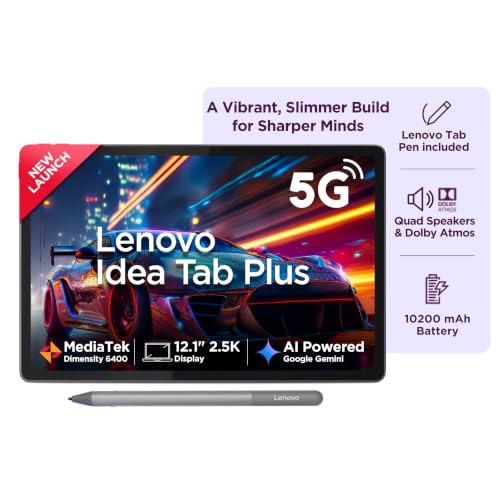
- Crisp, Bright, and Brilliantly Detailed – Experience immersive clarity on a stunning 12.1″ 2.5K display with a sharp 256…
- Powerful, Efficient, and Ready for Anything – Driven by the MediaTek Dimensity 6400 octa-core processor, featuring 2 hig…
- Fast, Spacious, and Built for More – Equipped with 8GB LPDDR4x soldered memory for smooth multitasking and seamless app …
Student Tablet Comparison
| Feature | Lenovo Idea Tab | Redmi Pad 2 | Galaxy Tab S10 FE | OnePlus Pad Go 2 | iPad 11 A16 |
|---|---|---|---|---|---|
| Best use | Overall study | Budget study | Premium notes | Large-screen study | Apple ecosystem |
| Display | 11″ 2.5K | 11″ 2.5K | 10.9″ | 12.1″ | 11″ |
| Refresh rate | 90Hz | 90Hz | 90Hz | 120Hz | 60Hz |
| Pen | ✅ Bundle options | ✅ Supported | ✅ Included | ✅ Supported | ✅ Optional |
| Keyboard | Optional | Optional | Optional | Optional | Optional |
| Storage | Up to 256GB | Up to 256GB | 128GB+ | Up to 256GB | Up to 512GB |
| Cellular option | ✅ | ✅ | Selected models | ✅ | ✅ |
| Best price range | ₹25K–₹32K | ₹20K–₹26K | ₹48K+ | ₹30K+ | ₹50K+ |
What Should a Student Look for in a Tablet?
Don’t simply buy based on RAM or screen size. Think about how you’ll actually study.
1. Display
For studying, I’d recommend roughly 10.5–12.5 inches.
Anything smaller can feel cramped when reading PDFs, while extremely large tablets can become uncomfortable to carry.
A high-resolution display is particularly useful for:
- Small textbook text
- Diagrams
- Charts
- Engineering drawings
- PDFs
- Digital textbooks
2. RAM
Minimum: 4GB
Good enough for:
- Basic browsing
- YouTube
- PDFs
- Simple apps
Better: 6GB
More comfortable for regular student use.
Recommended: 8GB
If your budget allows it, 8GB is the sweet spot for a tablet you want to keep for several years.
3. Storage
I’d recommend:
64GB
Only for very light users.
128GB
Good minimum for most students.
256GB
Better if you download:
- PDFs
- Videos
- Lecture recordings
- Books
- Notes
- Apps
- Offline content
If you don’t have expandable storage, choosing 256GB can be particularly useful.
4. Do You Need a Stylus?
For many students, yes.
A stylus is especially useful for:
- Handwritten notes
- Solving mathematics
- Annotating PDFs
- Highlighting textbooks
- Drawing diagrams
- Signing documents
- Making mind maps
However, if you mainly watch lectures and read PDFs, you don’t necessarily need to spend thousands extra on a premium pen.
5. Wi-Fi or 5G Tablet?
Choose Wi-Fi if:
- You study mostly at home
- Your college has Wi-Fi
- You already have a smartphone hotspot
- You want to save money
Choose 5G/cellular if:
- You travel frequently
- Your college doesn’t have reliable Wi-Fi
- You attend classes in multiple locations
- You don’t want to depend on your phone hotspot
For most students, Wi-Fi + phone hotspot is enough.
Tablet vs Laptop for Students
This is an important question.
| Task | Tablet | Laptop |
|---|---|---|
| Reading PDFs | ⭐⭐⭐⭐⭐ | ⭐⭐⭐⭐ |
| Handwritten notes | ⭐⭐⭐⭐⭐ | ⭐⭐ |
| Online classes | ⭐⭐⭐⭐⭐ | ⭐⭐⭐⭐⭐ |
| Watching lectures | ⭐⭐⭐⭐⭐ | ⭐⭐⭐⭐ |
| Research | ⭐⭐⭐⭐ | ⭐⭐⭐⭐⭐ |
| Long typing | ⭐⭐⭐ | ⭐⭐⭐⭐⭐ |
| Coding | ⭐⭐⭐ | ⭐⭐⭐⭐⭐ |
| Excel/advanced work | ⭐⭐⭐ | ⭐⭐⭐⭐⭐ |
| Portability | ⭐⭐⭐⭐⭐ | ⭐⭐⭐ |
| Drawing | ⭐⭐⭐⭐⭐ | ⭐⭐⭐ |
| Multitasking | ⭐⭐⭐⭐ | ⭐⭐⭐⭐⭐ |
The simple answer:
Tablet = excellent study companion.
Laptop = better primary computer.
If you’re studying computer science, coding, advanced Excel, engineering software, professional editing or other desktop-heavy subjects, don’t replace your laptop with a tablet just because the tablet is newer or more portable.
What About an iPad vs Android Tablet?
Choose iPad if:
- You already use Apple devices
- You want premium apps
- You plan to use the tablet for several years
- You enjoy digital drawing
- Your budget is flexible
- You specifically prefer iPadOS
Choose Android if:
- You want better hardware value
- You want more flexible file management
- You prefer expandable storage on supported models
- You want cheaper stylus bundles
- You want more choices between ₹20,000–₹40,000
For most budget-conscious Indian students, Android offers more hardware for the money.
Also Read | Tablet Accessories | Top 5 Tablet Accessories
Common Student Tablet Buying Mistakes
❌ Buying the cheapest tablet possible
A ₹10,000–₹15,000 tablet may look attractive, but weak processors, limited RAM and poor displays can become frustrating quickly.
❌ Ignoring the cost of the pen
A ₹25,000 tablet isn’t necessarily a ₹25,000 study setup if you need a ₹5,000 stylus.
Always calculate:
Tablet + Pen + Case + Keyboard = Actual Cost
❌ Buying too much storage
If you primarily stream content and store documents in the cloud, 512GB may be unnecessary.
❌ Buying 5G when you don’t need it
A cellular model can cost considerably more.
If your phone hotspot works reliably, Wi-Fi may be the smarter choice.
❌ Choosing a tablet instead of a laptop
A tablet is not automatically a laptop replacement.
If your course requires desktop software, buy the laptop first.
Best Student Tablets by Budget
Under ₹20,000
Best if you want a large, sharp display and basic study functionality.
₹20,000–₹30,000
Lenovo Idea Tab / Redmi Pad 2 with Pen
This is arguably the sweet spot for students.
₹30,000–₹40,000
OnePlus Pad Go 2 / higher Lenovo configurations
Good for students who want more screen space and stronger multitasking.
₹40,000–₹55,000
Samsung Galaxy Tab S10 FE / iPad 11
Choose based on whether you prefer Android or iPadOS.
₹45,000+
Lenovo Idea Tab Plus / iPad / Samsung
This is where you’re moving into premium productivity territory.
Who Should Buy a Student Tablet?
A tablet makes sense if you:
✅ Read lots of PDFs
✅ Attend online classes
✅ Take handwritten notes
✅ Watch educational videos
✅ Carry textbooks around
✅ Want a lightweight study device
✅ Use digital flashcards and study apps
✅ Want a secondary device alongside your laptop
Who Should Skip a Tablet?
You may not need one if:
❌ You already have a good laptop and don’t take digital notes
❌ Your course requires desktop-only software
❌ You mainly need a typing machine
❌ You’re buying one only for gaming
❌ Your budget doesn’t allow accessories
❌ You rarely use digital study material
Frequently Asked Questions
Which tablet is best for students?
For most students, the Lenovo Idea Tab is an excellent overall value choice because it combines an 11-inch 2.5K display, up to 8GB RAM, 256GB storage and pen-supported configurations.
Is 4GB RAM enough for students?
It can be enough for basic PDFs, browsing and video classes, but 6GB–8GB RAM is preferable if you want smoother multitasking and longer useful life.
Is 128GB enough for college students?
Yes, for many students. However, 256GB is better if you download large PDFs, lecture recordings, videos and offline study material.
Do students need a tablet with a pen?
Not necessarily. If you only watch lectures and read PDFs, a pen isn’t essential. But for handwritten notes, mathematical problems and PDF annotation, a stylus is extremely useful.
Is an iPad better than an Android tablet for students?
Not universally. iPadOS has a strong app ecosystem and excellent long-term appeal, while Android tablets often provide more hardware and larger displays at lower prices.
Can a tablet replace a laptop for college?
Usually, no. It can replace a laptop for some students with light workloads, but coding, advanced spreadsheets, desktop software and professional applications are still better suited to laptops.
Which screen size is best for studying?
Around 11–12 inches is the sweet spot for most students. It’s large enough for PDFs and multitasking while remaining portable.
Should I buy a 5G tablet?
Only if you genuinely need mobile connectivity away from Wi-Fi. Otherwise, a Wi-Fi model plus smartphone hotspot is usually more economical.
Our Final Verdict
For most students, I would not recommend spending ₹50,000–₹70,000 automatically.
The sweet spot is closer to ₹25,000–₹35,000, where you can get a capable Android tablet with a large high-resolution display, good RAM and depending on the bundle a stylus.
🏆 Best Overall: Lenovo Idea Tab
The combination of 11-inch 2.5K display, 8GB RAM, 256GB storage and pen-bundle availability makes it one of the most balanced student choices.
💰 Best Budget: Redmi Pad 2
A strong option if your priority is display + battery + affordable pricing.
✍️ Best Premium Android: Samsung Galaxy Tab S10 FE
The included S Pen makes it particularly attractive for serious handwritten note-taking.
📖 Best Large Screen: OnePlus Pad Go 2
A good choice if you want more screen space for PDFs, lectures and split-screen studying.
🍎 Best iPad: iPad 11 (A16)
The obvious choice for students who want the Apple ecosystem and iPadOS.
The best student tablet is ultimately the one that fits your course, budget and study style not simply the one with the highest specifications.
Also Read | Best Tablets for Reading, Work & Entertainment