
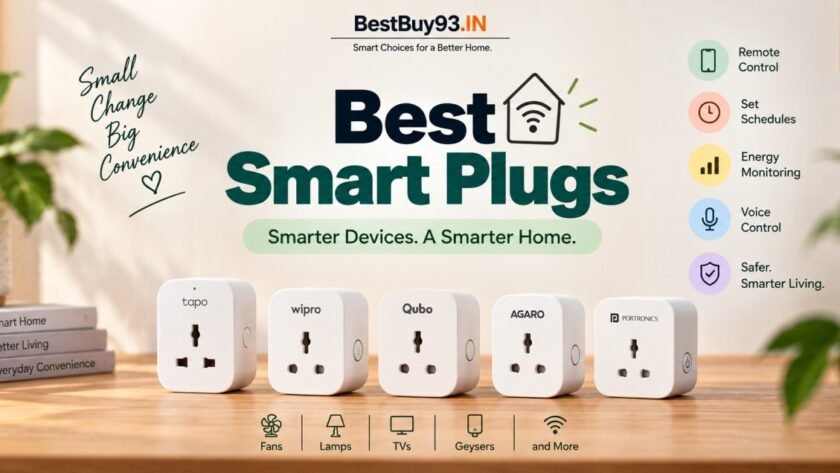

Want to make your regular fan, lamp, TV, geyser or other appliance smarter without replacing it?
A smart plug might be one of the easiest and cheapest ways to start building a smart home.
Instead of replacing your existing appliance with an expensive “smart” version, you simply plug it into a smart plug and gain features such as remote control, scheduling, timers and voice control through your phone or smart assistant.
But there’s one important catch:
Not every smart plug is suitable for every appliance.
A small 10A smart plug can be perfectly fine for a lamp or TV but may not be the right choice for a high-power appliance. For heavier loads, you may need a properly rated 16A smart plug.
So before you buy the cheapest smart plug you find online, let’s figure out which one actually makes sense for your home. 🏠⚡
Quick Answer: Which Is the Best Smart Plug in India?
For most people, TP-Link Tapo P110 is the strongest all-round choice if you want a compact smart plug with energy monitoring, scheduling, remote control and Alexa/Google Assistant support. TP-Link rates it for up to 16A / 3680W and 2.4GHz Wi-Fi.
If you’re specifically looking for a 16A smart plug for heavier appliances, options such as Qubo 16A, Wipro 16A and AGARO Regency 16A are worth considering.
Our Quick Picks
| Category | Our Pick |
|---|---|
| 🏆 Best Overall | TP-Link Tapo P110 |
| 💰 Best Value 16A | AGARO Regency 16A |
| 🏠 Best Indian Smart-Home Option | Qubo 16A |
| ⚡ Best for Heavy Appliances | Wipro 16A |
| 📊 Best for Energy Monitoring | TP-Link Tapo P110 |
| 🔌 Best for Simple Everyday Automation | Wipro Smart Plug |
What Is a Smart Plug?
A smart plug is basically an adapter that sits between your wall socket and appliance.
You plug the smart plug into the wall, connect your appliance to it, and then use an app to control the power.
Depending on the model, you may be able to:
- Turn appliances on/off remotely
- Create schedules
- Set timers
- Use Alexa or Google Assistant
- Monitor electricity consumption
- Automate daily routines
- Check whether a device is switched on
So your ordinary table lamp can suddenly become:
“Alexa, turn on the lamp.” 😎
That’s the basic idea.
Why Buy a Smart Plug Instead of a Smart Appliance?
This is where smart plugs become genuinely useful.
Imagine you already have a perfectly good:
- Table fan
- Lamp
- TV
- Air purifier
- Coffee maker
- Router
- Geyser
- Decorative lights
Do you really want to replace the entire appliance just to get app control?
Probably not.
A smart plug lets you add automation to an existing appliance, provided that appliance is suitable for smart-plug control.
That’s why smart plugs can be a great entry point into home automation.
Best Smart Plugs in India
1. TP-Link Tapo P110 — Best Overall
If you want a smart plug that does more than simply turn something on and off, Tapo P110 is one of the strongest options to consider.
It combines:
- Remote control
- Scheduling
- Timer
- Energy monitoring
- Energy-cost estimation
- Voice control
- Away mode
- Compact design
TP-Link specifies a 16A / 3680W maximum load, 2.4GHz Wi-Fi and compatibility with Amazon Alexa, Google Assistant and Samsung SmartThings. It also includes overload protection and a child safety shutter.
Why We Recommend It
The biggest advantage is energy monitoring.
Instead of simply asking:
“Is my appliance ON?”
you can also get a better idea of:
“How much electricity is this appliance actually using?”
That makes the Tapo P110 particularly interesting for people trying to understand or manage household electricity consumption.
Best For
- Smart-home beginners
- Energy-conscious users
- Lamps
- Fans
- TVs
- Air purifiers
- Compatible higher-load appliances
- People already using Alexa or Google Assistant
Who Should Skip It?
If you only need basic remote ON/OFF control and don’t care about energy monitoring, you can save money with a simpler model.
Pros
- Energy monitoring
- Remote control
- Scheduling
- Timer
- Voice control
- Compact design
- 16A rating
- No separate hub required for basic setup
Cons
- 2.4GHz Wi-Fi only
- More features than necessary for simple ON/OFF use
- Not designed for outdoor use
Our Verdict
🏆 Best overall smart plug for most users.

- Remote Control ——Instantly turn connected devices on/off wherever you are through the Tapo app
- Schedule —— Preset a schedule to automatically manage devices
- Timer —Create countdown timer lists for connected electronics
2. Wipro 16A Smart Plug — Best for Heavy Appliances
If you’re specifically looking for a 16A smart plug, Wipro is another option worth considering.
Wipro‘s smart-plug range supports remote control, scheduling and voice control through its smart-home ecosystem, including Alexa and Google Assistant.
The 16A versions are particularly relevant when you’re dealing with appliances that draw considerably more power than small electronics.
Best For
- Geysers
- Suitable AC applications
- Water heaters
- Higher-load appliances where the product’s rating is appropriate
Why We Recommend It
The main attraction here is straightforward:
16A capacity + smart control.
If you’re specifically shopping for a heavy-appliance smart plug rather than a tiny plug for your bedside lamp, this category matters more than having dozens of fancy app features.
Who Should Skip It?
If you’re only automating a lamp, TV or phone charger, a smaller-rated plug may make more sense.
Pros
- 16A option
- App-based control
- Voice control
- Scheduling
- Suitable for higher-load applications when correctly matched
Cons
- Check the exact model before buying
- Feature sets vary between Wipro smart-plug models
- Don’t assume every Wipro smart plug is designed for the same load
Our Verdict
⚡ A good choice when 16A capacity is your priority.

- Material: Polycarbonate, , Color: White
- Item Dimension: 6.35mm x 5.08mm x 8.1mm
- 1Year
3. Qubo 16A Smart Plug — Best Indian Smart-Home Option
Qubo’s 16A smart plug is designed specifically for heavier appliances and combines Wi-Fi + Bluetooth connectivity.
Qubo lists:
- 16A maximum load
- Wi-Fi + Bluetooth
- App control
- Alexa support
- Google Assistant support
- Timer
- Scheduling
- Energy-consumption monitoring
One particularly interesting feature is the Bluetooth fallback.
Qubo says its smart plugs can still be controlled locally through Bluetooth when internet connectivity is unavailable, while schedules can continue to operate.
Best For
- Indian smart-home setups
- Heavy appliances
- Users who want 16A capacity
- Alexa/Google users
- People interested in energy monitoring
Why We Recommend It
Qubo has built a broader Indian smart-home ecosystem, so the plug can make more sense if you eventually want to add other Qubo devices.
Who Should Skip It?
If you’re already deeply invested in another smart-home ecosystem and don’t want another app, you may prefer a plug from the same ecosystem.
Pros
- 16A option
- Wi-Fi + Bluetooth
- Energy monitoring
- Scheduling
- Timer
- Alexa and Google Assistant
- Indian smart-home ecosystem
Cons
- Apple HomeKit isn’t supported according to Qubo’s FAQ.
- Availability can vary
- 2.4GHz Wi-Fi required
Our Verdict
🏠 A strong choice for building a broader Indian smart-home setup.

4. AGARO Regency 16A — Best Value 16A Pick
If your priority is getting 16A smart-plug functionality without spending too much, AGARO Regency is an interesting value-oriented option.
The current product listing includes:
- 16A high-current support
- Energy monitoring
- App control
- Scheduling
- Timer
- Wi-Fi remote access
- Alexa compatibility
- Google Assistant compatibility
AGARO specifically positions it for appliances such as geysers, ACs, water heaters and microwave ovens.
Best For
- Budget-conscious buyers
- Heavy appliances
- Users wanting energy monitoring
- Basic smart-home automation
Why We Recommend It
The feature list is strong for the price category.
You get the important smart-plug features without necessarily moving into premium pricing.
Who Should Skip It?
If app ecosystem quality and long-term smart-home integration matter more to you than price, Tapo or another established ecosystem may be preferable.
Pros
- 16A
- Energy monitoring
- Timer
- Scheduling
- Alexa and Google Assistant
- Remote access
- Budget-friendly positioning
Cons
- App experience may matter more to some users than hardware features
- Always verify the exact model and load rating before connecting a heavy appliance
Our Verdict
💰 One of the more interesting value choices for a 16A smart plug.

- WORKS WITH ALEXA & GOOGLE ASSISTANT: Control your home appliances hands-free with voice commands via Alexa and Google As…
- 16A HIGH CURRENT SUPPORT: Designed for heavy appliances like geysers, air conditioners, water heaters, microwave ovens a…
- ENERGY MONITORING & APP CONTROL: Track energy usage in real-time and schedule on/off times using the dedicated smart app…
5. GreatWhite Petra 16A Wi-Fi Smart Plug — Best for Heavy-Duty Appliances
GreatWhite Petra is a 16A Wi-Fi smart plug designed for Indian homes where you want to add smart control to higher-power appliances. Its 16A rating makes it a practical choice for appliances that demand more power than typical low-load devices.
With Wi-Fi connectivity and smart-home functionality, Petra lets you control compatible appliances remotely while adding convenient automation to your daily routine. It is particularly worth considering if you want a smart plug from an established electrical brand rather than a lesser-known accessory manufacturer.
Best For
- Higher-power home appliances
- Everyday home automation
- Users looking for a 16A smart plug
- Homes that already use Wi-Fi-based smart devices
- Buyers who prefer established electrical brands
Why We Recommend It
The biggest reason to consider the GreatWhite Petra 16A Wi-Fi Smart Plug is its combination of a 16A rating and smart-home functionality. The higher power rating makes it more suitable for appliances that require a robust plug, while Wi-Fi connectivity keeps everyday control convenient.
GreatWhite’s experience in electrical products also gives Petra an edge for buyers who prefer choosing smart-home accessories from a familiar electrical brand.
Who Should Skip It?
If your main priority is detailed energy monitoring, electricity consumption tracking, or advanced automation, look for a smart plug that specifically highlights those features and provides detailed usage data.
Similarly, if you only need a basic smart plug for low-power devices such as lamps or chargers, a simpler and cheaper model may make more sense.
Pros
- 16A rating for higher-power appliances
- Wi-Fi connectivity
- Smart-home automation
- Remote control convenience
- Established electrical brand
- Suitable for everyday home use
Cons
- May be more than you need for low-power devices
- Advanced energy-monitoring features should be verified for the exact variant
- 16A smart plugs can be bulkier than standard smart plugs
Our Verdict
🔌 A solid 16A smart-plug choice for Indian homes, especially if you want smart control for higher-power appliances from a familiar electrical brand.
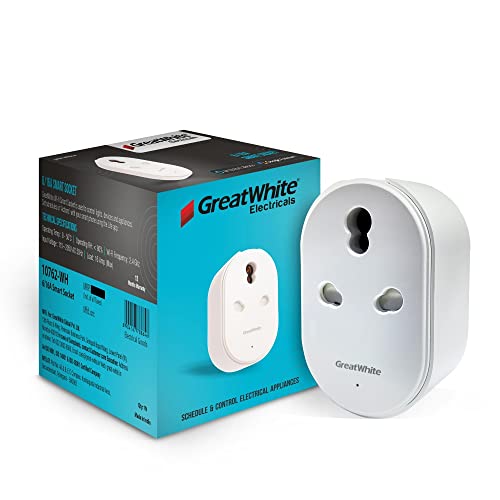
- App & Voice command control via WIFI
- “DIY” – Do it yourself product
- Make any Electrical Appliance Smart
Smart Plug Comparison
| Feature | Tapo P110 | Wipro 16A | Qubo 16A | AGARO Regency 16A | GreatWhite Petra 16A |
|---|---|---|---|---|---|
| Remote Control | ✅ | ✅ | ✅ | ✅ | ✅ |
| Scheduling | ✅ | ✅ | ✅ | ✅ | ✅ |
| Timer | ✅ | ✅ | ✅ | ✅ | Check model |
| Energy Monitoring | ✅ | Model-dependent | ✅ | ✅ | Check model |
| Alexa | ✅ | ✅ | ✅ | ✅ | ✅ |
| Google Assistant | ✅ | ✅ | ✅ | ✅ | ✅ |
| 16A Option | ✅ | ✅ | ✅ | ✅ | ✅ |
| Bluetooth | ❌ | Model-dependent | ✅ | Not highlighted | Not highlighted |
| Best For | Overall | Heavy appliances | Smart-home ecosystem | Value | Simple automation |
Features can vary by exact hardware version/model, so verify the manufacturer’s listing before purchase.
10A vs 16A Smart Plug: Which One Do You Need?
This is the most important buying decision.
Don’t just look at price.
Look at the appliance you’re connecting.
10A Smart Plug
Generally better suited to lower-power devices such as:
- Lamps
- TVs
- Chargers
- Small fans
- Some air purifiers
- Other compatible low-load electronics
Qubo, for example, positions its 10A plug for smaller devices such as phone chargers, air purifiers and TVs.
16A Smart Plug
Designed for higher-load appliances where the plug and electrical installation are appropriately rated.
Examples can include:
- Geysers
- Water heaters
- Some AC applications
- Microwave ovens
- Other higher-power appliances
Qubo specifically describes its 16A version as suitable for heavy appliances such as geysers, ACs and water pumps.
🚨 Important
16A doesn’t mean “plug anything into it.”
The appliance’s electrical load, plug type, wall socket, wiring and smart plug rating all need to be appropriate.
Never exceed the manufacturer’s rated load.
Can You Use a Smart Plug With a Geyser?
Yes but this needs extra attention.
A geyser is a high-power appliance, so you should use a properly rated 16A smart plug and compatible electrical installation if the specific product is designed for that application.
Don’t use a cheap 10A smart plug simply because it fits physically.
Electrical safety comes before smart-home convenience.
For permanent or high-load installations, consult a qualified electrician if you’re unsure about the wiring or socket rating.
Can You Use a Smart Plug With an AC?
This is where you should be particularly careful.
Air conditioners can have significant startup and operating loads, and the correct electrical configuration depends on the AC and installation.
If a smart plug manufacturer explicitly rates a particular 16A model for the relevant AC application, follow those specifications.
Otherwise, don’t assume a generic smart plug is suitable just because it says 16A.
Can You Use a Smart Plug With an Induction Cooktop?
Technically, the rating needs to match the appliance and electrical installation, but this is not an application we’d recommend casually experimenting with.
Induction cooktops can be high-power appliances and may have specific plug/socket requirements.
If your induction cooktop is a 2000W–2200W model, check its manufacturer instructions and electrical requirements before considering smart-plug control.
For high-power heating appliances, don’t use a smart plug as a shortcut around proper electrical installation.
Can a Smart Plug Save Electricity?
It can help but it doesn’t magically reduce appliance consumption.
A smart plug doesn’t make a refrigerator, geyser or fan inherently more efficient.
What it can do is make automation easier.
For example:
Without smart plug:
You leave the geyser on longer than necessary.
With smart plug:
You create a schedule so it switches off automatically.
Similarly, you can:
- Turn lights off automatically
- Schedule a fan
- Turn appliances off when you’re away
- Monitor energy usage on supported models
- Prevent certain devices from being left on unnecessarily
So the savings come from better control and habits, not from the smart plug itself.
Smart Plug vs Smart Switch
These aren’t exactly the same thing.
Smart Plug
You plug it into an existing wall socket.
Advantages:
- Easy installation
- Portable
- No electrician usually required
- Great for renters
- Easy to move between appliances
Smart Switch
A smart switch is installed into the electrical wiring/wall switch setup.
Advantages:
- Cleaner permanent installation
- Better for fixed lighting
- Can control built-in circuits
For beginners:
Smart plug = easier starting point.
What Features Should You Look For?
1. Correct Amp Rating
This comes first.
10A or 16A?
Choose based on the appliance and manufacturer’s specifications.
2. Energy Monitoring
If you want to understand electricity consumption, this is a genuinely useful feature.
Tapo P110, Qubo 16A and AGARO Regency 16A all advertise energy-monitoring capabilities.
3. Scheduling
This is one of the most useful smart-plug functions.
Examples:
7:00 AM → ON
7:30 AM → OFF
You can automate repetitive routines without remembering them every day.
4. Timer
Useful when you want:
“Turn this off after 30 minutes.”
Great for certain lamps, fans and other compatible appliances.
5. Voice Control
Look for compatibility with the ecosystem you already use.
Common options include:
- Amazon Alexa
- Google Assistant
6. App Quality
Don’t underestimate this.
A smart plug can have a great specification sheet and still be annoying if its app is unreliable.
Look for:
- Easy setup
- Clear device status
- Scheduling
- Stable connectivity
- Firmware updates
- Useful automation features
7. Wi-Fi Band
Many affordable smart plugs operate on 2.4GHz Wi-Fi rather than 5GHz.
Tapo and Qubo both specify 2.4GHz Wi-Fi compatibility.
So if your router combines 2.4GHz and 5GHz under one network name, check the manufacturer’s setup instructions if pairing gives you trouble.
Common Smart Plug Buying Mistakes
❌ Buying 10A for a high-load appliance
This is probably the biggest mistake.
❌ Choosing only based on price
A ₹400 plug isn’t automatically a bargain if it has poor compatibility or lacks the features you actually need.
❌ Ignoring the wall socket
The smart plug, appliance plug and wall socket all need to be compatible.
❌ Assuming 16A means universal compatibility
It doesn’t.
❌ Forgetting Wi-Fi requirements
Many smart plugs need 2.4GHz Wi-Fi for setup.
❌ Expecting electricity savings automatically
Automation can reduce unnecessary usage, but the plug itself isn’t an energy-saving device.
❌ Using it outdoors without checking the rating
For example, TP-Link explicitly says the Tapo smart plug isn’t suitable for outdoor use.
❌ Using smart plugs as a substitute for proper electrical work
For high-load appliances or questionable wiring, get a qualified electrician involved.
Best Smart Plug Based on Your Need
🏆 You want the best overall:
Best balance of smart features, energy monitoring, automation and ecosystem support.
💰 You want an affordable 16A model:
AGARO Regency 16A
Good feature set for buyers prioritizing value.
🏠 You want an Indian smart-home ecosystem:
Qubo 16A
Particularly interesting if you’re planning to add more Qubo devices later.
⚡ You mainly care about heavy appliances:
Choose the correct 16A model and verify its exact appliance compatibility.
🔌 You mainly want simple automation:
GreatWhite Petra 16A
Worth considering if your priority is smart ON/OFF control and voice-assistant compatibility.
Are Smart Plugs Safe?
A good-quality smart plug from a reputable manufacturer, used within its specified electrical limits, can be a useful home-automation device.
But safety depends heavily on correct application.
Follow these rules:
- Never exceed the rated current.
- Don’t use damaged plugs.
- Don’t overload connected power strips.
- Don’t use unsuitable extension arrangements.
- Keep the plug dry unless specifically rated otherwise.
- Check the appliance’s power requirements.
- Use the correct 10A/16A version.
- Follow manufacturer instructions.
- Get professional electrical advice for permanent/high-load installations.
TP-Link and Qubo both provide explicit load and application guidance, which is exactly the kind of information you should check before purchasing.
Final Verdict: Which Smart Plug Should You Buy?
Smart plugs are one of those gadgets that look almost unnecessary until you actually start using one.
Then suddenly you’re wondering:
“Why am I still manually switching this thing off?” 😂
For most users, TP-Link Tapo P110 is the strongest overall choice because it combines remote control, scheduling, energy monitoring and voice control in a compact package.
For heavy appliances, pay more attention to the 16A rating and actual electrical compatibility than flashy smart-home features.
For a broader Indian smart-home ecosystem, Qubo 16A is compelling, while Wipro 16A is worth considering when heavy-appliance compatibility is the priority.
And if you’re looking for maximum features at a budget-friendly 16A price point, AGARO Regency 16A is an interesting alternative.
The simplest rule:
Lamp/TV/fan → 10A can be enough.
Geyser/heavy appliance → look for a properly rated 16A model.
Energy tracking → choose a model with energy monitoring.
Alexa/Google → check ecosystem compatibility.
Not sure about the electrical load → don’t guess.
A smart home should make life easier not make your electrician nervous. 😭⚡
Frequently Asked Questions
What is the best smart plug in India?
For most users, the TP-Link Tapo P110 is a strong overall choice because it combines remote control, scheduling, energy monitoring, timers and voice control. It supports up to 16A/3680W according to TP-Link, although the connected appliance must still be appropriate for the plug and electrical installation.
Is a 10A or 16A smart plug better?
Neither is universally better. A 10A plug is generally suited to lower-power appliances, while a 16A model is intended for higher-load applications when the appliance and electrical installation are appropriately rated. Always check the appliance’s actual requirements before choosing.
Can I use a smart plug for a geyser?
A properly rated 16A smart plug may be suitable for some geyser setups, but you must verify the smart plug’s specifications, the geyser’s electrical load and the wall socket/wiring. Never use a 10A plug simply because it physically fits.
Can I control a smart plug without Wi-Fi?
It depends on the model. Some smart plugs provide local connectivity options. For example, Qubo supports Bluetooth fallback, allowing local control when internet connectivity is unavailable. Tapo also supports local app control in certain conditions, although some smart features require additional connectivity.
Do smart plugs reduce electricity bills?
Not automatically. A smart plug doesn’t make an appliance inherently more energy-efficient. It can help reduce unnecessary consumption by allowing scheduling, timers, remote shut-off and, on supported models, energy monitoring.
Can I use a smart plug with Alexa and Google Assistant?
Many current smart plugs support both Amazon Alexa and Google Assistant. However, compatibility varies by model, so check the manufacturer’s specifications before buying. Tapo, Qubo, Wipro and AGARO advertise voice-control support on relevant models.
Do smart plugs work on 5GHz Wi-Fi?
Many affordable smart plugs are designed for 2.4GHz Wi-Fi rather than 5GHz. For example, Tapo and Qubo specify 2.4GHz connectivity. If your router combines both bands, follow the manufacturer’s setup instructions if pairing fails.
Are smart plugs safe for high-power appliances?
They can be when the smart plug is specifically rated for the appliance’s load and the electrical installation is appropriate. A 16A label alone isn’t a guarantee that every high-power appliance is suitable. Always follow the manufacturer’s load limits and installation guidance.
Related Reading on BestBuy93.IN
If you’re building a smarter and more convenient home, these guides can also help:
- Best Induction Cooktops for Home in India
- Induction vs Gas Stove: Which Is Better for Indian Cooking?
- Induction Cooking Guide
- Best Air Fryers for Home in India
- Best Electric Kettles for Home in India
- Best Rice Cookers for Home in India
- Best Mixer Grinders for Home in India



















[…] Also Read | Best Smart Plugs in India for a Smarter Home […]