

Remember those days when almost every laptop came with a built-in CD/DVD drive? You could insert a movie disc, install software from a CD, or open old family photographs without thinking twice.
Today, things look very different. Most modern laptops are slimmer, lighter and increasingly dependent on cloud storage, USB drives and online downloads. That means many new laptops no longer include an optical disc drive.
But what if you still have a collection of DVDs, old music CDs, archived photographs, software discs or important documents stored on physical media?
You don’t necessarily need to replace your laptop. An external DVD drive can bring back CD and DVD functionality through a USB connection.
In this guide, we’ll explore the best external DVD drives to consider, explain the difference between DVD readers and writers, compare useful features, and help you choose a model that works with your laptop.
Whether you’re using a Windows laptop, a MacBook or a thin-and-light notebook, there’s one important thing to check before buying: the connection and compatibility matter just as much as the drive itself.
Quick Answer: Which External DVD Drive Should You Choose?
If you want a quick recommendation, start with your primary requirement.
| Your requirement | What to consider |
|---|---|
| Everyday CD/DVD access | A basic external DVD writer from an established brand |
| Budget-conscious purchase | HP External USB DVD-RW Drive |
| Slim portable design | LG GP65NB60 |
| Familiar business accessory | Dell DW316 |
| USB-C-oriented setup | ASUS ZenDrive U9M |
| Long-term disc archiving | A compatible M-DISC writer |
Our buying advice: Don’t spend extra on a premium optical drive if you only need to open an old DVD occasionally. A conventional external DVD writer is usually enough for everyday CD and DVD tasks.
Best External DVD Drives to Consider
We’ve shortlisted products from familiar computer accessory brands and a few models worth considering for specific connection requirements.
These are research-based recommendations using available product information and listings. We haven’t physically tested these drives, so we won’t pretend to have measured their noise, burning performance or long-term durability.
1. HP External USB DVD-RW Drive – A Practical Everyday Option
If you want an external DVD drive for occasional use, the HP External USB DVD-RW Drive is a sensible model to investigate.
It is designed for users who need access to optical discs without installing an internal drive. You can consider this category of product for reading compatible CDs and DVDs, accessing old files, and writing discs when the drive and blank media support the required format.
Why consider it?
- Familiar computer accessory brand.
- External USB connectivity.
- Suitable product category for basic CD/DVD requirements.
- More practical than buying an entirely new laptop just to access old discs.
Best for: Students, home users and professionals who occasionally need to access physical discs.
Reasons to buy
- A straightforward option for everyday optical-disc access.
- A recognisable brand name.
- No need to open your laptop or modify its hardware.
What to check before buying
- Exact model number and supported disc formats.
- Whether the included cable matches your laptop.
- Operating-system compatibility.
- Warranty and seller authenticity.
Our verdict: A practical starting point if you want a conventional external DVD drive without paying extra for specialist features.

- Back up your data, move files, enjoy your multimedia and read and write CDs and DVDs to your heart’s content with a comp…
- Keep your workspace tidy and add an ODD only when you need it
- Connect the USB-powered drive to any USB 2.0 or 3.0 port on your PC and you’re ready to go
2. LG GP65NB60 – A Slim Portable DVD Writer
The LG GP65NB60 is worth considering if portability is important.
Slim external DVD writers are useful because they can be stored alongside a laptop without taking up much desk or bag space. This can be convenient for people who travel with their computers or only connect an optical drive occasionally.
The GP65NB60 is also associated with M-DISC support. This is a feature worth investigating if you want to create compatible archival discs rather than simply play DVDs.
Why consider it?
- Slim portable DVD-writer design.
- CD and DVD functionality.
- M-DISC compatibility listed for the model.
- Useful for occasional disc access and compatible data-writing tasks.
Best for: Users who want a compact external optical drive and are interested in disc-based data archiving.
Reasons to buy
- Portable form factor.
- More versatile than a read-only DVD player when the writing functionality is needed.
- M-DISC support is useful for people who specifically work with compatible archival media.
What to check before buying
- Confirm that the listing is genuinely for GP65NB60.
- Check whether the cable is included.
- Confirm the seller’s warranty and return policy.
- Verify that the drive supports the particular discs you plan to use.
Our verdict: A good model to shortlist if you want a slim DVD writer. Don’t pay extra for M-DISC support unless you actually plan to use compatible archival discs.
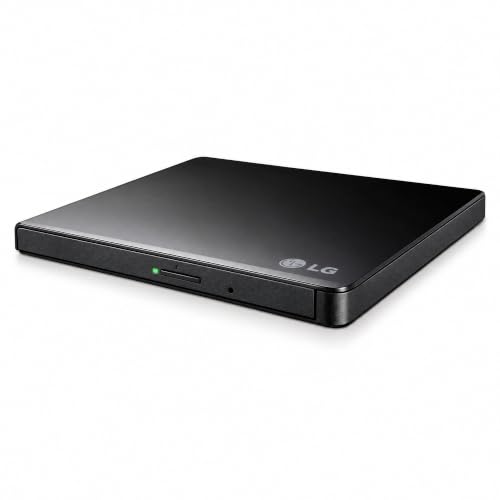
- 14mm Height Ultra Slim Portable DVD Writer Drive
- USB 2.0 interface (up to 480Mbits/s, USB 3.0 Compatible)
- Max 8x DVDR Write Speed
3. Dell DW316 – A Familiar Business-Oriented Choice
The Dell DW316 is another model to consider if you prefer an external optical drive from a well-known PC manufacturer.
An external DVD drive can be particularly useful in office environments where older software, archived records, training material or project files may still be stored on discs.
Instead of keeping an old laptop around just because it has a built-in DVD drive, you can use an external optical drive with a compatible computer.
Why consider it?
- Slim external optical-drive design.
- CD/DVD read and write functionality listed for the model.
- Useful for business and home computing requirements.
- A familiar Dell accessory model.
Best for: Office users, professionals and people who occasionally work with older CD/DVD collections.
Reasons to buy
- Established PC brand.
- Useful for accessing physical media.
- A practical accessory for compatible Windows laptops.
What to check before buying
- Exact DW316 model and condition.
- Supported disc formats.
- Included cable and connection type.
- Whether the seller provides a valid warranty.
Our verdict: Worth considering if you want a conventional external DVD drive for office and everyday use. Compare its current price with other established-brand options before making a purchase.

- Plug and play disc burning and disc playing solution that you can use with a USB port
- Play or burn your favorite DVDs or CDs
- Streamlined design, which compliments contemporary notebooks and blends in well with your home workspace or a high tech …
4. ASUS ZenDrive U9M – For a More Flexible Connection Setup
The ASUS ZenDrive U9M is an option to investigate if your laptop setup involves both traditional USB-A and USB-C connections.
Modern laptops increasingly use USB-C ports, while older external optical drives often rely on USB-A. Having the correct connector or a suitable adapter can make everyday use much easier.
The ZenDrive U9M is a premium-style option in this category, so check its current Indian availability carefully. Some listings may be imported, and the included accessories or warranty can vary between sellers.
Why consider it?
- Designed as a slim external DVD writer.
- USB-A and USB-C connection options are associated with the U9M package.
- Suitable for users who want a more flexible connection arrangement.
- M-DISC support is another feature to investigate if archival use matters.
Best for: Users with newer laptops, MacBooks or mixed USB-A and USB-C devices who want to avoid connection hassles.
Reasons to buy
- Flexible connectivity, subject to the exact package.
- Slim portable design.
- Useful feature set for compatible disc-writing requirements.
What to check before buying
- Confirm the exact U9M model number.
- Check which cables are included in the Indian listing.
- Verify Windows or macOS compatibility for your version.
- Check import charges, warranty and return conditions.
Our verdict: A model worth investigating for USB-C-oriented setups, but don’t buy it purely because the ASUS name sounds premium. Compare the final landed price and included accessories first.
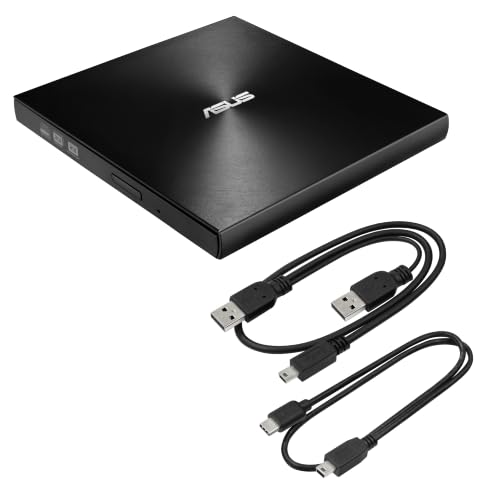
- 13mm for ultra slim and light
- Mac/PC Support
- Includes USB 2. 0 and Type-C cables
External DVD Drive Comparison Table
Here’s a quick comparison to help narrow down the options.
| Product | Main appeal | Suitable buyer | Important check |
|---|---|---|---|
| HP External USB DVD-RW | Everyday disc access | Home and student users | Exact model and connection |
| LG GP65NB60 | Slim portable writer | Frequent travellers | M-DISC and cable support |
| Dell DW316 | Business-oriented option | Office users | Seller and warranty |
| ASUS ZenDrive U9M | Flexible connectivity | USB-C laptop users | Exact cable bundle |
A quick reminder: A DVD writer is not automatically a Blu-ray drive. If you want to read Blu-ray discs, you need a drive specifically designed to support Blu-ray media.
DVD Reader vs DVD Writer: What’s the Difference?
This is one of the most important things to understand before buying.
The terms DVD reader, DVD player and DVD writer are sometimes used interchangeably in online listings. However, they don’t always describe the same functionality.
| Feature | DVD reader | DVD writer |
|---|---|---|
| Read existing DVDs | Yes | Yes |
| Read compatible CDs | Usually, depending on model | Usually, depending on model |
| Write data to blank DVDs | No | Yes |
| Burn music or data CDs | No | Yes, if supported |
| Create backup discs | No | Yes, if supported |
When should you buy a DVD reader?
Choose a reader if you only want to access existing discs.
For example:
- Watching compatible movie DVDs.
- Opening old photographs.
- Reading archived office documents.
- Accessing educational material stored on discs.
When should you buy a DVD writer?
Choose a writer if you also want to create discs.
For example:
- Burning personal files onto blank DVDs.
- Creating compatible data backups.
- Writing music CDs.
- Creating discs for older computers or devices.
Our recommendation: If the price difference is reasonable, an external DVD writer offers more flexibility. However, confirm that it supports the exact disc formats you need.
What to Look for Before Buying an External DVD Drive
Don’t choose an external DVD drive just because the product listing says USB 3.0 or advertises a slim design.
Here are the features that deserve your attention.
A. USB Connection Type
Start by checking your laptop’s ports.
If your laptop has traditional USB-A ports, a USB-A external DVD drive may connect directly.
If your laptop only has USB-C ports, you’ll need either:
- An external DVD drive with a compatible USB-C connector.
- A suitable USB-C-to-USB-A data adapter.
- A compatible USB-C hub.
Remember that not every USB-C cable supports data transfer. A charging-only cable won’t solve your connectivity problem.
B. CD and DVD Format Support
Different optical drives support different disc formats.
| Disc format | What it’s used for |
|---|---|
| CD-R | Writing data once |
| CD-RW | Rewritable CDs |
| DVD-R | Writing data once |
| DVD+R | Writing data once |
| DVD-RW | Rewritable DVDs |
| DVD+RW | Rewritable DVDs |
| DVD-ROM | Reading pre-recorded DVDs |
| DVD-RAM | Specialised rewritable disc format |
If you have an old collection of discs, check their formats before purchasing a drive.
A drive that supports only a limited selection of formats may not be suitable for your entire collection.
C. Read and Write Speed
DVD drives often advertise speeds such as 8x DVD writing or 24x CD writing.
But what do these numbers mean?
They indicate the maximum rated writing speed for compatible media, not a guarantee that every disc will burn at that speed.
Actual performance depends on:
- Disc quality.
- Disc format.
- Drive capability.
- Computer connection.
- Software settings.
For occasional home use, you don’t need to chase the highest advertised speed. Compatibility and reliability matter more.
D. Power Requirements
Most slim external DVD drives are USB-powered.
This means they draw power from your laptop through the USB connection.
However, some drives may require additional power in certain situations, especially when connected through an unpowered hub or when the laptop’s port cannot supply sufficient power.
If a drive isn’t recognised, try connecting it directly to the laptop before assuming the product is defective.
E. Portability and Build Quality
If you plan to carry your external DVD drive regularly, consider:
- Overall thickness.
- Weight.
- Cable storage.
- Protective carrying case.
- Tray or slot-loading design.
- Ease of ejecting discs.
A compact drive is convenient, but a fragile cable or poorly protected disc tray can become annoying over time.
F. M-DISC Support
M-DISC is a type of optical media designed for long-term data storage.
Some compatible DVD writers support burning M-DISC media. This may appeal to photographers, professionals and users who want another physical backup option.
However, remember that M-DISC support does not guarantee that your data will remain accessible forever.
You still need to:
- Use compatible media.
- Store discs properly.
- Maintain multiple backups.
- Check that your future devices can read the format.
USB-A vs USB-C: Which Connection Is Better?
This depends on the ports available on your laptop.
| USB-A | USB-C |
|---|---|
| Common on older and many current laptops | Common on newer thin laptops |
| Often requires an adapter on USB-C-only devices | Can connect directly when supported |
| Widely available on conventional DVD drives | Useful for modern laptop setups |
| Connector is larger | Connector is smaller and reversible |
Here’s a simple example.
If you’re using an older Windows laptop with USB-A ports, you don’t necessarily need a premium USB-C DVD drive.
But if you’re using a modern MacBook with only USB-C ports, a compatible USB-C connection or adapter becomes essential.
Don’t assume USB-C automatically means faster DVD burning. The optical mechanism and disc speed place their own limits on performance. The connector mainly determines whether the drive can connect conveniently.
Are External DVD Drives Compatible With Windows and Mac?
Many external DVD drives support multiple operating systems, but compatibility should never be assumed.
Windows laptops
Most conventional external USB optical drives are designed to work with compatible Windows systems.
However, check the manufacturer’s documentation for your Windows version and the exact drive model.
MacBooks
MacBooks can use compatible external optical drives, but connector requirements and playback software matter.
If your MacBook only has USB-C ports, check whether the drive includes a compatible cable or requires an adapter.
Linux laptops
Some external optical drives can work with Linux systems, but compatibility depends on the device, distribution, firmware and disc format.
Check the manufacturer’s support information or reliable documentation before purchasing.
Chromebooks
Chromebook support can be more restrictive.
A USB optical drive being recognised as a device does not automatically mean that ChromeOS supports every disc format, burning feature or playback workflow.
If you use a Chromebook, verify the exact drive and ChromeOS functionality before ordering.
Do You Need Additional Software to Play DVDs?
Yes, this is an important detail that many buyers overlook.
An external DVD drive provides the hardware needed to access a disc. It does not necessarily include everything required to play a commercial movie DVD.
You may need compatible DVD playback software.
For example, VLC Media Player is a commonly used option for playing supported media formats. However, commercial DVD playback can involve encryption, region restrictions and additional compatibility requirements.
Also remember that:
- Reading a data DVD is different from playing a movie DVD.
- Burning a disc requires compatible writing software.
- Ripping a DVD may involve additional software and copyright restrictions.
- Some bundled software is available only for particular operating systems or product packages.
Before buying, check whether software is included or whether you’ll need to install a separate application.
Common Buying Mistakes to Avoid
A little checking before checkout can save you from buying the wrong accessory.
Mistake 1: Buying a USB-A drive for a USB-C-only laptop
A USB-A drive may still work with an adapter, but remember to include the adapter cost and compatibility in your decision.
Mistake 2: Assuming every DVD drive supports Blu-ray
It doesn’t.
A conventional DVD writer cannot automatically read Blu-ray discs. Look specifically for Blu-ray support if that’s your requirement.
Mistake 3: Confusing a DVD reader with a DVD writer
If you want to burn blank discs, make sure the listing explicitly mentions writing or burning support.
Mistake 4: Ignoring operating-system compatibility
A product may work with Windows but have limitations on macOS or ChromeOS.
Check the exact supported operating systems.
Mistake 5: Expecting movie playback without software
The drive handles the physical disc. Your computer still needs compatible playback software.
Mistake 6: Choosing the cheapest unknown listing
Very inexpensive generic drives may look attractive, but seller support, warranty, cable quality and long-term reliability can be difficult to assess.
Compare the final price with established-brand alternatives before deciding.
In Case You Are Looking For –
Consider linking this article to related guides on your website:
- Best Portable SSDs for Backing Up Smartphone Photos and Videos
- Best External Monitors for Dual-Screen Productivity
- Best USB-C Hubs and Adapters for Laptop Connectivity
- Best Laptop Accessories for Work and Productivity
- Best USB Flash Drives for Storing and Transferring Files
Frequently Asked Questions
1. Can I use an external DVD drive with a laptop that has no DVD slot?
Yes. A compatible external DVD drive connects through USB and allows your laptop to access supported CDs and DVDs without an internal optical drive.
2. Do external DVD drives work with Windows 11?
Many external USB DVD drives are compatible with Windows 11, but check the manufacturer’s documentation for the exact model. Playback software may be needed for movie DVDs.
3. Can an external DVD drive play movies?
Yes, if the drive supports the disc format and your computer has compatible DVD playback software. Some commercial DVDs may also involve region or encryption restrictions.
4. Can I burn CDs and DVDs using an external DVD drive?
Yes, provided you purchase a DVD writer rather than a read-only drive. You will also need compatible blank discs and writing software.
5. Can I connect an external DVD drive to a USB-C laptop?
Yes, if the drive has a compatible USB-C connector or you use a suitable USB-C data adapter or hub.
6. Is an external DVD drive the same as a Blu-ray drive?
No. A standard DVD drive supports compatible CDs and DVDs, but it cannot automatically read Blu-ray discs. You need a Blu-ray-compatible optical drive for that.
7. Do external DVD drives need a separate power adapter?
Many slim external DVD drives draw power through USB. Some models or connection setups may require additional power, so check the manufacturer’s requirements.
8. Is an external DVD writer worth buying in 2026?
It can be worthwhile if you still use physical media for archived files, old software, music CDs, educational content or personal backups. If everything you need is already available online, you may not need one.
Final Verdict: Which External DVD Drive Should You Buy?
External DVD drives may not be everyday laptop accessories anymore, but they’re still useful when you need access to physical media.
The right purchase depends on how you plan to use it.
- For everyday disc access: Consider the HP External USB DVD-RW Drive.
- For a slim portable option: Shortlist the LG GP65NB60.
- For office and business use: Consider the Dell DW316.
- For a more flexible connection setup: Investigate the ASUS ZenDrive U9M.
Before ordering, check the exact model, connector, supported disc formats, operating-system compatibility and seller warranty.
And here’s our final tip: if you only need to read an old family DVD once in a while, don’t overspend on a premium optical drive. Choose a compatible, reasonably priced model and put the savings towards something you’ll use more frequently.
Sometimes the best tech upgrade is simply making your old technology useful again. 💿