

Dust has a way of collecting in the places we forget to clean. It settles between keyboard keys, around laptop vents, inside desktop PC cases, behind monitors and in narrow corners of desks and cabinets. A regular cloth may clean the surface, but it cannot always reach these tight spaces.
An electric air duster offers a practical alternative. It uses a motor-driven stream of air to dislodge loose dust from keyboards, computer cases, vents and other suitable areas. Many rechargeable models come with different nozzles, adjustable speed settings and compact designs that make them convenient for home-office use.
Unlike disposable compressed-air cans, an electric duster can be reused after charging or connecting it to its specified power source. However, not every model provides the same airflow, battery life, noise level or level of control.
In this guide, we compare seven electric dusters and air-blower options worth considering, explain what to check before purchasing and share essential precautions for cleaning computers and delicate electronics.
Important: Product prices and availability change. Specifications such as RPM and battery runtime are based on manufacturer or seller information unless stated otherwise. We have not represented these products as personally tested.
Quick Comparison: Best Electric Dusters in India
| Product | Best For | Indicative Price |
|---|---|---|
| XECH X-Jet Blower | Compact cordless cleaning | ₹1,699 |
| AGARO Electric Air Duster | Everyday home-office use | ₹1,898 |
| Portronics Tornado | Rechargeable, portable cleaning | ₹1,999 |
| Portronics Tornado Pro | Additional controls and features | ₹2,099 |
| WOLFBOX MF50 | Premium cordless option | ₹2,899 |
| Portronics Tornado Plus | Multiple speed modes and dual batteries | Around ₹2,999 |
| MetroVac DataVac ED-500 series | Frequent cleaning near a power outlet | Check current imported or specialist pricing |
1. XECH X-Jet Blower
Best for: Buyers looking for a compact cordless electric duster.
The XECH X-Jet is an option to consider if you want a rechargeable blower for cleaning your keyboard, computer setup and other suitable household items. Its portable format makes it convenient to move between a desk, laptop station and other cleaning areas.
The model is advertised with a high-speed motor, but RPM alone does not establish how effectively a duster removes dust. Nozzle design, airflow, speed control and handling also matter.
Features to check
- Cordless operation.
- Advertised high-speed airflow.
- Included nozzle attachments.
- Charging method and battery runtime.
- Warranty and after-sales support.
Pros
- Portable design.
- Convenient for small cleaning jobs.
- No disposable compressed-air can required.
Cons
- Battery runtime depends on the selected speed and use.
- High-speed airflow may be excessive for delicate components.
- Current availability and warranty terms should be confirmed.
Who should consider it?
This is worth comparing if you want a compact, rechargeable option for occasional keyboard and desk cleaning.
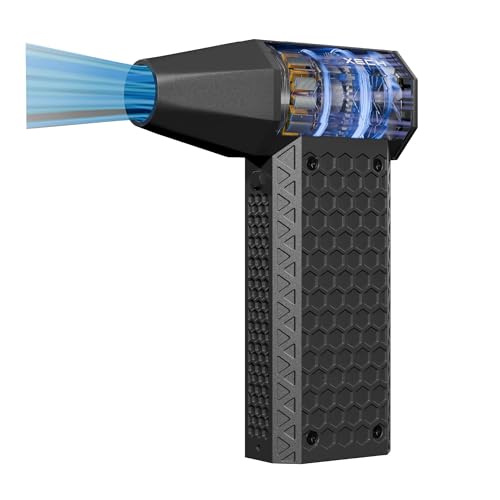
- Powerful Jet Blower for Cleaning: X-Jet combines a powerful brushless motor with up to 140,000 RPM for powerful high-spe…
- High-Power Electric Air Duster: Blow dust from keyboards, computers, consoles, camera equipment and electronics without …
- Cordless, Rechargeable Freedom: No power cord while cleaning. This air blower cordless design is USB-C rechargeable and …
2. AGARO Electric Air Duster
Best for: Routine cleaning around a home-office workstation.
AGARO’s electric air duster is another option for removing loose dust from keyboards, computer cases, vents and other compatible surfaces. It is worth considering if you want a rechargeable device from a brand with a presence in the Indian home and personal-care appliance market.
The product listing advertises a high-speed motor and adjustable speed settings. Check the exact version before purchasing because features and accessories can differ between listings.
Features to check
- Number of speed settings.
- Battery capacity and charging time.
- Included nozzles and brushes.
- Ease of holding and directing the airflow.
- Warranty and replacement support.
Pros
- Suitable for recurring home-office cleaning.
- Cordless convenience.
- Useful alternative to buying disposable air cans repeatedly.
Cons
- Runtime and airflow depend on the model and setting.
- Noise levels may matter if you work in a shared room.
- It cannot replace a vacuum cleaner for collecting large amounts of dust.
Who should consider it?
Compare AGARO if you want a reusable duster for regular keyboard, PC and workspace maintenance.
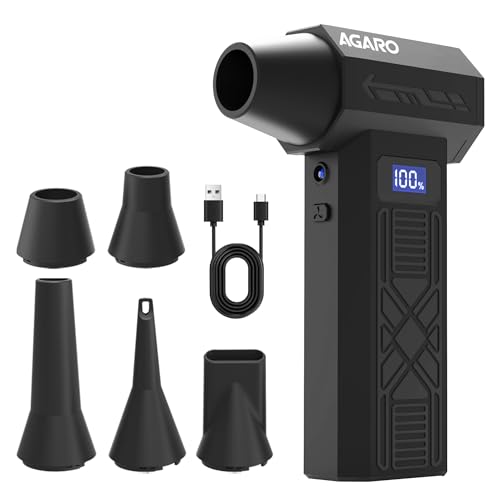
- Ultra-High 120000 RPM Performance Delivers strong, focused airflow to clear dust from computers, consoles, cameras, car …
- 4-Speed Adjustable Airflow Switch between gentle cleaning and powerful blasting with easy speed control and a clear digi…
- Long Lasting 5200 mAh Rechargeable Battery Cordless freedom with long-lasting backup; Type-C fast charging ensures quick…
3. Portronics Tornado Mini Handheld Air Duster
Best for: Compact, rechargeable cleaning for everyday electronics.
Portronics Tornado is a portable air duster designed for cleaning computers, keyboards and other suitable surfaces. Its rechargeable format can be convenient for people who prefer to keep their cleaning equipment near their workstation.
The exact Tornado model and its feature set should be verified before buying, particularly if you are comparing it with Tornado Pro or Tornado Plus.
Features to check
- USB-C or other specified charging method.
- Speed adjustment.
- Included nozzle attachments.
- Battery runtime.
- Warranty and replacement policy.
Pros
- Compact and easy to store.
- Suitable for quick cleaning sessions.
- Reusable rather than disposable.
Cons
- Battery-powered operation limits continuous cleaning time.
- Small nozzles can concentrate airflow, requiring careful use.
- Accessories may differ between product variants.
Who should consider it?
This option may suit students, bloggers, office workers and PC users who want a compact cleaner for regular dust removal.
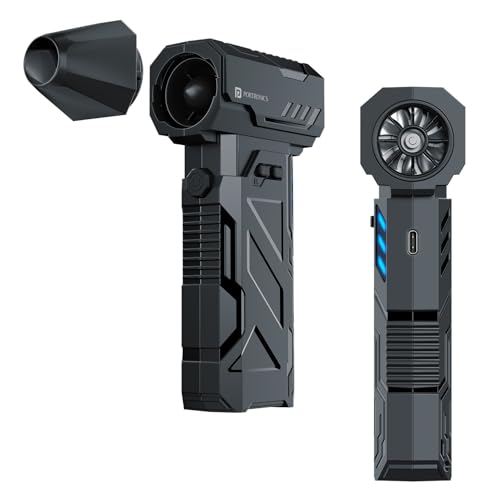
- 160W Powerful Air Blower – The Portronics Tornado is a compact yet ultra-powerful handheld air duster designed for deep …
- Copper Brushless Motor for Long Life – Equipped with a premium copper brushless motor that ensures consistent high-speed…
- 3-Speed Control Modes – Choose from 3 adjustable air speeds: Gear I (30 mins), Gear II (25 mins), and Gear III (10 mins)…
4. Portronics Tornado Pro
Best for: Buyers who want additional control features.
Portronics Tornado Pro is positioned as a higher-feature version of the brand’s handheld air duster range. Its listing advertises Type-C charging, a brushless motor, three speed settings, an LED display, a built-in light and multiple nozzle attachments.
These features can be useful when moving between different cleaning tasks. The lowest speed may help you control the airflow for lighter jobs, while a higher setting may be more suitable for stubborn loose dust on robust surfaces.
Features to check
- Advertised motor speed and speed settings.
- LED display and built-in light.
- Nozzle selection.
- Battery runtime and charging time.
- Warranty and seller support.
Pros
- Several advertised control and convenience features.
- Portable, rechargeable design.
- Multiple attachments for different tasks.
Cons
- Additional features may not be necessary for occasional cleaning.
- Maximum RPM does not directly measure cleaning effectiveness.
- The correct speed still needs to be selected for the surface.
Who should consider it?
Compare Tornado Pro if you expect to clean regularly and would benefit from adjustable speed and additional accessories.
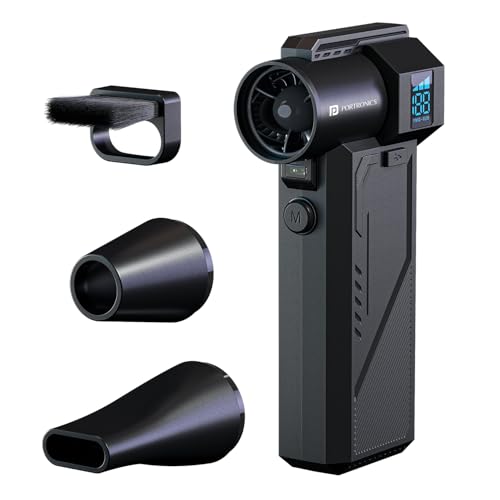
- Extreme 1,30,000 RPM Air Blower for Deep Cleaning The Tornado Pro blasts dust at ultra-high speed with its advanced BLDC…
- Three Adjustable Speed Modes for Precision Control Choose from Gear I (up to 60 minutes), Gear II (up to 25 minutes) and…
- LED Display for Real-Time Speed & Battery Status Stay updated on working mode, power consumption and battery level with …
5. WOLFBOX MF50 Electric Air Duster
Best for: Buyers considering a higher-priced cordless option.
The WOLFBOX MF50 is a rechargeable electric air duster advertised with a three-speed design and multiple nozzle attachments. It is intended for cleaning tasks involving computers, keyboards and other compatible equipment.
A cordless model can be convenient when you need to move between devices or do not want a power cord across your workspace. However, verify the product’s actual dimensions, included accessories and warranty arrangements before ordering.
Features to check
- Advertised motor speed.
- Speed settings.
- Battery runtime.
- Included nozzles.
- Charging method and warranty.
Pros
- Cordless convenience.
- Multiple speed options.
- Useful for cleaning more than one workstation or device.
Cons
- More expensive than some entry-level models.
- Imported-product availability and support can vary by seller.
- High-speed airflow requires care around delicate components.
Who should consider it?
This is worth comparing if you want a cordless model with multiple speed settings and are comfortable spending more than you would on a basic duster.
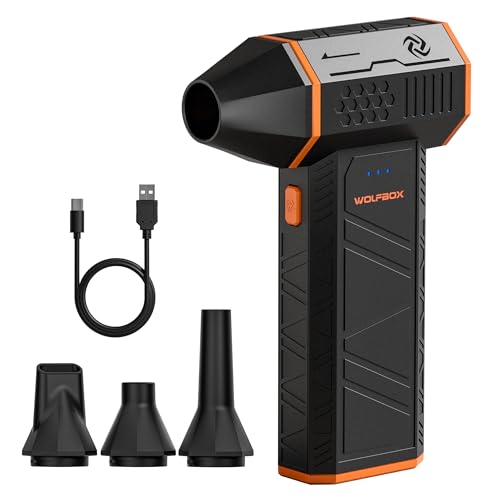
- Powerful Turbo Fan, 110,000 RPM-The WOLFBOX MegaFlow50 electric air duster blasts away dust with a turbo motor spinning …
- Economical and Eco-Friendly-The WOLFBOX MF50 is built to last, featuring a durable body and rechargeable battery-a smart…
- Ultra-Light and Portable-Weighing just 200g, this compact air duster is easy to carry anywhere. Comes with a lanyard for…
6. Portronics Tornado Plus
Best for: Buyers who want adjustable speeds and a dual-battery arrangement.
Portronics Tornado Plus is listed with a brushless motor, three adjustable speed modes, two rechargeable 3,000mAh batteries, multiple nozzle attachments and Type-C charging. The manufacturer lists a price of approximately ₹2,999, but check the live listing for current stock and offers.
The dual-battery arrangement is a feature to consider if you value battery capacity and want to compare charging and runtime arrangements with single-battery alternatives. Actual cleaning time still depends on the speed setting and usage pattern.
Pros
- Three advertised speed modes.
- Multiple nozzle attachments.
- Dual rechargeable batteries.
- USB-C charging.
Cons
- May be unnecessary for people who clean only occasionally.
- Battery capacity alone does not guarantee a specific runtime.
- Availability and price may vary.
Who should consider it?
Compare Tornado Plus if you want a feature-rich rechargeable model and its battery and accessory configuration suits your needs.
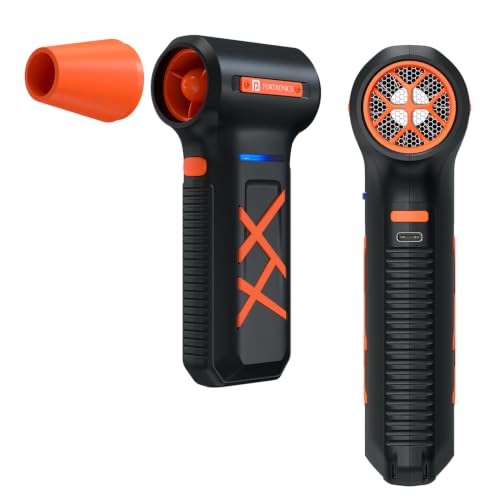
- Powerful 130,000 RPM Air Blasting Performance Blast away dust, debris, and dirt with an ultra-high-speed brushless motor…
- Dual 3000mAh Rechargeable Batteries Equipped with dual high-capacity batteries for extended runtime, ensuring uninterrup…
- 3 Adjustable Speed Modes Choose from three airflow levels to tackle everything from delicate electronics to stubborn dus…
7. MetroVac DataVac ED-500 Series
Best for: Frequent cleaning at a fixed workstation with access to a power outlet.
Unlike the cordless products above, the MetroVac DataVac ED-500 series uses a corded design. MetroVac lists a 500-watt motor, 70 CFM airflow, a 12-foot power cord and a weight of around three pounds for the ED-500 specifications. The ED-500V is a variable-speed variant, so confirm which model you are purchasing.
A corded unit can be convenient for longer cleaning sessions because you do not need to stop to recharge a battery. On the other hand, its size, cord and potentially higher cost can make it less convenient for casual use.
Pros
- No battery-runtime limitation during normal powered operation.
- Designed for computer and electronics dusting.
- Useful for frequent cleaning near a workstation.
Cons
- Less portable than a compact cordless model.
- Takes up more storage space.
- Current Indian availability and pricing may be limited.
Who should consider it?
This option is more relevant to people who clean computer equipment regularly, maintain multiple systems or prefer a corded device for extended sessions.
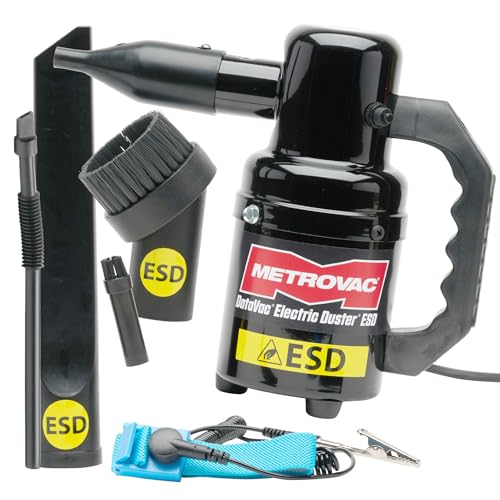
- POWERFUL AIR BLOWER: 500-watt motor delivers strong airflow. Use as a handheld blower, dust blower, or mini air blower t…
- ANTI-STATIC DESIGN: ESD safe system includes grounded 3-conductor cord and wrist strap. Protects sensitive electronics d…
- DURABLE ALL-STEEL BUILD: Rugged, professional-grade body built to last. This small blower replaces disposable canned air…
How to Choose the Best Electric Duster
Before purchasing, focus on the features that affect how you will actually use the device.
1. Cordless or corded?
A cordless electric duster is easier to carry around your home and use at different desks. Its runtime depends on battery capacity and speed.
A corded model suits a fixed cleaning station and avoids charging breaks, but the cable limits mobility.
Choose cordless for portability and corded for frequent, extended cleaning near a suitable outlet.
2. Adjustable speed settings
Adjustable speed can be especially useful for keyboards and delicate equipment. A lower setting may help prevent small objects from flying away or dust from being pushed deeper into a narrow space.
Use the lowest effective airflow first. Increase it only when the surface and equipment can safely tolerate it.
3. Nozzle attachments
Different nozzle shapes help direct air into different areas.
| Attachment | Useful For |
|---|---|
| Narrow nozzle | Gaps between keyboard keys and narrow vents |
| Wide nozzle | Larger, open surfaces |
| Brush attachment | Suitable surface dusting when the manufacturer permits it |
| Angled nozzle | Reaching awkward corners |
| Extension nozzle | Directing airflow into deeper, accessible gaps |
Not every model includes every attachment. Confirm the contents of the box before buying.
4. Battery capacity and runtime
A larger battery may provide longer use, but the actual runtime depends on the motor, speed setting and how often the device is activated.
Check whether the manufacturer specifies runtime at low or high speed. Do not compare runtime figures unless the conditions are similar.
5. Noise level
Electric dusters can be loud, particularly at higher speeds. If you work in a shared room, live in an apartment or clean late at night, look for credible noise measurements or reviews describing the sound.
Wear appropriate hearing protection if exposure is uncomfortable or prolonged.
6. Weight and handling
A compact device is easier to direct around a keyboard, monitor stand or desktop case. If you expect to clean several devices in one session, grip comfort and weight can matter more than headline motor speed.
7. Warranty and service
Check the seller’s return policy, warranty period and access to service before purchasing. This is especially important for imported products or models sold by third-party sellers.
Electric Duster vs Compressed-Air Can vs Vacuum Cleaner
| Feature | Electric Air Duster | Compressed-Air Can | Vacuum Cleaner |
|---|---|---|---|
| Main function | Blows loose dust away | Releases pressurised gas to dislodge dust | Collects dust and debris |
| Reusable | Yes, after charging or with power | No, each can has limited contents | Yes |
| Best use | Keyboards, vents and suitable electronics | Occasional targeted cleaning | Floors, upholstery and collected debris |
| Portability | Depends on battery or cord | Usually very portable | Depends on model |
| Main limitation | Can spread dust; airflow requires care | Limited contents and handling restrictions | Attachments may be too large for narrow gaps |
An electric duster is not automatically better for every cleaning job. A vacuum cleaner is more appropriate when you need to collect dust rather than blow it into the surrounding room. For electronic equipment, use only a vacuum or accessory suitable for the device and its static-safety requirements.
How to Clean a Keyboard with an Electric Duster
- Shut down the computer or disconnect the keyboard, following its manufacturer’s instructions.
- Move the keyboard to a clear, well-ventilated surface.
- If the keyboard manufacturer permits it, tilt it slightly to help loose debris fall out.
- Start with the duster’s lowest speed and use a suitable nozzle.
- Direct airflow across the key gaps rather than forcing the nozzle into them.
- Use short bursts and keep the nozzle at a sensible distance.
- Wipe the keycaps and outer surface with an appropriate, lightly dampened cloth if needed.
- Allow all surfaces to dry fully before reconnecting the keyboard.
Do not use strong airflow to force debris deeper into the keyboard. Avoid spraying liquids directly onto keys or openings.
How to Clean a Desktop PC Safely
Cleaning inside a computer requires more care than dusting a keyboard.
- Shut down the PC completely.
- Switch off and unplug the power supply, then disconnect external cables as appropriate.
- Move the computer to a suitable, ventilated work area.
- Follow the computer or case manufacturer’s instructions before opening the case.
- Use controlled airflow to remove loose dust from suitable areas.
- Prevent fans from spinning freely under the airflow, following the manufacturer’s guidance.
- Avoid touching circuit boards or components with the nozzle.
- Do not open the power supply unit itself.
- Refit the case panels securely before reconnecting power.
Important: Do not use an electric duster while the computer is powered on when cleaning inside the case. Avoid excessive airflow, static-generating attachments and contact with delicate components. If you are unsure about cleaning internal parts, use a qualified technician.
Cleaning Hard-to-Reach Corners Around the Home
Electric dusters can also be useful outside a computer setup, provided the device is suitable for the task.
Desk and monitor stand
Use controlled airflow to move loose dust out of accessible corners, then wipe the surface or vacuum the displaced dust.
Window tracks
A narrow nozzle may loosen dry dust from accessible tracks. Follow with a cloth or vacuum to collect it.
Behind appliances
Only clean areas that are safely accessible. Switch off and unplug appliances where appropriate, and follow the manufacturer’s cleaning guidance.
Decorative shelves and cabinet corners
Use low airflow and move fragile objects first. A cloth or brush may be safer for lightweight decorations.
Camera and sensitive optical equipment
Do not assume a general-purpose electric duster is suitable for camera sensors or delicate optics. Follow the equipment manufacturer’s cleaning instructions and use specialised tools where required.
Common Mistakes to Avoid
Choosing by RPM alone: Motor speed is not the same as airflow or cleaning effectiveness. Compare nozzle design, controls and credible performance evidence.
Using maximum speed everywhere: Strong airflow can dislodge small parts or force dust into deeper spaces. Start low and increase cautiously.
Blowing dust towards your face: Dust can irritate the eyes and airways. Direct airflow away from people and pets, and use eye protection where appropriate.
Letting PC fans spin freely: Excessive airflow can overspin fans. Keep them from rotating freely while cleaning, following the manufacturer’s instructions.
Using the duster on wet surfaces: Do not direct air into wet electronics or use a device contrary to its moisture-safety instructions.
Ignoring battery care: Use the specified charging method and stop using the unit if the battery swells, overheats or becomes damaged.
Expecting the duster to collect dust: A blower moves dust; it does not necessarily capture it. Vacuum or wipe the surrounding area after cleaning.
In Case You Are Looking For –
- Best Bluetooth Keyboards for Phones, Tablets & Laptops
- Best Budget Gaming Laptops in India
- 10 Laptop Setup Essentials
- Best Budget Laptops for Students & Work in India
Frequently Asked Questions
1. Which is the best electric duster in India?
The best choice depends on your budget and needs. XECH X-Jet and AGARO are options to compare in the lower-price segment, while Portronics Tornado Pro, Tornado Plus and WOLFBOX MF50 offer other feature combinations. Check current prices, specifications and support before purchasing.
2. Is an electric air duster safe for a PC?
It can be used for suitable cleaning tasks if the equipment is powered off, airflow is controlled and the manufacturer’s guidance is followed. Keep fans from spinning freely and avoid touching components with the nozzle.
3. Can I clean my laptop keyboard with an electric duster?
Yes, if the laptop manufacturer permits this method. Power down the laptop, use low airflow and a suitable nozzle, and avoid forcing dust or debris deeper into the keyboard.
4. Is an electric duster better than compressed-air cans?
An electric duster is reusable and convenient for repeated cleaning. Compressed-air cans are portable and may suit occasional use. Neither is best for every job; compare handling instructions, airflow control, cost and the equipment being cleaned.
5. Does a higher RPM mean a better electric duster?
No. RPM measures motor speed, not the amount of air delivered or how effectively dust is removed. Airflow, pressure, nozzle design, speed control and handling also matter.
6. How often should I clean my PC?
It depends on the room’s dust levels, ventilation, pets and how heavily the computer is used. Inspect the vents periodically and clean when dust begins to accumulate. Follow the computer manufacturer’s maintenance guidance.
7. Can an electric duster replace a vacuum cleaner?
No. A duster blows dust away from a surface, whereas a vacuum collects it. For a complete cleaning routine, you may need to collect displaced dust using a suitable vacuum or cloth.
8. Can I use an electric duster to clean ceiling corners?
A suitable nozzle may help with accessible dry dust, but use care around fragile items and electrical fittings. Do not climb on unstable furniture or direct airflow into electrical equipment.
9. Are cordless electric dusters rechargeable?
Many models are rechargeable, but charging methods and battery specifications vary. Check whether the product uses USB-C or another specified charger and follow the manufacturer’s instructions.
10. What should I check before buying an electric duster?
Compare speed settings, nozzle attachments, battery runtime, charging method, weight, noise, warranty and seller reliability. Also consider whether you need a portable device or a corded unit for frequent cleaning.
Final Verdict
An electric duster can be a useful addition to your home-office cleaning kit, especially if you regularly clean keyboards, computer cases, vents and narrow corners.
For a compact everyday option, compare the XECH X-Jet, AGARO Electric Air Duster and Portronics Tornado. If adjustable controls and extra features matter more to you, consider the Portronics Tornado Pro, Portronics Tornado Plus or WOLFBOX MF50. For frequent cleaning near a fixed workstation, the corded MetroVac DataVac ED-500 series is another option to investigate.
Before buying, focus on the features you will actually use rather than choosing by motor speed alone. For electronics, safe handling and controlled airflow matter just as much as the device’s headline specifications.
Keep your workspace cleaner, your tools organised and your electronics maintenance routine simple. 💨⌨️