


A practical 2026 buying guide for a more comfortable, organised laptop setup.
Working on a laptop for hours can turn your desk into a tiny battlefield: tangled charging cables, a screen sitting too low, and your neck slowly questioning your career choices. 😅
A laptop stand can help raise your screen, free up desk space, and make your workstation feel more organised. But here’s the catch: not every laptop stand is stable, adjustable, or suitable for every laptop. And a fancy-looking stand won’t magically fix your posture.
In this guide, we’ll explore the different types of laptop stands, what to look for before buying one in India, and which kind makes sense for blogging, studying, working from home, gaming, or travelling.
1. Why Use a Laptop Stand?
A laptop is designed to be portable, not necessarily to provide the ideal screen and keyboard positions for every desk setup.
When your laptop sits flat on a desk, you may find yourself looking down at the screen. Raising the display can make it easier to position it at a comfortable viewing height.
A laptop stand can also help you:
- Create a more organised desk: Raise the laptop and make better use of the space underneath.
- Adjust your viewing angle: Useful when switching between sitting positions or desk setups.
- Improve airflow around the laptop: Some stands leave more space around the underside, although better airflow does not guarantee lower temperatures.
- Build a workstation: Pair the stand with an external keyboard, mouse, and monitor.
- Make your setup more portable: Foldable stands can be packed away when you work in different places.
The key is choosing a stand that fits your actual routinenot buying one just because it looks good in a desk-setup reel.
2. Best Laptop Stand Types at a Glance

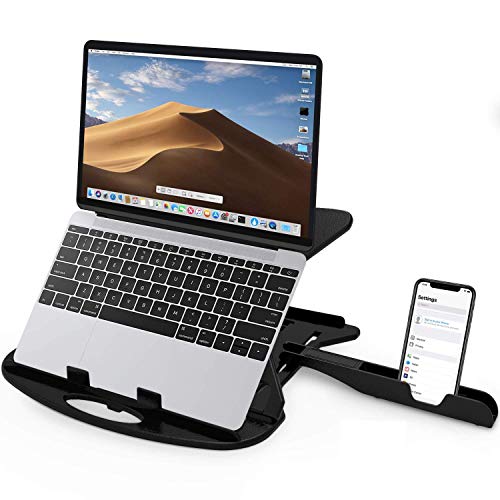
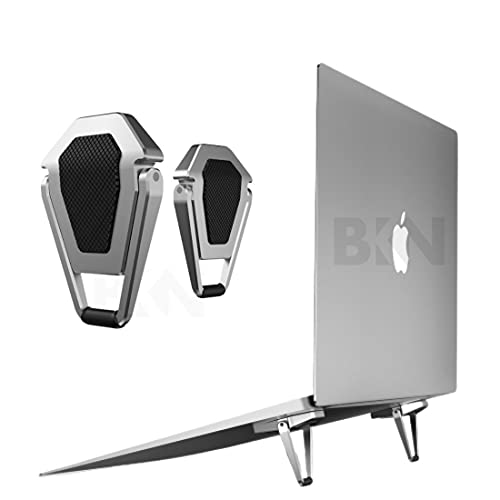
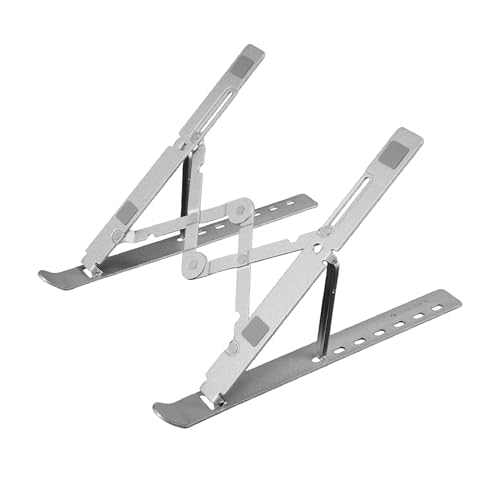
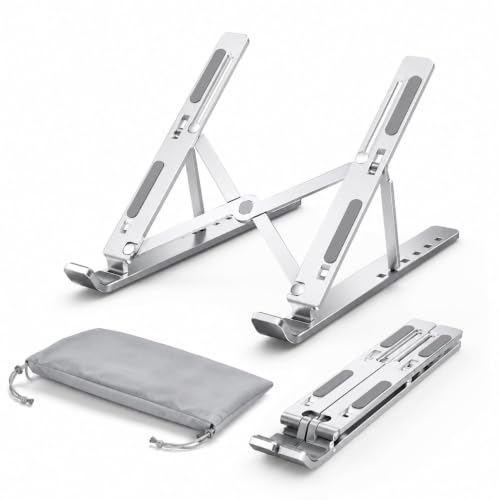
Foldable laptop stand
A practical option for students, bloggers, and people who move between workspaces. It folds for storage and travel, but check that its hinges lock securely.

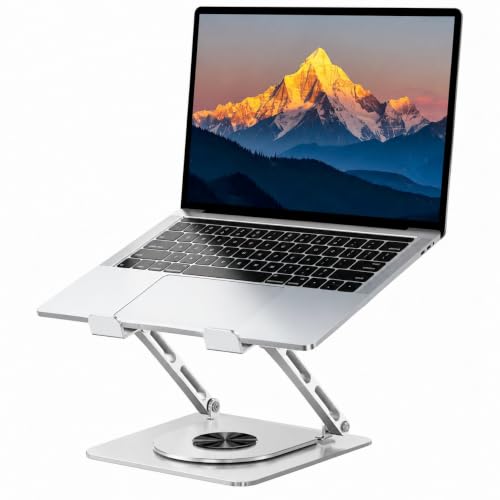
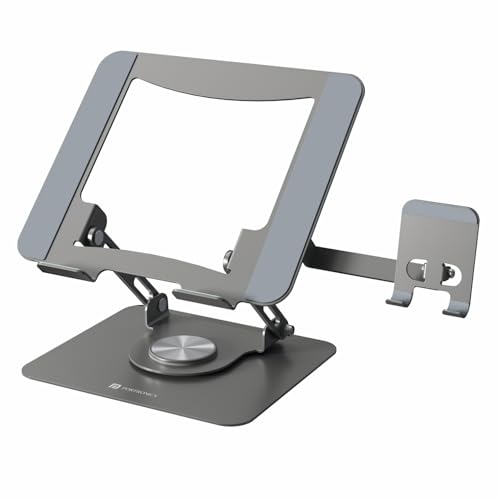
Height-adjustable laptop stand
Suitable for a dedicated desk where you want to fine-tune screen height and angle. Stability becomes especially important when the stand is extended.

Laptop cooling stand
Often includes built-in fans or a ventilated surface. Consider one if your laptop gets hot during demanding tasks, but check noise, power requirements, and compatibility.

Vertical laptop stand
Designed to store a laptop upright, often in a setup with an external monitor, keyboard, and mouse. It saves desk space but is not intended to raise the screen for direct laptop use.



3. Top Laptop Stand Picks by Use Case
Instead of pretending one design is perfect for everyone, let’s match the stand type to the way you work.
1. Best for Everyday Work: Adjustable Laptop Stand

If your laptop is your main work machine, an adjustable stand is a sensible place to start.
It allows you to change the screen height and viewing angle to suit your desk. That can be especially useful when you spend long sessions reading, writing, researching, or attending online meetings.
What to look for
- A stable base that doesn’t wobble when you type.
- Several usable height or angle settings.
- Non-slip pads and a secure front lip.
- Compatibility with your laptop’s dimensions and weight.
Reasons to consider it: Flexible positioning for a dedicated workspace.
What to watch out for: Some adjustable designs become less stable at their highest setting. If you type directly on the laptop, test whether the raised position is comfortable or use a separate keyboard.
CTA: Compare adjustable laptop stands and check their supported laptop sizes before choosing.
2. Best for Students: Foldable Laptop Stand

Students often work wherever they can find a free surface: a study table, a shared desk, or a corner of the dining table. A foldable stand makes it easier to move your setup without turning it into a furniture-moving project.
Look for a lightweight design that opens and folds easily, but don’t sacrifice stability for portability.
Reasons to consider it: Easy to store and carry between study locations.
What to watch out for: Very compact models may offer limited height adjustment or feel less secure with heavier laptops.
CTA: Check foldable models for portability, locking positions, and laptop compatibility.
3. Best for a Dedicated Home Office: Sturdy Height-Adjustable Stand

If you work from home most days, you may benefit from a stand that stays on your desk rather than one you fold away every evening.
A sturdy stand can help you create a consistent workstation. Pair it with an external keyboard and mouse so the screen can be raised without forcing your hands into an awkward position.
Reasons to consider it: A more permanent setup with adjustable screen positioning.
What to watch out for: Check the footprint. A large stand can eat up desk space, especially on compact tables.
CTA: Compare desk-based adjustable stands by stability, range of adjustment, and footprint.
4. Best for Hot-Running Laptops: Cooling Stand

If you edit videos, play games, or run demanding software, you may be looking at cooling stands.
These products usually combine a raised platform with fans or ventilation. Whether they meaningfully reduce temperatures depends on your laptop’s cooling design, workload, and the stand itself.
Reasons to consider it: Combines laptop support with airflow features.
What to watch out for: Fan noise, USB power needs, fan placement, and whether the laptop’s air intakes align with the cooling surface.
A cooling pad is not a guaranteed fix for overheating. If your laptop is frequently throttling or shutting down, investigate the laptop’s cooling system rather than relying on an accessory alone.
CTA: Compare cooling pads by fan layout, noise, size, and laptop fit.
5. Best for Minimalist Desk Setups: Vertical Laptop Stand

A vertical stand is useful when you use your laptop with an external monitor and want to reclaim desk space.
It holds the laptop upright instead of spreading it across the desk. Some models have adjustable slots to accommodate different laptop thicknesses.
Reasons to consider it: Helps keep a multi-device desk tidy.
What to watch out for: Check the slot width and whether the laptop can be held securely without scratching its body. Also confirm whether your laptop supports the closed-lid workflow you intend to use.
CTA: Look for a vertical holder that fits your laptop’s thickness and your desk arrangement.
4. Laptop Stand Comparison Table
| Stand type | Best suited for | Main advantage | Main limitation |
|---|---|---|---|
| Adjustable | Daily desk work | Customisable screen position | Can wobble if poorly built |
| Foldable | Students and travel | Easy to store and carry | May have fewer adjustments |
| Sturdy desk stand | Work-from-home | Dedicated, consistent setup | Takes up desk space |
| Cooling stand | Demanding workloads | Adds ventilation or fans | Cooling results vary |
| Vertical stand | External-monitor setups | Saves desk space | Not for direct screen viewing |
Quick takeaway: For most people who work on a laptop at a desk, an adjustable stand paired with an external keyboard and mouse is a useful configuration to consider. For travel, portability may matter more; for a multi-monitor desk, a vertical holder may be more relevant.
5. Pros and Cons of Laptop Stands
| Reasons to buy / What we like | What we don’t like |
|---|---|
| Can raise the screen to a more comfortable viewing position | Raising the screen alone does not create a complete ergonomic setup |
| Helps organise a compact desk | Some designs wobble or shift |
| Foldable options are easy to store | Very compact models may offer limited adjustment |
| Open designs can leave room for airflow | Better airflow does not guarantee lower temperatures |
| Can work well with external peripherals | Keyboard and mouse may be an additional expense |
| Several types suit different work styles | Compatibility and build quality vary significantly |
The biggest benefit is flexibility. The biggest mistake is assuming that every stand will automatically improve comfort or cooling.
6. How to Choose the Right Laptop Stand
Before you add a stand to your cart, check these details.
1. Laptop size and weight
Start with your laptop’s actual dimensions and weight not just the screen size.
A stand advertised for 15.6-inch laptops may not necessarily suit every laptop of that size, especially if it has an unusually deep base or weighs more than expected.
Check:
- Supported screen-size range.
- Maximum supported weight.
- Platform width and depth.
- Whether the laptop’s base fits securely.
2. Height and angle adjustment
If you work at a desk for several hours, adjustment can be useful because one fixed position may not suit every chair, desk, or user.
But don’t focus only on the maximum height. Ask whether the stand has a practical range of positions and remains stable when adjusted.
3. Stability and build quality
A stand that shakes every time you type can quickly become irritating.
Look for:
- Firm joints and locking mechanisms.
- A base that sits flat on your desk.
- Non-slip feet.
- A secure front lip or support.
- Reviews that specifically mention wobbling or hinge looseness.
Metal construction can feel sturdy, but material alone is not a quality guarantee. Design and workmanship matter too.
4. Keyboard and mouse compatibility
This one is easy to overlook.
When you raise your laptop screen, its keyboard rises too. That can make typing uncomfortable if your hands have to reach upward.
For a raised-screen setup, consider an external keyboard and mouse. This lets you position the screen and typing area more independently.
5. Cooling and ventilation
If your laptop gets warm, check whether the stand blocks or exposes the laptop’s air intakes.
An open platform may allow more airflow around the underside. A fan-equipped cooling pad adds active airflow, but its effect varies by laptop and workload.
Don’t pay extra for fans unless cooling is a real need for your use case.
6. Portability and storage
If you work from different locations, consider the stand’s folded size and weight.
A foldable model should be easy to pack and should stay securely folded during transport. For a permanent desk, portability may matter much less than stability.
7. Desk space and cable management
A stand should make your setup more functional, not leave you with no room for your mouse.
Measure your available desk space and account for:
- The stand’s footprint.
- Laptop charging cable.
- External keyboard and mouse.
- Any monitor or accessories.
- Space to move your hands comfortably.
8. Price, warranty, and returns
Prices and offers change frequently in India, so compare current listings rather than relying on an old deal or screenshot.
Before buying, review the seller, return policy, warranty terms, and recent customer feedback. Pay particular attention to comments about stability, compatibility, and durability.
Laptop Stand Setup Tips for Work From Home
A laptop stand is only one part of a comfortable workstation. Here’s how to make it work in everyday life.
Scenario 1: You’re blogging or writing for hours
Imagine researching products, writing drafts, checking SEO, and switching between multiple tabs. Your laptop is open all day, and the screen sits low on the table.
Raising the screen can make the display easier to view. If the keyboard becomes too high, add an external keyboard and mouse.
Setup idea: Adjustable stand + external keyboard + mouse + comfortable chair.
Scenario 2: You’re attending back-to-back video meetings
A low laptop camera can create an awkward viewing angle during calls. Raising the laptop can bring the camera closer to eye level, depending on your setup.
Check that the stand is stable and that your face is well-lit. A stand won’t fix poor lighting, but it can help you position the screen more deliberately.
Setup idea: Stable stand + good lighting + headset or microphone as needed.
Scenario 3: You’re studying in a small room
A foldable stand can be stored when you need the desk for books or other tasks.
If your workspace is shared, portability and quick setup may matter more than having a large, heavy stand with multiple adjustment mechanisms.
Setup idea: Foldable stand + compact mouse + easy-to-store accessories.
Scenario 4: You’re using an external monitor
If the laptop is acting as a secondary screen or computer, a vertical stand may help reclaim desk space. Make sure the laptop’s ports and cables remain accessible.
Setup idea: External monitor + keyboard + mouse + vertical laptop holder.
Research Methodology
This guide is organised around the main laptop stand categories and the features buyers should compare: adjustability, stability, laptop compatibility, portability, ventilation, desk footprint, and peripheral support.
The recommendations are use-case-based rather than a claim that every product has been independently tested. Product designs and prices can change, so shoppers should verify the latest specifications, seller details, warranty, and return terms before purchasing.
For a product-specific shortlist, compare current listings and recent customer reviews, paying particular attention to recurring complaints about wobbling, slipping, hinge durability, fan noise, and fit.
Frequently Asked Questions
1. Which laptop stand is suitable for work from home?
An adjustable, stable laptop stand is a practical option for a dedicated work-from-home desk. Pair it with an external keyboard and mouse if raising the laptop makes typing uncomfortable.
2. Are laptop stands worth buying?
They can be useful if you want to raise your screen, organise your desk, or build a workstation with external peripherals. The value depends on your work habits and whether the stand fits your laptop properly.
3. Is an aluminium laptop stand better than a plastic one?
Not necessarily. Aluminium can provide a rigid structure, but a well-designed plastic stand can also work well. Check stability, weight capacity, grip, and build quality rather than choosing by material alone.
4. Do laptop stands help with neck discomfort?
Raising the screen may help you position it more comfortably, but a stand is not a treatment for neck pain. Your chair, desk height, viewing distance, keyboard, and breaks also matter. If discomfort persists, seek advice from a qualified professional.
5. Do cooling laptop stands actually work?
Some may help improve airflow or reduce temperatures under particular conditions, but results vary by laptop and workload. A cooling stand is not a guaranteed solution for overheating.
6. Can I use a laptop stand without an external keyboard?
Yes. However, if the stand raises the laptop substantially, the built-in keyboard may sit too high for comfortable typing. Consider an external keyboard and mouse for a more flexible setup.
7. Are foldable laptop stands stable?
Some are, but stability varies by design and build quality. Check the locking mechanism, supported laptop weight, non-slip feet, and customer feedback before buying.
8. Can I use a laptop stand with a 17-inch laptop?
Only if the stand supports your laptop’s dimensions and weight. Check the manufacturer’s compatibility specifications, especially if your laptop is large or heavy.
9. What is the difference between a laptop stand and a cooling pad?
A laptop stand primarily positions or raises the laptop. A cooling pad is designed to support airflow, often with built-in fans. Some products combine both functions.
10. Is a vertical laptop stand good for everyday work?
It can be useful when your laptop is connected to an external monitor and peripherals. It is generally intended for storage or a closed-lid setup, rather than viewing and typing directly on the laptop.
Final Thoughts
The best laptop stand is the one that fits your laptop, your desk, and the way you actually work.
For everyday desk use, consider a stable adjustable stand. If you study in different places or travel often, a foldable model may suit you better. If your laptop is part of a multi-monitor setup, a vertical holder can help free up valuable desk space. And if heat is your main concern, compare cooling pads carefully instead of assuming every fan-equipped model will solve the problem.
Before buying, check compatibility, stability, adjustment range, and the latest price. Most importantly, remember that a comfortable workstation is about the whole setup not just the stand.
Ready to organise your desk? Explore laptop stand options, compare their features, and choose one that makes your everyday work a little more comfortable. 💻
Also Read | Best Video Doorbells in India























[…] Read | Best Laptop Stands in India: Top Picks | Best Bluetooth Keyboards for Phones, Tablets & […]
[…] Also Read | Best Laptop Stands in India: Top Picks […]
[…] Also Read | Best Laptop Stands in India: Top Picks […]