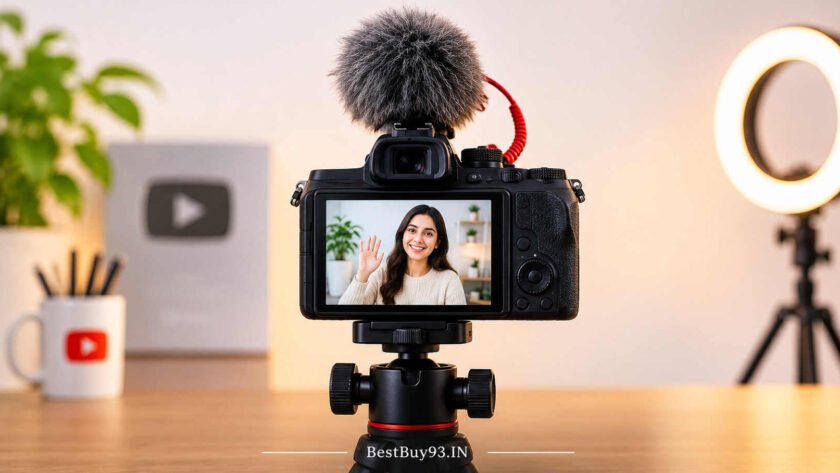

Starting a YouTube channel is exciting, but choosing your first camera can quickly become confusing. Should you buy a mirrorless camera, a compact vlogging camera, an action camera, or simply continue recording with your smartphone? With so many options available, beginners often end up spending more money than necessary on equipment they may not even need.
The good news is that you don’t need a professional filmmaking setup to create impressive YouTube videos. Today’s beginner-friendly cameras offer excellent video quality, reliable autofocus, flip-out screens, built-in stabilisation, and external microphone connectivity. These features make recording tutorials, product reviews, talking-head videos, travel vlogs, and lifestyle content much easier.
However, the best camera for one YouTuber may not be the right choice for another. Someone recording indoor beauty tutorials will have different requirements from a travel vlogger who spends most of their time shooting outdoors.
In this guide, we explore some of the best cameras for beginner YouTubers, including affordable mirrorless cameras, compact vlogging cameras, and portable action cameras. We will compare their features, discuss their advantages and disadvantages, and explain what beginners should look for before investing in their first dedicated YouTube camera.
Whether you’re planning to start a lifestyle channel, technology channel, gaming channel, educational channel, or travel vlog, this guide will help you make a more informed decision.
Best Cameras for Beginner YouTubers: Quick Comparison
Before exploring individual cameras, here is a quick comparison of some popular options for aspiring YouTube creators.
| Camera | Camera Type | Video Capability | Best For |
|---|---|---|---|
| Canon EOS R50 | Mirrorless | 4K | First-time YouTubers |
| Sony ZV-E10 | Mirrorless | 4K | Product reviews and tutorials |
| DJI Osmo Pocket 3 | Compact gimbal camera | 4K | Travel and lifestyle vlogging |
| Canon EOS R50 V | Video-focused mirrorless | 4K | Video-first creators |
| Sony ZV-E10 II | Mirrorless | 4K up to 60p | Growing YouTube channels |
| DJI Osmo Action 5 Pro | Action camera | 4K | Outdoor and adventure videos |
| Canon EOS R100 | Mirrorless | 4K | Budget-conscious beginners |
Video capabilities depend on the selected recording mode. Prices, bundles, and availability vary between sellers.
Best Cameras for Beginner YouTubers
1. Canon EOS R50 – Best Overall Camera for Beginner YouTubers
The Canon EOS R50 is an excellent starting point for people who want to move beyond smartphone recording and invest in a dedicated camera.
It features a 24.2MP APS-C CMOS sensor, interchangeable RF lenses, Dual Pixel CMOS AF II autofocus, and 4K video recording. Its fully articulating touchscreen makes it particularly convenient for people who record themselves without having someone behind the camera.
One of its biggest advantages is its beginner-friendly operation. You can experiment with different shooting modes, adjust exposure settings, and gradually develop your video production skills without immediately needing professional filmmaking knowledge.
The interchangeable-lens system also gives you room to experiment with wide-angle shots, portraits, and close-up product videos as your channel develops.
Key Features:
- 24.2MP APS-C CMOS sensor.
- 4K video recording.
- Dual Pixel CMOS AF II autofocus.
- Fully articulating touchscreen.
- Interchangeable RF and compatible RF-S lenses.
- External microphone input.
Best For: Beginners creating tutorials, talking-head videos, product reviews, lifestyle content, and educational videos.
What We Like:
- Beginner-friendly operation.
- Reliable subject autofocus.
- Fully articulating display.
- Flexible lens options.
- Good combination of photography and video features.
What We Don’t Like:
- Additional lenses can increase the overall investment.
- No in-body image stabilisation.
- 4K recording options have limitations compared with more advanced video cameras.

- Sensor: Full frame CMOS AF II Sensor with 24.2 MP (brilliant resolution for large prints and image cropping)
- Image Processor: DIGIC X with 651 autofocus points (important for speed and accuracy of autofocus and burst photography)…
- Connectivity: WiFi, NFC and Bluetooth built-in (useful for remotely controlling your camera and transferring pictures wi…

- Sensor: Full frame APS-C CMOS Sensor with 24.2 MP (brilliant resolution for large prints and image cropping)
- Optical Image Stabilizer technology compensates for up to 4.5 stops of camera shake to better enable taking sharp handhe…
- STM stepping motor offers fast, quiet, smooth, and accurate autofocus performance that is ideal for video recording as w…
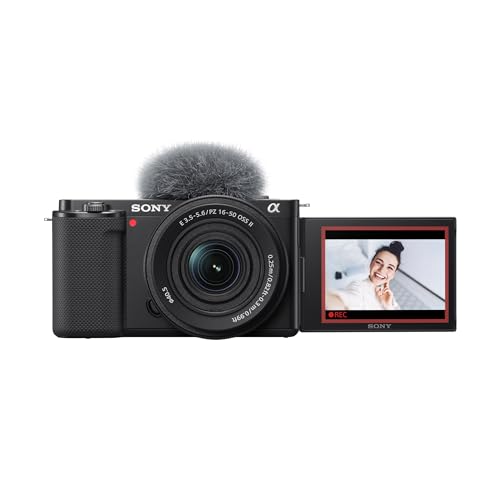
2. Sony ZV-E10 – Best for Product Reviews and YouTube Tutorials
If your YouTube channel focuses on product reviews, beauty tutorials, technology demonstrations, or educational videos, the Sony ZV-E10 deserves a place on your shortlist.
This creator-focused APS-C mirrorless camera offers a 24.2MP sensor, interchangeable lenses, 4K video recording, and Sony’s Real-time Eye AF and subject-tracking capabilities.
One particularly useful feature is Product Showcase Setting. It helps the camera transition focus towards an object held in front of the lens, making it useful for creators who regularly demonstrate products.
The fully articulating screen also allows you to monitor your framing while recording yourself.
Another advantage is its external microphone connection, which gives you the flexibility to improve audio quality with a compatible microphone.
Key Features:
- 24.2MP APS-C sensor.
- 4K video recording.
- Real-time Eye AF.
- Product Showcase Setting.
- Fully articulating LCD screen.
- External microphone input.
- Sony E-mount interchangeable lenses.
Best For: Product reviewers, beauty creators, technology YouTubers, tutorial channels, and talking-head videos.
What We Like:
- Creator-friendly camera features.
- Excellent autofocus capabilities.
- Product Showcase Setting.
- Interchangeable lenses.
- External microphone connectivity.
What We Don’t Like:
- No built-in electronic viewfinder.
- No in-body image stabilisation.
- Handheld walking footage may require additional stabilisation.

- Large APS-C type 24.2-megapixel Exmor CMOS sensor
- Interchangeable-lens camera, designed for easy selfie and vlog shoots
- 4K video with oversampling for greater detail
- Large 24.2MP APS-C Exmor CMOS Sensor and fast BIONZ X processor
- 4K Movie oversampled from 6k w/ full pixel readout, no pixel binning
- Product Showcase Setting transitions focus from face to object

- Large APS-C type 24.2-megapixel Exmor CMOS sensor
- Interchangeable-lens camera, designed for easy selfie and vlog shoots
- 4K video with oversampling for greater detail
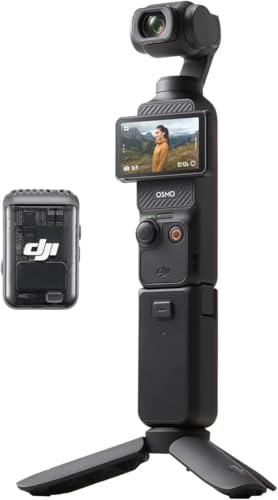
3. DJI Osmo Pocket 3 – Best for Travel and Lifestyle Vlogging
Not every YouTuber wants to carry a traditional mirrorless camera. If you prefer recording travel experiences, street videos, food adventures, and everyday lifestyle content, the DJI Osmo Pocket 3 is worth considering.
Unlike conventional mirrorless cameras, this compact device combines a camera with a built-in three-axis mechanical gimbal. This helps produce smoother footage when walking, moving, or recording handheld videos.
It features a 1-inch CMOS sensor, 4K video recording at up to 120fps in supported slow-motion modes, and a rotating touchscreen that makes switching between horizontal and vertical recording convenient.
Its compact design also makes it easier to carry around compared with a traditional camera-and-lens setup.
For beginner vloggers, the biggest attraction is convenience. You can take it out, frame your shot, and start recording without assembling a complicated camera rig.
Key Features:
- 1-inch CMOS sensor.
- 4K video recording.
- Built-in three-axis mechanical stabilisation.
- Rotating touchscreen.
- ActiveTrack subject tracking.
- Compact handheld design.
- Compatible wireless audio options.
Best For: Travel vloggers, lifestyle creators, food vloggers, walking videos, and everyday content.
What We Like:
- Excellent portability.
- Built-in mechanical gimbal.
- Convenient vertical and horizontal shooting.
- Smooth handheld footage.
- Beginner-friendly operation.
What We Don’t Like:
- Fixed camera lens.
- Less flexible than interchangeable-lens mirrorless cameras.
- Small body requires careful battery and storage management.
- Capture Stunning Footage – Osmo Pocket 3 features a 1-inch CMOS sensor and records in 4K resolution at an impressive 120…
- Effortlessly Frame Your Shots – Get the ideal composition with Osmo Pocket 3's expansive 2-inch touch screen that rotate…
- Ultra-Steady Footage – Say goodbye to shaky videos! Osmo Pocket 3's advanced 3-axis mechanical stabilization delivers su…

- Capture Stunning Footage – Osmo Pocket 3 features a 1-inch CMOS sensor and records in 4K resolution at an impressive 120…
- Effortlessly Frame Your Shots – Get the ideal composition with Osmo Pocket 3's expansive 2-inch touch screen that rotate…
- Ultra-Steady Footage – Say goodbye to shaky videos! Osmo Pocket 3's advanced 3-axis mechanical stabilization delivers su…
4. Canon EOS R50 V – Best for Video-Focused Creators
The Canon EOS R50 V is designed with video creators in mind. If your main objective is recording YouTube videos rather than balancing photography and video equally, this camera is worth exploring.
It combines an APS-C sensor with interchangeable lenses and video-focused controls. It offers 4K recording, a front-facing recording indicator, a fully articulating screen, and support for Canon’s advanced video workflows, including Canon Log 3.
Its vertical tripod mount and creator-oriented controls make it particularly interesting for people who produce both YouTube videos and short-form social media content.
The interchangeable-lens system also allows creators to build a setup around their recording style instead of being restricted to a fixed camera lens.
Key Features:
- APS-C CMOS sensor.
- 4K video recording.
- Canon Log 3 support.
- Fully articulating touchscreen.
- Interchangeable RF and RF-S lenses.
- Video-oriented controls.
- External microphone connectivity.
Best For: YouTube creators, educational channels, video-first creators, and people producing both long-form and short-form content.
What We Like:
- Video-focused design.
- Interchangeable lenses.
- Creator-friendly recording controls.
- Flexible recording formats.
- Suitable for growing content channels.
What We Don’t Like:
- No built-in electronic viewfinder.
- No in-body image stabilisation.
- Lens and accessory costs can increase the overall budget.

- High-Resolution Sensor: Equipped with a 24.2 MP APS-C CMOS sensor, delivering sharp, detailed images with excellent colo…
- Advanced Image Processor: Powered by Canon’s DIGIC X processor for fast performance, quick image processing, and improve…
- High-Speed Shooting: Capture fast-moving subjects effortlessly with up to 15 fps continuous shooting using the electroni…

- High-Resolution Sensor: Equipped with a 24.2 MP APS-C CMOS sensor, delivering sharp, detailed images with excellent colo…
- Advanced Image Processor: Powered by Canon’s DIGIC X processor for fast performance, quick image processing, and improve…
- High-Speed Shooting: Capture fast-moving subjects effortlessly with up to 15 fps continuous shooting using the electroni…
5. Sony ZV-E10 II – Best for Growing YouTube Channels
If you already know that content creation is something you want to pursue seriously, the Sony ZV-E10 II offers a more advanced starting point.
It features a 26MP APS-C sensor, interchangeable lenses, improved autofocus capabilities, and advanced video recording options, including 4K at up to 60fps and 10-bit 4:2:2 recording in supported modes.
The 10-bit recording capability provides more flexibility when colour grading footage during editing. This can be useful as your video production skills improve.
Its fully articulating display and creator-focused design also make it convenient for self-recording.
However, it is considerably more expensive than an entry-level camera. Beginners should consider whether they genuinely need its advanced recording capabilities before spending extra.
Key Features:
- 26MP APS-C sensor.
- 4K 60p recording.
- 10-bit 4:2:2 recording.
- Advanced autofocus and subject tracking.
- Fully articulating touchscreen.
- Interchangeable Sony E-mount lenses.
- External microphone connectivity.
Best For: Serious beginner YouTubers, technology reviewers, educators, and creators planning to upgrade their production quality.
What We Like:
- Advanced video recording options.
- Excellent autofocus.
- Flexible lens ecosystem.
- More room for advanced editing.
- Creator-focused design.
What We Don’t Like:
- Higher purchase cost.
- No built-in mechanical sensor stabilisation.
- Advanced features may be unnecessary for casual creators.

- Exmor R CMOS sensor: The ZV-E10 II features Sony's most advanced sensor technology in an APS-C back-illuminated Exmor R …
- Interchangeable lenses to capture your vision : From the G Master series, which blends breathtaking resolution with exqu…
- Create your look in camera: The Creative Look function makes it simple to create expressive moods for stills and movies …

- APS-C format Exmor R CMOS sensor with 26.0 megapixels
- BIONZ XR image processing engine for stunning 4K footage at up to 60p
- Creative Look and Cinematic Vlog Setting for greater expressive freedom
6. DJI Osmo Action 5 Pro – Best for Outdoor and Adventure YouTube Videos
Traditional mirrorless cameras are not always the most practical choice for outdoor creators. If your content involves cycling, hiking, travel adventures, water activities, or action footage, an action camera can be a better option.
The DJI Osmo Action 5 Pro is a compact action camera featuring dual OLED touchscreens, 4K video recording, electronic stabilisation, and a rugged waterproof design.
Its compact body makes it suitable for mounting on compatible accessories, helmets, and other recording equipment.
It is also useful for creators who want to capture point-of-view footage without carrying a large camera setup.
However, an action camera is not necessarily the best choice for indoor talking-head videos or professional-looking product reviews. Its fixed wide-angle lens and small sensor serve a different purpose from a mirrorless camera.
Key Features:
- 1/1.3-inch sensor.
- 4K video recording.
- RockSteady electronic stabilisation.
- Dual OLED touchscreens.
- Waterproof construction.
- Compact and rugged body.
Best For: Travel creators, adventure vloggers, cycling videos, outdoor activities, and action footage.
What We Like:
- Portable design.
- Excellent electronic stabilisation.
- Suitable for outdoor recording.
- Dual screens.
- Rugged construction.
What We Don’t Like:
- Limited lens flexibility.
- Not ideal for every indoor recording situation.
- Small sensor compared with APS-C mirrorless cameras.

- Capture Urban Nightscapes – Osmo Action 5 Pro features a new 1/1.3″ sensor for stunning low-light. Great for nighttime b…
- Enhanced Subject Tracking – 4nm Chip for fast, reliable framing. Keep fast-moving subjects centered. [7] The 4nm chip en…
- Long Lasting All-Condition Use – Experience the satisfaction of up to 4 hours of extended battery life.[1] Ideal for all…
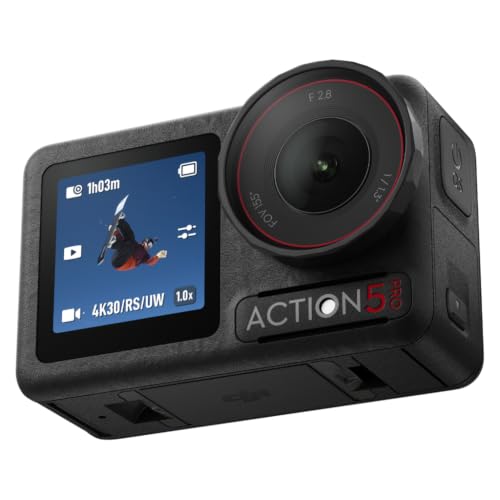
- Pro-Grade Night & Dynamic Imaging – Discover breathtaking imaging quality with Osmo Action 5 Pro action camera 4K and it…
- Always Centered, Always Focused – Achieve pinpoint accuracy with our advanced 4nm chip. DJI Osmo Action 5 Pro vlogging c…
- 360° HorizonSteady [17], Rock-Solid Footage – Industry-leading stabilization eliminates 360° roll-axis shakes, keeping y…
7. Canon EOS R100 – Best Budget Mirrorless Camera for Beginners
If you want to enter the interchangeable-lens camera category without spending as much as you would on more advanced creator-focused models, the Canon EOS R100 is another option.
It features a 24.1MP APS-C sensor, interchangeable RF lenses, and 4K video recording.
Its affordable positioning makes it interesting for beginners who want to explore photography alongside video recording.
However, there are some important limitations. Its 4K recording comes with a substantial crop and uses contrast-detection autofocus rather than the more advanced Dual Pixel CMOS AF available in the EOS R50.
It also lacks a fully articulating touchscreen, which makes self-recording less convenient.
Key Features:
- 24.1MP APS-C sensor.
- 4K video recording.
- Interchangeable RF lenses.
- Dual Pixel CMOS AF for supported recording modes.
- Compact camera body.
- Beginner-oriented controls.
Best For: Budget-conscious beginners interested in photography and occasional YouTube recording.
What We Like:
- More affordable entry into mirrorless cameras.
- APS-C sensor.
- Interchangeable lenses.
- Suitable for learning photography fundamentals.
What We Don’t Like:
- Limited 4K autofocus capabilities.
- No fully articulating touchscreen.
- Less video-focused than the EOS R50.
- Not the most convenient option for solo vloggers.

- Capture memories effortlessly with the Canon EOS R100 Mirrorless Camera. Perfect for beginners and casual snapshots, pai…
- Image Sensor:APS-C CMOS
- Image processor: DIGIC 8

- Beginner-Friendly Mirrorless Power: The Canon EOS R100 offers an accessible entry into mirrorless photography with a 24….
- Versatile RF-S 18-45mm Lens Included: This kit comes with the Canon RF-S 18-45mm f/4.5-6.3 IS STM lens, perfect for gene…
- Dual Pixel CMOS Autofocus for Sharp Results: Canon’s reliable Dual Pixel CMOS AF ensures fast and accurate focusing, esp…
Pros and Cons of Recommended Cameras
Choosing a camera becomes easier when you compare what each model does well and where it falls short.
| Camera | Reasons to Buy | What We Don’t Like |
|---|---|---|
| Canon EOS R50 | Beginner-friendly, autofocus, flip screen | No IBIS |
| Sony ZV-E10 | Product Showcase, interchangeable lenses | No IBIS |
| DJI Osmo Pocket 3 | Built-in gimbal, portability | Fixed lens |
| Canon EOS R50 V | Video-focused features, Canon Log 3 | No viewfinder |
| Sony ZV-E10 II | 4K60, 10-bit recording, autofocus | Higher price |
| DJI Osmo Action 5 Pro | Rugged, portable, stabilised footage | Limited lens flexibility |
| Canon EOS R100 | Affordable mirrorless entry | Basic video features |
Which Camera Offers the Best Value?
- Best overall for beginners: Canon EOS R50.
- Best for product demonstrations: Sony ZV-E10.
- Best for travel vlogging: DJI Osmo Pocket 3.
- Best for video-first creators: Canon EOS R50 V.
- Best for long-term video upgrades: Sony ZV-E10 II.
- Best for adventure content: DJI Osmo Action 5 Pro.
- Best for budget-conscious photography beginners: Canon EOS R100.
What to Look for When Buying a YouTube Camera
Buying a camera based only on megapixels or advertised video resolution is not the smartest approach. YouTube creators need a combination of image quality, audio support, autofocus, stabilisation, and ease of operation.
Here are the most important features to consider.
1. Video Resolution and Frame Rates
Video resolution determines the level of detail captured by your camera.
Most beginner YouTubers should look for at least Full HD 1080p recording, although 4K is preferable if the budget allows.
Why consider 4K?
- Provides more flexibility when cropping footage.
- Helps retain detail when editing.
- Offers flexibility for producing different video formats.
- Gives creators more room to reframe footage.
However, 4K is not compulsory. A well-lit, properly framed 1080p video with clear audio can look better than poorly recorded 4K footage.
Also check frame rates. Common options include:
| Frame Rate | Typical Use |
|---|---|
| 24fps | Cinematic-style footage |
| 25fps | Common video production in India |
| 30fps | Everyday YouTube videos |
| 50/60fps | Smooth movement and action |
| 100/120fps | Slow-motion footage in supported modes |
2. Autofocus Performance
Autofocus is particularly important for creators who record videos alone.
Imagine recording a product review and holding an item in front of the camera. You want the camera to focus on the product rather than keeping your face sharp while the item remains blurry.
Look for features such as:
- Face detection.
- Eye detection.
- Subject tracking.
- Continuous autofocus.
- Product-focused autofocus modes.
Sony and Canon both offer creator-friendly autofocus systems across several models.
3. Flip-Out Screen
A fully articulating screen is one of the most useful features for beginner YouTubers.
It allows you to see your framing while recording yourself, making it easier to adjust your position, check lighting, and ensure that you remain in the frame.
This is especially useful for:
- Talking-head videos.
- Makeup tutorials.
- Product reviews.
- Cooking demonstrations.
- Solo vlogging.
If you regularly record yourself, prioritise a fully articulating screen over a traditional fixed display.
4. Image Stabilisation
Camera movement can make videos uncomfortable to watch, especially when recording handheld.
There are different types of stabilisation:
- Optical stabilisation: Uses moving optical elements in a compatible lens.
- In-body image stabilisation (IBIS): Moves the camera sensor to compensate for movement.
- Electronic stabilisation (EIS): Uses digital processing to reduce visible shake.
- Mechanical gimbal stabilisation: Uses motors to physically stabilise the camera.
A camera without IBIS can still produce good videos, but walking vloggers should pay particular attention to stabilisation.
5. External Microphone Support
Audio quality deserves just as much attention as video quality.
A camera may record beautiful 4K footage, but poor audio can make the final video difficult to enjoy.
Look for a camera with a compatible external microphone connection.
This allows you to connect:
- Lavalier microphones.
- Wireless microphone systems.
- Shotgun microphones.
- Other compatible external audio accessories.
For indoor talking-head videos, a wireless lavalier microphone can be particularly convenient.
6. Battery Life and Recording Limits
Long recording sessions can quickly drain batteries.
Before buying, check the manufacturer’s battery-life estimates, actual recording conditions, supported power options, and any recording-duration limitations.
If you create long tutorials, interviews, or educational videos, these details matter.
An additional battery or compatible USB power solution can also be a useful investment.
7. Lens Compatibility and Upgrade Options
Interchangeable-lens cameras provide greater flexibility as your channel grows.
For example:
- Wide-angle lenses are useful for room tours and vlogging.
- Standard zoom lenses are useful for everyday videos.
- Prime lenses can help create attractive background separation.
- Macro lenses are useful for detailed product demonstrations.
However, remember that lenses can be expensive. Consider the cost of building an entire camera system, not just the camera body.
8. Connectivity and File Transfer
Moving footage from your camera to your computer or smartphone should not become an unnecessarily complicated process.
Look for:
- USB connectivity.
- Wi-Fi and Bluetooth support.
- Compatible smartphone applications.
- HDMI output, if required.
- Reliable memory-card compatibility.
Creators who regularly edit videos on computers should also check memory-card speeds and file-transfer requirements.
Which Type of Camera Is Best for Your YouTube Channel?
Not every YouTube channel needs the same equipment. Your content style should influence your camera purchase.
| YouTube Content Type | Recommended Camera Type | Why |
|---|---|---|
| Talking-head videos | Mirrorless | Autofocus and lens flexibility |
| Product reviews | Mirrorless | Product-focused autofocus |
| Beauty tutorials | Mirrorless | Close-ups and interchangeable lenses |
| Travel vlogs | Compact gimbal camera | Portability and stabilisation |
| Food videos | Mirrorless or compact | Detail and framing flexibility |
| Adventure videos | Action camera | Rugged and portable design |
| Educational videos | Mirrorless | Reliable indoor recording |
| Daily lifestyle vlogs | Compact or mirrorless | Depends on mobility |
| Shorts and Reels | Smartphone or compact camera | Easy vertical recording |
Should Beginners Buy a Camera or Use a Smartphone?
Here is something worth considering: you do not necessarily need to purchase a dedicated camera before uploading your first YouTube video.
Modern smartphones can produce excellent video quality. If you already own a capable smartphone, you can start by investing in a microphone, tripod, and lighting setup.
A dedicated camera becomes more valuable when you need:
- Better lens flexibility.
- More control over exposure and depth of field.
- More advanced video recording options.
- Dedicated camera accessories.
- Greater creative control over your footage.
The smartest approach is to invest according to your actual content requirements rather than purchasing equipment simply because other YouTubers use it.
Essential Accessories for Beginner YouTubers
A camera is only one part of a successful video recording setup. A few additional accessories can significantly improve your recording experience.
| Accessory | Why You Need It |
|---|---|
| External microphone | Improves voice recording |
| Tripod | Keeps the camera stable |
| LED light | Improves indoor lighting |
| Memory card | Stores video recordings |
| Extra battery | Supports longer recording sessions |
| Camera bag | Protects equipment |
| Gimbal | Helps stabilise compatible cameras |
| Reflector | Helps manage natural lighting |
Microphone
Clear audio makes videos easier to watch. Consider a compatible wireless lavalier microphone or shotgun microphone depending on your recording environment.
Tripod
A tripod is especially useful for talking-head videos, tutorials, product reviews, and educational content.
Choose one that can support the combined weight of your camera and lens.
Lighting
Good lighting can make a significant difference to video quality.
A simple LED panel or softbox can help illuminate your face when recording indoors. Natural window light is also a useful starting point.
Memory Card
Video files can occupy considerable storage space, particularly when recording in 4K.
Check the camera manufacturer’s recommended memory-card specifications, supported capacity, and required write speeds before purchasing.
Extra Battery
An additional battery is useful when recording longer videos or filming outdoors.
It helps avoid interruptions when your camera runs out of power.
Frequently Asked Questions
1. Which is the best camera for beginner YouTubers?
The Canon EOS R50 is an excellent all-round option for beginners because it offers a 24.2MP APS-C sensor, reliable autofocus, interchangeable lenses, and a fully articulating touchscreen. Best Cameras for Beginner YouTubers
2. Is a 4K camera necessary for starting a YouTube channel?
No. Full HD 1080p is sufficient for many beginner YouTube channels. However, 4K provides additional flexibility when editing, cropping, and reframing videos. Best Cameras for Beginner YouTubers
3. Is Sony ZV-E10 good for beginner YouTubers?
Yes. The Sony ZV-E10 offers creator-focused features, interchangeable lenses, 4K recording, and useful autofocus capabilities. It is particularly suitable for product reviews and tutorials. Best Cameras for Beginner YouTubers
4. Which camera is best for travel vlogging?
The DJI Osmo Pocket 3 is a strong option for travel vloggers because it combines a compact body with a built-in three-axis mechanical gimbal. Best Cameras for Beginner YouTubers
5. Can I start a YouTube channel without buying a camera?
Absolutely. A modern smartphone can be sufficient for recording your first videos. You can gradually invest in a dedicated camera once you understand your content requirements. Best Cameras for Beginner YouTubers
6. Do beginner YouTubers need an external microphone?
An external microphone is highly recommended because clear audio makes videos more enjoyable. A compatible lavalier microphone is a convenient option for talking-head videos and interviews. Best Cameras for Beginner YouTubers
7. Is a mirrorless camera better than an action camera for YouTube?
It depends on your content. Mirrorless cameras provide interchangeable lenses and greater creative flexibility, while action cameras are better suited to outdoor activities, adventure footage, and compact recording setups. Best Cameras for Beginner YouTubers
8. How much should a beginner spend on a YouTube camera?
A budget of approximately ₹40,000–₹70,000 can provide several useful beginner options in India. However, remember to account for lenses, microphones, lighting, tripods, and memory cards. Best Cameras for Beginner YouTubers
9. Which camera is better for indoor YouTube videos?
An APS-C mirrorless camera such as the Canon EOS R50 or Sony ZV-E10 is a good choice for indoor recording. Pair it with suitable lighting and an external microphone for a more complete setup. Best Cameras for Beginner YouTubers
10. What matters more for YouTube videos: camera quality or audio quality?
Both matter, but audio is frequently overlooked by beginners. Clear voice recording, proper lighting, stable footage, and engaging content are all important parts of producing watchable videos. Best Cameras for Beginner YouTubers
Final Thoughts
Choosing your first YouTube camera should be an exciting decision, not a reason to empty your savings account.
The Canon EOS R50 is a strong all-round starting point for beginners who want a dedicated mirrorless camera. The Sony ZV-E10 is particularly useful for product reviewers and tutorial creators, while the DJI Osmo Pocket 3 makes travel and lifestyle vlogging easier with its compact design and mechanical stabilisation.
If you want a more video-focused camera with room to develop your editing skills, consider the Canon EOS R50 V or Sony ZV-E10 II. Outdoor creators may find the DJI Osmo Action 5 Pro more practical.
Most importantly, remember that a successful YouTube channel is not built around expensive equipment alone. Consistent uploads, interesting storytelling, useful information, clear audio, and good lighting matter just as much.
Start with equipment you can comfortably afford, learn how to use it properly, and upgrade when your content genuinely demands it.
Explore more technology guides, creator accessories, and practical buying recommendations at BestBuy93.IN.