
Want to record smoother YouTube videos without investing in an expensive camera setup? A good smartphone gimbal can make a noticeable difference. Whether you are filming daily vlogs, product reviews, travel videos, cooking tutorials, unboxing videos or Instagram Reels, a mobile gimbal helps reduce unwanted camera movements and gives your footage a more polished look.
Modern smartphone gimbals offer much more than basic stabilisation. Many models now include three-axis motorised stabilisation, AI-powered subject tracking, built-in tripods, extension rods, gesture controls and magnetic phone mounts. Some even let you record yourself while moving around without needing another person behind the camera.
But with options from DJI, Insta360, Hohem, Zhiyun and Digitek, choosing the right one can get confusing. Should you spend more on AI tracking? Is a built-in tripod useful for YouTube creators? Do you really need a premium gimbal if you mostly record videos at home?
In this guide, we explore some of the best mobile gimbals worth considering in India in 2026. We compare their features, practical advantages, limitations and suitability for different content-creation styles. We also cover the important things to check before buying so you can choose a gimbal that works with your smartphone and filming requirements.
Quick Comparison: Best Mobile Gimbals at a Glance
| Mobile Gimbal | Best For | Main Features |
|---|---|---|
| DJI Osmo Mobile 8 | Overall creator use | Three-axis stabilisation, subject tracking, extension rod and tripod |
| DJI Osmo Mobile 7P | Feature-rich recording | Tracking module, fill light and extension rod |
| DJI Osmo Mobile 7 | Beginners | Three-axis stabilisation and compact design |
| Insta360 Flow 2 Pro | iPhone creators | Apple DockKit tracking and foldable design |
| Insta360 Flow 2 | Everyday vlogging | Built-in tripod, selfie stick and tracking features |
| Hohem iSteady M7 | Advanced creators | AI tracking, remote screen and accessory support |
| Hohem iSteady V3 Ultra | Solo recording | AI tracking and detachable remote |
| Hohem iSteady M6 Kit | Feature-focused creators | Three-axis stabilisation and tracking accessories |
| Zhiyun Smooth 5S AI | Manual video control | Three-axis stabilisation and AI tracking options |
| Digitek DSG-007F | Budget-conscious beginners | Foldable design and smartphone stabilisation |
Availability, bundle contents and compatibility may vary by retailer and region. Always verify the exact model and included accessories before ordering.
10 Best Mobile Gimbals for Recording Smooth YouTube Videos
1. DJI Osmo Mobile 8 – Best Overall for YouTube Creators
The DJI Osmo Mobile 8 is a strong option for creators who want a versatile smartphone stabiliser for everyday recording, travel videos and solo YouTube content.
Its three-axis stabilisation helps counter unwanted movement while walking, panning or capturing moving subjects. The model also offers 360-degree horizontal rotation, an integrated extension rod and a built-in tripod, making it useful for both moving shots and stationary recordings.
One of its interesting features is intelligent subject tracking. Depending on the compatible phone, tracking method and app, creators can keep themselves or another subject in the frame without constantly adjusting the camera.
The Multifunctional Module adds tracking, lighting and audio-related capabilities. However, the available functions depend on the configuration and compatible accessories.
Why You Should Consider It
- Three-axis motorised stabilisation.
- Built-in extension rod and tripod.
- Intelligent subject tracking.
- 360-degree horizontal pan rotation.
- Useful for solo creators and travel vloggers.
What We Like
- Versatile filming features.
- Convenient for recording yourself.
- Useful combination of tripod and handheld operation.
What We Don’t Like
- Premium features may be unnecessary for casual users.
- Tracking and lighting can reduce battery runtime.
- Phone and app compatibility should be checked before purchase.
Best for: YouTube creators who regularly record walking shots, travel videos, product demonstrations and solo vlogs.
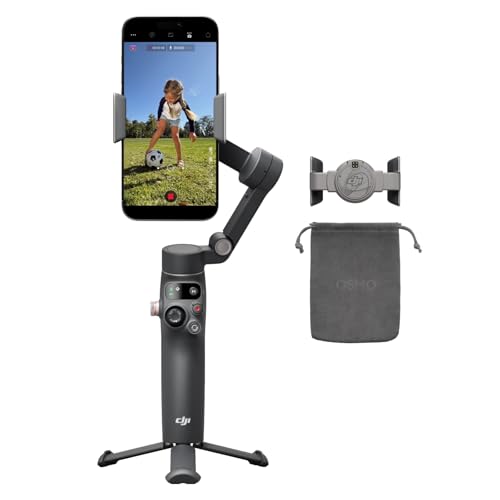
- Native Tracking With Audio [4] & Lighting [1] – Level up your shots with a DJI gimbal that combines tracking, audio rece…
- Seamless 360° Pan Rotation – Enjoy 360° horizontal rotation for immersive shots. Intelligent tracking lets you follow su…
- Direct Phone Connection for Tracking [2] – Instantly connect your phone to the foldable gimbal for quick setup and intel…
2. DJI Osmo Mobile 7P – Best for Feature-Rich Smartphone Recording
The DJI Osmo Mobile 7P is worth considering if you want advanced tracking features without moving to a more expensive professional filming setup.
It features three-axis stabilisation and a Multifunctional Module that adds subject tracking and fill-light functionality. It also includes a built-in extension rod and tripod, which can be helpful when recording yourself at home or while travelling.
For a creator who regularly makes talking-head videos, demonstrations or product reviews, the tracking module can reduce the need to reposition the phone manually.
Its main appeal is the combination of stabilisation, tracking and additional recording accessories in a compact setup.
Why You Should Consider It
- Three-axis stabilisation.
- Intelligent subject tracking through supported configurations.
- Multifunctional Module with fill light.
- Built-in extension rod and tripod.
- Suitable for solo video recording.
What We Like
- Useful feature combination.
- Convenient for self-recording.
- Good choice for creators who want more than basic stabilisation.
What We Don’t Like
- More features mean a learning curve for beginners.
- Tracking functions depend on device and app compatibility.
- Check the price carefully against the newer Osmo Mobile 8.
Best for: Creators who want tracking and additional lighting features for regular smartphone video production.

- Snap the Spectacular – The Multifunctional Module packs intelligent tracking, DJI Mic Mini reception, and lighting featu…
- Experience Seamless Stability – Osmo Mobile 7P’s robust 3-axis gimbal stabilization ensures lossless stability. Capture …
- Capture Like a Pro From Day One – Pair your Osmo Mobile 7P with DJI Mimo for ShotGuides and One-Tap Edit. Film and edit …
3. DJI Osmo Mobile 7 – Best for Beginners
Not every YouTube creator needs an expensive gimbal. If you are starting your content-creation journey, the DJI Osmo Mobile 7 offers a more straightforward way to explore smartphone stabilisation.
It provides three-axis stabilisation and a compact design for recording smoother handheld videos. Its built-in tripod is particularly useful for stationary shots, while the gimbal can also be used for walking footage and simple camera movements.
For beginners who want to experiment with vlogging, travel clips, home videos and short-form content, it offers a useful starting point.
Why You Should Consider It
- Three-axis smartphone stabilisation.
- Compact and portable design.
- Built-in tripod.
- Subject-tracking features through supported software and configurations.
- Suitable for everyday video recording.
What We Like
- Beginner-friendly concept.
- Useful for casual vlogging.
- Less complicated than some advanced creator setups.
What We Don’t Like
- Fewer advanced accessories than the 7P.
- Not designed for heavy phone rigs.
- Tracking capabilities depend on compatibility.
Best for: First-time gimbal buyers, casual vloggers and creators working with a simple smartphone setup.

- Experience Seamless Stability – Osmo Mobile 7’s robust 3-axis gimbal stabilization ensures lossless stability, making it…
- Streamline Your Creativity – The Osmo Mobile 7 phone gimbal features an integrated foldable design with a built-in tripo…
- Stay In Focus – With DJI Mimo’s ActiveTrack 7.0, track subjects with your gimbal in more diverse scenarios. No matter ho…
4. Insta360 Flow 2 Pro – Best for iPhone Creators
The Insta360 Flow 2 Pro is an interesting choice for creators who use compatible iPhones and want advanced subject tracking.
One of its major attractions is Apple DockKit support. This allows supported iPhones to use tracking in the native camera and compatible third-party applications, rather than relying exclusively on the manufacturer’s own camera app.
The gimbal also features three-axis stabilisation, a foldable design, a built-in selfie stick and a tripod. These features make it useful for travel content, live streaming, solo videos and creative camera movements.
However, not every tracking feature works identically across iPhone and Android devices. Android users should check the exact compatibility list before purchasing.
Why You Should Consider It
- Three-axis stabilisation.
- Apple DockKit support on compatible iPhones.
- Tracking in supported third-party applications.
- Built-in selfie stick and tripod.
- Foldable design.
What We Like
- Particularly interesting for iPhone users.
- Useful for solo creators and live streaming.
- Compact all-in-one design.
What We Don’t Like
- Advanced native tracking is iPhone-specific.
- Some functions require the Insta360 app.
- Phone compatibility can affect available camera controls.
Best for: iPhone users who regularly record YouTube videos, live streams, interviews and travel content.
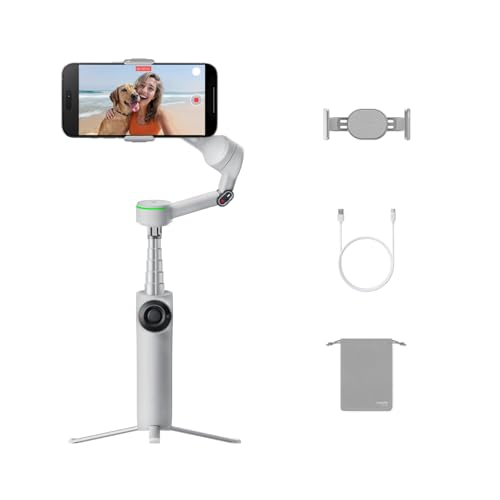
- Versatile Tracking in 200+ iOS Apps: The first and only gimbal series with Apple DockKit*. An advanced gimbal stabilizer…
- Active Zoom Tracking: A first* for gimbals, Flow 2 Pro can track fast movement precisely, even at up to 15x zoom! Perfec…
- Multi-Person Tracking: A smart phone gimbal that tracks and frames your whole group! Ideal for family gatherings, campin…
5. Insta360 Flow 2 – Best for Everyday Vlogging
If you want a smartphone gimbal for everyday content without necessarily paying for the Pro model, the Insta360 Flow 2 is another option worth comparing.
Its design combines a smartphone stabiliser with a built-in tripod and selfie stick. This makes it practical for creators who frequently switch between handheld filming and stationary recordings.
You can use it for walking videos, travel footage, talking-head clips and short-form content. Its tracking and creative shooting features can also help when recording alone.
Before purchasing, compare the Flow 2 with the Flow 2 Pro carefully. The Pro version offers additional tracking capabilities, particularly for compatible iPhone users.
Why You Should Consider It
- Three-axis stabilisation.
- Integrated tripod and selfie stick.
- Foldable construction.
- Subject-tracking features.
- Suitable for everyday creator use.
What We Like
- Convenient all-in-one design.
- Useful for travel and casual vlogging.
- Reduces the need to carry a separate small tripod.
What We Don’t Like
- Some advanced features are limited compared with the Pro version.
- App compatibility varies between phones.
- Not intended for heavy accessory-loaded rigs.
Best for: Travel vloggers, beginners and creators who want an easy-to-carry smartphone filming setup.

- All-in-One Content Creation Tool: All your essential tools in one AI phone gimbal. A built-in tripod for iPhone and Andr…
- Active Zoom Tracking: A first1 for gimbals, Flow 2 can track fast movement precisely, even at up to 15x zoom! Perfect fo…
- Multi-Person Tracking: A smart phone gimbal that tracks and frames your whole group! Ideal for family gatherings, campin…
6. Hohem iSteady M7 – Best for Advanced Smartphone Rigs
The Hohem iSteady M7 is designed for creators who want more control over their smartphone filming setup.
Its standout features include AI tracking, a detachable touchscreen remote and support for relatively heavy smartphone configurations. This can make it useful for creators who record themselves from a distance or work with larger phones and additional accessories.
Unlike compact foldable gimbals, the M7 is a more substantial device. That is worth remembering if portability is your biggest priority.
For product demonstrations, tutorials, cooking videos and solo studio-style recordings, its tracking and remote-control features may be particularly useful.
Why You Should Consider It
- Three-axis stabilisation.
- AI-powered tracking.
- Detachable touchscreen remote.
- Supports heavier phone setups within specified limits.
- Useful for controlled filming environments.
What We Like
- Advanced tracking and remote features.
- More flexibility for larger smartphone setups.
- Useful for creators recording alone.
What We Don’t Like
- Bulkier than compact foldable models.
- More expensive than beginner options.
- Additional accessories increase setup complexity.
Best for: Advanced creators, tutorial makers and people who use larger smartphones or accessory-heavy filming configurations.

- iSteady M7 features a detachable remote that comes with a 1.4-inch full-color touchscreen, providing you with convenient…
- The robust built-in extension pole supports creative shooting at various angles. It enables you to effortlessly capture …
- The integrated RGB and CCT fill light can flexibly illuminate your front and rear shots. Moreover, it supports the seaml…
7. Hohem iSteady V3 Ultra – Best for Solo Creators Who Need Remote Control
Recording yourself without someone operating the camera can be challenging. You need to frame the shot, check your position, start recording and ensure that you remain visible.
The Hohem iSteady V3 Ultra is designed to make this workflow easier with AI tracking and a detachable remote screen.
Its feature set is particularly relevant for creators who record fitness demonstrations, dance videos, tutorials, product showcases and talking-head content.
The remote can make it easier to monitor framing when the phone is positioned away from you. However, the exact tracking functions and controls should be checked against your phone and recording app.
Why You Should Consider It
- Three-axis smartphone stabilisation.
- AI tracking.
- Detachable remote screen.
- Useful for solo recording.
- Suitable for tutorials and demonstrations.
What We Like
- Convenient remote operation.
- Helpful for self-recording.
- Offers more flexibility than a basic stabiliser.
What We Don’t Like
- More features may be unnecessary for casual vloggers.
- Check the complete bundle before ordering.
- App and phone compatibility need verification.
Best for: Solo YouTubers, fitness creators, tutorial makers and people who record themselves from a distance.
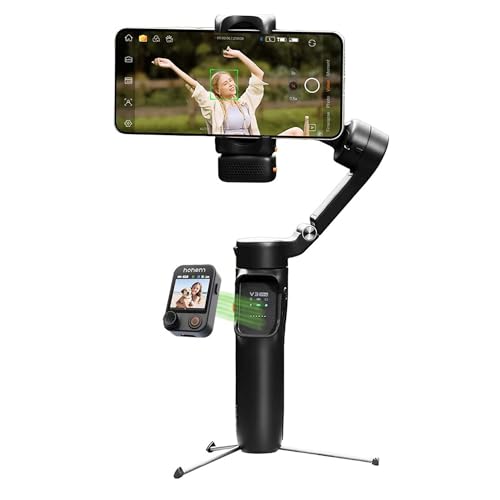
- 【AI Vision Sensor & Seamless Tracking】 Built-in high-precision AI vision sensor enables stable, fluid auto-tracking of p…
- 【3-Axis Stabilization & Lossless Vertical Shooting】 A powerful 3-axis motor system effectively counteracts hand shake, e…
- 【Built-in Telescopic Extension Rod & Dual-Color Temperature Fill Light】 Innovative integrated retractable extension rod …
8. Hohem iSteady M6 Kit – Best for Creators Who Want Additional Accessories
The Hohem iSteady M6 Kit is another model to consider if you want a feature-rich smartphone gimbal.
Depending on the kit, it can include additional tracking and lighting accessories that make it more versatile for recording videos in different environments.
The three-axis stabilisation is useful for smoother movement, while the accessory options can help creators experiment with lighting and subject tracking.
This model is particularly interesting for people who want to build a more complete smartphone filming setup rather than buying a basic stabiliser alone.
Why You Should Consider It
- Three-axis stabilisation.
- Tracking accessories in selected kits.
- Lighting options.
- Suitable for smartphone-based video production.
- Useful for controlled filming setups.
What We Like
- Accessory-focused approach.
- Useful for creators experimenting with different shots.
- Offers more flexibility than a basic phone holder.
What We Don’t Like
- Kit contents can vary.
- Additional accessories may increase the total cost.
- Not as compact as simpler foldable gimbals.
Best for: Creators who want to experiment with lighting, tracking and more controlled smartphone filming.

- 🏆🏆【Magnetic fill light with AI vision sensor】With an AI vision sensor, you can switch between the front and rear cameras…
- 🏆🏆【iSteady 7.0 Stabilization&Wide compability】iSteady M6 gimbal integrates the iSteady 7.0 stabilization algorithms, hel…
- 🏆🏆【OLED Display】The OLED display visualizes almost all gimbal statuses and you can conveniently check various gimbal par…
9. Zhiyun Smooth 5S AI – Best for Manual Camera Control
Some creators prefer having greater control over camera movement rather than relying entirely on automatic tracking.
The Zhiyun Smooth 5S AI is worth considering for this type of workflow. It combines three-axis stabilisation with manual controls and AI tracking features, depending on the configuration.
It can be useful for deliberate camera movements, cinematic-style shots, product footage and creative video sequences.
Its larger design may not be ideal for someone who wants the lightest possible travel setup. However, creators who enjoy adjusting their camera movements manually may appreciate the additional control.
Why You Should Consider It
- Three-axis stabilisation.
- Manual camera controls.
- AI tracking options.
- Designed for creative smartphone filming.
- Useful for planned camera movements.
What We Like
- More hands-on control.
- Suitable for cinematic-style smartphone footage.
- Interesting for product and detail shots.
What We Don’t Like
- Bulkier than some compact alternatives.
- AI accessories and bundles may vary.
- Requires some practice to use effectively.
Best for: Creators interested in controlled camera movements, product videos and cinematic smartphone footage.

- [Always Follow the Target] ZHIYUN Smooth 5S AI features an innovative AI tracking module for rapid and responsive target…
- [Make Every Moment Shine] Smooth 5S AI gimbal features a built-in high-power fill light for stunning illumination. The P…
- [Pro-Level Stability] With the same orthogonal 3-axis structure as pro camera stabilizers and advanced stabilization alg…
10. Digitek DSG-007F – Best Budget-Friendly Option
If you are not ready to invest in an expensive smartphone gimbal, the Digitek DSG-007F is worth checking out.
It is a more budget-conscious option for people who want to explore stabilised smartphone recording without immediately purchasing a premium model.
Its three-axis design and AI tracking-oriented feature set make it relevant for beginners who want to experiment with vlogging, short videos and everyday content.
However, do not assume that a budget gimbal will offer the same tracking reliability, build quality or app experience as premium DJI, Insta360 or Hohem models.
Check the exact phone compatibility, included tracking accessories and warranty information before ordering.
Why You Should Consider It
- Three-axis smartphone stabilisation.
- Foldable design.
- Tracking-oriented features.
- Budget-conscious alternative.
- Suitable for beginner experimentation.
What We Like
- More accessible entry point.
- Useful for trying smartphone stabilisation.
- Suitable for casual content creation.
What We Don’t Like
- Fewer premium ecosystem features.
- Check real-world tracking performance and app support.
- Build and accessory quality may differ from premium models.
Best for: Beginners and budget-conscious creators who want to explore smartphone gimbals.

- Easy operation: Switch between horizontal and vertical shooting, capture fast movements without missing any details. No …
- 3 creative operation modes: All follow mode, half follow mode and all lock mode for precise shooting. Single button pres…
- Potable and foldable: Easy to carry during the travel, tilt angle: 160°, roll angle: 325°, pan angle: 340°, weighing onl…
Which Mobile Gimbal Should You Choose?
The best gimbal depends on your phone, filming style and budget. Here is a simple way to narrow down the choices.
| Your Requirement | Gimbal to Consider | Why |
|---|---|---|
| Overall creator setup | DJI Osmo Mobile 8 | Versatile tracking and stabilisation features |
| Feature-rich DJI alternative | DJI Osmo Mobile 7P | Tracking module and fill light |
| First smartphone gimbal | DJI Osmo Mobile 7 | Simpler everyday setup |
| iPhone-focused tracking | Insta360 Flow 2 Pro | Apple DockKit support |
| Everyday travel vlogging | Insta360 Flow 2 | Integrated tripod and selfie stick |
| Heavy smartphone setup | Hohem iSteady M7 | Higher payload capacity |
| Solo recording with remote | Hohem iSteady V3 Ultra | Detachable remote and tracking |
| Manual camera control | Zhiyun Smooth 5S AI | Hands-on creative controls |
| Budget-friendly entry | Digitek DSG-007F | Lower-cost starting point |
What Is a Smartphone Gimbal?
A smartphone gimbal is a motorised stabilising device that helps keep your phone steady while recording videos.
Most modern smartphone gimbals use three axes:
- Pan axis: Helps control horizontal camera movement.
- Tilt axis: Helps control vertical camera movement.
- Roll axis: Helps keep the camera level when the handle moves.
The gimbal uses motors and sensors to compensate for unwanted movements. This makes walking footage, tracking shots and moving camera sequences smoother than ordinary handheld recording.
A gimbal is especially useful when you are filming while walking, following a subject or moving around a product.
However, a gimbal does not automatically make every video cinematic. Camera movement, lighting, framing, focus and sound still matter.
What to Look for When Buying a Mobile Gimbal
Before buying a mobile gimbal, consider these important features.
1. Three-Axis Stabilisation
If smooth video is your priority, look for a genuine three-axis motorised gimbal.
Basic selfie sticks and simple phone holders do not provide the same type of motorised stabilisation.
2. Smartphone Compatibility and Payload
This is one of the most important things to check.
Every gimbal has limits for smartphone weight, width and thickness. Your phone case, camera bump and accessories can affect the balance.
Before buying, check:
- Smartphone weight.
- Phone width and thickness.
- Maximum supported payload.
- Compatibility with your phone case.
- Clearance around the camera lenses.
A phone that physically fits the clamp may still be unsuitable if it exceeds the gimbal’s weight or balance limits.
3. AI Face and Subject Tracking
Tracking can be particularly useful for YouTubers who record alone.
It allows the gimbal to follow a person or subject as they move within the supported tracking range.
This is helpful for:
- Talking-head videos.
- Cooking tutorials.
- Dance videos.
- Fitness demonstrations.
- Product demonstrations.
- Solo vlogging.
But check whether tracking works in the camera app you actually use. Some features work only inside the manufacturer’s application, while others support selected third-party apps.
4. Built-In Tripod
A built-in tripod makes it easier to record stationary videos without carrying a separate stand.
It is useful for:
- Talking-head videos.
- Product reviews.
- Unboxing videos.
- Tutorials.
- Group photographs.
For outdoor filming, remember that a small built-in tripod may not be stable enough in strong wind or on uneven surfaces.
5. Battery Life
Battery life matters if you record long videos or spend several hours filming.
Manufacturer runtime figures are usually measured under controlled conditions. Tracking, lighting, phone charging and continuous movement can reduce actual runtime.
Look at how the gimbal performs during your intended recording workflow, not just the largest battery-life number on the product page.
6. Extension Rod and Remote Control
An extension rod helps create wider selfie shots and different camera angles.
A detachable remote is useful when you position your phone away from yourself. It can make recording and framing easier without repeatedly walking back to the phone.
7. App Compatibility
A gimbal’s hardware may work with a phone even when all its app-based features are not available.
Check the manufacturer’s compatibility list before purchasing, particularly if you want to use:
- Native smartphone camera.
- YouTube or YouTube Live.
- Instagram.
- Third-party camera applications.
- Manual camera controls.
Do not assume every tracking feature works in every application.
Gimbal vs Selfie Stick vs Tripod: Which One Do You Need?
| Feature | Smartphone Gimbal | Selfie Stick | Tripod |
|---|---|---|---|
| Motorised stabilisation | Yes | No | No |
| Walking videos | Best suited | Limited | Not suitable |
| Stationary recording | Yes, if tripod included | Limited | Excellent |
| Solo recording | Excellent with tracking | Basic | Excellent |
| Travel portability | Varies by model | Usually excellent | Varies by size |
| Camera movement control | Motorised | Manual | Mostly stationary |
If you mostly record stationary product reviews at a desk, a tripod may be enough.
If you regularly record walking videos, travel vlogs and moving shots, a three-axis gimbal is a more useful investment.
If you want something inexpensive for occasional selfies, a selfie stick may be all you need.
Pros and Cons of Using a Mobile Gimbal
| Reasons to Buy / What We Like | Limitations / What We Don’t Like |
|---|---|
| Helps create smoother handheld footage. | Requires charging and balancing. |
| Useful for walking and tracking shots. | Adds weight to your filming setup. |
| AI tracking can help solo creators. | Tracking depends on phone and app compatibility. |
| Built-in tripod helps with stationary recording. | Small tripods may not be stable outdoors. |
| Can make product videos more dynamic. | Does not improve phone sensor quality or audio. |
| Useful for travel and vlogging. | Premium models can be expensive. |
Tips for Recording Better YouTube Videos With a Mobile Gimbal
Buying a gimbal is only the first step. How you use it matters just as much.
1. Balance Your Smartphone Before Recording
Make sure your phone is mounted correctly and balanced according to the manufacturer’s instructions. Poor balancing can affect stabilisation and put unnecessary strain on the motors.
2. Use the Rear Camera When Possible
The rear camera on many smartphones offers better image quality than the front camera. If you are recording a product review or detailed demonstration, consider using the rear camera and a remote or tracking feature to manage framing.
3. Record in Good Lighting
A gimbal cannot fix poor lighting. Use natural window light or a suitable video light to make your footage look cleaner.
4. Use a Separate Microphone
Clear audio is essential for YouTube videos. Consider a compatible wireless lavalier microphone or another external audio solution.
A smooth video with muffled audio is still a frustrating viewing experience.
5. Avoid Unnecessary Camera Movement
You do not need to move the gimbal constantly. Slow pans, controlled tracking shots and simple camera movements often look more professional.
6. Practise Before Recording
Try walking shots, low-angle shots, follow shots and stationary tracking before filming an important video. Practising helps you understand the controls and avoid awkward movements.
Also Read | Best Smartphones Under INR 20,000 in India
Frequently Asked Questions
1. Which is the best mobile gimbal for YouTube videos?
The DJI Osmo Mobile 8 is a strong all-round option for smartphone-based YouTube creators. However, the best choice depends on your phone, budget, tracking requirements and filming style.
2. Is a mobile gimbal necessary for YouTube?
No. You can record excellent YouTube videos without a gimbal. A tripod is often enough for stationary talking-head videos and product reviews. A gimbal becomes more useful when recording walking shots, travel videos and moving camera sequences.
3. Can I use a mobile gimbal for recording YouTube Shorts?
Yes. Many smartphone gimbals support portrait and landscape recording. Check whether the model supports the orientation you need and whether your phone’s camera app works correctly with the gimbal.
4. Is a three-axis gimbal better than a selfie stick?
A three-axis gimbal uses motors to compensate for unwanted movement, while a selfie stick is primarily a manual extension handle. For smoother walking footage and controlled camera movements, a gimbal is generally more suitable.
5. Can a smartphone gimbal track my face automatically?
Many modern models offer face or subject tracking. However, the feature may require a companion app, tracking module or compatible third-party application. Always check the exact model’s tracking support.
6. Can I use a gimbal with an iPhone and Android phone?
Many smartphone gimbals support both platforms, but feature availability can vary. Apple DockKit features, for example, are designed for compatible iPhones. Check the manufacturer’s compatibility list for your exact phone.
7. Does a mobile gimbal improve video quality?
A gimbal improves camera stability and movement. It does not directly improve resolution, colour accuracy, dynamic range, low-light performance or microphone quality.
8. Can I record product reviews using a mobile gimbal?
Yes, but you may not need one for every product review. A tripod is often more practical for stationary unboxing videos and desk-based demonstrations. A gimbal is more useful for moving product shots and close-up walkthroughs.
9. How much should I spend on a mobile gimbal?
Your budget should depend on how frequently you record and which features you actually need. Beginners can start with a simpler stabiliser, while regular solo creators may benefit from tracking, remote control and integrated tripod features.
10. Should I buy a gimbal or a smartphone tripod first?
If most of your videos are recorded while sitting or standing in one place, buy a tripod first. If you frequently walk, travel or move the camera while recording, consider a three-axis gimbal.
Final Verdict: Which Mobile Gimbal Is Worth Buying?
A smartphone gimbal can be a useful addition to your YouTube setup, especially if you record travel videos, walking vlogs, product demonstrations or tutorials.
For an all-round creator setup, the DJI Osmo Mobile 8 is worth shortlisting. The DJI Osmo Mobile 7 is a simpler option for beginners, while the Osmo Mobile 7P offers additional tracking and lighting features.
iPhone users should also consider the Insta360 Flow 2 Pro, particularly if native tracking in supported applications is important. For more advanced solo filming, the Hohem iSteady M7 and V3 Ultra offer interesting tracking and remote-control features.
If you are working with a limited budget, the Digitek DSG-007F is worth comparing with other entry-level models.
Our biggest recommendation? Check smartphone compatibility before comparing extra features. A gimbal that balances your phone properly and works with your preferred camera app is far more useful than one with a long list of features you cannot use.
Start with the type of videos you want to create, choose the features that genuinely support your workflow and invest accordingly. Your content does not need the most expensive equipment to look professional. It needs good framing, lighting, sound and consistent storytelling.