
From smart TVs and laptops to Wi-Fi routers, gaming consoles and home-office equipment, modern Indian homes depend on electronics every day. However, electrical surges and sudden voltage spikes can potentially damage sensitive devices and shorten their useful life.
A good surge protector for home electronics adds a layer of protection by helping divert excess transient voltage away from connected equipment. It is particularly worth considering if you have an expensive television, desktop computer, gaming setup or several electronic devices connected in one place.
But not every extension board is a surge protector. Some boards simply provide extra sockets, while others include specific surge-protection components and additional safety features. Choosing the right product means looking beyond the number of sockets and checking its actual protection specifications.
In this guide, we compare popular surge-protection options available in India, explain what their features mean and share practical tips for choosing a suitable model for your home.
Important: A surge protector does not eliminate every electrical risk. It is not a substitute for proper earthing, suitable circuit protection, a voltage stabiliser where required, or a UPS for backup power.
Best Surge Protectors for Home Electronics: Quick Comparison
| Product | Best suited for | What to check |
|---|---|---|
| Belkin Essential Series 6-Socket Surge Protector | TVs, computers and entertainment systems | Surge rating, connected-equipment coverage and warranty |
| Honeywell 4-Socket Surge Protector | Sensitive electronics and desk setups | Listed joule rating, overload protection and warranty |
| GM Modular 3060 E-Book Spike Guard | Home-office desks and everyday electronics | Maximum load, thermal protection and socket compatibility |
| Havells surge-protection extension board | Buyers comparing established electrical brands | Confirm the exact model has genuine surge protection |
| Goldmedal surge-protection models | Multi-device setups | Verify surge specifications, load rating and safety features |
Product specifications vary between model numbers and variants. Confirm the exact product listing before purchasing; an extension board from a brand is not automatically a surge protector.
1. Belkin Essential Series 6-Socket Surge Protector
Best for: Home entertainment systems, desktop computers and multiple electronic devices.
Belkin’s Essential Series 6-Socket Surge Protector is worth considering if you want a dedicated surge-protection strip for a TV unit, computer desk or entertainment setup.
Belkin’s published specifications for the India-type F9E600 model list a maximum spike current of 13,000 A, energy dissipation of 420 joules, response time under one nanosecond and protection across live, neutral and earth lines. The manufacturer also lists a heavy-duty cable, circuit-breaker switch and connected-equipment warranty.
Key features
- Six power outlets.
- Published surge-protection specifications.
- Three-line protection.
- Heavy-duty cable.
- Lighted power switch with circuit breaker.
- Connected-equipment warranty, subject to the applicable terms.
Pros
- Suitable for a multi-device entertainment or workstation setup.
- Manufacturer provides specific protection figures to evaluate.
- Offers more than just additional sockets.
Things to check
- Confirm the precise model number and cable length.
- Review the current warranty terms for India.
- Read the conditions and exclusions of any connected-equipment coverage.
- Check the total load of everything you plan to connect.
Best for: Buyers who want a branded surge protector with clearly published specifications for a TV, computer and other low-to-moderate-power electronics.
Also Read | Best Smart Plugs for Controlling Home Appliances

- Maximum Spike Current: 13,000 Amps
- Grounds AC power with 3-line protection through all 6 sockets
- Delivers power through a 2-metre, heavyduty cables
2. Honeywell 4-Socket Surge Protector
Best for: Home-office electronics and desk setups.
Honeywell’s 4-Socket Surge Protector is another model to compare when protecting a computer, monitor, router and other sensitive electronics.
Some current retail listings state a surge rating of 525 joules, a maximum surge figure of 15,000 A and protection up to 6 kV. They also describe metal oxide varistor (MOV) technology, overload protection, child-safety shutters and fire-resistant material.
Because retail listings can contain inconsistent warranty or specification details, verify these figures against the exact model and seller documentation.
Key features to look for
- Four universal sockets.
- Published joule and surge-current ratings.
- MOV-based surge protection.
- Overload protection with a reset switch, where specified.
- Child-safety shutters.
- Suitable cable rating and length.
Pros
- A compact option for a home-office desk.
- Some versions publish useful technical protection figures.
- Can reduce the need for several separate power strips.
Things to check
- Confirm the exact surge rating rather than relying on generic product descriptions.
- Check warranty terms carefully.
- Ensure the product is suitable for Indian sockets and your connected devices.
Best for: People who want to compare a compact surge protector for a laptop setup, desktop accessories, router or monitor.

- Protect your electric devices from power surges & current spikes(6KV Max) of upto 525J/15,000Amp
- 4 Universal Sockets allows you to plug in devices with flat, round, square or angled plug types
- 7 advanced safety features: Overload Protection, Master reset switch, Child Lock shutter, Fire resistance material, MOV,…
3. GM Modular 3060 E-Book Spike Guard
Best for: Everyday electronics on a desk or home-office workstation.
GM Modular sells spike guards and extension boards in several configurations. The GM 3060 E-Book is one model to consider for a compact desk setup.
Published product information describes a four-socket arrangement, master switch, heavy-duty cord, child-safety shutters and thermal-trip protection. The listed load rating is 10 A for the model described by the manufacturer.
Before buying, verify whether the exact listing explicitly identifies surge protection and provides the relevant technical details. Thermal-trip protection is useful, but it is not the same thing as a stated surge-energy rating.
Key features to compare
- Socket arrangement and plug compatibility.
- Maximum current and total load.
- Thermal-trip or overload protection.
- Child-safety shutters.
- Cable length.
- Clearly stated surge-protection specifications.
Pros
- Practical format for a desk or study area.
- A master switch can make it easier to turn off connected devices together.
- Safety shutters and thermal protection may be useful, depending on the exact version.
Things to check
- Do not assume every GM extension board provides the same level of surge protection.
- Confirm the model number and rated load.
- Check the cable, plug and socket compatibility for your devices.
Best for: Buyers comparing GM’s desk-oriented spike guards and looking for a practical power-distribution setup.
Also Read | Best USB-C Hubs in India: 2026 Buying Guide

- 🔌 4 Universal Sockets – Connect multiple devices with globally compatible sockets for versatile use
- ⚠️ Thermal Trip Technology – Automatically cuts power during overload or overheating to keep your devices protected
- ⚡Keeps your electronics safe from unexpected voltage spikes
4. Havells Surge-Protection Extension Board
Best for: Buyers comparing established electrical-product brands.
Havells is another brand to consider when researching extension boards and electrical accessories. However, it is important to distinguish an ordinary extension board from a model that offers documented surge protection.
Before selecting a Havells product, look for the exact model number, rated current, cable specifications and any stated surge rating. Also check whether the model provides overload protection, a reset switch or child-safety shutters.
What to verify before buying
- Does the product explicitly state surge protection?
- Is the surge rating documented?
- What is the maximum permissible load?
- Does it include overload protection?
- Is the plug suitable for the intended Indian wall socket?
- What warranty and after-sales support are provided?
Pros
- Worth comparing alongside other established electrical brands.
- May suit buyers looking for a familiar brand and a straightforward design.
Things to check
A product’s brand reputation does not establish the protection level of every model. Do not select an ordinary extension board if your main requirement is documented surge protection.
Best for: Buyers who find a current Havells model with clearly specified surge-protection features and a suitable load rating.

- Powerful Surge Protector: This Havells EcoStar 4+1 Surge and Spike Guard with 4m Wire protects your electronic devices f…
- Safeguards your Devices: This surge and spike guard from Havells safeguards your electronic devices from voltage spikes,…
- 4 Multipurpose Sockets: This surge and spike guard with 4 multipurpose sockets allows you to connect multiple electronic…
5. Goldmedal Surge-Protection Models
Best for: Multi-device home and desk arrangements.
Goldmedal offers power strips and electrical accessories in several configurations. Some products focus on adding sockets and individual switches, while others may advertise spike or surge protection.
If you are considering a Goldmedal model, confirm the exact variant’s protection specifications rather than assuming every i-Strip or extension board provides equivalent surge protection.
What to look for
- A stated surge rating or energy-dissipation figure.
- Correct maximum load and cable rating.
- Suitable socket spacing.
- A master switch or individual switches, if required.
- Overload protection and child-safety shutters where available.
- Clear warranty terms.
Pros
- Multiple designs may suit different desk and entertainment layouts.
- Socket spacing and switch arrangement can make everyday use more convenient.
Things to check
A six-socket strip is not necessarily safer than a four-socket model. Prioritise documented protection, appropriate electrical ratings and build quality over socket count alone.
Best for: Buyers comparing Goldmedal products after confirming that the selected model includes the surge protection they need.
Also Read | 10 Laptop Setup Essentials
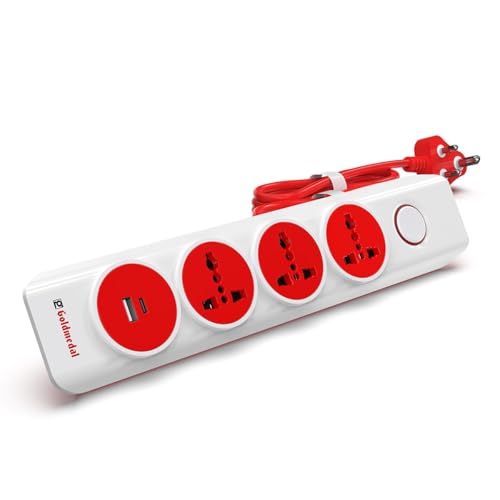
- MASTER SWITCH WITH POWER INDICATOR: Single master switch allows complete power control, improving safety and reducing st…
- HIGH-GRADE ABS BODY WITH BRASS COMPONENTS: Durable, heat-resistant construction with premium internal brass parts for re…
- BUILT-IN SAFETY PROTECTION: Designed with child safety shutters and overload protection to safeguard appliances and user…
How to Choose the Best Surge Protector for Your Home
The best model depends on what you want to protect, how many devices you use and the electrical conditions in your home.
1. Check the joule rating
The joule rating indicates the amount of transient surge energy a protector is designed to absorb or dissipate under specified conditions.
For example, a model listed at 525 joules has a stated energy-dissipation rating of 525 joules. This number is useful for comparison, but it does not by itself establish the product’s overall safety or performance.
Compare the rating alongside the manufacturer’s protection specifications, warranty, quality of construction and the type of electronics you want to connect.
2. Look for a clearly stated surge-current rating
Some manufacturers publish a maximum spike-current rating in amperes. This figure describes a surge-related specification, but it should not be used alone to decide which product is best.
Check that the rating applies to the exact model you are buying and read the manufacturer’s explanation of its protection features.
3. Confirm the electrical load rating
Every power strip has a maximum permissible load. The total load of connected devices must remain within that limit.
Do not assume that every socket can deliver the maximum rated current independently. The total rating generally applies to the entire strip.
For Indian homes, check the voltage, current, plug and cable specifications, and choose a product that is suitable for your wall socket and intended devices.
4. Check earthing and three-line protection
Proper earthing is important for electrical safety. Some surge protectors describe protection across live, neutral and earth lines, but that protection depends on a correctly wired and functioning electrical installation.
A surge protector cannot compensate for faulty or missing earthing. If you are unsure about the condition of your wiring, consult a qualified electrician.
5. Look for overload protection
Surge protection and overload protection address different problems.
- Surge protection is designed to respond to short-duration transient overvoltage events.
- Overload protection helps interrupt power when the load or current exceeds the permitted level, depending on the device design.
- Thermal protection can help respond to excessive heat in products that include this feature.
A model may offer one or more of these features. Read the specifications rather than assuming they are interchangeable.
6. Check the warranty and after-sales support
Some surge protectors advertise connected-equipment warranties. Such coverage is subject to conditions, exclusions, claim procedures and regional availability.
Before relying on a warranty, read the terms carefully. Check the product warranty separately from any connected-equipment coverage.
7. Choose the right number of sockets
Use the number of sockets as a convenience consideration after checking protection and load ratings.
- Four sockets: May suit a compact desk with a computer or a TV with a few accessories.
- Six sockets: May be convenient for a busier workstation or entertainment unit.
- Eight sockets: May suit a larger arrangement, provided the strip is appropriately rated and the total load stays within limits.
Do not buy a strip with more sockets simply to connect more devices than the circuit or product can safely handle.
Surge Protector vs Spike Guard vs Voltage Stabiliser vs UPS
These products are often confused, but they serve different purposes.
| Device | Main purpose | What it does not guarantee |
|---|---|---|
| Surge protector | Helps protect connected electronics from transient voltage surges | Does not guarantee protection against every electrical fault |
| Spike guard | A commonly used term for a power strip with spike or surge protection | The term alone does not prove a specific protection rating |
| Voltage stabiliser | Regulates voltage within its specified operating range | Does not automatically provide backup power or comprehensive surge protection |
| UPS | Provides temporary battery power and may offer additional power conditioning | Protection depends on its design; it is not a substitute for correct wiring |
If your home experiences frequent voltage fluctuations, repeated power cuts or other electrical problems, a surge protector alone may not be enough. Choose the right solution for the specific problem and seek professional advice where necessary.
Which Electronics Should You Connect to a Surge Protector?
A suitable surge protector can be useful for electronics such as:
- Smart televisions and streaming devices.
- Desktop computers and monitors.
- Gaming consoles.
- Wi-Fi routers and networking equipment.
- Audio receivers and home-theatre components.
- Printers and other compatible low-to-moderate-power electronics.
- Laptop chargers and phone chargers.
Always check the connected equipment’s power requirements and the strip’s maximum load.
What about refrigerators, air conditioners and other high-power appliances?
Do not connect high-power appliances to an ordinary extension board simply because it has a surge-protection label. Refrigerators, air conditioners, heaters, microwaves and other high-power equipment may have specific electrical and installation requirements.
Follow the appliance manufacturer’s instructions and use a properly rated dedicated outlet or suitable protective equipment where required. Ask a qualified electrician if you are unsure.
Common Surge Protector Buying Mistakes
Mistake 1: Assuming every extension board is a surge protector
Many extension boards primarily provide extra outlets. Look for specific surge-protection information on the product documentation.
Mistake 2: Choosing by price alone
A very inexpensive board may not provide the documented protection you need. Compare the technical specifications, build quality, load rating and warranty before buying.
Mistake 3: Ignoring the total load
Connecting too many devices can exceed the strip’s permitted load even if there are unused-looking sockets or multiple USB ports.
Mistake 4: Treating surge protection as voltage stabilisation
A surge protector is designed for transient events. It does not necessarily correct sustained under-voltage or over-voltage conditions.
Mistake 5: Ignoring earthing
A surge protector cannot fix a faulty electrical installation. Proper wiring and earthing remain essential.
Mistake 6: Assuming a warranty covers every kind of damage
Read the terms and exclusions. Connected-equipment coverage may require documentation, proof of purchase and compliance with installation instructions.
How to Use a Surge Protector Safely
Follow these practical precautions:
- Buy from a reliable seller and verify the exact model.
- Read the product’s maximum load and installation instructions.
- Avoid connecting one power strip to another.
- Keep the strip away from water, damp surfaces and excessive heat.
- Do not cover the device or obstruct its ventilation, if applicable.
- Stop using a strip with cracked housing, damaged cables, loose sockets, burning smells or signs of overheating.
- Do not exceed the total permissible load.
- Keep the unit accessible so you can switch it off when needed.
- Have questionable wiring or earthing checked by a qualified electrician.
- Replace a surge protector if the manufacturer indicates it has reached end of life or after a significant surge if its condition or protection status is uncertain.
Frequently Asked Questions
1. Which is the best surge protector for home electronics in India?
Belkin’s Essential Series 6-Socket Surge Protector is a useful starting point for comparing documented surge-protection specifications. Honeywell is another option to consider for a compact desk setup. The best choice depends on the exact model, its protection rating, your devices and your budget.
2. Is a spike guard the same as a surge protector?
The terms are often used interchangeably in India, but the name alone does not confirm a particular level of protection. Check whether the product explicitly lists surge protection and provides technical specifications.
3. Can I connect my TV and Wi-Fi router to the same surge protector?
Potentially, yes, if the surge protector is suitable for both devices, the plug types are compatible and the total load remains within the rated limit. Follow the instructions for both appliances.
4. Does a surge protector protect against every voltage fluctuation?
No. It is primarily designed to handle transient surges. Sustained under-voltage or over-voltage may require a different solution, such as an appropriately selected voltage stabiliser or other protective equipment.
5. Is a surge protector better than a voltage stabiliser?
Neither is universally better. They serve different purposes. A surge protector addresses transient surges, while a stabiliser regulates voltage within its specified range. The appropriate solution depends on the electrical problem and the appliance.
6. Do I need a surge protector for my computer?
A suitable surge protector is worth considering for a desktop computer and its peripherals. If you also need time to save work and shut down safely during a power cut, consider a suitably rated UPS.
7. Can I connect a refrigerator to a surge-protection extension board?
Do not assume an ordinary power strip is suitable. Check the refrigerator manufacturer’s instructions and the protective device’s electrical ratings. Use an appropriate outlet and consult a qualified electrician if necessary.
8. Does a surge protector work without proper earthing?
Its effectiveness and safety can depend on the design and the electrical installation. Proper earthing remains important. A surge protector should not be used as a substitute for correcting faulty wiring.
9. How long does a surge protector last?
There is no universal lifespan. It depends on the design, the electrical events it experiences, the manufacturer’s guidance and the condition of the device. Replace it if damaged or if the manufacturer indicates its protection has been exhausted.
10. Should I buy a surge protector with USB ports?
USB ports can be convenient, but they are not essential for surge protection. If you already own reliable chargers, a well-specified surge protector with standard power outlets may be a more practical choice.
Final Verdict: Which Surge Protector Should You Buy?
For home electronics, prioritise a properly specified surge protector over an extension board that merely adds sockets.
- For a TV and entertainment system: Compare the Belkin Essential Series 6-Socket Surge Protector.
- For a compact computer desk: Consider the Honeywell 4-Socket Surge Protector after checking the exact model’s ratings and warranty.
- For an everyday desk setup: Compare the GM Modular 3060 E-Book and verify its surge-protection specifications.
- For additional options: Check the current Havells and Goldmedal ranges, selecting only models with clearly documented protection features.
Before purchasing, verify the model number, surge rating, total load, cable and plug specifications, warranty terms and seller reliability. Prices and availability can change.
Most importantly, remember that surge protection works best as part of a safe electrical setup. Proper earthing, appropriate circuit protection and the right equipment for your home’s electrical conditions matter just as much as the product you choose.