

You finally get your camera ready for streaming.
Tripod? ✅
Capture card? ✅
OBS? ✅
Dummy battery? ✅
Lighting? Looking suspiciously professional. ✅
Then you reach the HDMI cable and discover your camera has a tiny little port that looks approximately half the size of the HDMI connector in your hand.
Welcome to the surprisingly confusing world of camera HDMI cables. 😭🎥
For camera streaming, an HDMI cable may connect your mirrorless camera, DSLR or cinema camera to:
- A capture card
- External recorder
- Field monitor
- Video switcher
- Wireless transmitter
- Streaming computer setup
But cameras do not all use the same HDMI connector.
Depending on the model, your camera could have:
Micro HDMI (Type D), Mini HDMI (Type C) or full-size HDMI (Type A).
Elgato’s current Cam Link guidance specifically notes that many cameras use Mini or Micro HDMI outputs and that you need a cable that connects the camera’s HDMI output to the capture device’s standard HDMI input.
That means the first rule when buying an HDMI cable for camera streaming is extremely simple:
Check your camera’s HDMI port BEFORE buying the cable.
Not after Amazon delivers it.
Not while angrily trying to force the connector in.
Before. 😂
For this guide, we compared current camera-friendly HDMI cables based on:
- Connector type
- 4K60 support
- Bandwidth
- Cable flexibility
- Length
- Connector profile
- Camera-rig friendliness
- Strain on small HDMI ports
- Capture-card compatibility
- Current India availability
- Overall value
Here are the best HDMI cables for camera streaming worth considering in 2026.
Best HDMI Cables for Camera Streaming: Quick Roundup
| HDMI Cable | Connector | Max Advertised Video | Length | Best For |
|---|---|---|---|---|
| UGREEN 30148 | Micro HDMI → HDMI | 4K60 | 1m | Best Overall |
| SmallRig 3043B | Micro HDMI → HDMI | 4K60 | 55cm | Best for Camera Rigs |
| SmallRig 4795 | Micro HDMI → HDMI | 4K60 | 1m | Best Longer Rig Cable |
| UGREEN 11167 | Mini HDMI → HDMI | 4K60 | 1.5m | Best for Mini HDMI Cameras |
| SmallRig 2957 | HDMI → HDMI | 4K60 | 55cm | Best Full-Size Camera Cable |
| SmallRig 4963 | HDMI → HDMI | 4K60 | Up to 1.5m extended | Best Coiled Cable |
| Portronics Konnect Sync/Stream | HDMI → HDMI | 4K60 | Varies | Best Budget Full-Size Option |
1. UGREEN 30148 Micro HDMI to HDMI Cable
Best Overall HDMI Cable for Camera Streaming
For cameras with a Micro HDMI Type-D output, the UGREEN 30148 is one of the easiest recommendations for an Indian streaming setup.
It uses:
Micro HDMI Type D → standard HDMI Type A
and supports video up to 4K at 60Hz.
UGREEN lists the 1m cable with 4K60 output, ARC/Ethernet support and gold-plated connectors. It is currently sold through UGREEN’s official India channel with a two-year India warranty.
Why 1 Metre Works Well
One metre is a nice middle ground for streaming.
It gives you enough room to route from:
camera → tripod → capture card
without creating a giant cable nest behind the desk.
For stationary YouTube setups, one metre is often more practical than ultra-short 35cm camera-rig cables.
Works Well For
- Mirrorless cameras
- DSLRs with Micro HDMI
- Camera-to-capture-card connections
- Camera-to-field-monitor setups
- Home YouTube studios
- OBS streaming setups
Reasons to Buy
| What We Like | What We Don’t Like |
|---|---|
| 4K60 support | Not suitable for Mini HDMI cameras |
| Useful 1m length | Thicker than ultra-slim SmallRig cables |
| 24K gold-plated contacts | 4K120 not supported |
| Official India availability | |
| Two-year warranty | |
| Good value |
Best For
Creators who have a Micro HDMI camera and want a straightforward, reliable streaming cable.
BestBuy93 Pick: This is the one I would buy first for a normal desk-based Micro HDMI streaming setup.

- Bi-Directional: Support Micro HDMI to HDMI & HDMI to Micro HDMI. It can help you to stream audio and video from a camera…
- This Micro-HDMI cable supports 3D Technology, 4K, Audio Return Channel, 1440p and 1080p Full HD Resolution, and Ethernet…
- Compatible for Raspberry Pi 4, Hero 7 Black, Hero 6 Hero5, Hero 4 Silver, Hero 3 White, Hero3+, A5000 handycam, A6500 A6…
2. SmallRig 3043B Ultra-Slim Micro HDMI to HDMI Cable
Best HDMI Cable for Compact Camera Rigs
The SmallRig 3043B is designed more specifically around cameras than a traditional electronics cable.
It is:
Micro HDMI Type D → full-size HDMI Type A
and supports up to 4K60.
SmallRig says the cable is approximately 3.6mm in diameter, making it thinner and softer than a normal HDMI cable. The 55cm length is specifically intended for camera rigs, and low-profile connectors help avoid blocking neighbouring ports.
This matters.
Micro HDMI ports are tiny.
Attaching an extremely thick, rigid HDMI cable and allowing it to hang from the side of your mirrorless camera is not exactly my favourite engineering decision.
Why Thin Cable Matters
A thin, flexible cable:
- Pulls less on the camera port
- Routes more cleanly around cages
- Works better with monitors
- Creates less clutter
- Is easier to secure with cable clamps
If your camera sits in a cage with a monitor or capture device close by, this design makes much more sense than a 2-metre living-room HDMI cable.
Reasons to Buy
| What We Like | What We Don’t Like |
|---|---|
| Designed specifically for camera rigs | 55cm may be too short for desk streaming |
| Very thin 3.6mm cable | Costs more than generic HDMI cables |
| 4K60 | Not Mini HDMI |
| Low-profile connectors | |
| Cable-management tie included | |
| Less bulky around camera ports |
Best For
Mirrorless-camera rigs, external monitors and compact streaming setups.

- 【Micro-HDMI connectivity】 The Micro HDMI to HDMI cable offers you a convenient way to optimize your viewing. Connect dig…
- 【Ultra Thin & Flexible】The ultra-thin and flexible HDMI high-speed cable (55m/1.8ft) with 3.6mm diameter fits perfectly …
- 【High-Speed HDMI Cable】Ultra thin HDMI 2.0 version standard cable supports Ultra HD 4K@60Hz, Full HD 1080P, 3D, Ethernet…
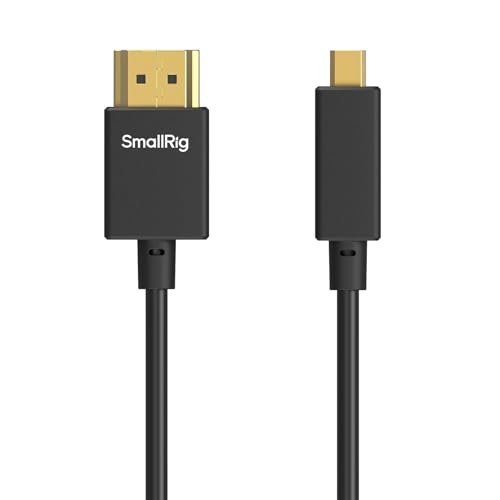
3. SmallRig 4795 Ultra-Slim Micro HDMI to HDMI Cable
Best 1-Metre Camera-Rig Cable
Love the SmallRig ultra-slim design but need more length?
The SmallRig 4795 essentially takes the same camera-friendly concept and stretches it to 100cm.
SmallRig lists:
- Micro HDMI → full-size HDMI
- HDMI 2.0-class transmission
- Up to 4K60
- 3.6mm cable diameter
- Low-profile connectors
- 1m length
- Included cable tie
It specifically lists cameras such as Sony Alpha and Fujifilm models with compatible Micro HDMI outputs among intended applications.
Why I Like This Length for Streaming
The 55cm SmallRig is fantastic on a cage.
But for:
camera on tripod → capture card on desk
55cm can quickly become annoying.
The 1m version gives you much more flexibility while keeping the cable considerably slimmer than many conventional HDMI cables.
Reasons to Buy
| What We Like | What We Don’t Like |
|---|---|
| Camera-friendly thin cable | More expensive than UGREEN |
| 1m length | Availability can fluctuate |
| 4K60 | |
| Low-profile connectors | |
| Flexible TPE construction | |
| Excellent for desk rigs |
Best For
Creators who want a professional-looking camera rig but need more reach than a 35–55cm cable provides.
- [D to A HDMI Cable] The D to A HDMI cable is designed specifically for camera kits, it can be used to connect cameras wi…
- [Ultra Thin & Flexible] The ultra-thin and flexible high speed HDMI cable (100cm / 3.28ft) with 3.6mm diameter fits perf…
- [High-Speed HDMI 2.0 Cable] Ultra thin 2.0 version standard HDMI cable supports Ultra HD 4K@60Hz, Full HD 1080P, 3D, Eth…
4. UGREEN 11167 Mini HDMI to HDMI Cable
Best HDMI Cable for Cameras With Mini HDMI
Stop.
Before ordering the Micro HDMI cable everybody recommends, look at your camera.
Some cameras use Mini HDMI Type C, not Micro HDMI Type D.
They are different connectors.
UGREEN’s 11167 is designed for those devices.
It uses:
Mini HDMI Type C → standard HDMI Type A
and supports 4K60 with up to 18Gbps bandwidth.
The current India listing specifies a 1.5m length, shielded construction, gold-plated connectors and a two-year warranty.
Why 1.5m Can Be Useful
Mini HDMI is often found on larger cameras and camcorders where the camera may sit farther from the streaming computer.
At 1.5 metres, you have enough cable to position:
camera → tripod → desk → capture card
without stretching everything tightly.
Reasons to Buy
| What We Like | What We Don’t Like |
|---|---|
| Mini HDMI Type-C connector | Completely incompatible with Micro HDMI |
| 4K60 | Slightly long for compact camera cages |
| 18Gbps bandwidth | Not designed specifically as ultra-slim rig cable |
| 1.5m length | |
| Official India availability | |
| Good price |
Best For
Cameras and camcorders that specifically use Mini HDMI.

5. SmallRig 2957 Ultra-Slim Full-Size HDMI Cable
Best for Cameras With Full-Size HDMI
Not every camera forces you to deal with tiny HDMI connectors.
Some professional and cinema-oriented cameras provide a proper full-size HDMI Type-A output.
Bless them. 😭
The SmallRig 2957 connects:
HDMI Type A → HDMI Type A
and supports up to 4K60.
It is just 55cm long and approximately 3.6mm thick, making it ideal for connecting cameras to nearby monitors, recorders or wireless-video transmitters.
SmallRig lists compatible device categories including cameras such as Blackmagic Pocket Cinema models, Panasonic S-series/GH-series cameras, Z CAM systems and monitors such as Atomos Ninja models where appropriate full-size HDMI ports are present.
Reasons to Buy
| What We Like | What We Don’t Like |
|---|---|
| Full-size connectors are sturdier | Only useful for Type-A cameras |
| 4K60 | 55cm is short for desk setups |
| Very thin | |
| Camera-rig focused | |
| Low-profile connectors | |
| Good for monitor/recorder rigs |
Best For
Cinema cameras and mirrorless/video cameras that provide full-size HDMI.

- 【Ultra Thin & Flexible】The ultra-thin and flexible high speed HDMI cable (55m/1.8ft) with 3.6mm diameter fits perfectly …
- 【High Speed HDMI Cable】Ultra-Slim HDMI 2.0 version standard cable supports ultra HD 4K@60Hz, Full HD 1080P, 3D, Ethernet…
- 【Wide Compability】Compatible with devices with standard HDMI type A connector, including an HDTV, Computer, TV Stick, Ro…
6. SmallRig 4963 Coiled HDMI Cable
Best Coiled HDMI Cable for Camera Streaming
Cable management becomes particularly irritating when your camera position changes constantly.
A coiled cable helps.
The SmallRig 4963 uses full-size HDMI connectors and a coiled TPU design that stretches when needed and retracts when you move devices closer together.
SmallRig lists:
- HDMI Type A → Type A
- HDMI 2.0-class support
- Up to 4K60
- Flexible coiled construction
- Maximum extended length around 1.5 metres
It is designed for devices such as cameras, monitors and video transmitters with full-size HDMI ports.
Why Coiled Cables Are Useful
When mounted between:
camera → monitor
or:
camera → video transmitter,
a normal long cable can dangle everywhere.
A coiled cable naturally manages excess length.
Reasons to Buy
| What We Like | What We Don’t Like |
|---|---|
| Retractable coiled design | Full-size HDMI only |
| 4K60 | Not ideal if maximum cable flexibility is needed |
| Camera-rig focused | |
| Up to roughly 1.5m stretched | |
| Keeps setups cleaner |
Best For
Moving camera rigs, tripod setups and monitor connections.

- 1.Flexible coiled design allows for easy extension and retraction
- 2.Complies with HDMI 2.0 specification, supporting up to 4K@60Hz resolution
- 3.Enables high-speed data transmission between cameras, monitors, and transmitters with full-sized HDMI ports.
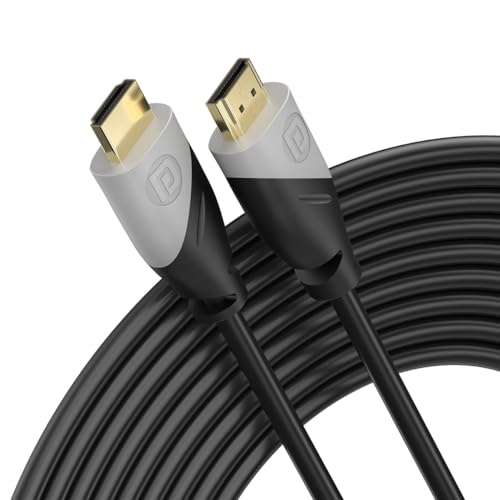
7. Portronics Konnect Sync / Konnect Stream HDMI Cable
Best Budget Full-Size HDMI Cable in India
If both your camera and capture card use standard HDMI or you are using a Micro/Mini HDMI adapter that ends in a standard female HDMI connection you do not necessarily need a ₹1,500 specialist cable.
Current Portronics Konnect Sync/Stream models are available in India with 4K60 support at considerably lower prices than premium camera accessories.
Current shopping results show Konnect Sync variants available from roughly ₹200–₹400 depending on seller and length.
Where It Makes Sense
For a completely stationary setup:
camera → cable → capture card
where nobody is moving equipment around, a normal HDMI cable can work perfectly well.
Where SmallRig Is Better
On a compact camera cage.
Regular HDMI cables are generally thicker and place more mechanical force on ports.
So Portronics is a stronger recommendation for:
desktop streaming
than:
handheld rigging.
Reasons to Buy
| What We Like | What We Don’t Like |
|---|---|
| Very affordable | Bulkier than specialist camera cables |
| 4K60 options | Not ideal for tiny camera rigs |
| Easy India availability | Full-size connector only |
| Multiple lengths | |
| Excellent stationary setup value |
- 4K@60Hz HDMI Cable: Portronics Konnect Sync is a male-to-male HDMI cable that supports 4K@60Hz resolution, allowing you …
- Wide Compatibility: This cable is compatible with Smart HDTV, Set-top Box, Laptops, Projectors, eARC enabled Speakers, a…
- Plug, Play, and Enjoy: This HDMI cable requires no other driver or software. Just plug in the Konnect Sync and you're go…
Micro HDMI vs Mini HDMI vs Full-Size HDMI
This is the section I want you to read before buying anything.
Full-Size HDMI — Type A
This is the normal HDMI connector found on:
TVs, capture cards, monitors, consoles and many professional cameras.
It is the largest and most robust option.
Mini HDMI — Type C
Smaller than standard HDMI.
Found on certain:
DSLRs, camcorders and older or larger camera designs.
Do not confuse it with Micro HDMI.
Micro HDMI — Type D
Even smaller.
Common on compact:
mirrorless cameras, action cameras and other portable equipment.
Elgato notes that Mini and Micro HDMI are particularly common on cameras used with HDMI capture devices.
Easy Rule
Before buying:
Look at camera manual → identify HDMI connector → buy matching cable.
Do not rely entirely on an Amazon title that says:
“Compatible With Sony Canon Nikon Camera.”
That sentence tells you almost nothing.
Different models from the same company can use different HDMI connectors.
What HDMI Cable Speed Do You Need for Streaming?
This gets overcomplicated online.
For most camera streaming setups:
1080p30 or 1080p60
A decent High Speed HDMI cable is generally sufficient.
You do not need an expensive 8K cable simply because your face will eventually appear on YouTube.
For 4K60 Streaming
Look for a cable capable of the full 18Gbps class of bandwidth.
HDMI Licensing’s Premium High Speed certification is specifically designed to test cables for up to 18Gbps and use cases including 4K60 and HDR.
That is why most of the camera-specific recommendations in this guide target:
4K60 / 18Gbps-class performance.
For creators, that is currently the sweet spot.
Do You Need HDMI 2.1 or 48Gbps?
Usually?
No.
Ultra High Speed HDMI cables support up to 48Gbps and were introduced for HDMI 2.1-class applications including 4K100/120 and 8K60.
That is excellent for:
- PS5
- Xbox
- High-end gaming PCs
- 4K120 displays
But most cameras used for livestreaming do not output 4K120 over HDMI to a capture card.
Buying a 48Gbps gaming cable does not magically improve a camera outputting 1080p60.
It merely gives you bandwidth you are not using.
4K60 Is More Than Enough for Most Creators
This is another area where marketing can run away with reality.
Many live streams are ultimately delivered at:
1080p30
or
1080p60.
Even when capturing in 4K, the final streaming platform may use lower resolutions or compressed video.
So focus on:
- Reliable signal
- Correct connector
- Short practical length
- Flexible cable
- Good strain relief
before obsessing over the biggest number printed on the packaging.
Why Clean HDMI Matters More Than an Expensive Cable
You could buy the finest HDMI cable on Earth.
If your camera sends:
battery icon
focus box
ISO
aperture
grid lines
through HDMI…
your livestream will show them too. 😭
For clean streaming, your camera should ideally support clean HDMI output, meaning interface overlays can be disabled.
Elgato specifically recommends checking whether a camera can output clean HDMI before using it with Cam Link.
So before buying the cable:
connect your camera to a TV.
Turn off display information.
Check whether you can get a clean picture.
What Else Do You Need for HDMI Camera Streaming?
The cable does not connect directly to OBS.
Your usual setup is:
Camera → HDMI cable → Capture card → USB → Computer → OBS
Sony’s own HDMI livestreaming instructions similarly describe a camera connected by HDMI to a third-party HDMI-to-USB capture device, which then connects to the computer running streaming software.
You may also need:
- Capture card
- USB cable
- Dummy battery or USB-C camera power
- Tripod
- Camera cage
- HDMI cable clamp
- Streaming software
What Cable Length Is Best?
35–55cm
Best for:
camera → field monitor
camera → recorder
camera → wireless transmitter
Excellent on a cage.
Terrible if your capture card is on the other side of the desk.
Around 1 Metre
My favourite general streaming length.
Enough flexibility without excessive cable.
Ideal for:
camera on tripod beside desk → capture card.
1.5–2 Metres
Useful when:
- Camera is farther from computer
- You use a standing desk
- Capture hardware is mounted elsewhere
- You need flexibility in camera positioning
But avoid unnecessarily long cable runs.
More cable means more:
clutter, weight and opportunities for somebody to trip over your entire YouTube career.
Thin vs Braided HDMI Cable for Cameras
For normal home electronics, thick braided cable sounds premium.
For a tiny Micro HDMI camera port?
I often prefer thin and flexible.
A thick cable acts like a lever on the connector.
SmallRig’s 3.6mm ultra-slim cables are specifically designed around camera rigs for this reason.
Save your armoured HDMI cable for the television.
Your tiny mirrorless port does not need to tow a truck.
Should You Use an HDMI Cable Clamp?
If your camera is permanently rigged?
Yes, seriously consider it.
Micro HDMI and Mini HDMI are much less mechanically robust than full-size HDMI.
A cable clamp attaches to the cage and absorbs some pulling force before it reaches the camera connector.
SmallRig even sells a Micro HDMI-to-full-size adapter system with mounting screws designed specifically to secure the connection to a cage or L-bracket.
If you frequently:
move the tripod, change angles or accidentally yank cables,
port protection is worth thinking about.
Best HDMI Cable by Camera Port
| Camera Port | Recommended Cable |
|---|---|
| Micro HDMI | UGREEN 30148 |
| Micro HDMI, compact rig | SmallRig 3043B |
| Micro HDMI, 1m rig | SmallRig 4795 |
| Mini HDMI | UGREEN 11167 |
| Mini HDMI, compact rig | SmallRig Mini HDMI Ultra-Slim |
| Full HDMI | SmallRig 2957 |
| Full HDMI, moving setup | SmallRig 4963 Coiled |
| Full HDMI, budget desk setup | Portronics Konnect Sync/Stream |
HDMI Cable vs Micro HDMI Adapter
You have two options.
Option 1: Direct Cable
Micro HDMI → HDMI
Simple.
Fewer connection points.
Excellent for normal setups.
Option 2: Short Adapter
Micro HDMI → short adapter → full-size HDMI cable
This can be useful when you want:
- Easier cable replacement
- More rugged full-size cable runs
- Cage-mounted strain relief
UGREEN currently sells short Micro HDMI-to-HDMI female adapters rated up to 4K60, while SmallRig offers cage-mountable versions designed to secure the fragile camera-side connection.
For a professional rig, the adapter approach can actually make a lot of sense.
How We Selected These HDMI Cables
We compared current manufacturer specifications, HDMI certification guidance and India retailer availability.
Our selection criteria included:
- Correct camera connector type
- 4K60 capability
- 18Gbps-class performance
- Cable flexibility
- Length
- Low-profile connectors
- Camera-rig suitability
- Port strain
- India availability
- Warranty
- Value
We also reviewed current Elgato and Sony camera-streaming guidance to confirm practical HDMI requirements for camera-to-capture-card workflows.
Specifications and seller availability can change, so always verify the exact product model before purchasing.
Frequently Asked Questions
What HDMI cable do I need for camera streaming?
First identify whether your camera has:
Micro HDMI, Mini HDMI or full-size HDMI.
Then buy a cable that converts that output to the standard HDMI input used by your capture card.
Is Micro HDMI the same as Mini HDMI?
No.
Micro HDMI is Type D.
Mini HDMI is Type C.
They are physically different connectors.
Is 4K60 HDMI enough for camera streaming?
Yes, for the overwhelming majority of creator streaming setups.
A Premium High Speed-class cable supporting 18Gbps is designed for applications including 4K60.
Do I need HDMI 2.1 for streaming?
Usually not.
HDMI 2.1-class Ultra High Speed cables are useful for bandwidth up to 48Gbps and high-refresh formats such as 4K120, which most camera streaming workflows do not require.
Does an expensive HDMI cable improve camera quality?
Not in the way a better lens does.
A properly functioning digital HDMI cable either carries the required signal reliably or begins exhibiting problems such as dropouts or failure at unsupported bandwidths.
Spending more does not turn 1080p into better-looking 1080p.
Can I use a normal TV HDMI cable with a camera?
Yes if both ends fit and the cable supports the required video mode.
But thick TV-oriented cables can be awkward on small camera ports.
What is the best Micro HDMI cable for Sony cameras?
For stationary streaming, the UGREEN 30148 is a strong 1m option.
For a compact camera rig, the SmallRig 3043B is particularly attractive because it is thin, flexible and only 55cm long.
What is the best HDMI cable for a camera cage?
Choose a short, ultra-slim cable.
SmallRig’s 35cm and 55cm HDMI cables are designed specifically around compact camera rigs.
Can I stream directly with an HDMI cable?
Normally you also need a capture card.
The basic chain is:
camera → HDMI → capture card → computer.
Sony and Elgato both describe this type of setup for HDMI-based camera streaming.
Why does OBS show camera information on screen?
Your camera may not have clean HDMI enabled.
Look for HDMI information-display or clean-output settings in the camera menu/manual.
Can HDMI carry camera audio too?
Yes.
HDMI carries digital video and audio, assuming your camera outputs the audio and the capture device accepts it.
Final Verdict: Which HDMI Cable Should You Buy for Camera Streaming?
For a typical mirrorless camera with Micro HDMI, my best overall choice is the UGREEN 30148 1m Micro HDMI-to-HDMI cable.
It gives you:
4K60 + practical 1m length + official India availability + two-year warranty
without becoming unnecessarily expensive.
If your camera is mounted in a cage or connected to an external monitor, I would choose the SmallRig 3043B instead.
Its short 55cm length and 3.6mm ultra-slim construction are much friendlier to a compact rig.
Need the same camera-friendly design but more reach?
Choose the SmallRig 4795 1m.
Have Mini HDMI instead?
The UGREEN 11167 1.5m Mini HDMI-to-HDMI cable is the straightforward choice, supporting up to 4K60 and 18Gbps.
For cameras with full-size HDMI, the SmallRig 2957 is excellent for compact rigs, while a Portronics Konnect Sync/Stream cable makes more sense if the camera is stationary and price matters more than ultra-slim construction.
And please
before pressing Buy Now…
check the port.
Not the camera brand.
Not the camera colour.
Not the product title that mentions seventeen camera manufacturers.
The actual HDMI port.
Because Micro HDMI and Mini HDMI look annoyingly similar in product photos, but they are very much not interested in fitting into each other’s sockets. 😭🎥
For most creators, the winning formula is surprisingly simple:
Correct connector + 4K60 support + short practical length + flexible cable + clean HDMI output.
You don’t need the biggest bandwidth number.
You need the cable that works reliably every single time you press Go Live. 🔴✨