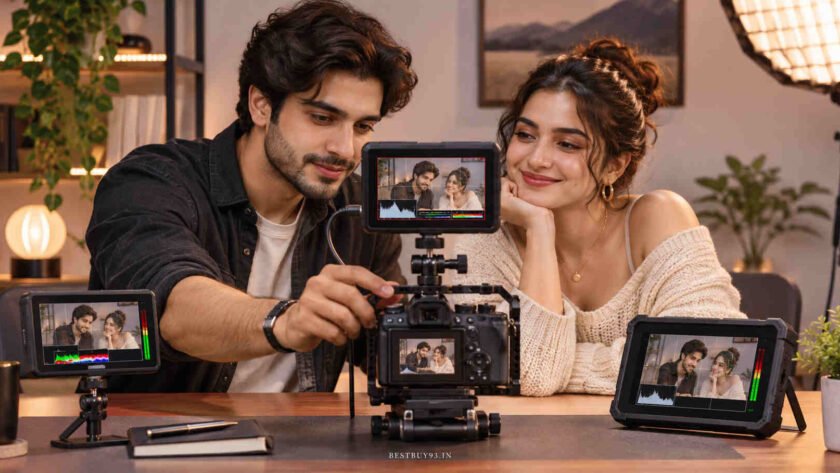

Trying to judge focus, exposure and framing on a tiny camera LCD sounds perfectly reasonable until you actually start recording video.
Then suddenly your 3-inch screen becomes a postage stamp.
Is the face properly in focus?
Is the background clipping?
Did the microphone sneak into the frame?
Did you accidentally compose everything two inches too high?
Welcome to filmmaking. 😂🎥
A good external camera monitor, also called an on-camera monitor or field monitor, gives you a much larger and more useful view of what your camera is recording.
More importantly, many modern field monitors add tools your camera may not provide conveniently, including:
- Focus peaking
- False colour
- Waveform
- Zebra
- Histogram
- 3D LUT preview
- Frame guides
- Anamorphic desqueeze
- HDMI loop-through
- Camera control
- External video recording on selected models
For YouTubers, vloggers, filmmakers, product-video creators and home-studio shooters, this can make monitoring dramatically easier.
For this guide, we compared current external monitors based on screen brightness, resolution, HDMI support, monitoring tools, LUT support, weight, battery options, recording capability and suitability for different creator workflows.
Here are some of the best external monitors for video recording in 2026.
Best External Camera Monitors: Quick Comparison
| Monitor | Screen | Brightness | Maximum Input | Recording | Best For |
|---|---|---|---|---|---|
| Atomos Shinobi II | 5.2-inch FHD | 1500 nits | 4K30 HDMI | No | Best Overall |
| FEELWORLD LUT6E | 6-inch FHD | 1600 nits | 4K30 HDMI | No | Best Value Bright Monitor |
| Viltrox DC-550 Pro II | 5.5-inch FHD | 1400 nits | 4K60 HDMI | No | Best 4K60 Value Pick |
| Portkeys LH5P II | 5.5-inch FHD | 2000 nits | 4K30 HDMI | No | Best Camera-Control Monitor |
| Blackmagic Video Assist 5” 12G HDR | 5-inch FHD | 2500 nits | 4K/12G-SDI + HDMI | Yes | Best Monitor-Recorder |
| SmallHD Indie 7 | 7-inch 1920×1200 | 1000 nits | HDMI + 3G-SDI | No | Best Professional Monitor |
| FEELWORLD F6 Plus | Approx. 5.5–6-inch FHD | Model dependent | 4K HDMI | No | Best Budget Entry Point |
1. Atomos Shinobi II
Best Overall External Monitor for Video Recording
For most mirrorless-camera creators, the Atomos Shinobi II is probably the most balanced external monitor in this list.
It uses a 5.2-inch 1920×1080 touchscreen with a brightness rating of 1500 nits.
That is bright enough to make outdoor monitoring considerably easier than using a typical camera LCD.
Atomos supports HDMI input up to 4K 30fps, while the monitor itself displays the signal on its Full HD panel.
The Shinobi II also weighs only around 210g, which matters if you intend to mount it directly above a small mirrorless camera.
Monitoring Tools
This is where the Shinobi II becomes much more useful than simply attaching a bigger screen.
It includes:
- Waveform
- Histogram
- RGB parade
- Vectorscope
- Focus peaking
- Zebra
- False colour
- Frame guides
- Safe areas
- Anamorphic desqueeze
- 3D LUT support
Atomos also provides preset social-media frame guides such as 9:16, 4:5 and 1:1, which is surprisingly useful if you create both YouTube and Instagram content from the same shoot.
Camera Control
On supported cameras, the Shinobi II can control selected functions through USB-C, including ISO, aperture, shutter and recording controls.
That can be extremely useful when your camera is mounted somewhere awkward.
Main Limitation
The Shinobi II is a monitor, not a recorder.
If your actual goal is external ProRes or RAW recording, look at an Atomos Ninja or Blackmagic Video Assist instead.
Reasons to Buy
| What We Like | What We Don’t Like |
|---|---|
| 1500-nit display | Does not record video |
| Excellent monitoring tools | 4K HDMI input tops out at 30fps |
| Lightweight 210g body | Battery usually purchased separately |
| 3D LUT support | Premium over budget monitors |
| Camera control on compatible bodies | |
| Excellent creator-oriented UI |
Best For
YouTubers, mirrorless-camera users and solo creators who want a premium monitor without external recording.
Also Read | Best Coffee Makers for Home and Office

- Ideal Use: The Atomos Shinobi II HDMI 4K Monitor has been designed, with a focus on common settings that need to be adju…
- Versatile: It harnesses the versatility of USB-C to allow for the widest possible compatibility with most modern mirrorl…
- Sliders: The on-screen sliders adjust white balance, lens aperture, shutter speed and angle, and ISO with immediate and …
2. FEELWORLD LUT6E
Best Value Bright External Monitor
The FEELWORLD LUT6E is particularly interesting because it delivers a lot of practical specs without entering professional-monitor pricing.
It has a 6-inch 1920×1080 IPS display with 1600 nits of brightness.
That makes it well suited to:
- Outdoor filming
- YouTube production
- Product videos
- Interviews
- Short films
- Home studios
The monitor supports HDMI input and output up to 4096×2160 at 30fps.
Why HDMI Output Matters
Some cheaper monitors provide only HDMI input.
The LUT6E includes HDMI output too.
That means you can feed the video signal onward to another monitor or another piece of equipment.
This becomes useful in multi-person productions where:
camera operator → monitor → second display.
Brightness
At 1600 nits, this is much more outdoor-friendly than inexpensive 400–500-nit monitors.
A monitor does not suddenly become invisible the moment somebody opens a window.
Progress. 😂
Weight
FEELWORLD lists the LUT6E at approximately 300g.
It is slightly heavier than the Shinobi II but still manageable on a standard mirrorless rig.
Reasons to Buy
| What We Like | What We Don’t Like |
|---|---|
| 1600-nit screen | No external recording |
| 6-inch display | Less refined ecosystem than Atomos |
| HDMI input and output | 4K input limited to 30fps |
| Full HD panel | Build feels more budget-oriented |
| NP-F battery compatibility | |
| Strong price-to-feature ratio |
Best For
Budget-conscious filmmakers who need a bright monitor with professional monitoring features.
Also Read | Movie Night: Easy Snacks & Drinks
Buy Now on Amazon India Best External Monitors for Video Recording
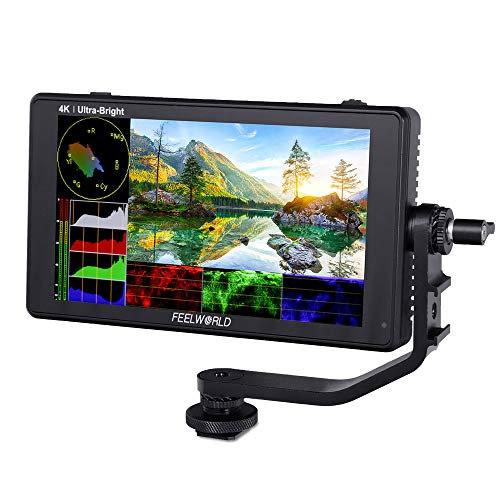
- 【Visible in Sunlight】Feelworld lut6 6 inch ultra bight camera monitor has 2600nit brightness is at almost 5 times the br…
- 【Touch Screen Custom LUTs】You can increase or decrease the brightness and volume simply by swiping up or down, slip from…
- 【Enjoy Sharper and Richer Colors Image】LUT6 dslr monitor display an HDR (high dynamic range) signal for incredible clari…
3. Viltrox DC-550 Pro II
Best Value Monitor for 4K60 HDMI
The newer Viltrox DC-550 Pro II is a very interesting option for creators recording higher-frame-rate 4K video.
It has a 5.5-inch Full HD touchscreen rated at 1400 nits.
More importantly, Viltrox says the Pro II uses HDMI 2.0 and supports 4K 60Hz input and output.
That gives it an advantage over several budget monitors that accept only 4K30.
Monitoring Features
Viltrox includes:
- Waveform
- Histogram
- False colour
- Composition tools
- Custom 3D LUT import
- Touchscreen controls
It also adds an interesting onion-skin function, which lets you use captured reference frames for composition comparison.
That can be useful for:
- Stop-motion-style work
- Repeated product shots
- Matching camera positions
- Before-and-after compositions
Camera Control
The Pro II also introduces camera-control functions through supported wired or wireless connections.
Exact compatibility should always be verified for your specific camera model.
Reasons to Buy
| What We Like | What We Don’t Like |
|---|---|
| 4K60 HDMI input/output | Compatibility varies by camera |
| 1400-nit display | Not an external recorder |
| Touchscreen | Smaller ecosystem than Atomos |
| LUT support | Active cooling may matter in quiet environments |
| Camera-control options | |
| Good value |
Best For
Creators recording 4K60 who want a reasonably priced monitor without dropping down to 4K30 monitoring.
Also Read | Popcorn Maker Essentials for Snack Lovers With High Standards
Buy Now on Amazon India Best External Monitors for Video Recording
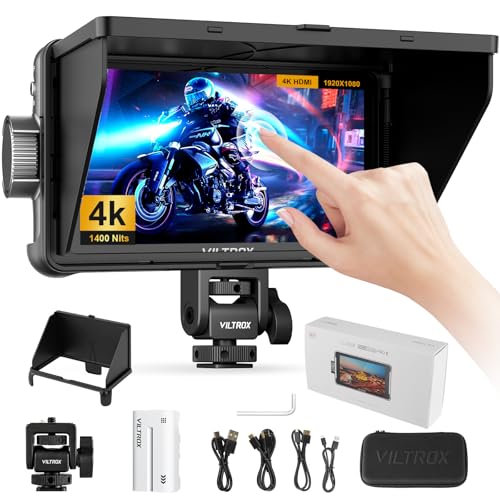
- DIRECT CAMERA CONTROL & HDMI 2.0 4K@60 – An industry-first upgrade. Effortlessly adjust aperture, shutter, ISO, white ba…
- 1400 NITS HIGH-BRIGHTNESS IPS TOUCH SCREEN – Monitor true-to-life details on a 5.5-inch Full HD 1920×1080 display with 1…
- FULLY CUSTOMIZABLE PRO TOOLS WITH ONION SKIN – Move, resize and zoom waveform, histogram, vectorscope and RGB parade to …
4. Portkeys LH5P II
Best External Monitor for Camera Control
The Portkeys LH5P II is where things become seriously interesting for solo camera operators.
Portkeys gives it a 5.5-inch 1920×1080 panel rated at an impressive 2000 nits.
That makes it one of the brightest compact monitors in this roundup.
It accepts:
- DCI 4K up to 24fps
- UHD 4K up to 30fps
- Full HD up to 60fps
and includes both HDMI input and HDMI output.
Camera Control
Camera control is the big selling point.
Portkeys supports wired and wireless control for selected cameras, including certain Sony and Blackmagic bodies.
Depending on compatibility, this can reduce how often you need to touch the camera itself.
That is useful for:
- Gimbal rigs
- Shoulder rigs
- Low-angle cameras
- Cameras mounted against walls
- Solo YouTube studios
Monitoring Tools
It includes professional tools such as:
- Waveform
- Peaking
- ARRI-style false colour
- 3D LUT monitoring
The display also covers 100% Rec.709 according to Portkeys.
Reasons to Buy
| What We Like | What We Don’t Like |
|---|---|
| Very bright 2000-nit display | Camera control varies by model |
| Camera-control features | More expensive than FEELWORLD |
| HDMI in and out | HDMI-only workflow |
| LUT support | Not a recorder |
| Aluminium construction | |
| Excellent outdoor visibility |
Best For
Solo filmmakers and creators who want to control supported cameras from the monitor.
Also Read | Best Sandwich Makers for Café Grilled Sandwiches
Buy Now on Amazon India Best External Monitors for Video Recording
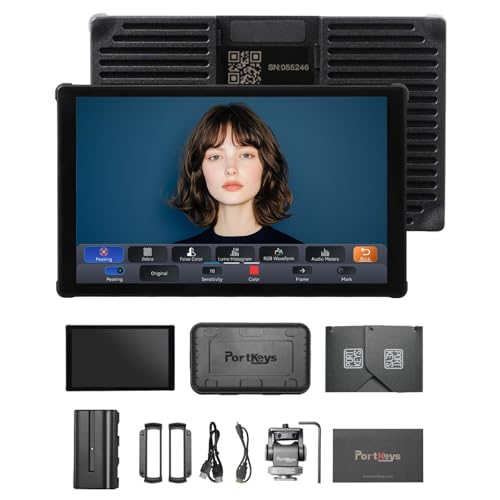
- Portkeys PT5 III Camera Monitor obtained Full HD IPS display (1920*1152) with 800cd/m² brightness and high-sensitivity m…
- Powered by MOVNORM OS, the Portkeys PT5 III is extremely easy to use and navigate. With a full set of professional monit…
- Supports 4K signals up to 4096*2160p @30Hz (HDMI input/output). USB 3.0 port for fast 3D LUT import and data transfer. U…
5. Blackmagic Design Video Assist 5” 12G HDR
Best External Monitor + Recorder
This is where we leave the category of:
“nice screen for my camera”
and enter:
“small production tool that happens to have a screen.”
The Blackmagic Video Assist 5-inch 12G HDR combines a 1920×1080 touchscreen with a massive 2500-nit brightness rating.
That is extremely useful outdoors.
But brightness is not the headline feature.
It Records Video
Unlike Shinobi, FEELWORLD, Viltrox or Portkeys monitor-only models, the Video Assist can record video externally.
Blackmagic lists recording in 10-bit 4:2:2 ProRes or DNx to compatible SD media.
Supported camera workflows can also use Blackmagic RAW.
HDMI + 12G-SDI
The monitor includes:
- HDMI 2.0a input/output
- 12G-SDI input/output
That makes it useful far beyond consumer mirrorless cameras.
You can integrate it into:
- Cinema-camera rigs
- Broadcast setups
- Production cameras
- HDMI mirrorless systems
- SDI workflows
Monitoring Tools
Blackmagic provides:
- Scopes
- Focus assist
- Exposure tools
- 3D LUT support
- HDR monitoring
The USB-C port can also be used with external storage.
Reasons to Buy
| What We Like | What We Don’t Like |
|---|---|
| 2500-nit HDR display | Significantly more expensive |
| External recording | Heavier than monitor-only options |
| 12G-SDI | More complex than beginners need |
| HDMI 2.0 | Storage adds cost |
| ProRes/DNx support | Overkill for simple vlogging |
| Professional scopes |
Best For
Filmmakers who need both monitoring and high-quality external recording.
Also Read | Easy One-Pot Dinner Recipes for Busy Days
Buy Now on Amazon India Best External Monitors for Video Recording
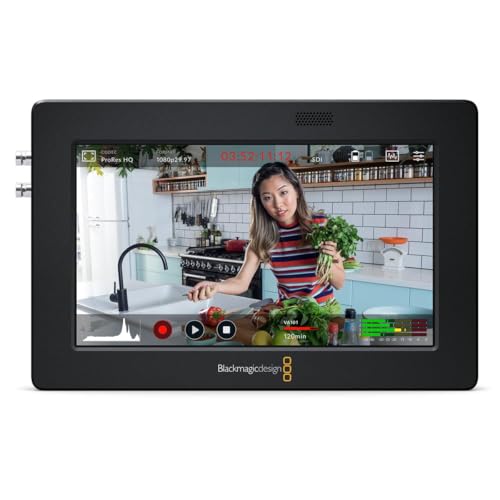
- External LCD Touchscreen Monitor Assistant with Recorder
- Viewfinder for Consumer Broadcast Cameras – 5"
- Scope
6. SmallHD Indie 7
Best Professional Field Monitor
If your workflow is becoming genuinely professional, SmallHD is one of the names you will repeatedly encounter.
The SmallHD Indie 7 uses a 7-inch 1920×1200 touchscreen with 10-bit colour and a maximum brightness of approximately 1000 nits.
It also provides 3G-SDI connectivity.
Why Buy a 7-Inch Monitor?
Five-inch monitors are excellent on compact rigs.
Seven-inch screens are better when you want to evaluate:
- Focus
- Composition
- Lighting
- Makeup
- Product placement
- Background details
from farther away.
For studio recording, interviews or crew-based shoots, that extra screen area becomes genuinely useful.
PageOS Workflow
SmallHD’s biggest strength is not simply panel specifications.
Its monitoring software and page-based workflow are designed for professional production environments.
This is the sort of monitor you buy because you care about monitoring workflow, not because you found “7-inch screen” in an Amazon search.
Construction
SmallHD uses a lightweight aluminium chassis and specifically positions the Indie 7 for demanding run-and-gun production work.
Reasons to Buy
| What We Like | What We Don’t Like |
|---|---|
| Excellent 7-inch workspace | Expensive |
| 1920×1200 resolution | 1000 nits is lower than some competitors |
| Professional interface | Too much for casual YouTube creators |
| SDI support | Larger rig footprint |
| Strong build quality | |
| Professional monitoring ecosystem |
Best For
Professional video production, cinema rigs, interviews and crew-based shoots.
Also Read | What to Serve with Hot Coffee on Cozy Mornings
Buy Now on Amazon India Best External Monitors for Video Recording

- 【Aluminum Alloy Material】Nitze cage for SmallHD Indie 7 / 702 Touch monitor is made of anodized aluminum alloy for light…
- 【Locking Method】Securely lock your monitor by three 1/4"-20 screws on both sides and bottom that prevents your monitor f…
- 【Built-in NATO Rail】Built-in NATO rail on the bottom makes your accessories installation more quickly and convenient. Ni…
7. FEELWORLD F6 Plus
Best Entry-Level External Monitor
Not everybody needs false-colour perfection and 2500-nit brightness.
Sometimes you just need:
a screen bigger than the camera screen.
The FEELWORLD F6 Plus family remains popular because it provides Full HD monitoring, HDMI support and LUT features at relatively approachable pricing.
Current Indian shopping results show F6 Plus variants from specialist retailers as well as import sellers.
Why Beginners Like It
For home studio recording, the monitor does not necessarily need to fight direct sunlight.
If you record:
- YouTube talking-head videos
- Tutorials
- Product reviews
- Cooking videos
- Podcasts
- Indoor reels
then an affordable external display can still massively improve framing.
Reasons to Buy
| What We Like | What We Don’t Like |
|---|---|
| Affordable | Brightness varies by model/version |
| Compact | Verify exact generation before buying |
| 4K HDMI input support | Not professional build quality |
| LUT support on many variants | No external recording |
| Excellent first monitor | Outdoor visibility may be limited |
Best For
Beginners building their first mirrorless-camera video rig.
Also Read | Easy Sunday Brunch Ideas for the Family
Buy Now on Amazon India Best External Monitors for Video Recording

- 🎬【Newest Innovative Touch Screen】Easy Touchscreen Controls,Freely Zoom In and Out OCR Full-fit Screen Design The monitor…
- 🎬【Light and Slim Design, Only 235g 】The F6 PLUS is 5.5 inch and only 235g, and makes it the ideal size and weight for fi…
- 🎬【3D LUT Color Calibration and Real-time Preview】F6 PLUS provides S-log2/3, V-log, Log-C etc, to convert log mode to REC…
External Monitor vs External Recorder: Know the Difference
This distinction is extremely important.
External Monitor
Examples:
These primarily display the camera’s video signal.
They help you monitor.
They usually do not record your video independently.
External Monitor-Recorder
Examples:
- Blackmagic Video Assist
- Atomos Ninja series
These can both display and record the camera’s HDMI/SDI output.
That can provide benefits such as:
- ProRes recording
- DNx recording
- RAW workflows on compatible cameras
- Longer recording workflows
- SSD/SD recording
- Easier editing codecs
But they are typically:
heavier, more expensive and more power hungry.
If your camera’s internal recording already does everything you need, buying a recorder may simply make your rig unnecessarily complicated.
What Brightness Do You Need?
Brightness is measured in nits.
For external monitors, this matters a lot.
Around 400–600 Nits
Fine indoors.
Poor in strong sunlight.
Around 1000 Nits
Good general-purpose brightness.
1500–2000 Nits
Excellent for outdoor creators.
2500+ Nits
Very strong daylight visibility.
This is why the 1500-nit Shinobi II, 2000-nit Portkeys and 2500-nit Blackmagic are attractive for outdoor production.
Is a 5-Inch or 7-Inch Monitor Better?
Choose 5–5.5 Inches If:
- You vlog
- You use a gimbal
- You shoot handheld
- You travel
- You use a small mirrorless camera
A 5-inch screen is dramatically bigger than your camera LCD without turning the rig into gym equipment.
Choose 7 Inches If:
- You shoot on a tripod
- You record interviews
- You have a cinema rig
- You work with a crew
- You monitor from farther away
- You want easier manual focus
Seven inches is wonderful.
Until you attach it to a tiny camera and realise your screen is now bigger than the camera. 😂
Why Focus Peaking Matters
Autofocus is excellent on modern cameras.
But it is not perfect.
Focus peaking highlights sharp edges in the frame so you can quickly judge which parts of the image are in focus.
It is particularly useful for:
- Manual-focus lenses
- Product videography
- Macro shots
- Interviews
- Cinematic focus pulls
Why False Colour Matters
False colour converts brightness levels into different colours.
Instead of guessing whether skin is exposed properly by looking at the picture, you can use colour-coded exposure zones.
This is particularly useful when shooting:
- Log footage
- Interviews
- Controlled lighting
- Commercial videos
It is one of those features that looks bizarre the first time you use it.
Then one day you realise:
“Oh. This is much easier than staring suspiciously at the LCD.” 😂
What Is a Waveform Monitor?
Waveform shows the brightness distribution of your image.
Unlike a histogram, it retains information about where brightness is located within the frame.
That makes waveform one of the most useful exposure tools available to video shooters.
If you intend to become serious about videography, learn waveform.
Your eyeballs lie.
Waveforms are significantly less emotional.
Do You Need LUT Support?
If you shoot Log video, LUT preview can be extremely useful.
Log footage intentionally looks:
- Flat
- Low contrast
- Desaturated
Applying a monitoring LUT lets you preview something closer to the final graded image without necessarily baking that look into the recording.
The Shinobi II supports .cube LUT files, while FEELWORLD, Viltrox, Portkeys and Blackmagic also provide LUT-monitoring workflows.
Check Your Camera’s HDMI Port Before Buying
Please do this.
Seriously. 😭
Cameras may use:
- Full-size HDMI
- Mini HDMI
- Micro HDMI
Your monitor may have full-size HDMI while your camera uses Micro HDMI.
That means you need the correct cable.
Also verify:
- Maximum HDMI output resolution
- Maximum frame rate
- Clean HDMI availability
- Whether overlays can be disabled
- 10-bit output capability
- RAW-output compatibility
- Camera-control compatibility
A monitor cannot display a signal your camera cannot output.
What Accessories Will You Need?
Your shiny new monitor may arrive and immediately ask for several friends.
Budget for:
NP-F Battery
Many camera monitors use Sony-style NP-F batteries.
HDMI Cable
Prefer a short flexible cable designed for camera rigs.
Monitor Mount
A tilt/swivel mount is much better than permanently staring at the monitor from one angle.
Camera Cage
Useful if your camera has limited mounting points.
Sun Hood
Still useful outdoors even with bright displays.
How We Selected These External Monitors
We evaluated current manufacturer specifications and recent 2026 field-monitor comparisons.
The key criteria were:
- Screen size
- Resolution
- Brightness
- HDMI input capability
- SDI availability
- Monitoring tools
- 3D LUT support
- Camera control
- External recording
- Weight
- Battery flexibility
- Outdoor visibility
- Value
- Indian availability
We did not claim personal hands-on testing of every model.
Current manufacturer documentation was prioritised for technical specifications, while current retailer listings were used to confirm practical availability.
Frequently Asked Questions
What is the best external monitor for video recording?
For most mirrorless-camera creators, the Atomos Shinobi II is one of the strongest overall monitor-only choices thanks to its 1500-nit 5.2-inch display, monitoring tools, LUT support and light 210g body. Best External Monitors for Video Recording
What is the best budget camera monitor?
The FEELWORLD F6 Plus is a good entry-level option, while the brighter LUT6E is a stronger step-up choice for outdoor use. Best External Monitors for Video Recording
Is 1000 nits bright enough outdoors?
It can be usable, especially with a sun hood, but 1500–2000 nits provides noticeably more comfortable daylight monitoring. Best External Monitors for Video Recording
Do external monitors record video?
Not all.
The Shinobi II, FEELWORLD LUT6E and Portkeys LH5P II primarily monitor.
The Blackmagic Video Assist can both monitor and record. Best External Monitors for Video Recording
Do I need a 4K external monitor for a 4K camera?
No.
Most small field monitors use Full HD panels.
They can still accept a 4K signal and display it scaled to the panel resolution. Best External Monitors for Video Recording
Is 5 inches enough?
Yes.
Five to 5.5 inches is the sweet spot for compact mirrorless rigs.
Seven inches is better for tripod or professional production setups. Best External Monitors for Video Recording
Which monitor is best for outdoor shooting?
The Blackmagic Video Assist 5” 12G HDR reaches 2500 nits, while the Portkeys LH5P II reaches 2000 nits and the Shinobi II reaches 1500 nits. Best External Monitors for Video Recording
Can an external monitor improve video quality?
A monitor itself does not improve the image your camera records.
However, better monitoring can help you achieve more accurate:
focus, exposure, composition and colour preview.
An external recorder may additionally change recording formats or quality depending on your camera and supported workflow. Best External Monitors for Video Recording
Final Verdict: Which External Monitor Should You Buy?
For most YouTubers, videographers and mirrorless-camera creators, the Atomos Shinobi II is my best overall pick.
It combines:
1500-nit brightness + professional monitoring tools + LUT support + low weight + camera control in a compact package.
Want better value?
The FEELWORLD LUT6E gives you a larger 6-inch, 1600-nit display with HDMI input and output at a significantly more accessible level.
Want 4K60 HDMI?
The Viltrox DC-550 Pro II is particularly compelling.
Want serious camera-control functionality?
Look at the Portkeys LH5P II.
Need actual external recording rather than monitoring alone?
Skip straight to the Blackmagic Video Assist 5” 12G HDR or an appropriate Atomos recorder.
And if you are moving toward professional cinema production, SmallHD Indie 7 offers a more production-focused 7-inch monitoring environment.
The biggest mistake would be buying the largest monitor you can find.
For video rigs, bigger is not automatically better.
The right external monitor is the one that gives you enough screen area to confidently judge your shot without making the entire camera rig miserable to use.
For handheld creators?
5 to 5.5 inches is usually perfect.
For tripod and studio work?
6 to 7 inches becomes very attractive.
And once you start using waveform, false colour and focus peaking properly?
Going back to the tiny built-in camera display feels a little like editing a YouTube video on a smartwatch. 🎥😭