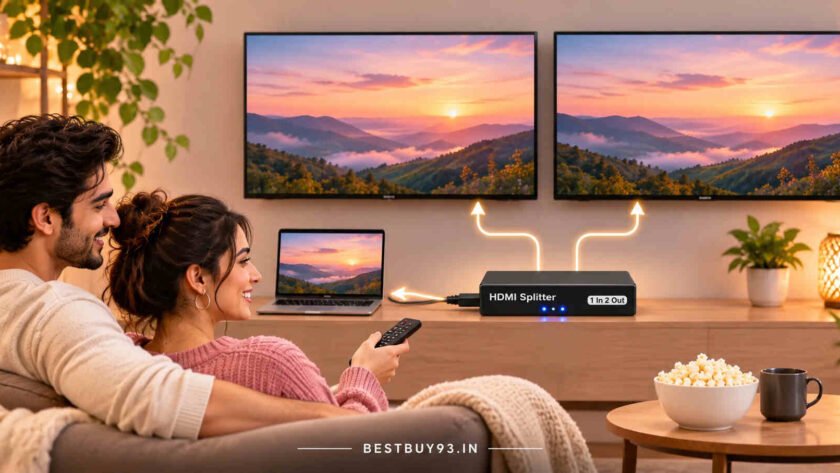

Want to connect one laptop, streaming device, gaming console, set-top box or media player to multiple TVs or monitors at the same time?
That is exactly what an HDMI splitter is designed to do.
But before you buy one, there is one very important sentence we need to get out of the way:
An HDMI splitter normally duplicates the same picture on every connected display. It does not create an extended desktop with different content on each monitor.
This is the mistake that causes approximately 70% of HDMI-splitter disappointment. 😭
You buy a 1-in-2-out splitter for your laptop expecting:
Monitor 1 → Chrome
Monitor 2 → Premiere Pro
…and Windows cheerfully gives you the exact same desktop on both.
That is because a splitter duplicates one HDMI signal. For independent extended monitors, you usually need multiple graphics outputs, a compatible USB-C/Thunderbolt dock or DisplayPort MST solution instead. OREI explicitly states that its 1×2 and 1×4 splitters mirror one source and cannot create an extended computer desktop.
If mirroring is exactly what you need, though, a good HDMI splitter can be incredibly useful.
Think:
- One set-top box on two TVs
- One laptop presentation on a monitor and projector
- One gaming console mirrored to a TV and capture setup
- One media player feeding four commercial displays
- One video source shown in multiple rooms
- Classroom and conference-room screens
- Retail digital signage
- Restaurants and cafés with multiple TVs
For this guide, we compared current HDMI splitters based on resolution, refresh rate, HDMI bandwidth, HDCP support, EDID management, downscaling, HDR compatibility, output count, audio extraction and India availability.
Best HDMI Splitters: Quick Roundup
| HDMI Splitter | Best For | Outputs | Max Video | Key Feature |
|---|---|---|---|---|
| OREI UHDS-102 | Best Overall | 2 | 4K 60Hz | Simple 18Gbps 4K60 mirroring |
| StarTech ST122HD20S | Best for Mixed Displays | 2 | 4K 60Hz | Built-in scaler + audio extraction |
| OREI BK-102A | Best HDMI 2.1 / Gaming | 2 | 8K60 / 4K120 | 48Gbps, VRR, ALLM, downscaling |
| OREI UHDS-104A | Best 1×4 Splitter | 4 | 4K 60Hz | Downscaling + audio extraction |
| KanexPro SP-HD1X48K | Best Premium 1×4 HDMI 2.1 | 4 | 8K60 / 4K120 | 48Gbps + per-output scaling |
| Black-i HDMI Splitter 1×2 | Best Simple India Pick | 2 | 4K 30Hz | Affordable locally sold option |
| OREI HD-102C | Best Basic Compact Splitter | 2 | 4K 30Hz | Built-in HDMI input lead |
1. OREI UHDS-102
Best Overall HDMI Splitter for Most 4K60 Setups
For most people trying to duplicate one modern HDMI source across two televisions or monitors, the OREI UHDS-102 is the most sensible place to start.
It is a 1×2 HDMI 2.0 splitter supporting resolutions up to 4K at 60Hz, 18Gbps bandwidth and HDCP support.
OREI also documents support for HDR10+, Dolby Vision and HLG on this model, along with multichannel HDMI audio and selectable EDID behaviour.
What Does 1×2 Mean?
It means:
1 HDMI input → 2 HDMI outputs
For example:
Fire TV Stick → splitter → TV 1 + TV 2
Both TVs display the same content.
Why 4K60 Matters
Older inexpensive splitters often top out at:
4K30
That may be fine for presentations and movies, but 4K60 gives smoother motion and is more suitable for modern PCs, media devices and general-purpose displays.
Reasons to Buy
| What We Like | What We Don’t Like |
|---|---|
| 4K 60Hz support | Only two outputs |
| 18Gbps HDMI 2.0 | No extended desktop |
| HDR-format support | Not 4K120 |
| EDID modes | No dedicated audio extraction |
| Metal enclosure | Requires power |
| Good all-round specification |
Best For
Home entertainment, presentations, YouTube studios and general two-display 4K60 mirroring.

- 4K 18 Gbps Powered HDMI Splitter split one HDMI 2.0 input signal to two HDMI output signals identical to the input signa…
- DOES NOT EXTEND MONITOR DISPLAY – Supported resolution: up to 4K/60Hz, 1080p, 720p, VGA to WUXGA & Supported Audio: LPCM…
- Heavy-duty cool metal enclosure protects the insides and keeps the unit cool by aiding in quick heat absorption and diss…
2. StarTech ST122HD20S
Best HDMI Splitter for Mixed 4K and 1080p Displays
Here is where HDMI splitting gets slightly annoying.
Imagine you connect:
Display 1 → 4K TV
Display 2 → 1080p projector
A cheap splitter may force both outputs to use the capability of the weakest display.
Or worse:
one screen simply refuses to show anything.
The StarTech ST122HD20S addresses this with a built-in scaler.
StarTech specifies:
- HDMI 2.0b
- Up to 4K 60Hz
- 18Gbps
- 4:4:4 chroma
- HDR
- HDCP 2.2
- EDID management
- Built-in scaling
- 3.5mm and optical audio extraction
Its scaler can allow two connected displays to operate at different supported resolutions for example 4K on one and a lower compatible resolution on another.
Why This Is Useful
This is especially valuable in offices and meeting rooms.
Perhaps your modern television is 4K.
But your ceiling projector is still 1080p.
Replacing the projector just because the HDMI splitter is having an existential crisis would be mildly excessive.
Audio Extraction
The StarTech also offers separate audio outputs.
That helps if you want the source audio going to:
- Amplifier
- Powered speakers
- AV system
instead of relying only on TV speakers.
Reasons to Buy
| What We Like | What We Don’t Like |
|---|---|
| 4K60 | Expensive |
| Built-in scaling | Only two HDMI outputs |
| Excellent mixed-display flexibility | Overkill for basic home setups |
| Optical + analogue audio extraction | Needs external power |
| EDID controls | |
| HDCP 2.2 |
Best For
Offices, AV installations and mixed 4K/1080p systems where reliability matters more than price.

- 4K RESOLUTION: This 2-port HDMI splitter supports 4K 60Hz HDMI resolutions for TVs that require the highest quality of i…
- PLUG AND PLAY: With no additional software or drivers required, this 4K HDMI audio video splitter supports easy plug-and…
- MIRROR DISPLAYS: Use this 2-way ultra-HD HDMI 2.0 splitter to mirror a display, such as corporate information or adverti…
3. OREI BK-102A
Best HDMI 2.1 Splitter for 4K120 Gaming
Using:
- PlayStation 5
- Xbox Series X
- High-end gaming PC
- 120Hz gaming TV
Then a normal HDMI 2.0 splitter is no longer enough if you want to preserve 4K at 120Hz.
You need HDMI 2.1-class bandwidth.
The OREI BK-102A is a 1×2 HDMI 2.1 splitter supporting up to:
8K at 60Hz
and
4K at 120Hz
with up to 48Gbps FRL bandwidth.
It also supports gaming-oriented HDMI 2.1 features including:
- VRR
- ALLM
- QMS
- QFT
as well as HDR10, HDR10+, Dolby Vision and HLG.
Automatic Downscaling
This is another major advantage.
OREI documents automatic conversion between:
8K → 4K
8K → 1080p
4K → 1080p
depending on connected display capability.
That is useful when your displays are not identical.
Audio Extraction
You also get optical and 3.5mm audio outputs.
So this is much more than a basic splitter.
Reasons to Buy
| What We Like | What We Don’t Like |
|---|---|
| HDMI 2.1 | Expensive compared with 4K60 splitters |
| 48Gbps | Only two HDMI displays |
| 4K120 | Requires proper Ultra High Speed HDMI cables |
| 8K60 | Unnecessary for normal TV viewing |
| VRR and ALLM | |
| Downscaling | |
| Audio extraction |
Best For
PS5, Xbox Series X and gaming PCs where maintaining 4K120 is important.

- 8K HDMI 1 input into 2 output Splitter with Audio Extractor through Optical Or Analog. This Device will not extract Audi…
- 8K HDMI Splitter is compatible with all operating system such as Windows, Mac OS, Linux. Also works perfectly with Logit…
- Supported resolution: up to 8K, 4K/120Hz, 1080p, 720p, HDR, HDR10, HDR10+ Dolby Vision, HLG Pass Through. Supports HDMI …
4. OREI UHDS-104A
Best HDMI Splitter for Four Displays
Need more than two screens?
This is where you move from a 1×2 splitter to a 1×4 model.
The OREI UHDS-104A accepts one HDMI input and distributes it to four HDMI outputs simultaneously.
It supports:
- HDMI 2.0b
- 18Gbps
- 4K60 4:4:4
- HDCP 2.2
- 4K-to-1080p downscaling
- AUTO/COPY EDID
- Optical audio
- 3.5mm analogue audio
OREI explicitly positions the unit for applications including conference rooms, classrooms, restaurants, retail displays and digital signage.
Why 1×4 Makes Sense
Imagine a café.
One sports source.
Four televisions.
You do not need four streaming devices.
You need:
Source → splitter → TV × 4.
Same applies to:
- Shops
- Exhibitions
- Training rooms
- Churches
- Conference halls
- Large homes
Reasons to Buy
| What We Like | What We Don’t Like |
|---|---|
| Four HDMI outputs | More expensive than 1×2 |
| 4K60 | Same content on all four |
| Downscaling | Not HDMI 2.1 |
| Audio extraction | No 4K120 |
| EDID management | Larger than simple splitters |
| Metal enclosure |
Best For
Commercial setups, classrooms and homes needing one source mirrored across four displays.

- OREI HDMI Splitter 1 in 4 Out: THIS UNIT DOES NOT EXTEND MONITORS – ONLY Split one HDMI input signal to four HDMI output…
- 4K 18 Gbps Powered OREI HDMI Splitter split one HDMI 2.0 input signal to four HDMI output signals identical to the input…
- Supported resolution: up to 4K/60Hz, 1080p, 720p, VGA to WUXGA & Supported Audio: LPCM, Dolby-AC3, DTS7.1, DSD/Dolby Tru…
5. KanexPro SP-HD1X48K
Best Premium 1×4 HDMI 2.1 Splitter
Want four outputs and HDMI 2.1?
Now we are entering serious AV territory.
The KanexPro SP-HD1X48K is a 1×4 HDMI 2.1 splitter supporting:
- 48Gbps bandwidth
- 8K60
- 4K120
- HDCP 2.3
- VRR
- ALLM
- QMS
- QFT
- HDR10/HDR10+
- Dolby Vision
- HLG
- Dolby Atmos
- DTS:X
It can also perform automatic downscaling independently across outputs.
Who Actually Needs This?
Not somebody connecting a Tata Play box to two bedroom TVs.
This is designed more for:
- Premium gaming rooms
- Professional AV
- Demo installations
- High-end home theatres
- Display walls
- Modern commercial installations
Mixed Display Handling
The ability to handle different display capabilities is one of the strongest reasons to pay for premium distribution hardware.
Your 8K display does not necessarily have to be dragged down simply because another screen is 4K or 1080p.
Reasons to Buy
| What We Like | What We Don’t Like |
|---|---|
| Four outputs | Expensive |
| HDMI 2.1 | Huge overkill for ordinary setups |
| 48Gbps | Requires quality HDMI cabling |
| 4K120 | Larger investment |
| 8K60 | |
| Per-output downscaling | |
| Strong gaming support |
Best For
High-end four-display systems where 4K120 or 8K capability actually matters.
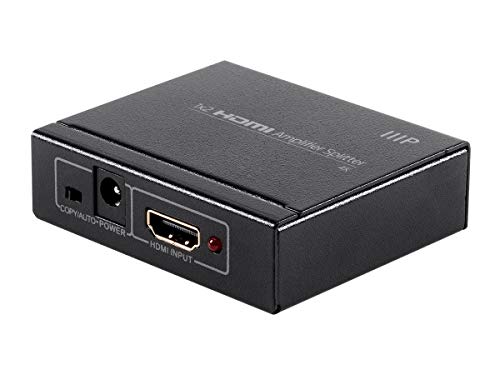
6. Black-i HDMI Splitter 1 In 2 Out 4K
Best Simple India-Available Pick
If your needs are modest, there is no reason to pay HDMI 2.1 money.
The Black-i HDMI Splitter 1 In 2 Out 4K is a locally available option designed to mirror one source to two displays.
Black-i lists:
- HDMI 1.4a
- 4K×2K at 30Hz
- Two HDMI outputs
- HDCP up to 1.3
- Deep-colour support
- Powered operation
- One-year replacement warranty
The company currently sells it directly in India.
Who Is 4K30 Enough For?
Plenty of people.
If you are using:
- Presentations
- CCTV output
- Signage
- Films
- Set-top boxes
- Basic office displays
then 4K120 is completely irrelevant.
Even 4K60 may be unnecessary.
Where I Would Not Use It
For:
PS5 4K120.
High-refresh PC gaming.
Modern high-end Dolby Vision distribution.
Those use cases deserve newer hardware.
Reasons to Buy
| What We Like | What We Don’t Like |
|---|---|
| Available directly in India | 4K limited to 30Hz |
| Straightforward 1×2 design | HDMI 1.4 generation |
| Powered | Not suitable for modern 4K120 gaming |
| Affordable compared with pro models | Older HDCP support |
| One-year replacement warranty |
Best For
Basic home, office and presentation setups that do not need 4K60 or 4K120.
7. OREI HD-102C
Best Compact Basic HDMI Splitter
Another straightforward option is OREI’s HD-102C.
This is a compact 1×2 HDMI 1.4 splitter with a built-in male HDMI input cable.
OREI specifies support for:
- 4K30
- 1080p
- 720p
- HDMI 1.4
- HDCP 1.4
- Dolby Vision
- HDR
- Dolby TrueHD
- DTS-HD Master Audio
Again, it mirrors the same source rather than creating an extended desktop.
Why Consider It?
Convenience.
The attached source cable means one less short HDMI lead to buy.
It is ideal for relatively simple setups where you just want:
“plug this thing in and make both screens show the same picture.”
Reasons to Buy
| What We Like | What We Don’t Like |
|---|---|
| Compact | Only 4K30 |
| Built-in input cable | No HDMI 2.0/2.1 |
| Simple setup | No scaling |
| Good for 1080p | No audio extraction |
| Useful for older equipment |

- HDMI Splitter 1in2 Out – Split one HDMI input signal to two HDMI output signals identical to the input signal – Input: 1…
- Supported resolution: 3D, 4K x 2K@30hz, 1080P @30hz, 1080P @60hz. Deep Color 4K @ 30Hz / 480i/ 576i/ 480p/ 576p/ 720p/ 1…
- Heavy-duty cool metal enclosure protects the insides and keeps the unit cool by aiding in quick heat absorption and diss…
HDMI Splitter vs HDMI Switch: Do Not Confuse Them
These are opposite devices.
HDMI Splitter
One source → multiple displays
Example:
Laptop → TV + projector.
HDMI Switch
Multiple sources → one display
Example:
PS5 + Fire TV + laptop → one TV.
A product listed as:
“3 in 1 out”
is generally a switch.
A product listed as:
“1 in 2 out”
is typically a splitter.
Marketplace listings sometimes call everything a “switch splitter,” which is a beautiful way to ensure nobody knows what they are buying. 😭
Check the actual input/output configuration.
Can an HDMI Splitter Extend Two Monitors?
Normally, no.
This deserves repeating because it is the most common buying mistake.
A typical HDMI splitter duplicates one signal.
Your computer sees essentially one display path.
Both screens show the same content.
OREI explicitly states this for its UHDS and BK splitter ranges.
What Should You Buy for Extended Monitors?
Depending on your laptop:
- USB-C dock with multiple display outputs
- Thunderbolt dock
- DisplayPort MST hub
- DisplayLink dock
- Separate HDMI + DisplayPort outputs
- Dedicated graphics card outputs
Check your computer’s support first.
What Does 1×2, 1×4 and 1×8 Mean?
Very simple.
1×2
1 source → 2 screens
1×4
1 source → 4 screens
1×8
1 source → 8 screens
Do not automatically buy more ports “just in case.”
Every extra output adds:
cost, hardware complexity and cable clutter.
If you need two screens?
Buy 1×2.
HDMI 1.4 vs HDMI 2.0 vs HDMI 2.1
This is probably the most useful buying shortcut.
HDMI 1.4-Class Splitter
Typically suitable for:
- 1080p
- 4K30
- Older equipment
Good budget choice.
HDMI 2.0-Class Splitter
Look for around 18Gbps bandwidth.
Suitable for:
- 4K60
- HDR on supported models
- Most streaming devices
- General 4K home-theatre use
For most buyers in 2026:
this is the sweet spot.
HDMI 2.1-Class Splitter
Look for up to 48Gbps FRL.
Useful for:
- 4K120
- 8K60
- PS5
- Xbox Series X
- High-end PC gaming
- VRR
- ALLM
OREI’s BK-102A and KanexPro’s SP-HD1X48K are examples of this class.
Do You Need a Powered HDMI Splitter?
For reliable multi-display distribution?
Yes, I strongly prefer powered models.
Powered splitters actively manage and repeat the HDMI signal.
That becomes increasingly important with:
- 4K
- Longer cables
- Multiple outputs
- HDCP
- HDR
- EDID negotiation
Ultra-cheap passive Y cables are not equivalent to proper powered HDMI distribution hardware.
HDMI is a digital handshake-heavy connection.
It is not an electrical extension board where one socket magically becomes four.
What Is EDID?
EDID stands for Extended Display Identification Data.
Basically, a display tells the source:
“Hello. I support these resolutions, refresh rates, colour formats and audio modes.”
When multiple displays are connected through a splitter, those capabilities may differ.
That creates questions such as:
Should the source output 4K or 1080p?
HDR or SDR?
Stereo or surround sound?
Good splitters include EDID management to handle this process more predictably.
OREI and StarTech both provide EDID controls on several of the models above.
Why Downscaling Matters
Imagine:
TV 1 = 4K
Projector = 1080p
A splitter without scaling may force everything to 1080p.
Or create compatibility problems.
A splitter with per-output or automatic downscaling may allow:
4K source → 4K TV
while simultaneously sending:
1080p → projector.
This is exactly why models such as the StarTech ST122HD20S, OREI UHDS-104A and premium HDMI 2.1 units cost more.
What Is HDCP?
HDCP is copy-protection technology used with HDMI content.
Streaming services, Blu-ray players, set-top boxes and other sources may require compatible HDCP versions across the signal chain.
If the source requires newer HDCP and your splitter does not support it, you may get:
black screen.
Very cinematic.
Not particularly useful. 😭
For modern 4K protected content, look for HDCP 2.2 or newer compatibility.
HDMI 2.1 models may support HDCP 2.3.
What HDMI Splitter Should Gamers Buy?
1080p60
Almost any reputable powered splitter will work.
4K60
Choose HDMI 2.0 / 18Gbps.
4K120
Choose HDMI 2.1 / 48Gbps hardware.
If you have a PS5 or Xbox Series X and care about:
VRR + 4K120,
make sure the splitter explicitly supports those features.
Do not assume “8K” written in enormous letters on the Amazon thumbnail automatically means full HDMI 2.1 functionality.
Check the actual bandwidth.
Should You Buy a 1×4 Splitter Instead of 1×2?
Only if you genuinely need more screens.
For two displays, 1×2 is:
- Smaller
- Cheaper
- Easier to cable
- Easier to troubleshoot
Choose 1×4 for:
- Digital signage
- Restaurants
- Classrooms
- Multi-TV rooms
- Trade shows
- Commercial installations
How We Selected the Best HDMI Splitters
We compared current 2026 manufacturer documentation, India retailer listings and product availability.
Our main criteria were:
- Number of HDMI outputs
- Maximum resolution
- Maximum refresh rate
- HDMI bandwidth
- HDMI 2.0/2.1 support
- HDCP compatibility
- HDR support
- EDID management
- Downscaling
- Mixed-display behaviour
- Audio extraction
- Powered operation
- India availability
- Practical value
We prioritised manufacturer specifications over marketplace titles because generic HDMI listings frequently use terms such as “4K,” “8K,” “switch” and “splitter” inconsistently.
Frequently Asked Questions
What is the best HDMI splitter for two 4K displays?
For mainstream 4K60 use, the OREI UHDS-102 is a strong choice because it supports 18Gbps HDMI 2.0 and 4K60 output to two displays.
Can an HDMI splitter connect two monitors to a laptop?
Yes, but normal HDMI splitters will show the same content on both monitors.
They generally cannot create an extended desktop.
Can I use an HDMI splitter for dual monitors with different screens?
Not a standard splitter.
Use a compatible dock, MST hub or multiple native display outputs.
What HDMI splitter do I need for PS5?
If you want to preserve 4K120 and HDMI 2.1 gaming features, use a true HDMI 2.1 splitter such as the OREI BK-102A.
Is 4K30 enough?
Yes for many presentations, films, CCTV and digital-signage applications.
For desktop use and smoother video, 4K60 is preferable.
Do HDMI splitters reduce quality?
A properly designed digital splitter should distribute the supported HDMI signal without intentionally reducing image quality.
However, mismatched displays, poor cables, insufficient bandwidth or EDID issues can force lower resolutions or create signal problems.
Can I connect one Fire TV Stick to two TVs?
Yes.
A powered 1×2 HDMI splitter can mirror the same Fire TV output to two TVs, assuming HDCP and resolution compatibility.
Can a splitter show different channels on two TVs?
No.
Both TVs receive the same source signal.
For different content, each display needs its own source or a more complex matrix/distribution system.
Does a 1×4 splitter show the same image on all four TVs?
Yes.
A standard 1×4 HDMI splitter duplicates the same source to all four outputs.
Do I need HDMI 2.1?
Only if you need features such as:
4K120, 8K or certain modern gaming functions.
For standard 4K60 mirroring, HDMI 2.0 is usually enough.
Final Verdict: Which HDMI Splitter Should You Buy?
For most people connecting one 4K source to two displays, the OREI UHDS-102 is the most sensible overall choice.
It gives you the important modern basics:
4K60 + 18Gbps + modern HDR support + EDID control without forcing you into expensive HDMI 2.1 hardware.
If your screens have different resolutions, spend more on something with a proper scaler.
The StarTech ST122HD20S is particularly strong for mixed 4K and lower-resolution installations because of its built-in scaling and audio extraction.
For PS5, Xbox Series X or gaming PCs where you genuinely need 4K120, move straight to HDMI 2.1.
The OREI BK-102A supports 48Gbps, 4K120, VRR and ALLM, making it much more appropriate for current-generation gaming.
Need four displays?
The OREI UHDS-104A is the practical 4K60 option.
For a premium four-screen HDMI 2.1 installation, the KanexPro SP-HD1X48K goes all the way to 4K120 and 8K60 with advanced downscaling.
And if you simply need an inexpensive locally available unit for basic mirroring?
The Black-i 1×2 4K splitter is worth considering as long as 4K30 is sufficient.
But before you buy anything, answer this one question:
Do you want the same picture on every display or different windows on each monitor?
If you want the same picture:
HDMI splitter.
If you want separate desktops:
not an HDMI splitter.
That five-second distinction could save you one purchase, one return request and approximately forty-five minutes of angrily searching Windows display settings for an “Extend” option that was never going to appear. 😭🖥️✨